
workshop-cloud-native-security
 workshop-cloud-native-security copied to clipboard
 krol3
krol3
workshop about cloud-native security
Security Cloud-Native Workshop
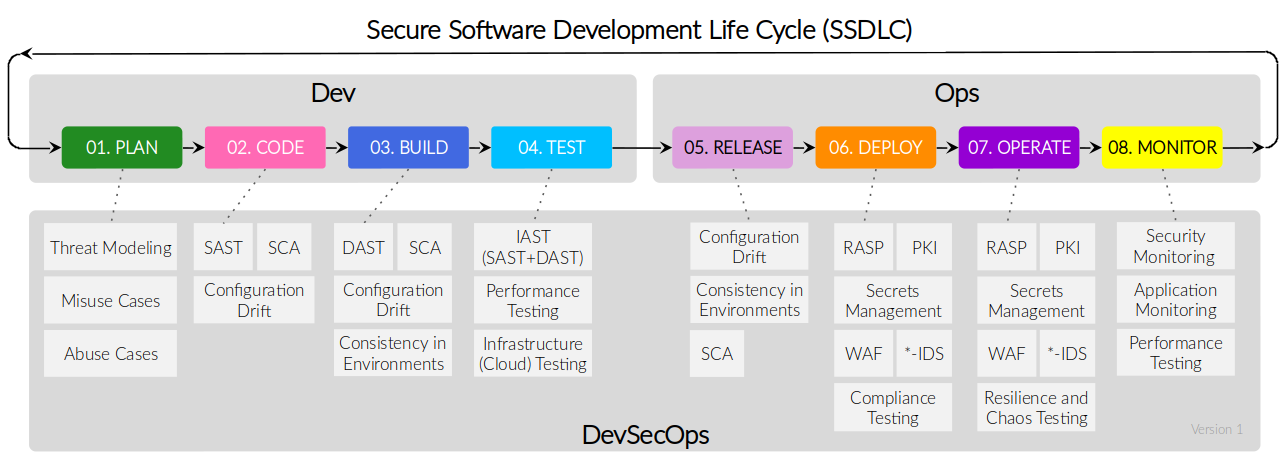
Security across Development life cycle in Cloud-Native
Quick Start Workshop (2-hours)
In this quick start hands-on workshop, you will explore the build, infrastructure and runtime in Cloud-Native.

How could you embed security across all stages of Software Development Life Cycle?. Build, infra, and runtime will be the key points of this workshop. We will explore good practices to embed security along the container images, Kubernetes, infrastructure as a code, and workloads and how to DevOps practices will help its adoption together with tools to implement security, compliance and forensic.
Table of Contents
- Prerequisites
- Container Threads
- Container Security Best Practices
- Detecting Vulnerabilities
- Scanning Container images
- Filter Log4j-CVE using OPA
- Scanning Filesystems
- SBOM artifact
- Scanning Git Repositories
- Binaries created by Golang
- CI Integration with Github Action
- Detecting Misconfigurations
- Misconfigurations in Container Images
- Misconfigurations in Kubernetes
- Misconfigurations in Infra as Code
- Terraform
- CloudFormation
- CI Integration with Github Action
- Security Audit in Kubernetes
- Workloads Scanning
- Kubernetes CIS Benchmark
- Kubernetes Pentesting: kube-hunter
- Audit Reports
- Polaris
- Conftest
- Integration
- Lens
- Octant
- Policy as Code with OPA
- Vulnerabilities
- container image
- Kubernetes
- Runtime Detection in Containers
- Container
- Kubernetes installation
- Alerting
- Collaborate
Prerequisites
Before you begin, you need the following software:
- A Linux, stand-alone virtual machine (VM)
- A kubernetes cluster: minikube, kind, or any kubernetes flavor.
- Kubernetes command-line tool: kubectl Installation on Linux here
Note: For Infrastructure scanning, it will be used a kind cluster with two nodes. See the kind.yaml
kind create cluster --name k8s-local --config kind.yaml --image kindest/node:v1.20.7
Congratulations
Thank you for attending the workshop. I would love your feedback, or contribution for other cases and samples with other scenaries.
Collaborate
If you find any typos, errors, outdated resources; or if you have a different point of view. Please open a pull request or contact me.
Pull requests and stars are always welcome 🙌
 krol3
krol3