

 koopjs
Are multiple layers supported per service?
Currently, a single feature layer is exposed when I use my provider. Is it possible to expose multiple layers per service?
Thanks.

Hi Walter, you can pass multiple layers.
Check out the docs at https://github.com/koopjs/featureserver

Just kidding, this is possible, and there are some docs but there need to be more
hi there, is there a working example where multiple layers are available in the service? is there any other documentation to show how to implement this? Fairly new here and would appreciated any information or guidance. Thank you!

I was able to get this to work. I used req.params.layer and simply had conditional code based on layer number in getData method

@acommeford as @SergeyBarskiy noted this is possible and depends on how you implement the getData function in your provider. The layer identifier is passed to the getData function in the req object, specifically req.params.layer. Since you have the value assigned to req.params.layer in getData, you can code logic there that uses it to return specific datasets or subsets.

I was able to get this to work. I used req.params.layer and simply had conditional code based on layer number in getData method
Hi @SergeyBarskiy or any wizards here, is it possible to post your example script on the conditions and req.params here? I'm testing koop for transforming various OGC and GeoJson services in open-source repos/channels for usage in custom ESRI webapps. It's working perfectly for a single input/output but I'm also stuck on the exposing multiple feature services/various geometries. The potential of Koop is incredible but some assistance in these matters would be appreciated for putting it to actual use cases around the world, as the project suffers from a lack of documentation. Thanks!

getData(req, callback) {

  if (req.params.layer === 0) {
    // Do whatever is specific to layer 0 and get your geojson
    // ...
    // ...

    return callback(null, geojson)
  }

  if (req.params.layer === 1) {
    // Do whatever is specific to layer 1 here and get your geojson
    // ...
    // ...

    return callback(null, geojson)
  }

  // etc
}
@abalonia - we're always looking for contributors to our docs. The layer parameter is doc'd here https://koopjs.github.io/docs/usage/provider#output-services-route-parameters; if you are interested in fleshing it out, you can fork and submit PR here https://github.com/koopjs/koopjs.github.io.
@rgwozdz wow, that was pretty fast, 👍 Thanks!! Yes I will definitely add my take on things and maybe post the draft of my end-product once i am a little more confident. Keep up the great work.
@abalonia - sounds great. I'm slowly trying to improve the docs and always looking for input. As someone that uses/devs Koop often, it's sometimes hard to know where we need more/improved docs.
One idea is to have an "Examples" section in the docs, where snippets like this live. That way the Provider Spec page stays focused, but we still have a space to show implementations.
@rgwozdz Any tips on extracting coordinates from MultiLineString geojson provider for conversion to a feature service? i tried various ways of looping through the nested arrays, but I have not been successful in creating an output that draws the geometry in AGOL.
My geojson example has the following structure, { "type": "FeatureCollection", "features": [{ "type": "Feature", "id": "road 1", "geometry": { "type": "MultiLineString", "coordinates": [[[146.468582, -41.241478, -41.241478], [146.574768, -41.251186, -41.251186], [146.640411, -41.255154, -41.255154], [146.766129, -41.332348, -41.332348], [146.794189, -41.34417, -41.34417], [146.822174, -41.362988, -41.362988], [146.863434, -41.380234, -41.380234], [146.899521, -41.379452, -41.379452], [146.929504, -41.378227, -41.378227], [147.008041, -41.356079, -41.356079], [147.098343, -41.362919, -41.362919]]] }, "geometry_name": "the_geom", "properties": { "TYPE": "alley" } }, { "type": "Feature", "id": "road 2", "geometry": { "type": "MultiLineString", "coordinates": [[[147.098343, -41.362919, -41.362919], [147.17305, -41.452778, -41.452778], [147.213867, -41.503773, -41.503773], [147.234894, -41.546661, -41.546661], [147.251129, -41.573826, -41.573826], [147.264664, -41.602474, -41.602474], [147.284485, -41.617554, -41.617554], [147.300583, -41.637878, -41.637878]]] }, "geometry_name": "the_geom", "properties": { "TYPE": "highway" }
@abalonia - You don't need to do any of kind of extraction. The GeoJSON you posted should work (I've tried it myself), but you have to add a top-level metadata object with a geometryType property (see metadata doc. So you likely need to have something like this in your provider:
// You've already translated you JSON to GeoJSON here

// Now, add metadata
geojson.metadata = {
  geometryType: 'MultiLineString'
}
The most common reason you won't get rendering from Koop (assuming no errors in console) is due to leaving out 'metadata.geometryType' or setting it to an invalid type. Without it being set properly, koop assumes the provider is generating a Table Layer rather than a Feature Layer and clients therefore don't attempt to render it.
You can check if Koop thinks your data should be a Table or Feature Layer by requesting the layer endpoint, e.g., /provider/FeatureServer/0 and checking the type property.
As an aside, the geojson you posted contains the fields id, and geometry_name, which should probably be nested inside the properties object.
Thanks again @rgwozdz . Apologies for the pestering, but I tried everything yet the polylines are still not rendering.Here are the checks,
the feature service shows Feature Layer type
{ "id": 0, "name": "geoserver", "type": "Feature Layer", "description": "testing stuff", "copyrightText": " ", "parentLayer": null, "subLayers": null, "minScale": 0, "maxScale": 0, "drawingInfo": { "renderer": { "type": "simple", "symbol": { "color": [247, 150, 70, 204], "width": 6.999999999999999, "type": "esriSLS", "style": "esriSLSSolid" } }, "labelingInfo": null }, "defaultVisibility": true, "extent": { "xmin": -179.999798, "ymin": -55.006364, "xmax": 179.999971, "ymax": 78.22195, "spatialReference": { "wkid": 4326, "latestWkid": 4326 } }, "hasAttachments": false, "htmlPopupType": "esriServerHTMLPopupTypeNone", "displayField": "idField", "typeIdField": null, "fields": [{ "name": "idField", "type": "esriFieldTypeOID", "alias": "idField", "sqlType": "sqlTypeInteger", "domain": null, "defaultValue": null, "editable": false, "nullable": false }, { "name": "Name", "type": "esriFieldTypeString", "alias": "Name", "sqlType": "sqlTypeOther", "domain": null, "defaultValue": null, "length": 128, "editable": false, "nullable": false }, { "name": "id", "type": "esriFieldTypeString", "alias": "id", "sqlType": "sqlTypeOther", "domain": null, "defaultValue": null, "length": 128, "editable": false, "nullable": false }, { "name": "cable_id", "type": "esriFieldTypeString", "alias": "cable_id", "sqlType": "sqlTypeOther", "domain": null, "defaultValue": null, "length": 128, "editable": false, "nullable": false }, { "name": "color", "type": "esriFieldTypeString", "alias": "color", "sqlType": "sqlTypeOther", "domain": null, "defaultValue": null, "length": 128, "editable": false, "nullable": false }, { "name": "length", "type": "esriFieldTypeString", "alias": "length", "sqlType": "sqlTypeOther", "domain": null, "defaultValue": null, "length": 128, "editable": false, "nullable": false }, { "name": "rfs", "type": "esriFieldTypeString", "alias": "rfs", "sqlType": "sqlTypeOther", "domain": null, "defaultValue": null, "length": 128, "editable": false, "nullable": false }, { "name": "owners", "type": "esriFieldTypeString", "alias": "owners", "sqlType": "sqlTypeOther", "domain": null, "defaultValue": null, "length": 128, "editable": false, "nullable": false }, { "name": "url", "type": "esriFieldTypeString", "alias": "url", "sqlType": "sqlTypeOther", "domain": null, "defaultValue": null, "length": 128, "editable": false, "nullable": false } ], "relationships": [], "canModifyLayer": false, "canScaleSymbols": false, "hasLabels": false, "capabilities": "Query", "maxRecordCount": 2000, "supportsStatistics": true, "supportsAdvancedQueries": true, "supportedQueryFormats": "JSON", "ownershipBasedAccessControlForFeatures": { "allowOthersToQuery": true }, "supportsCoordinatesQuantization": false, "useStandardizedQueries": true, "advancedQueryCapabilities": { "useStandardizedQueries": true, "supportsStatistics": true, "supportsOrderBy": true, "supportsDistinct": true, "supportsPagination": true, "supportsTrueCurve": false, "supportsReturningQueryExtent": true, "supportsQueryWithDistance": true }, "dateFieldsTimeReference": null, "isDataVersioned": false, "supportsRollbackOnFailureParameter": true, "hasM": false, "hasZ": false, "allowGeometryUpdates": true, "objectIdField": "idField", "globalIdField": "", "types": [], "templates": [], "hasStaticData": false, "timeInfo": {}, "uniqueIdField": { "name": "idField", "isSystemMaintained": true }, "currentVersion": 10.51, "fullVersion": "10.5.1", "geometryType": "esriGeometryPolyline" }`
A snippet of the response, showing idField is set correctly and is integer; geometry has paths/coordinates as well ' "objectIdFieldName": "idField", "uniqueIdField": { "name": "idField", "isSystemMaintained": true }, "globalIdFieldName": "", "hasZ": false, "hasM": false, "spatialReference": { "wkid": 4326 }, "fields": [{ "name": "idField", "type": "esriFieldTypeOID", "alias": "idField", "sqlType": "sqlTypeInteger", "domain": null, "defaultValue": null }, { "name": "Name", "type": "esriFieldTypeString", "alias": "Name", "sqlType": "sqlTypeOther", "domain": null, "defaultValue": null, "length": 128 }, { "name": "id", "type": "esriFieldTypeString", "alias": "id", "sqlType": "sqlTypeOther", "domain": null, "defaultValue": null, "length": 128 }, { "name": "cable_id", "type": "esriFieldTypeString", "alias": "cable_id", "sqlType": "sqlTypeOther", "domain": null, "defaultValue": null, "length": 128 }, { "name": "color", "type": "esriFieldTypeString", "alias": "color", "sqlType": "sqlTypeOther", "domain": null, "defaultValue": null, "length": 128 }, { "name": "length", "type": "esriFieldTypeString", "alias": "length", "sqlType": "sqlTypeOther", "domain": null, "defaultValue": null, "length": 128 }, { "name": "rfs", "type": "esriFieldTypeString", "alias": "rfs", "sqlType": "sqlTypeOther", "domain": null, "defaultValue": null, "length": 128 }, { "name": "owners", "type": "esriFieldTypeString", "alias": "owners", "sqlType": "sqlTypeOther", "domain": null, "defaultValue": null, "length": 128 }, { "name": "url", "type": "esriFieldTypeString", "alias": "url", "sqlType": "sqlTypeOther", "domain": null, "defaultValue": null, "length": 128 } ], "features": [{ "attributes": { "Name": "IOX Cable System", "id": "iox-cable-system", "cable_id": "1901", "color": "#b7b9bb", "length": "8,850 km", "rfs": "2020 Q2", "owners": "IOX Cable Limited", "url": "http://www.iox.mu", "idField": 1 }, "geometry": { "paths": [[[[27.866656, -32.983326], [30.600053, -32.991005], [37.800047, -31.851466], [46.800041, -27.951758], [52.200037, -23.080595], [53.775036, -20.99512], [54.225036, -20.574419], [54.900035, -20.258109], [55.800035, -20.258109], [56.700034, -20.469047], [57.150034, -20.679718], [57.487534, -20.679718], [57.699325, -20.454248], [58.050033, -20.469047], [59.400032, -20.363626], [61.650031, -20.363626], [62.77503, -20.09974], [63.225029, -19.835386], [63.448223, -19.67435], [63.900029, -18.880128], [65.250028, -17.168565], [68.400026, -13.698987], [73.800022, -8.401139], [76.05002, -6.616663], [79.200018, -3.029996], [81.000017, 0.568591], [82.575016, 5.51006], [82.800016, 7.744877], [81.900016, 9.524423], [79.7372, 11.914356]]]] } }, { "attributes": { "Name": "Okinawa Cellular Cable", "id": "okinawa-cellular-cable", "cable_id": "2042", "color": "#b6b8ba", "length": "760 km", "rfs": "2020 April", "owners": "Okinawa Cellular Telephone Company", "url": "https://www.au.com/okinawa_cellular/", "idField": 2 }, "geometry": { "paths": [[[[127.977278, 26.591575], [127.799984, 26.562513], [127.574984, 26.763587], [127.687484, 27.164666], [128.474983, 28.359234], [128.699983, 29.344567], [129.149983, 30.514496], [129.599982, 31.286739], [130.049982, 31.574717], [130.557086, 31.596523]]]] }
Here is the agol screenshot,
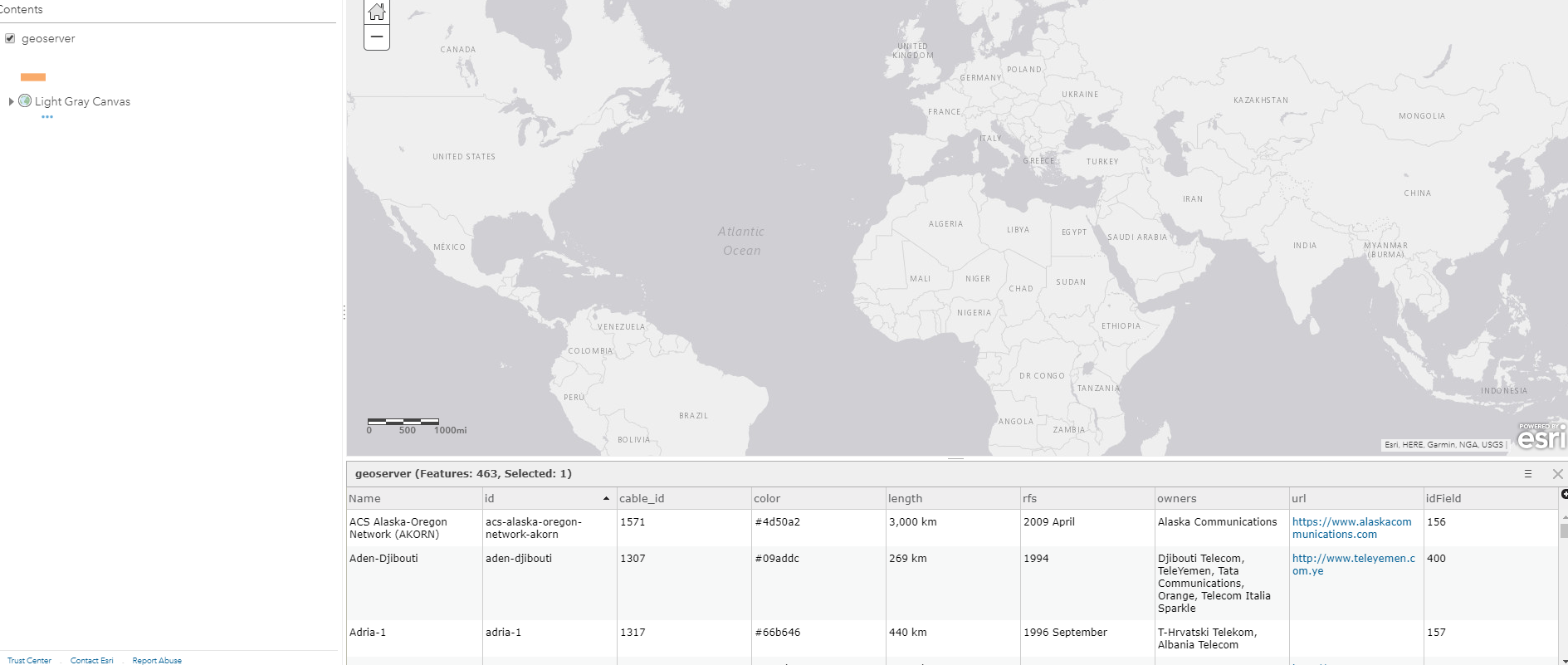
My console is occasionally logging... 1) a line needs to have two or more coordinates to be valid , 2) a line needs to have two or more coordinates to be valid , 3) a line needs to have two or more coordinates to be valid , 4) a line needs to have two or more coordinates to be valid , 5) a line needs to have two or more coordinates to be valid , 6) a line needs to have two or more coordinates to be valid , 7) position should not have more than 3 elements
@abalonia do any errors/warnings appear in your browser's console when you try to load/reload the web map?

 const request = require('request').defaults({gzip: true, json: true})

function Model (koop) {}

Model.test.getData = function (req, callback) {

  request(`http://localhost:8080/geoserver/cite/ows?service=WFS&version=1.0.0&request=GetFeature&typeName=cite%3ACables&maxFeatures=50&outputFormat=application%2Fjson`, (err, res, body) => {
    if (err) return callback(err)

    const geojson = translate(body)

        geojson.metadata = {
        name: 'geoserver',
        geometryType: 'MultiLineString',
        extent:  [[-179.999798,-55.006364],[179.999971,78.22195]],
        idField: 'idField'
       }

    callback(null, geojson)
  })
}

function translate (input) {
  return {
    type: 'FeatureCollection',
    features: input.features.map(formatFeature)
  }
}

function formatFeature (inputFeature) {

  const feature = {
    type: 'Feature',
    idField: inputFeature.properties.idField,
    properties: inputFeature.properties,
    geometry: {
      type: 'MultiLineString',
     coordinates: [inputFeature.geometry.coordinates]
    }
  }

  return feature

}
module.exports = Model
Ok @abalonia, this is a difficult debugging problem. I've successfully used the file geojson provider to serve a plain GeoJSON file containing multiline features to an AGOL web map - and had it render as expected. So I feel confident that the problem we have here is not in the Koop internals. If you could provide me with some data that comes back from http://localhost:8080/geoserver/cite/ows?service=WFS&version=1.0.0&request=GetFeature&typeName=cite%3ACables&maxFeatures=50&outputFormat=application%2Fjson maybe I can determine if something is off in your provider.