

 kingToolbox
2.3.0 Pre2 WSL+Vim Ctrl and Shift key useless
WindTerm 2.3.0 PreRelease 2
win10 19044.1469
Session: WSL2, both Ubuntu20.04 and Debian 11.1
When I use vim in the WSL (WindTerm shell session), I found Ctrl and Shift has no function, like the action Ctrl-F go to next page, like the G go to page end, even typing underscore (shift-dash), they can not be success. I just use the original cmd.exe to test vim in the WSL, there is no this issue.
Could you please help to check the problem?

I will investigate this issue and I will update here if there is any progress. Please stay tuned, thank you.
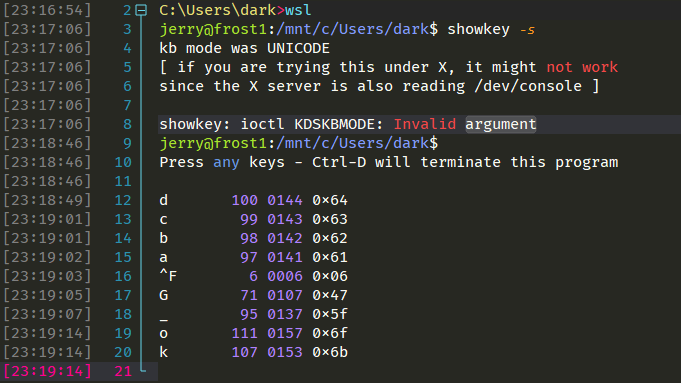
BTW, If possible, please tell me what is the output of the Ctrl+F shortcut key when running the command showkey?

Sorry, I'm new to WindTerm, where should I run the showkey ? And where to see the output ?
showkey is a Linux shell command, You just need to execute it in shell like ls or cat. You can read showkey command in Linux with Examples to learn more.
SORRY! WindTerm_2.3.0_Prerelease_2 and WindTerm_2.3.0_Prerelease_3 has a serious SFTP bug #487 and may cause file corruption after uploaded.
Please use the old versions or update to the WindTerm_2.3.0_Prerelease_4 version. Thank you.
Thank you. Judging from your screenshot, all keys are correct. Did you open the input method while typing in Vim? If you turn on the input method, the phenomenon will be very similar to what you described.
I've check my input method state, when editing with vim, they've been set to english mode, I also test with ENG input method, nothing changed, issue still exist.
If it's effected by input method, I think before I enter vim editor, the shell will also has the same issue, but obviously I can input G / _ / Ctrl+F in the shell.
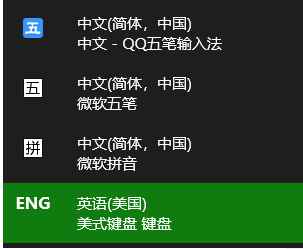
Here is the screen record: https://user-images.githubusercontent.com/2143333/151744788-5d33b1c7-1cef-4b0d-82e2-5009f33487e1.mp4
`
WindTerm 2.5.0
Windows10 19044.1826
Session: WSL2, archlinux, nvim 7.2
` Have the same problem. The shift key useless , cann't type Upper key except '! " : ' three char.


