

 kghunt
menu to disable watchdog sleep
Is it possible to use a if statement to trigger the watchdog sleep?
I tried is for some time but was not able to achieve the above. It would be helpful to add a menu item to turn on and off the watchdog - which will make updating much more appealing.
Best regards

You could do it. It would need to default to off though otherwise it would turn back on everyone you reset it.
On Fri, 13 Jul 2018, 13:53 tryandburn, [email protected] wrote:
Is it possible to use a if statement to trigger the watchdog sleep?
I tried is for some time but was not able to achieve the above. It would be helpful to add a menu item to turn on and off the watchdog - which will make updating much more appealing.
Best regards
— You are receiving this because you are subscribed to this thread. Reply to this email directly, view it on GitHub https://github.com/kghunt/Basic_Watch/issues/12, or mute the thread https://github.com/notifications/unsubscribe-auth/AE6Xxiyg1bAuyx9oACEotBpRS1AyCXlXks5uGJg8gaJpZM4VO1-r .

Thats an obvious point, but I missed it... Will try it during the weekend!
With my update you can press buttons 1 & 3 to force a reset. This allows updating the watch. Also, why not just don't the sleep while in the menu?
On Fri, Jul 13, 2018, 7:12 AM tryandburn notifications-at-github.com |github2/Allow William| [email protected] wrote:
Thats an obvious point, but I missed it... Will try it during the weekend!
— You are receiving this because you are subscribed to this thread. Reply to this email directly, view it on GitHub https://github.com/kghunt/Basic_Watch/issues/12#issuecomment-404845376, or mute the thread https://github.com/notifications/unsubscribe-auth/AAow8uOeJUY1v93huaLI35EQjCRURJ44ks5uGKrdgaJpZM4VO1-r .

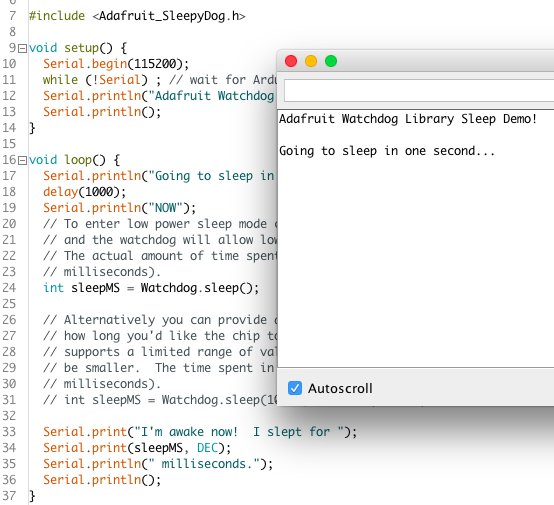
I was curious so I tried it on the fly... Serial is available when watchdog is disabled...but once it has been activated there is no way back - although I used EEPROM readout...there is way to get the Arduino to show up on Serial. So I looked for some examples by Adafruit. As shown in the Screenshot the "NOW" before the sleep is not send either...Any ideas?
After changing the setting. Reset the watch. You could even call the reset function after the setting is changed.
On Fri, 13 Jul 2018, 19:35 tryandburn, [email protected] wrote:
I was curious so I tried it on the fly... Serial is available when watchdog is disabled...but once it has been activated there is no way back - although I used EEPROM readout...there is way to get the Arduino to show up on Serial. So I looked for some examples by Adafruit. As shown in the Screenshot the "NOW" before the sleep is not send either...Any ideas?
[image: bildschirmfoto 2018-07-13 um 20 32 04] https://user-images.githubusercontent.com/32697165/42707897-e5ec9744-86db-11e8-9b75-31bbf29394e9.png
— You are receiving this because you commented. Reply to this email directly, view it on GitHub https://github.com/kghunt/Basic_Watch/issues/12#issuecomment-404917414, or mute the thread https://github.com/notifications/unsubscribe-auth/AE6XxuH1V5vo_cJJXigeTuNdE8uGd2jZks5uGOhbgaJpZM4VO1-r .
The above example did not work for the watchX, but flawlessly on one of my UNOs...Is there some problem because the Leonardo Bords have a dedicated USB controller, differing from the likes of UNO or Mega?
You menu item needs to:
- Change a Boolean in eeprom to turn off sleep
- Call the reset function to restart the device.
The sleep needs wrapping in an if statement read from eeprom during setup.