

 keymanapp
bug(Android): "Error in Keyboard sil_euro_latin.." message appears after upgrading the Euro Latin Keyboard
Describe the bug After upgrading the Euro Latin Keyboard I noticed that there is an error message pop up on the Keyboard view.
To Reproduce
- Install 15.0.259 beta build in Android Mobile device.
- Open Keyman In-app.
- Click the 3 dot button which appears in the top right corner of the Keyman view.
- Verify that there is an option 'Install Updates" under Settings option.
- Click 'Install Updates' option.
- Verify that an 'Keyboard update' message will appear on the Screen.
Here, I noticed that there is an error message "Error in Keyboard sil_euro_latin..." appearing on the Screen. Also, selecting the predictions from the banner, I noticed that the selected word appears with some other bg color.
Expected behavior The sil_euro_latin Keyboard should be working fine after upgrading it. Selecting any predictions from the banner should appear on the text pane.
Screenshots
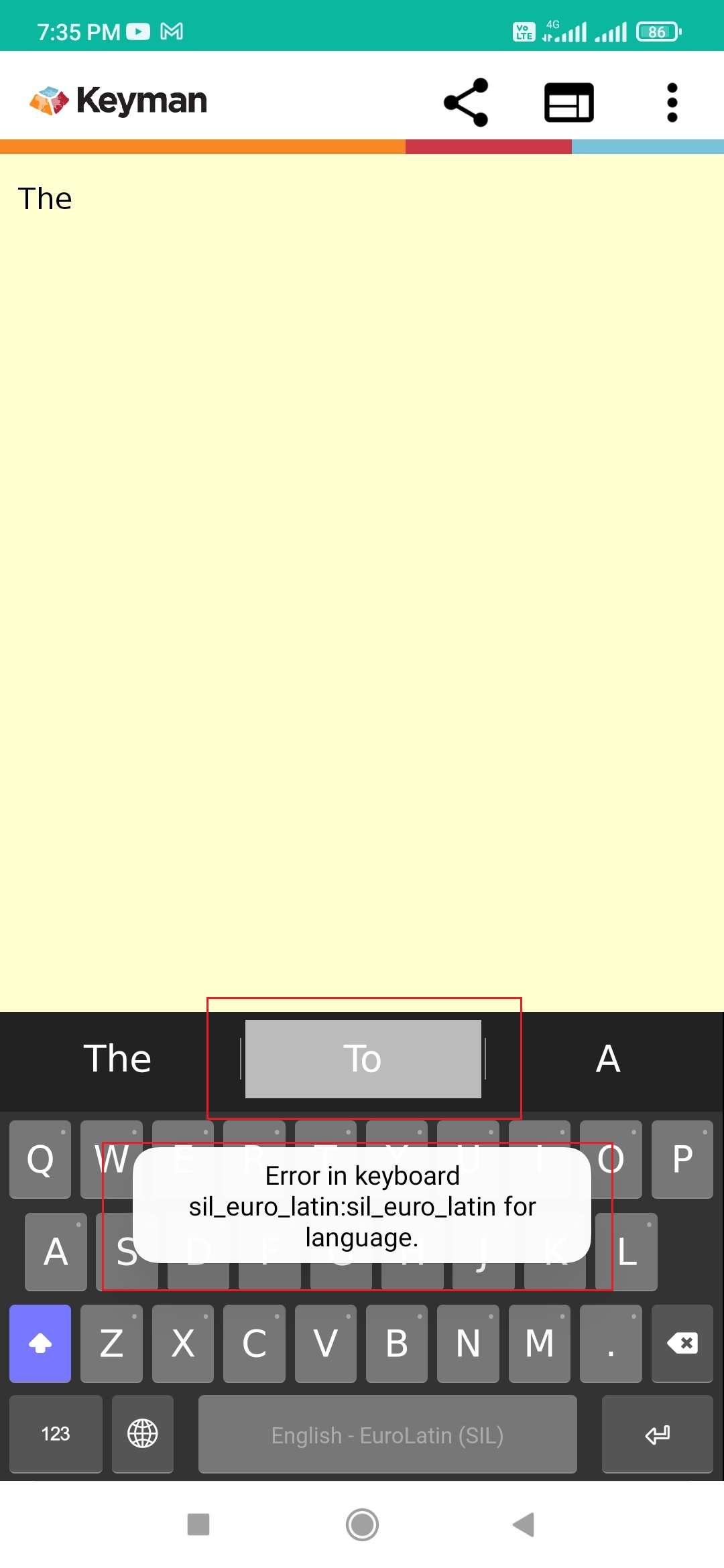
Keyman for Android: Device: Android Mobile Device
- OS: 11.0
- Keyman version: 15.0.29-beta build
- Target Application: Keyman In-App
Keyboard
- Keyboard name: <EuroLatin(SIL)>
- Keyboard version: 2.0
- Language name: English

We'll need some more detail including Keyman version and screenshots I think!

We'll need some more detail including Keyman version and screenshots I think!
@mcdurdin Sorry. I have updated with my comments. :-)
I am unable to reproduce this behavior on Alpha 16.0.49.
@bharanidharanj can you repro this in the alpha version?


Retested with Keyman 15.0.268 Beta build and I was not able to reproduce this issue.
@MakaraSok Retested this issue with Keyman 16.0.49-alpha build in API 26 / Android 8.0 emulator and I was not able to reproduce it. Hence, I am closing the same. Thanks.