

 keymanapp
Test(macOS): Regression Test for Keyman for macOS 16.0.37-alpha
Keyman for Mac Acceptance Test Procedures
To be tested with Keyman for macOS 16.0.37-alpha
- These test procedures are to be run before moving from alpha to beta, or beta to stable, or before PRs are merged into stable branches.
- Copy these lists of tests into a new issue (for tier transitions) or a comment on the PR.
- Use User Testing format for documenting tests.
User Testing
Setup Steps
- Ensure the device is running the latest version of macOS (beta build for beta phase, alpha build for alpha phase
- Uninstall previous version of Keyman on the device
- Install latest master build (or whatever version is to be tested) of Keyman on the device
SUITE_BASIC_SMOKE_TEST: Basic smoke test
- TEST_VERSION: Verify that the version displayed in the About box is correct.
-
SKIP_TEST_DOWNLOAD_WIFI_OFF:
- On device, turn Wifi off and/or disconnect Ethernet cable
- Activate Keyman and select Keyman Configuration from the input methods menu. Click Download keyboard
- Verify error message "Could not reach Keyman server!" is displayed (This is currently not happening. Bug reported as: https://github.com/keymanapp/keyman/issues/302)
- Close Keyman configuration windows.
-
TEST_DOWNLOAD_WIFI_ON:
- On device, re-enable Internet connectivity
- Activate Keyman and select Keyman Configuration from the input methods menu. Click Download keyboard.
- Verify that page displays correctly (should have a Keyboard Search box with the prompt: Enter language or keyboard.
- Search for Amharic. Should see several keyboards, including some by The Ge'ez Frontier Foundation and some by SIL.
- Double-click any KMP file (in Finder). Should see a “Do you want the Keyman to install the keyboard from the file 'xxx.kmp'?“ message. If you click Install, the package should be installed (or updated) and the configuration window should display, showing that the keyboard(s) in the package are installed and enabled. If you click Cancel, the configuration window should not be displayed (but there is a known issue that the very first time after Keyman loads, if the configuration window has not been shown, it will be displayed even if the user clicks Cancel).
SUITE_APPLICATION_COMPATIBILITY: Application Compatibility Tests
-
GROUP_CHROME_URL_BAR: Chrome browser URL bar
-
GROUP_CHROME_FB_SEARCH_CONTROL: Chrome browser Facebook search control
-
GROUP_CHROME_GOOGLE_DOCS: Chrome browser Google Docs document (currently known compatibility issue for steps 3, 4 & 5 because any selection change will cause the context to be reset - Google docs can't report context.)
-
GROUP_CHROME_WORD_ONLINE: Chrome browser Word Online Note: Not using the Office Extension for Chrome - not sure if that would make a difference
- Beginning of paragraph (currently known compatibility issues steps 1, 3, 4 & 5)
- Elsewhere in paragraph
-
GROUP_ATOM: Atom editor - test in Snippet editor (currently known compatibility issue for steps 3, 4 & 5)
-
GROUP_SAFARI_URL_BAR: Safari browser URL bar
-
GROUP_SAFARI_FB_SEARCH_CONTROL: Safari browser Facebook search control
-
GROUP_SAFARI_GOOGLE_DOCS: Safari browser Google Docs document (currently known compatibility issue for steps 3, 4 & 5 because any selection change will cause the context to be reset - Google docs can't report context.)
-
GROUP_SAFARI_WORD_ONLINE: Safari browser Word Online a) Beginning of paragraph (currently known compatibility issues steps 1, 3, 4 & 5, 6&7) b) Elsewhere in paragraph (occasionally steps 4 & 5 deletes a preceding (space?) character, but I haven't figured out when/why. Step 6 is not relevant. Step 7 fails for the same reason it doesn't work at the beginning of the paragraph. There seems to be a certain level of general twitchiness, with extra characters sometimes being displayed - sometimes only briefly - and characters being deleted.)
-
GROUP_FIREFOX_URL_BAR: Firefox browser URL bar
-
GROUP_FIREFOX_FB_SEARCH_CONTROL: Firefox browser Facebook search control
-
GROUP_FIREFOX_GOOGLE_DOCS: Firefox browser Google Docs document (currently known compatibility issue for steps 3, 4 & 5 because any selection change will cause the context to be reset - Google docs can't report context.)
-
GROUP_FIREFOX_WORD_ONLINE: Firefox browser Word Online a) Beginning of paragraph b) Elsewhere in paragraph
-
GROUP_MESSAGES_APP: Messages app a) New message with nobody filled in in To: line b) New message in existing conversation, such that the message area has grayed out text: "iMessage")
-
GROUP_NOTES_APP: Notes app
-
GROUP_TEXTEDIT: TextEdit
-
GROUP_TERMINAL: Terminal (known compatibility issues: Steps 1 & 3 insert an extra leading space if there are no preceding characters. Skip step 4 - mouse doesn't move insertion point in Terminal. Step 5 can be done using left-arrow instead. Skip steps 6 & 7. If the Terminal window has LOTS of text in it, it won't provide any context, which leads to other compatibility problems.)
-
GROUP_LIBREOFFICE: LibreOffice 7.0 (currently known compatibility issue for steps 3, 4 & 5 because any selection change will cause the context to be reset - LibreOffice Vanilla can't report context.).
-
GROUP_MAIL: Mail (message body)
Test Cases
Select the Amharic keyboard. For each of the following applications/contexts, test that
-
TEST_AMHARIC: (1). typing ta produces ታ; (2). typing t, left-arrow, a produces አት; (3). typing tt, left-arrow, a produces ታት; (4). typing tt, then mouse-clicking between the two ታ characters, and then typing a produces ታት.
In each of the last three cases, the insertion point should end up before the final ት character.
-
TEST_SHORTCUTS፡ (cont. from above) (5). common keyboard shortcuts for the app work as expected. For example:
- ⌘-F (typically opens a Find dialog or control);
- ⌘-O (File Open);
- ⌘-X (Cut);
- ⌘-C (Copy);
- ⌘-V (Paste);
- ⌘-A (Select All).
(Note that in Google Docs, these commands correspond to both a Google-Docs command and a browser command. The "normal" behavior in all three browsers is to activate the Google Docs command, not the browser command, with the exception that ⌘-O in Safari opens Safari's standard macOS Open file dialog.)
(6). with a few characters displayed, ⌘-A followed by typing t replaces selected characters with ት. (7). typing at, then ⌘-A, followed by a produces አ.
SUITE_OSK: OSK UI/Functionality Tests
-
TEST_OSK_UI:
- Verify behavior of "Always show on-screen keyboard" option
- Verify behavior and appearance of On-Screen Keyboard and the menu that toggles it on and off.
- With OSK visible, verify that switching keyboards updates the display to show the appropriate layout.
- Verify that switching to system keyboard or other IM turns off Keyman OSK.

User Test Results
Test specification and instructions
✅ SUITE_BASIC_SMOKE_TEST: Basic smoke test
2 tests in 1 groups PASSED
✅ SUITE_APPLICATION_COMPATIBILITY: Application Compatibility Tests
38 tests in 19 groups PASSED
-
✅ GROUP_CHROME_URL_BAR: Chrome browser URL bar
-
✅ GROUP_CHROME_FB_SEARCH_CONTROL: Chrome browser Facebook search control
-
✅ GROUP_CHROME_GOOGLE_DOCS: Chrome browser Google Docs document (currently known compatibility issue for steps 3, 4 & 5 because any selection change will cause the context to be reset - Google docs can't report context.)
-
✅ GROUP_CHROME_WORD_ONLINE: Chrome browser Word Online
2 tests PASSED
-
✅ GROUP_ATOM: Atom editor - test in Snippet editor (currently known compatibility issue for steps 3, 4 & 5)
-
✅ GROUP_SAFARI_URL_BAR: Safari browser URL bar
-
✅ GROUP_SAFARI_FB_SEARCH_CONTROL: Safari browser Facebook search control
-
✅ GROUP_SAFARI_GOOGLE_DOCS: Safari browser Google Docs document (currently known compatibility issue for steps 3, 4 & 5 because any selection change will cause the context to be reset - Google docs can't report context.)
-
✅ GROUP_SAFARI_WORD_ONLINE: Safari browser Word Online
2 tests PASSED
-
✅ GROUP_FIREFOX_URL_BAR: Firefox browser URL bar
-
✅ GROUP_FIREFOX_FB_SEARCH_CONTROL: Firefox browser Facebook search control
-
✅ GROUP_FIREFOX_GOOGLE_DOCS: Firefox browser Google Docs document (currently known compatibility issue for steps 3, 4 & 5 because any selection change will cause the context to be reset - Google docs can't report context.)
-
✅ GROUP_FIREFOX_WORD_ONLINE: Firefox browser Word Online
2 tests PASSED
-
✅ GROUP_MESSAGES_APP: Messages app
-
✅ GROUP_NOTES_APP: Notes app
-
✅ GROUP_TEXTEDIT: TextEdit
-
✅ GROUP_TERMINAL: Terminal (known compatibility issues: Steps 1 & 3 insert an extra leading space if there are no preceding characters. Skip step 4 - mouse doesn't move insertion point in Terminal. Step 5 can be done using left-arrow instead. Skip steps 6 & 7. If the Terminal window has LOTS of text in it, it won't provide any context, which leads to other compatibility problems.)
-
✅ GROUP_LIBREOFFICE: LibreOffice 7.0 (currently known compatibility issue for steps 3, 4 & 5 because any selection change will cause the context to be reset - LibreOffice Vanilla can't report context.).
-
✅ GROUP_MAIL: Mail (message body)
✅ SUITE_OSK: OSK UI/Functionality Tests
1 tests in 1 groups PASSED
- ✅ TEST_OSK_UI (PASSED): Posted the same result for the second time since it is not taken by the bot for the first time. :-)
![keymanapp-test-bot[bot] avatar](https://avatars.githubusercontent.com/in/133554?v=4 "Published by a pub.dev verified publisher")
SUITE_BASIC_SMOKE_TEST: Basic smoke test
- TEST_VERSION (PASSED): Verified the latest Keyman 16.0.37 successfully appears in the About box.
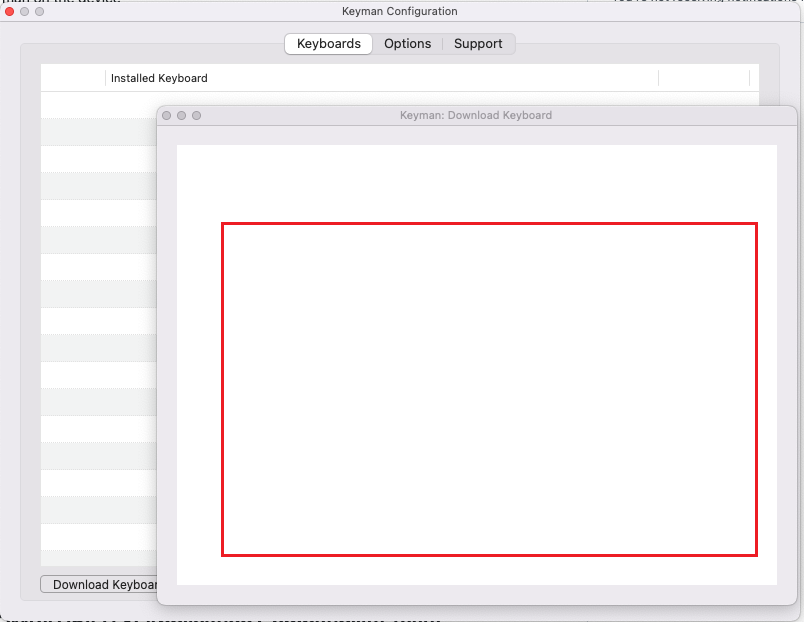
- TEST_DOWNLOAD_WIFI_OFF (FAILED): It does not show up any error message after clicking the Download Keyboard button. Instead of that it is showing a blank page.
- TEST_DOWNLOAD_WIFI_ON (FAILED): Double Clicking on the .kmp file would directly install the corresponding Keyboard. And it does not show up any warning message like "Do you want the Keyman to install the keyboard from the file 'xxx.kmp'?" .

SUITE_APPLICATION_COMPATIBILITY: Application Compatibility Tests
GROUP_CHROME_URL_BAR: Chrome browser URL bar
- TEST_AMHARIC (PASSED): Tested this as per the instructions and it is working as expected.
- TEST_SHORTCUTS (PASSED): Tested this as per the instructions and it is working as expected.
GROUP_CHROME_FB_SEARCH_CONTROL: Chrome browser Facebook search control
- TEST_AMHARIC (PASSED): Tested this as per the instructions and it is working as expected.
- TEST_SHORTCUTS (PASSED): Tested this as per the instructions and it is working as expected.
GROUP_CHROME_GOOGLE_DOCS: Chrome browser Google Docs document (currently known compatibility issue for steps 3, 4 & 5 because any selection change will cause the context to be reset - Google docs can't report context.)
- TEST_AMHARIC (PASSED): Tested this as per the instructions and I noticed that the compatibility issue happens while running 3, 4 and 5th Steps.
- TEST_SHORTCUTS (PASSED): Tested this as per the instructions and it is working as expected.
GROUP_CHROME_WORD_ONLINE: Chrome browser Word Online
- TEST_AMHARIC (PASSED): Tested this as per the instructions and I noticed that the compatibility issue still happens while running steps 1, 3, 4 & 5
- TEST_SHORTCUTS (PASSED): Tested this as per the instructions and I noticed that the compatibility issue still happens while running steps 6&7
SUITE_APPLICATION_COMPATIBILITY: Application Compatibility Tests
GROUP_ATOM: Atom editor - test in Snippet editor (currently known compatibility issue for steps 3, 4 & 5)
- TEST_AMHARIC (PASSED): Tested this in Snippet editor and I noticed that the compatibility issue still happens while running steps 3,4.
- TEST_SHORTCUTS (PASSED): Tested this in Snippet editor and it is working as expected.
GROUP_SAFARI_URL_BAR: Safari browser URL bar
- TEST_AMHARIC (PASSED): Tested this as per the instructions and it is working as expected.
- TEST_SHORTCUTS (PASSED): Tested this as per the instructions and it is working as expected.
GROUP_SAFARI_FB_SEARCH_CONTROL: Safari browser Facebook search control
- TEST_AMHARIC (PASSED): Tested this as per the instructions and it is working as expected.
- TEST_SHORTCUTS (PASSED): Tested this as per the instructions and it is working as expected.
GROUP_SAFARI_GOOGLE_DOCS: Safari browser Google Docs document (currently known compatibility issue for steps 3, 4 & 5 because any selection change will cause the context to be reset - Google docs can't report context.)
- TEST_AMHARIC (PASSED): Tested this in Snippet editor and I noticed that the compatibility issue still happens while running steps 3,4.
- TEST_SHORTCUTS (PASSED): Tested this as per the instructions and it is working as expected.
GROUP_SAFARI_WORD_ONLINE: Safari browser Word Online
- TEST_AMHARIC (PASSED): Tested this as per the instructions and I noticed that the compatibility issue still happens while running steps 1, 3, 4 & 5
- TEST_SHORTCUTS (PASSED): Tested this as per the instructions and I noticed that the compatibility issue still happens while running steps 6&7
GROUP_FIREFOX_URL_BAR: Firefox browser URL bar
- TEST_AMHARIC (PASSED): Tested this as per the instructions and it is working as expected.
- TEST_SHORTCUTS (PASSED): Tested this as per the instructions and it is working as expected.
GROUP_FIREFOX_FB_SEARCH_CONTROL: Firefox browser Facebook search control
- TEST_AMHARIC (PASSED): Tested this as per the instructions and it is working as expected.
- TEST_SHORTCUTS (PASSED): Tested this as per the instructions and it is working as expected.
GROUP_FIREFOX_GOOGLE_DOCS: Firefox browser Google Docs document (currently known compatibility issue for steps 3, 4 & 5 because any selection change will cause the context to be reset - Google docs can't report context.)
- TEST_AMHARIC (PASSED): Tested this in Snippet editor and I noticed that the compatibility issue still happens while running steps 3,4.
- TEST_SHORTCUTS (PASSED): Tested this as per the instructions and it is working as expected.
GROUP_FIREFOX_WORD_ONLINE: Firefox browser Word Online
- TEST_AMHARIC (PASSED): Tested this as per the instructions and I noticed that the compatibility issue still happens while running steps 1, 3, 4 & 5
- TEST_SHORTCUTS (PASSED): Tested this as per the instructions and I noticed that the compatibility issue still happens while running steps 6&7
SUITE_APPLICATION_COMPATIBILITY: Application Compatibility Tests
GROUP_MESSAGES_APP: Messages app
- TEST_AMHARIC (PASSED): Tested this as per the instructions and it is working as expected.
- TEST_SHORTCUTS (PASSED): Tested this as per the instructions and it is working as expected.
GROUP_NOTES_APP: Notes app
- TEST_AMHARIC (PASSED): Tested this as per the instructions and it is working as expected.
- TEST_SHORTCUTS (PASSED): Tested this as per the instructions and it is working as expected.
GROUP_TEXTEDIT: TextEdit
- TEST_AMHARIC (PASSED): Tested this as per the instructions and it is working as expected.
- TEST_SHORTCUTS (PASSED): Tested this as per the instructions and it is working as expected.
GROUP_TERMINAL: Terminal (known compatibility issues: Steps 1 & 3 insert an extra leading space if there are no preceding characters. Skip step 4 - mouse doesn't move insertion point in Terminal. Step 5 can be done using left-arrow instead. Skip steps 6 & 7. If the Terminal window has LOTS of text in it, it won't provide any context, which leads to other compatibility problems.)
- TEST_AMHARIC (PASSED): Tested this as per the instructions and I noticed that the compatibility issue still happens while running steps 1, 3.
- TEST_SHORTCUTS (PASSED): Tested this as per the instructions. (Skipped - Steps 6 and 7)
GROUP_LIBREOFFICE: LibreOffice 7.0 (currently known compatibility issue for steps 3, 4 & 5 because any selection change will cause the context to be reset - LibreOffice Vanilla can't report context.).
- TEST_AMHARIC (PASSED): Tested this in LibreOffice Writer and noticed that the compatibility issues still happens while running 3,4 and 5.
- TEST_SHORTCUTS (PASSED): Tested this as per the instructions and it is working as expected.
GROUP_MAIL: Mail (message body)
- TEST_AMHARIC (PASSED): Tested this as per the instructions and it is working as expected.
- TEST_SHORTCUTS (PASSED): Tested this as per the instructions and it is working as expected.
SUITE_OSK: OSK UI/Functionality Tests
- TEST_OSK_UI (PASSED): Tested OSK UI functionality as per the instructions and it is working as expected.
SUITE_OSK: OSK UI/Functionality Tests
- TEST_OSK_UI (PASSED): Posted the same result for the second time since it is not taken by the bot for the first time. :-)
@bharanidharanj Can you try and retest the case above?
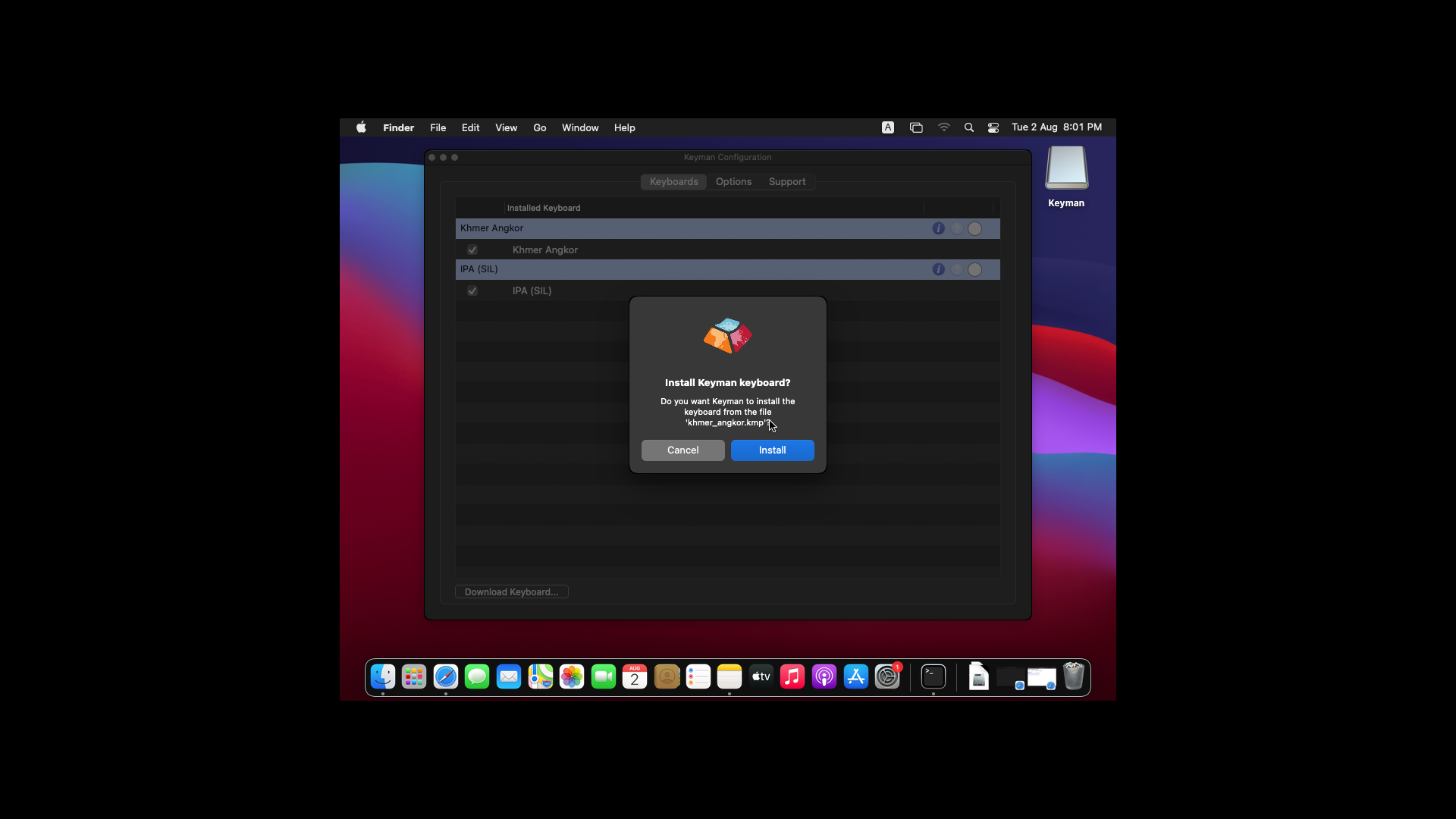
I don't see any issue mentioned. I do see the warning dialogue box when testing on macOS BigSur. See below.
SUITE_BASIC_SMOKE_TEST: Basic smoke test
- TEST_DOWNLOAD_WIFI_ON (PASSED): Retested this as per Makara's Suggestion and YES...I am able to see the above mentioned Warning dialogue box after double clicking the .kmp file. Thanks.