

 keymanapp
test(web): Regression Test for KMW Alpha 16.0.29
Keyman for Web Acceptance Test Procedures
- These test procedures are to be run before moving from alpha to beta, or beta to stable, or before PRs are merged into stable branches.
- Copy these lists of tests into a new issue (for tier transitions) or a comment on the PR.
- Use User Testing format for documenting tests.
Remember that KeymanWeb is embedded into the iOS and Android apps, thus we need to ensure that those work properly with a KeymanWeb release as well. See the Android and iOS instructions for details.
User Testing
SUITE_INSPECT: Visual Inspection of 16.0.29 Alpha
- TEST_CI_WEB_ALPHA: Verify latest CI build of KMW 16.0.29 is successful
- TEST_CI_ANDROID_ALPHA: Verify latest CI build of Android 16.0.29 is successful
- TEST_CI_IOS_ALPHA: Verify latest CI build of iOS 16.0.29 is successful
-
TEST_VERIFY_HISTORY: Verify
HISTORY.mdcontains information on all the current changes.
SUITE_DESKTOP: Desktop Platforms
Ensure that all tests in the selections below are run on a representative set of the following browsers and setups:
- GROUP_WINDOWS_FIREFOX
- GROUP_WINDOWS_CHROME
- GROUP_MACOS_SAFARI
- GROUP_MACOS_CHROME
- GROUP_MACOS_FIREFOX
- GROUP_LINUX_FIREFOX
Baseline Tests
Use the web/samples/minified.html sample page for the following tests.
-
TEST_BASELINE_ADD_SIL_IPA: Using the "Add a keyboard by keyboard name" section, add
sil_ipa.- Ensure the key sequence n> produces
ŋ.
- Ensure the key sequence n> produces
-
TEST_BASELINE_ADD_KM: Using the "Add a keyboard by BCP-47 language code" section, add
km. A Khmer keyboard should be added (perhaps khmer_basic, but not necessarily). -
TEST_BASELINE_ADD_KHMER_ANGKOR: Using the "Add a keyboard by keyboard name" section, add
khmer_angkor.- Ensure the key combination Ctrl+AltB produces
ឞ. Delete the character again. - Type the following (US) keys in sequence: s u j r k. You should see
ស្រុក. - Continuing from the last test, hit Backspace, checking each time to ensure the output is as expected. As this is a reorder (keyboard) rule test, you should see:
-
ស្រុ -
ស្រ -
ស្ -
ស - empty text area.
-
- Ensure the key combination Ctrl+AltB produces
-
TEST_BASELINE_ADD_SPANISH: Using the "Add a keyboard by language name(s) section", add
spanish. Verify that a Spanish keyboard is added to the list. -
TEST_BASELINE_SWEDISH: Swap to the Swedish keyboard.
- Ensure the key sequence ' e produces
éand that o \ e producesœ.
- Ensure the key sequence ' e produces
Text Selection Tests [SKIP THIS FOR NOW AS THE KEYBOARD IS NOT SET UP FOR YET]
@mcdurdin Please at the following keyboard for this test. Thanks.
These tests are all run with the web_context_tests keyboard, in the Unminified Test Page. They should be run on both INPUT and TEXTAREA elements. Press Ctrl+F5 to reload the page between tests.
-
TEST_SELECTION: Type abcx. Select
bcand type q. The output after the final key should beaqx. (This is testing selection replacement with no matching keyboard rule.) -
TEST_SELECTION_2: Type abcx. Select
bcand type p. The output after the final key should beaqx. (This is testing selection replacement with a matching keyboard rule.) -
TEST_CONTEXT_BASE: Type abcd. The output after the final key should be
!. -
TEST_CONTEXT_SELECTION: Type abcx. Select the
xcharacter, and type d. The output after the final key should beabcd. -
TEST_CONTEXT_SELECTION_2: Type abcx. Select the
xcharacter, and delete it with Backspace. Type d. The output after the final key should be!. -
TEST_CONTEXT_SELECTION_3: Type abcx. Select the
xcharacter, and type y. Press Backspace, and type d. The output after the final key should be!. -
TEST_CONTEXT_SELECTION_4: Type xabcx. Select the
abccharacters, and type d. The output after the final key should bexdx.
Element Attachment Tests
-
TEST_ATTACHMENT_API: Utilize the
web/testing/attachment-apisamples page to test the following:-
'auto'attachment mode properly and automatically attaches to each dynamically-added control. -
'manual'attachment mode results in a page with no KMW-activated controls. - Each 'attached' control functions as expected for the keyboard(s) selected.
- KeymanWeb properly attaches to and detaches from each relevant type of control with the page's API-interface controls.
- Confirm that the independent-keyboard management API functions correctly.
-
Site-based tests of attachment API
All behavior exhibited here should feel "normal". These tests are solely to ensure that nothing got accidentally broken.
For each of these, make use of the Tests the new Attachment/Enablement API functionality test page.
-
TEST_NORMAL_USE: Ensure that the keyboard displays and works correctly when first loaded up.
- Click the "Create Inputs" button one time.
- Click / touch the new page element. The OSK should display.
- Use the OSK to type one or two keys. The keys should produce their expected output.
- Click / touch a blank area of the page. The OSK should automatically hide.
-
TEST_ELEMENT_HOPPING:
- Click the "Create Inputs" button one time and the "Create Textarea" button one time.
- Click / touch the first of the new page elements. The OSK should display.
- Click / touch the other page element. The OSK should remain visible.
- Click / tough the first element again. The OSK should remain visible.
- Click / touch a blank area of the page. The OSK should automatically hide.
-
TEST_SPECIFIC_KEYBOARDS:
- Click the "Create Inputs" button three times.
- Click / touch
Dynamic area #0. - Click the element's "Set to Dzongkha" button.
- Change the keyboard to French.
- Click
Dynamic area #1's "Set to Dzongkha button. - Click
Dynamic area #1. The Dzongkha keyboard should be displayed. - Click
Dynamic area #2. - Change the keyboard to Lao.
- Click
Dynamic area #0.The French keyboard should be displayed. - Click
Dynamic area #2.The Lao keyboard should be displayed. - Click
Dynamic area #1.The Dzongkha keyboard should be displayed. - Click
Dynamic area #0's "Clear Keyboard" button. - Click
Dynamic area #0.The Lao keyboard should be displayed.
Tests CJK keyboard functionality
Use the standard "Test unminified KeymanWeb" page.
-
TEST_JAPANESE_TYPING: Verify that a CJK keyboard still works.
- Under "Add a keyboard by keyboard name", type
japanese, then click Add. - Select the Japanese keyboard. The OSK should change shape notably:

- Type
a. A "picker" displaying a few options should display:

- Type
2. The second option should replace the context.
- Under "Add a keyboard by keyboard name", type
-
TEST_JAPANESE_FOCUS: Verify that a CJK keyboard is shown and hidden properly without interfering with a page's UX.
- Select the page's textarea element. The OSK's title bar should appear (as with step 2 for the
_TYPINGtest). - Click a blank area on the page. The OSK should automatically hide and the caret should disappear from the textarea.
- Just in case, "caret": the blinking vertical line segment that lets you know where new characters will appear in the context.
- Select the page's input field (the second editable control). The OSK should reappear under the newly-selected control.
- Select the page's textarea element again. The OSK should remain visible, and the caret should move from the input control to the textarea control.
- Select the page's textarea element. The OSK's title bar should appear (as with step 2 for the
SUITE_TOUCH: Touch platform tests
Ensure that all tests in the selections below are run on a representative set of the following browsers and setups:
- GROUP_ANDROID_CHROME_TOUCH
- GROUP_ANDROID_CHROME_HARDWARE
- GROUP_IPHONE_SAFARI_TOUCH
- GROUP_IPHONE_SAFARI_HARDWARE
- GROUP_IPAD_SAFARI_TOUCH
- GROUP_IPAD_SAFARI_HARDWARE
Baseline Tests
Use the web/samples/minified.html sample page for the following tests.
-
TEST_BASELINE_ADD_SIL_IPA: Using the "Add a keyboard by keyboard name" section, add
sil_ipa.- For physical devices, ensure the key sequence n> produces
ŋ. - For touch devices, ŋ should be a subkey of n - ensure it works.
- For physical devices, ensure the key sequence n> produces
-
TEST_BASELINE_ADD_KM: Using the "Add a keyboard by BCP-47 language code" section, add
km. A Khmer keyboard should be added (perhaps khmer_basic, but not necessarily). -
TEST_BASELINE_ADD_KHMER_ANGKOR: Using the "Add a keyboard by keyboard name" section, add
khmer_angkor.- If using a physical keyboard, ensure the key combination Ctrl+AltB produces
ឞ. Delete the character again. - Type in the following sequence on touch: ស ុ ្រ (subkey of រ) ក. You should see
ស្រុក. - For physical devices, typing the following (US) keys in sequence: s u j r k. You should see
ស្រុក. - Continuing from the last test, hit Backspace, checking each time to ensure the output is as expected. As this is a reorder (keyboard) rule test, you should see:
-
ស្រុ -
ស្រ -
ស - empty text area.
-
- If using a physical keyboard, ensure the key combination Ctrl+AltB produces
-
TEST_BASELINE_ADD_SPANISH: Using the "Add a keyboard by language name(s) section", add
spanish. Verify that a Spanish keyboard is added to the list. -
TEST_BASELINE_SWEDISH: Swap to the Swedish keyboard.
- If using a physical keyboard, ensure the key sequence ' e produces
éand that o \ e producesœ. - If using a touch-based keyboard, use long-press . to output ' and then press e. The two characters should not combine.
- If using a touch-based keyboard, ensure that long-press p and long-press G displays properly and that the subkeys produce the expected output.
- If using a physical keyboard, ensure the key sequence ' e produces
-
TEST_BASELINE_CAMEROON: If using a touch-based keyboard, add the following keyboard by name: "sil_cameroon_qwerty"
- Ensure the top two rows of the symbol layer work correctly. (These have unusual 'layer' settings.)
- Ensure that the tri-color key (on both 'default' and 'shift' layers) changes layer appropriately and that keys pressed automatically transition back to the default layer. (The 'default' layer's variant is very unusual, as it matches a keyboard rule and changes layer, but doesn't generate direct output!)
- Test that a subkey on the 'default' and on the 'shift' layers output the expected character.
Element Attachment Tests
-
TEST_ATTACHMENT_API: Utilize the
web/testing/attachment-apisamples page to test the following:-
'auto'attachment mode properly and automatically attaches to each dynamically-added control. -
'manual'attachment mode results in a page with no KMW-activated controls. - Each 'attached' control functions as expected for the keyboard(s) selected.
- KeymanWeb properly attaches to and detaches from each relevant type of control with the page's API-interface controls.
- Confirm that the independent-keyboard management API functions correctly.
-
Site-based tests of attachment API
All behavior exhibited here should feel "normal". These tests are solely to ensure that nothing got accidentally broken.
For each of these, make use of the Tests the new Attachment/Enablement API functionality test page.
-
TEST_NORMAL_USE: Ensure that the keyboard displays and works correctly when first loaded up.
- Click the "Create Inputs" button one time.
- Click / touch the new page element. The OSK should display.
- Use the OSK to type one or two keys. The keys should produce their expected output.
- Click / touch a blank area of the page. The OSK should automatically hide.
-
TEST_ELEMENT_HOPPING:
- Click the "Create Inputs" button one time and the "Create Textarea" button one time.
- Click / touch the first of the new page elements. The OSK should display.
- Click / touch the other page element. The OSK should remain visible.
- Click / tough the first element again. The OSK should remain visible.
- Click / touch a blank area of the page. The OSK should automatically hide.
-
TEST_SPECIFIC_KEYBOARDS:
- Click the "Create Inputs" button three times.
- Click / touch
Dynamic area #0. - Click the element's "Set to Dzongkha" button.
- Change the keyboard to French.
- Click
Dynamic area #1's "Set to Dzongkha button. - Click
Dynamic area #1. The Dzongkha keyboard should be displayed. - Click
Dynamic area #2. - Change the keyboard to Lao.
- Click
Dynamic area #0.The French keyboard should be displayed. - Click
Dynamic area #2.The Lao keyboard should be displayed. - Click
Dynamic area #1.The Dzongkha keyboard should be displayed. - Click
Dynamic area #0's "Clear Keyboard" button. - Click
Dynamic area #0.The Lao keyboard should be displayed.

User Test Results
Test specification and instructions
✅ SUITE_INSPECT: Visual Inspection of 16.0.29 Alpha
4 tests in 1 groups PASSED
- ✅ TEST_CI_WEB_ALPHA (PASSED): Verified the latest CI build of KMW 16.0.29 and it is successful.
- ✅ TEST_CI_ANDROID_ALPHA (PASSED): Verified that the latest CI build of Android 16.0.29 and it is successful.
- ✅ TEST_CI_IOS_ALPHA (PASSED): Verified that the latest CI build of iOS 16.0.29 and it is successful.
- ✅ TEST_VERIFY_HISTORY (PASSED): Verified that Version History file in each platforms and they contain information on all the current changes.
✅ SUITE_DESKTOP: Desktop Platforms
108 tests in 6 groups PASSED
-
✅ GROUP_WINDOWS_FIREFOX:
18 tests PASSED
- ✅ TEST_BASELINE_ADD_SIL_IPA (PASSED): Tested this as per the instructions in web/samples/minified.html page and it is working as expected.
- ✅ TEST_BASELINE_ADD_KM (PASSED): Tested this as per the instructions in web/samples/minified.html page and it is working as expected.
- ✅ TEST_BASELINE_ADD_KHMER_ANGKOR (PASSED): Tested this as per the instructions in web/samples/minified.html page and it is working as expected.
- ✅ TEST_BASELINE_ADD_SPANISH (PASSED): Tested this as per the instructions in web/samples/minified.html page and it is working as expected.
- ✅ TEST_BASELINE_SWEDISH (PASSED): Retested this as per the instructions in web/samples/minified.html page and it is working as expected.
- ✅ TEST_SELECTION (PASSED): Tested in https://downloads.keyman.com/web/alpha/16.0.29/static/testing/unminified.html link and it is working as expected.
- ✅ TEST_SELECTION_2 (PASSED): Tested this in the above Uniminified Test Page in Firefox and it is working as expected.
- ✅ TEST_CONTEXT_BASE (PASSED): Tested this in the above Uniminified Test Page in Firefox and it is working as expected.
- ✅ TEST_CONTEXT_SELECTION (PASSED): Tested this in the above Uniminified Test Page in Firefox and it is working as expected.
- ✅ TEST_CONTEXT_SELECTION_2 (PASSED): Tested this in the above Uniminified Test Page in Firefox and it is working as expected.
- ✅ TEST_CONTEXT_SELECTION_3 (PASSED): Tested this in the above Uniminified Test Page in Firefox and it is working as expected.
- ✅ TEST_CONTEXT_SELECTION_4 (PASSED): Tested this in the above Uniminified Test Page in Firefox and it is working as expected.
- ✅ TEST_ATTACHMENT_API (PASSED): Tested this as per the instructions in web/testing/attachment-api page and it is working both auto and manual attachment modes.
- ✅ TEST_NORMAL_USE (PASSED): Tested this as per the instructions in web/testing/attachment-api page and it is working as expected.
- ✅ TEST_ELEMENT_HOPPING (PASSED): Tested this as per the instructions in web/testing/attachment-api page and it is working as expected.
- ✅ TEST_SPECIFIC_KEYBOARDS (PASSED): Tested this as per the instructions in web/testing/attachment-api page and it is working as expected.
- ✅ TEST_JAPANESE_TYPING (PASSED): Tested this as per the instructions in web/samples/unminified.html page and it is working as expected.
- ✅ TEST_JAPANESE_FOCUS (PASSED): Tested this as per the instructions in web/samples/unminified.html page and it is working as expected.
-
✅ GROUP_WINDOWS_CHROME:
18 tests PASSED
- ✅ TEST_BASELINE_ADD_SIL_IPA (PASSED): Tested this as per the instructions in web/samples/minified.html page and it is working as expected.
- ✅ TEST_BASELINE_ADD_KM (PASSED): Tested this as per the instructions in web/samples/minified.html page and it is working as expected.
- ✅ TEST_BASELINE_ADD_KHMER_ANGKOR (PASSED): Tested this as per the instructions in web/samples/minified.html page and it is working as expected.
- ✅ TEST_BASELINE_ADD_SPANISH (PASSED): Tested this as per the instructions in web/samples/minified.html page and it is working as expected.
- ✅ TEST_BASELINE_SWEDISH (PASSED): Retested this as per Marc's suggestion (Clear the Catch Memory) ..and..YES..it is working fine. Thanks, Marc ! :-) (notes)
- ✅ TEST_SELECTION (PASSED): Tested this in the above Uniminified Test Page in Windows Chrome Browser and it is working as expected.
- ✅ TEST_SELECTION_2 (PASSED): Tested this in the above Uniminified Test Page in Windows Chrome Browser and it is working as expected.
- ✅ TEST_CONTEXT_BASE (PASSED): Tested this in the above Uniminified Test Page in Windows Chrome Browser and it is working as expected.
- ✅ TEST_CONTEXT_SELECTION (PASSED): Tested this in the above Uniminified Test Page in Windows Chrome Browser and it is working as expected.
- ✅ TEST_CONTEXT_SELECTION_2 (PASSED): Tested this in the above Uniminified Test Page in Windows Chrome Browser and it is working as expected.
- ✅ TEST_CONTEXT_SELECTION_3 (PASSED): Tested this in the above Uniminified Test Page in Windows Chrome Browser and it is working as expected.
- ✅ TEST_CONTEXT_SELECTION_4 (PASSED): Tested this in the above Uniminified Test Page in Windows Chrome Browser and it is working as expected.
- ✅ TEST_ATTACHMENT_API (PASSED): Tested this as per the instructions in web/testing/attachment-api page and it is working both auto and manual attachment modes.
- ✅ TEST_NORMAL_USE (PASSED): Tested this as per the instructions in web/testing/attachment-api page and it is working as expected.
- ✅ TEST_ELEMENT_HOPPING (PASSED): Tested this as per the instructions in web/testing/attachment-api page and it is working as expected.
- ✅ TEST_SPECIFIC_KEYBOARDS (PASSED): Tested this as per the instructions in web/testing/attachment-api page and it is working as expected.
- ✅ TEST_JAPANESE_TYPING (PASSED): Tested this as per the instructions in web/samples/unminified.html page and it is working as expected.
- ✅ TEST_JAPANESE_FOCUS (PASSED): Tested this as per the instructions in web/samples/unminified.html page and it is working as expected.
-
✅ GROUP_MACOS_SAFARI:
18 tests PASSED
- ✅ TEST_BASELINE_ADD_SIL_IPA (PASSED): Tested this as per the instructions in web/samples/minified.html page and it is working as expected.
- ✅ TEST_BASELINE_ADD_KM (PASSED): Tested this as per the instructions in web/samples/minified.html page and it is working as expected.
- ✅ TEST_BASELINE_ADD_KHMER_ANGKOR (PASSED): Tested this as per the instructions in web/samples/minified.html page and it is working as expected.
- ✅ TEST_BASELINE_ADD_SPANISH (PASSED): Tested this as per the instructions in web/samples/minified.html page and it is working as expected.
- ✅ TEST_BASELINE_SWEDISH (PASSED): Retested this as per Marc's suggestion (Clear the Catch Memory) and now it is working fine. (notes)
- ✅ TEST_SELECTION (PASSED): Tested this in the above Unminified Test Page in SAFARI Browser and it is working as expected.
- ✅ TEST_SELECTION_2 (PASSED): Tested this in the above Unminified Test Page in SAFARI Browser and it is working as expected.
- ✅ TEST_CONTEXT_BASE (PASSED): Tested this in the above Unminified Test Page in SAFARI Browser and it is working as expected.
- ✅ TEST_CONTEXT_SELECTION (PASSED): Tested this in the above Unminified Test Page in SAFARI Browser and it is working as expected.
- ✅ TEST_CONTEXT_SELECTION_2 (PASSED): Tested this in the above Unminified Test Page in SAFARI Browser and it is working as expected.
- ✅ TEST_CONTEXT_SELECTION_3 (PASSED): Tested this in the above Unminified Test Page in SAFARI Browser and it is working as expected.
- ✅ TEST_CONTEXT_SELECTION_4 (PASSED): Tested this in the above Unminified Test Page in SAFARI Browser and it is working as expected.
- ✅ TEST_ATTACHMENT_API (PASSED): Tested this as per the instructions in web/testing/attachment-api page and it is working both auto and manual attachment modes.
- ✅ TEST_NORMAL_USE (PASSED): Tested this as per the instructions in web/testing/attachment-api page and it is working as expected.
- ✅ TEST_ELEMENT_HOPPING (PASSED): Tested this as per the instructions in web/testing/attachment-api page and it is working as expected.
- ✅ TEST_SPECIFIC_KEYBOARDS (PASSED): Tested this as per the instructions in web/testing/attachment-api page and it is working as expected.
- ✅ TEST_JAPANESE_TYPING (PASSED): Tested this as per the instructions in web/samples/unminified.html page and it is working as expected.
- ✅ TEST_JAPANESE_FOCUS (PASSED): Tested this as per the instructions in web/samples/unminified.html page and it is working as expected.
-
✅ GROUP_MACOS_CHROME:
18 tests PASSED
- ✅ TEST_BASELINE_ADD_SIL_IPA (PASSED): Tested this as per the instructions in web/samples/minified.html page and it is working as expected.
- ✅ TEST_BASELINE_ADD_KM (PASSED): Tested this as per the instructions in web/samples/minified.html page and it is working as expected.
- ✅ TEST_BASELINE_ADD_KHMER_ANGKOR (PASSED): Tested this as per the instructions in web/samples/minified.html page and it is working as expected.
- ✅ TEST_BASELINE_ADD_SPANISH (PASSED): Tested this as per the instructions in web/samples/minified.html page and it is working as expected.
- ✅ TEST_BASELINE_SWEDISH (PASSED): Retested this as per Marc's suggestion (Clear the Catch Memory) and now it is working fine. (notes)
- ✅ TEST_SELECTION (PASSED): Tested this in the above Unminified Test Page in Chrome Browser and it is working as expected.
- ✅ TEST_SELECTION_2 (PASSED): Tested this in the above Unminified Test Page in Chrome Browser and it is working as expected.
- ✅ TEST_CONTEXT_BASE (PASSED): Tested this in the above Unminified Test Page in Chrome Browser and it is working as expected.
- ✅ TEST_CONTEXT_SELECTION (PASSED): Tested this in the above Unminified Test Page in Chrome Browser and it is working as expected.
- ✅ TEST_CONTEXT_SELECTION_2 (PASSED): Tested this in the above Unminified Test Page in Chrome Browser and it is working as expected.
- ✅ TEST_CONTEXT_SELECTION_3 (PASSED): Tested this in the above Unminified Test Page in Chrome Browser and it is working as expected.
- ✅ TEST_CONTEXT_SELECTION_4 (PASSED): Tested this in the above Unminified Test Page in Chrome Browser and it is working as expected.
- ✅ TEST_ATTACHMENT_API (PASSED): Tested this as per the instructions in web/testing/attachment-api page and it is working both auto and manual attachment modes.
- ✅ TEST_NORMAL_USE (PASSED): Tested this as per the instructions in web/testing/attachment-api page and it is working as expected.
- ✅ TEST_ELEMENT_HOPPING (PASSED): Tested this as per the instructions in web/testing/attachment-api page and it is working as expected.
- ✅ TEST_SPECIFIC_KEYBOARDS (PASSED): Tested this as per the instructions in web/testing/attachment-api page and it is working as expected.
- ✅ TEST_JAPANESE_TYPING (PASSED): Tested this as per the instructions in web/samples/unminified.html page and it is working as expected.
- ✅ TEST_JAPANESE_FOCUS (PASSED): Tested this as per the instructions in web/samples/unminified.html page and it is working as expected.
-
✅ GROUP_MACOS_FIREFOX:
18 tests PASSED
- ✅ TEST_BASELINE_ADD_SIL_IPA (PASSED): Tested this as per the instructions in web/samples/minified.html page and it is working as expected.
- ✅ TEST_BASELINE_ADD_KM (PASSED): Tested this as per the instructions in web/samples/minified.html page and it is working as expected.
- ✅ TEST_BASELINE_ADD_KHMER_ANGKOR (PASSED): Tested this as per the instructions in web/samples/minified.html page and it is working as expected.
- ✅ TEST_BASELINE_ADD_SPANISH (PASSED): Tested this as per the instructions in web/samples/minified.html page and it is working as expected.
- ✅ TEST_BASELINE_SWEDISH (PASSED): Retested this as per the instructions in web/samples/minified.html page and it is working as expected.
- ✅ TEST_SELECTION (PASSED): Tested this in the above Unminified Test Page in Firefox Browser and it is working as expected.
- ✅ TEST_SELECTION_2 (PASSED): Tested this in the above Unminified Test Page in Firefox Browser and it is working as expected.
- ✅ TEST_CONTEXT_BASE (PASSED): Tested this in the above Unminified Test Page in Firefox Browser and it is working as expected.
- ✅ TEST_CONTEXT_SELECTION (PASSED): Tested this in the above Unminified Test Page in Firefox Browser and it is working as expected.
- ✅ TEST_CONTEXT_SELECTION_2 (PASSED): Tested this in the above Unminified Test Page in Firefox Browser and it is working as expected.
- ✅ TEST_CONTEXT_SELECTION_3 (PASSED): Tested this in the above Unminified Test Page in Firefox Browser and it is working as expected.
- ✅ TEST_CONTEXT_SELECTION_4 (PASSED): Tested this in the above Unminified Test Page in Firefox Browser and it is working as expected.
- ✅ TEST_ATTACHMENT_API (PASSED): Tested this as per the instructions in web/testing/attachment-api page and it is working both auto and manual attachment modes.
- ✅ TEST_NORMAL_USE (PASSED): Tested this as per the instructions in web/testing/attachment-api page and it is working as expected.
- ✅ TEST_ELEMENT_HOPPING (PASSED): Tested this as per the instructions in web/testing/attachment-api page and it is working as expected.
- ✅ TEST_SPECIFIC_KEYBOARDS (PASSED): Tested this as per the instructions in web/testing/attachment-api page and it is working as expected.
- ✅ TEST_JAPANESE_TYPING (PASSED): Tested this as per the instructions in web/samples/unminified.html page and it is working as expected.
- ✅ TEST_JAPANESE_FOCUS (PASSED): Tested this as per the instructions in web/samples/unminified.html page and it is working as expected.
-
✅ GROUP_LINUX_FIREFOX:
18 tests PASSED
- ✅ TEST_BASELINE_ADD_SIL_IPA (PASSED): Tested this as per the instructions in (Ubuntu Bionic 18.04 Linux OS) web/samples/minified.html page and it is working as expected.
- ✅ TEST_BASELINE_ADD_KM (PASSED): Tested this as per the instructions in (Ubuntu Bionic 18.04 Linux OS) web/samples/minified.html page and it is working as expected.
- ✅ TEST_BASELINE_ADD_KHMER_ANGKOR (PASSED): Tested this as per the instructions in (Ubuntu Bionic 18.04 Linux OS) web/samples/minified.html page and it is working as expected.
- ✅ TEST_BASELINE_ADD_SPANISH (PASSED): Tested this as per the instructions in (Ubuntu Bionic 18.04 Linux OS) web/samples/minified.html page and it is working as expected.
- ✅ TEST_BASELINE_SWEDISH (PASSED): Tested this as per the instructions in (Ubuntu Bionic 18.04 Linux OS) web/samples/minified.html page and it is working as expected.
- ✅ TEST_SELECTION (PASSED): Tested this in Ubuntu Bionic Linux (VM) in the Unminified Test Page in Firefox Browser and it is working as expected.
- ✅ TEST_SELECTION_2 (PASSED): Tested this in Ubuntu Bionic Linux (VM) in the Unminified Test Page in Firefox Browser and it is working as expected.
- ✅ TEST_CONTEXT_BASE (PASSED): Tested this in Ubuntu Bionic Linux (VM) in the Unminified Test Page in Firefox Browser and it is working as expected.
- ✅ TEST_CONTEXT_SELECTION (PASSED): Tested this in Ubuntu Bionic Linux (VM) in the Unminified Test Page in Firefox Browser and it is working as expected.
- ✅ TEST_CONTEXT_SELECTION_2 (PASSED): Tested this in Ubuntu Bionic Linux (VM ) in the Unminified Test Page in Firefox Browser and it is working as expected.
- ✅ TEST_CONTEXT_SELECTION_3 (PASSED): Tested this in Ubuntu Bionic Linux (VM) in the Unminified Test Page in Firefox Browser and it is working as expected.
- ✅ TEST_CONTEXT_SELECTION_4 (PASSED): Tested this in Ubuntu Bionic Linux (VM) in the Unminified Test Page in Firefox Browser and it is working as expected.
- ✅ TEST_ATTACHMENT_API (PASSED): Tested this as per the instructions in (Ubuntu Bionic 18.04 Linux OS) web/testing/attachment-api page and it is working both auto and manual attachment modes.
- ✅ TEST_NORMAL_USE (PASSED): Tested this as per the instructions in (Ubuntu Bionic 18.04 Linux OS) web/testing/attachment-api page and it is working as expected.
- ✅ TEST_ELEMENT_HOPPING (PASSED): Tested this as per the instructions in (Ubuntu Bionic 18.04 Linux OS) web/testing/attachment-api page and it is working as expected.
- ✅ TEST_SPECIFIC_KEYBOARDS (PASSED): Tested this as per the instructions in (Ubuntu Bionic 18.04 Linux OS) web/testing/attachment-api page and it is working as expected.
- ✅ TEST_JAPANESE_TYPING (PASSED): Tested this as per the instructions in (Ubuntu Bionic 18.04 Linux OS) web/samples/unminified.html page and it is working as expected.
- ✅ TEST_JAPANESE_FOCUS (PASSED): Tested this as per the instructions in (Ubuntu Bionic 18.04 Linux OS) web/samples/unminified.html page and it is working as expected.
✅ SUITE_TOUCH: Touch platform tests
60 tests in 6 groups PASSED
-
✅ GROUP_ANDROID_CHROME_TOUCH:
10 tests PASSED
- ✅ TEST_BASELINE_ADD_SIL_IPA (PASSED): Tested this in API 29 / Android 10 emulator in web/samples/minified.html page and it is working as expected.
- ✅ TEST_BASELINE_ADD_KM (PASSED): Tested this in API 29 / Android 10 emulator in web/samples/minified.html page and it is working as expected.
- ✅ TEST_BASELINE_ADD_KHMER_ANGKOR (PASSED): Tested this in API 29 / Android 10 emulator in web/samples/minified.html page and it is working as expected.
- ✅ TEST_BASELINE_ADD_SPANISH (PASSED): Tested this in API 29 / Android 10 emulator in web/samples/minified.html page and I was able to see the Spanish keyboard added in the Keyboard list.
- ✅ TEST_BASELINE_SWEDISH (PASSED): ):Tested this as per the instructions and the two characters are not combined with each other.
- ✅ TEST_BASELINE_CAMEROON (PASSED): Tested this in API 29 / Android 10 emulator in web/samples/minified.html page and it is working as expected.
- ✅ TEST_ATTACHMENT_API (PASSED): Tested this in API 29 / Android 10 emulator in web/testing/attachment-api page and it is working as expected.
- ✅ TEST_NORMAL_USE (PASSED): Tested this in API 29 / Android 10 emulator in web/testing/attachment-api page and it is working as expected.
- ✅ TEST_ELEMENT_HOPPING (PASSED): Tested this in API 29 / Android 10 emulator in web/testing/attachment-api page and it is working as expected.
- ✅ TEST_SPECIFIC_KEYBOARDS (PASSED): Tested this in API 29 / Android 10 emulator in web/testing/attachment-api page and it is working as expected.
-
✅ GROUP_ANDROID_CHROME_HARDWARE:
10 tests PASSED
- ✅ TEST_BASELINE_ADD_SIL_IPA (PASSED): Tested this in API 29 / Android 10 emulator in web/samples/minified.html page and it is working as expected.
- ✅ TEST_BASELINE_ADD_KM (PASSED): Tested this in API 29 / Android 10 emulator in web/samples/minified.html page and it is working as expected.
- ✅ TEST_BASELINE_ADD_KHMER_ANGKOR (PASSED): Tested this in API 29 / Android 10 emulator in web/samples/minified.html page and it is working as expected.
- ✅ TEST_BASELINE_ADD_SPANISH (PASSED): Tested this in API 29 / Android 10 emulator in web/samples/minified.html page and it is working as expected.
- ✅ TEST_BASELINE_SWEDISH (PASSED): Tested this in API 29 / Android 10 emulator in web/samples/minified.html page and it is working as expected.
- ✅ TEST_BASELINE_CAMEROON (PASSED): Tested this in API 29 / Android 10 emulator in web/samples/minified.html page and it is working as expected.
- ✅ TEST_ATTACHMENT_API (PASSED): Tested this in API 29 / Android 10 emulator in web/testing/attachment-api page and it is working as expected.
- ✅ TEST_NORMAL_USE (PASSED): Tested this in API 29 / Android 10 emulator in web/testing/attachment-api page and it is working as expected.
- ✅ TEST_ELEMENT_HOPPING (PASSED): Tested this in API 29 / Android 10 emulator in web/testing/attachment-api page and it is working as expected.
- ✅ TEST_SPECIFIC_KEYBOARDS (PASSED): Tested this in API 29 / Android 10 emulator in web/testing/attachment-api page and it is working as expected.
-
✅ GROUP_IPHONE_SAFARI_TOUCH:
10 tests PASSED
- ✅ TEST_BASELINE_ADD_SIL_IPA (PASSED): Tested this in iOS 15.5 / iPhone 13 Pro Max Simulator in web/samples/minified.html page and it is working as expected.
- ✅ TEST_BASELINE_ADD_KM (PASSED): Tested this in iOS 15.5 / iPhone 13 Pro Max Simulator in web/samples/minified.html page and it is working as expected.
- ✅ TEST_BASELINE_ADD_KHMER_ANGKOR (PASSED): Tested this in iOS 15.5 / iPhone 13 Pro Max Simulator in web/samples/minified.html page and it is working as expected.
- ✅ TEST_BASELINE_ADD_SPANISH (PASSED): Tested this in iOS 15.5 / iPhone 13 Pro Max Simulator in web/samples/minified.html page and it is working as expected.
- ✅ TEST_BASELINE_SWEDISH (PASSED): Tested this in iOS 15.5 / iPhone 13 Pro Max Simulator in web/samples/minified.html page and it is working as expected.
- ✅ TEST_BASELINE_CAMEROON (PASSED): Tested this in iOS 15.5 / iPhone 13 Pro Max Simulator in web/samples/minified.html page and it is working as expected.
- ✅ TEST_ATTACHMENT_API (PASSED): Tested this in iOS 15.5 / iPhone 13 Pro Max Simulator in web/testing/attachment-api page and it is working as expected.
- ✅ TEST_NORMAL_USE (PASSED): Tested this in iOS 15.5 / iPhone 13 Pro Max Simulator in web/testing/attachment-api page and it is working as expected.
- ✅ TEST_ELEMENT_HOPPING (PASSED): Tested this in iOS 15.5 / iPhone 13 Pro Max Simulator in web/testing/attachment-api page and it is working as expected.
- ✅ TEST_SPECIFIC_KEYBOARDS (PASSED): Tested this in iOS 15.5 / iPhone 13 Pro Max Simulator in web/testing/attachment-api page and it is working as expected.
-
✅ GROUP_IPHONE_SAFARI_HARDWARE:
10 tests PASSED
- ✅ TEST_BASELINE_ADD_SIL_IPA (PASSED): Tested this in iOS 15.5 / iPhone 13 Pro Max Simulator in web/samples/minified.html page and it is working as expected.
- ✅ TEST_BASELINE_ADD_KM (PASSED): Tested this in iOS 15.5 / iPhone 13 Pro Max Simulator in web/samples/minified.html page and it is working as expected.
- ✅ TEST_BASELINE_ADD_KHMER_ANGKOR (PASSED): Tested this in iOS 15.5 / iPhone 13 Pro Max Simulator in web/samples/minified.html page and it is working as expected.
- ✅ TEST_BASELINE_ADD_SPANISH (PASSED): Tested this in iOS 15.5 / iPhone 13 Pro Max Simulator in web/samples/minified.html page and it is working as expected.
- ✅ TEST_BASELINE_SWEDISH (PASSED): Tested this in iOS 15.5 / iPhone 13 Pro Max Simulator in web/samples/minified.html page and it is working as expected.
- ✅ TEST_BASELINE_CAMEROON (PASSED): Tested this in iOS 15.5 / iPhone 13 Pro Max Simulator in web/samples/minified.html page and it is working as expected.
- ✅ TEST_ATTACHMENT_API (PASSED): Tested this in iOS 15.5 / iPhone 13 Pro Max Simulator in web/testing/attachment-api page and it is working as expected.
- ✅ TEST_NORMAL_USE (PASSED): Tested this in iOS 15.5 / iPhone 13 Pro Max Simulator in web/testing/attachment-api page and it is working as expected.
- ✅ TEST_ELEMENT_HOPPING (PASSED): Tested this in iOS 15.5 / iPhone 13 Pro Max Simulator in web/testing/attachment-api page and it is working as expected.
- ✅ TEST_SPECIFIC_KEYBOARDS (PASSED): Tested this in iOS 15.5 / iPhone 13 Pro Max Simulator in web/testing/attachment-api page and it is working as expected.
-
✅ GROUP_IPAD_SAFARI_TOUCH:
10 tests PASSED
- ✅ TEST_BASELINE_ADD_SIL_IPA (PASSED): Tested this in iOS 15.5 / iPad Air (5th generation) in web/samples/minified.html page and it is working as expected.
- ✅ TEST_BASELINE_ADD_KM (PASSED): Tested this in iOS 15.5 / iPad Air (5th generation) in web/samples/minified.html page and it is working as expected.
- ✅ TEST_BASELINE_ADD_KHMER_ANGKOR (PASSED): Tested this in iOS 15.5 / iPad Air (5th generation) in web/samples/minified.html page and it is working as expected.
- ✅ TEST_BASELINE_ADD_SPANISH (PASSED): Tested this in iOS 15.5 / iPad Air (5th generation) in web/samples/minified.html page and it is working as expected.
- ✅ TEST_BASELINE_SWEDISH (PASSED): Tested this in iOS 15.5 / iPad Air (5th generation) in web/samples/minified.html page and it is working as expected.
- ✅ TEST_BASELINE_CAMEROON (PASSED): Tested this in iOS 15.5 / iPad Air (5th generation) in web/samples/minified.html page and it is working as expected.
- ✅ TEST_ATTACHMENT_API (PASSED): Tested this in iOS 15.5 / iPad Air (5th generation) in web/samples/minified.html page and it is working as expected.
- ✅ TEST_NORMAL_USE (PASSED): Tested this in iOS 15.5 / iPad Air (5th generation) in web/testing/attachment-api page and it is working as expected.
- ✅ TEST_ELEMENT_HOPPING (PASSED): Tested this in iOS 15.5 / iPad Air (5th generation) in web/testing/attachment-api page and it is working as expected.
- ✅ TEST_SPECIFIC_KEYBOARDS (PASSED): Tested this in iOS 15.5 / iPad Air (5th generation) in web/testing/attachment-api page and it is working as expected.
-
✅ GROUP_IPAD_SAFARI_HARDWARE:
10 tests PASSED
- ✅ TEST_BASELINE_ADD_SIL_IPA (PASSED): Tested this in iOS 15.5 / iPad Air (5th generation) in web/samples/minified.html page and it is working as expected.
- ✅ TEST_BASELINE_ADD_KM (PASSED): Tested this in iOS 15.5 / iPad Air (5th generation) in web/samples/minified.html page and it is working as expected.
- ✅ TEST_BASELINE_ADD_KHMER_ANGKOR (PASSED): Tested this in iOS 15.5 / iPad Air (5th generation) in web/samples/minified.html page and it is working as expected.
- ✅ TEST_BASELINE_ADD_SPANISH (PASSED): Tested this in iOS 15.5 / iPad Air (5th generation) in web/samples/minified.html page and it is working as expected.
- ✅ TEST_BASELINE_SWEDISH (PASSED): Tested this in iOS 15.5 / iPad Air (5th generation) in web/samples/minified.html page and it is working as expected.
- ✅ TEST_BASELINE_CAMEROON (PASSED): Tested this in iOS 15.5 / iPad Air (5th generation) in web/samples/minified.html page and it is working as expected.
- ✅ TEST_ATTACHMENT_API (PASSED): Tested this in iOS 15.5 / iPad Air (5th generation) in web/samples/minified.html page and it is working as expected.
- ✅ TEST_NORMAL_USE (PASSED): Tested this in iOS 15.5 / iPad Air (5th generation) in web/testing/attachment-api page and it is working as expected.
- ✅ TEST_ELEMENT_HOPPING (PASSED): Tested this in iOS 15.5 / iPad Air (5th generation) in web/testing/attachment-api page and it is working as expected.
- ✅ TEST_SPECIFIC_KEYBOARDS (PASSED): Tested this in iOS 15.5 / iPad Air (5th generation) in web/testing/attachment-api page and it is working as expected.
![keymanapp-test-bot[bot] avatar](https://avatars.githubusercontent.com/in/133554?v=4 "Published by a pub.dev verified publisher")
SUITE_INSPECT: Visual Inspection of 16.0.29 Alpha
- TEST_CI_WEB_ALPHA (PASSED): Verified the latest CI build of KMW 16.0.29 and it is successful.
- TEST_CI_ANDROID_ALPHA (PASSED): Verified that the latest CI build of Android 16.0.29 and it is successful.
- TEST_CI_IOS_ALPHA (PASSED): Verified that the latest CI build of iOS 16.0.29 and it is successful.
- TEST_VERIFY_HISTORY (PASSED): Verified that Version History file in each platforms and they contain information on all the current changes.

SUITE_DESKTOP: Desktop Platforms
GROUP_WINDOWS_FIREFOX:
- TEST_BASELINE_ADD_SIL_IPA (PASSED): Tested this as per the instructions in web/samples/minified.html page and it is working as expected.
- TEST_BASELINE_ADD_KM (PASSED): Tested this as per the instructions in web/samples/minified.html page and it is working as expected.
- TEST_BASELINE_ADD_KHMER_ANGKOR (PASSED): Tested this as per the instructions in web/samples/minified.html page and it is working as expected.
- TEST_BASELINE_ADD_SPANISH (PASSED): Tested this as per the instructions in web/samples/minified.html page and it is working as expected.
- TEST_BASELINE_SWEDISH (FAILED): Tested this as per the instructions in web/samples/minified.html page and it is showing an error message.
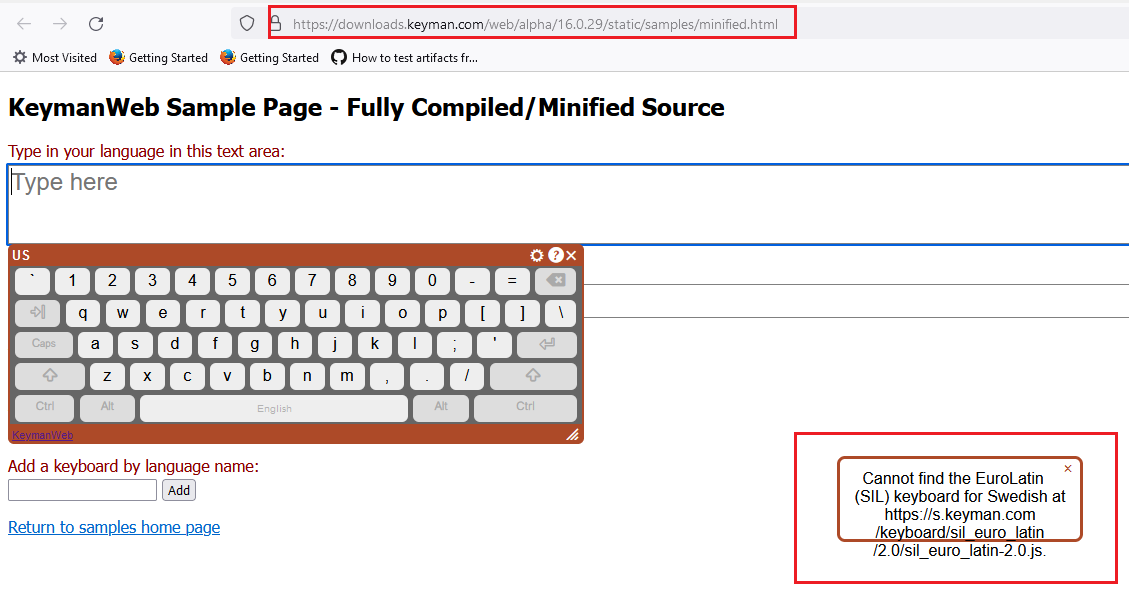
- TEST_ATTACHMENT_API (PASSED): Tested this as per the instructions in web/testing/attachment-api page and it is working both auto and manual attachment modes.
- TEST_NORMAL_USE (PASSED): Tested this as per the instructions in web/testing/attachment-api page and it is working as expected.
- TEST_ELEMENT_HOPPING (PASSED): Tested this as per the instructions in web/testing/attachment-api page and it is working as expected.
- TEST_SPECIFIC_KEYBOARDS (PASSED): Tested this as per the instructions in web/testing/attachment-api page and it is working as expected.
- TEST_JAPANESE_TYPING (PASSED): Tested this as per the instructions in web/samples/unminified.html page and it is working as expected.
- TEST_JAPANESE_FOCUS (PASSED): Tested this as per the instructions in web/samples/unminified.html page and it is working as expected.
SUITE_DESKTOP: Desktop Platforms
GROUP_WINDOWS_CHROME:
-
TEST_BASELINE_ADD_SIL_IPA (PASSED): Tested this as per the instructions in web/samples/minified.html page and it is working as expected.
-
TEST_BASELINE_ADD_KM (PASSED): Tested this as per the instructions in web/samples/minified.html page and it is working as expected.
-
TEST_BASELINE_ADD_KHMER_ANGKOR (PASSED): Tested this as per the instructions in web/samples/minified.html page and it is working as expected.
-
TEST_BASELINE_ADD_SPANISH (PASSED): Tested this as per the instructions in web/samples/minified.html page and it is working as expected.
-
TEST_BASELINE_SWEDISH (FAILED): Tested this as per the instructions in web/samples/minified.html page and it is showing an error message.
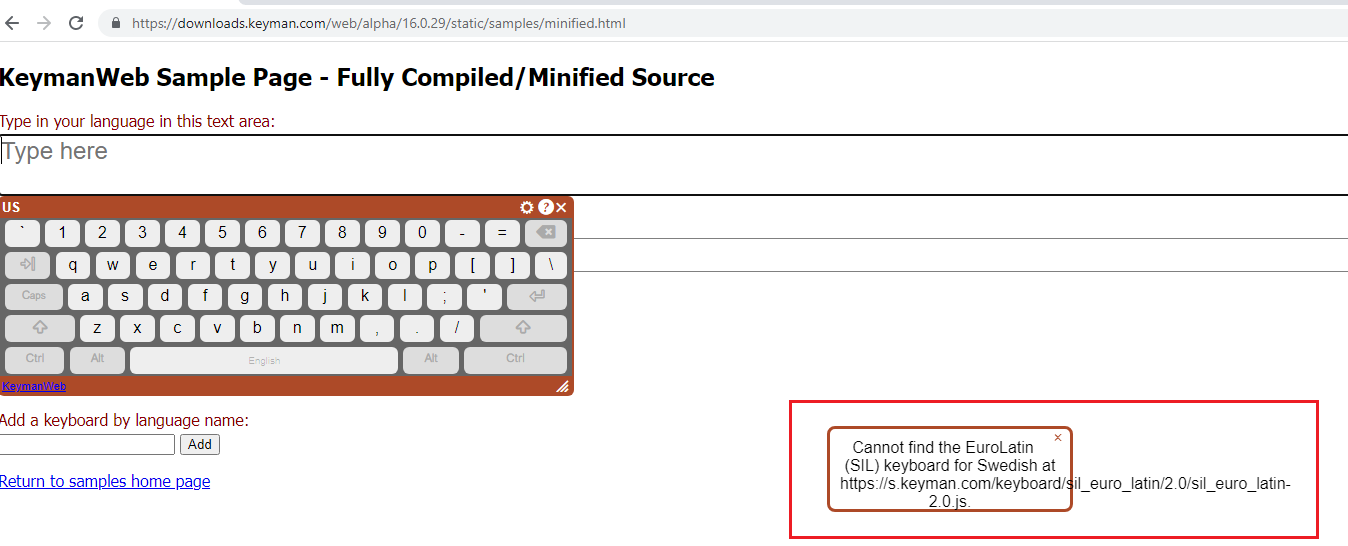
-
TEST_ATTACHMENT_API (PASSED): Tested this as per the instructions in web/testing/attachment-api page and it is working both auto and manual attachment modes.
-
TEST_NORMAL_USE (PASSED): Tested this as per the instructions in web/testing/attachment-api page and it is working as expected.
-
TEST_ELEMENT_HOPPING (PASSED): Tested this as per the instructions in web/testing/attachment-api page and it is working as expected.
-
TEST_SPECIFIC_KEYBOARDS (PASSED): Tested this as per the instructions in web/testing/attachment-api page and it is working as expected.
-
TEST_JAPANESE_TYPING (PASSED): Tested this as per the instructions in web/samples/unminified.html page and it is working as expected.
-
TEST_JAPANESE_FOCUS (PASSED): Tested this as per the instructions in web/samples/unminified.html page and it is working as expected.
SUITE_DESKTOP: Desktop Platforms
GROUP_MACOS_SAFARI:
-
TEST_BASELINE_ADD_SIL_IPA (PASSED): Tested this as per the instructions in web/samples/minified.html page and it is working as expected.
-
TEST_BASELINE_ADD_KM (PASSED): Tested this as per the instructions in web/samples/minified.html page and it is working as expected.
-
TEST_BASELINE_ADD_KHMER_ANGKOR (PASSED): Tested this as per the instructions in web/samples/minified.html page and it is working as expected.
-
TEST_BASELINE_ADD_SPANISH (PASSED): Tested this as per the instructions in web/samples/minified.html page and it is working as expected.
-
TEST_BASELINE_SWEDISH (FAILED): Tested this as per the instructions in web/samples/minified.html page and it is showing an error message.

-
TEST_ATTACHMENT_API (PASSED): Tested this as per the instructions in web/testing/attachment-api page and it is working both auto and manual attachment modes.
-
TEST_NORMAL_USE (PASSED): Tested this as per the instructions in web/testing/attachment-api page and it is working as expected.
-
TEST_ELEMENT_HOPPING (PASSED): Tested this as per the instructions in web/testing/attachment-api page and it is working as expected.
-
TEST_SPECIFIC_KEYBOARDS (PASSED): Tested this as per the instructions in web/testing/attachment-api page and it is working as expected.
-
TEST_JAPANESE_TYPING (PASSED): Tested this as per the instructions in web/samples/unminified.html page and it is working as expected.
-
TEST_JAPANESE_FOCUS (PASSED): Tested this as per the instructions in web/samples/unminified.html page and it is working as expected.
SUITE_DESKTOP: Desktop Platforms
GROUP_MACOS_CHROME:
-
TEST_BASELINE_ADD_SIL_IPA (PASSED): Tested this as per the instructions in web/samples/minified.html page and it is working as expected.
-
TEST_BASELINE_ADD_KM (PASSED): Tested this as per the instructions in web/samples/minified.html page and it is working as expected.
-
TEST_BASELINE_ADD_KHMER_ANGKOR (PASSED): Tested this as per the instructions in web/samples/minified.html page and it is working as expected.
-
TEST_BASELINE_ADD_SPANISH (PASSED): Tested this as per the instructions in web/samples/minified.html page and it is working as expected.
-
TEST_BASELINE_SWEDISH (FAILED): Tested this as per the instructions in web/samples/minified.html page and it is showing an error message.

-
TEST_ATTACHMENT_API (PASSED): Tested this as per the instructions in web/testing/attachment-api page and it is working both auto and manual attachment modes.
-
TEST_NORMAL_USE (PASSED): Tested this as per the instructions in web/testing/attachment-api page and it is working as expected.
-
TEST_ELEMENT_HOPPING (PASSED): Tested this as per the instructions in web/testing/attachment-api page and it is working as expected.
-
TEST_SPECIFIC_KEYBOARDS (PASSED): Tested this as per the instructions in web/testing/attachment-api page and it is working as expected.
-
TEST_JAPANESE_TYPING (PASSED): Tested this as per the instructions in web/samples/unminified.html page and it is working as expected.
-
TEST_JAPANESE_FOCUS (PASSED): Tested this as per the instructions in web/samples/unminified.html page and it is working as expected.
SUITE_DESKTOP: Desktop Platforms
GROUP_MACOS_FIREFOX:
-
TEST_BASELINE_ADD_SIL_IPA (PASSED): Tested this as per the instructions in web/samples/minified.html page and it is working as expected.
-
TEST_BASELINE_ADD_KM (PASSED): Tested this as per the instructions in web/samples/minified.html page and it is working as expected.
-
TEST_BASELINE_ADD_KHMER_ANGKOR (PASSED): Tested this as per the instructions in web/samples/minified.html page and it is working as expected.
-
TEST_BASELINE_ADD_SPANISH (PASSED): Tested this as per the instructions in web/samples/minified.html page and it is working as expected.
-
TEST_BASELINE_SWEDISH (FAILED): Tested this as per the instructions in web/samples/minified.html page and it is showing an error message.
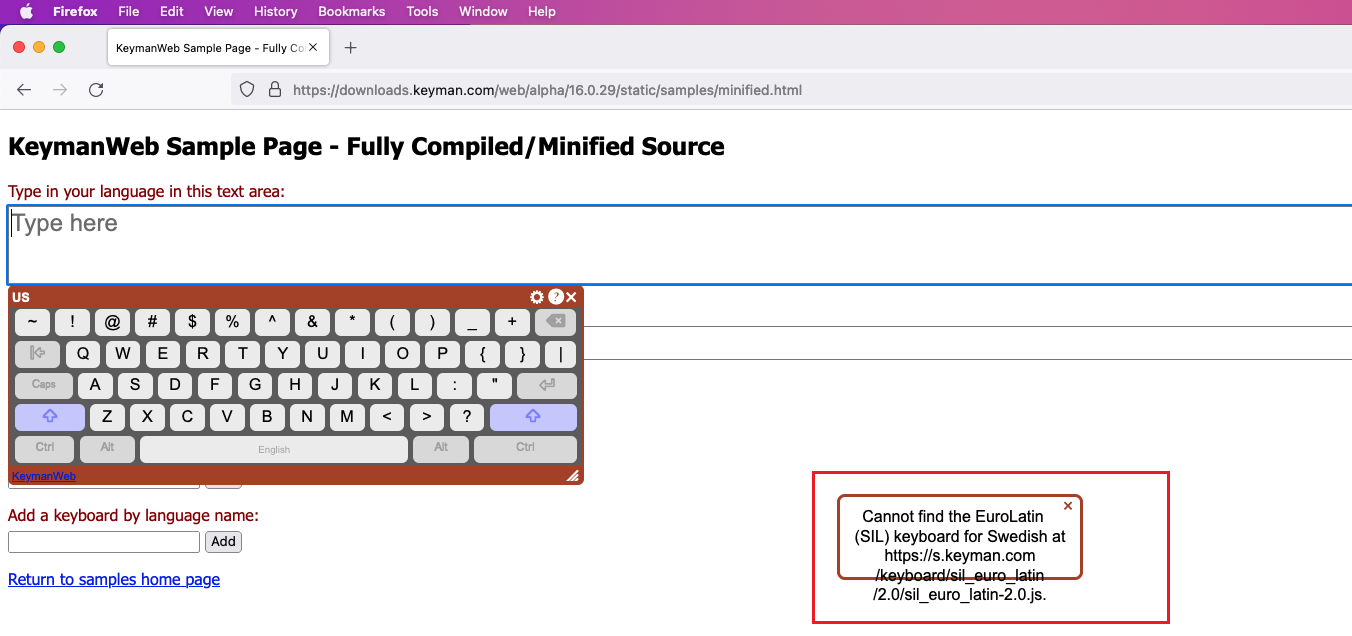
-
TEST_ATTACHMENT_API (PASSED): Tested this as per the instructions in web/testing/attachment-api page and it is working both auto and manual attachment modes.
-
TEST_NORMAL_USE (PASSED): Tested this as per the instructions in web/testing/attachment-api page and it is working as expected.
-
TEST_ELEMENT_HOPPING (PASSED): Tested this as per the instructions in web/testing/attachment-api page and it is working as expected.
-
TEST_SPECIFIC_KEYBOARDS (PASSED): Tested this as per the instructions in web/testing/attachment-api page and it is working as expected.
-
TEST_JAPANESE_TYPING (PASSED): Tested this as per the instructions in web/samples/unminified.html page and it is working as expected.
-
TEST_JAPANESE_FOCUS (PASSED): Tested this as per the instructions in web/samples/unminified.html page and it is working as expected.
SUITE_DESKTOP: Desktop Platforms
GROUP_LINUX_FIREFOX:
- TEST_BASELINE_ADD_SIL_IPA (PASSED): Tested this as per the instructions in (Ubuntu Bionic 18.04 Linux OS) web/samples/minified.html page and it is working as expected.
- TEST_BASELINE_ADD_KM (PASSED): Tested this as per the instructions in (Ubuntu Bionic 18.04 Linux OS) web/samples/minified.html page and it is working as expected.
- TEST_BASELINE_ADD_KHMER_ANGKOR (PASSED): Tested this as per the instructions in (Ubuntu Bionic 18.04 Linux OS) web/samples/minified.html page and it is working as expected.
- TEST_BASELINE_ADD_SPANISH (PASSED): Tested this as per the instructions in (Ubuntu Bionic 18.04 Linux OS) web/samples/minified.html page and it is working as expected.
- TEST_BASELINE_SWEDISH (PASSED): Tested this as per the instructions in (Ubuntu Bionic 18.04 Linux OS) web/samples/minified.html page and it is working as expected.
- TEST_ATTACHMENT_API (PASSED): Tested this as per the instructions in (Ubuntu Bionic 18.04 Linux OS) web/testing/attachment-api page and it is working both auto and manual attachment modes.
- TEST_NORMAL_USE (PASSED): Tested this as per the instructions in (Ubuntu Bionic 18.04 Linux OS) web/testing/attachment-api page and it is working as expected.
- TEST_ELEMENT_HOPPING (PASSED): Tested this as per the instructions in (Ubuntu Bionic 18.04 Linux OS) web/testing/attachment-api page and it is working as expected.
- TEST_SPECIFIC_KEYBOARDS (PASSED): Tested this as per the instructions in (Ubuntu Bionic 18.04 Linux OS) web/testing/attachment-api page and it is working as expected.
- TEST_JAPANESE_TYPING (PASSED): Tested this as per the instructions in (Ubuntu Bionic 18.04 Linux OS) web/samples/unminified.html page and it is working as expected.
- TEST_JAPANESE_FOCUS (PASSED): Tested this as per the instructions in (Ubuntu Bionic 18.04 Linux OS) web/samples/unminified.html page and it is working as expected.
SUITE_TOUCH: Touch platform tests
GROUP_ANDROID_CHROME_TOUCH:
- TEST_BASELINE_ADD_SIL_IPA (PASSED): Tested this in API 29 / Android 10 emulator in web/samples/minified.html page and it is working as expected.
- TEST_BASELINE_ADD_KM (PASSED): Tested this in API 29 / Android 10 emulator in web/samples/minified.html page and it is working as expected.
- TEST_BASELINE_ADD_KHMER_ANGKOR (PASSED): Tested this in API 29 / Android 10 emulator in web/samples/minified.html page and it is working as expected.
- TEST_BASELINE_ADD_SPANISH (PASSED): Tested this in API 29 / Android 10 emulator in web/samples/minified.html page and I was able to see the Spanish keyboard added in the Keyboard list.
- **TEST_BASELINE_SWEDISH (PASSED):Tested this as per the instructions and the two characters are not combined with each other.
- TEST_BASELINE_CAMEROON (PASSED): Tested this in API 29 / Android 10 emulator in web/samples/minified.html page and it is working as expected.
- TEST_ATTACHMENT_API (PASSED): Tested this in API 29 / Android 10 emulator in web/testing/attachment-api page and it is working as expected.
- TEST_NORMAL_USE (PASSED): Tested this in API 29 / Android 10 emulator in web/testing/attachment-api page and it is working as expected.
- TEST_ELEMENT_HOPPING (PASSED): Tested this in API 29 / Android 10 emulator in web/testing/attachment-api page and it is working as expected.
- TEST_SPECIFIC_KEYBOARDS (PASSED): Tested this in API 29 / Android 10 emulator in web/testing/attachment-api page and it is working as expected.
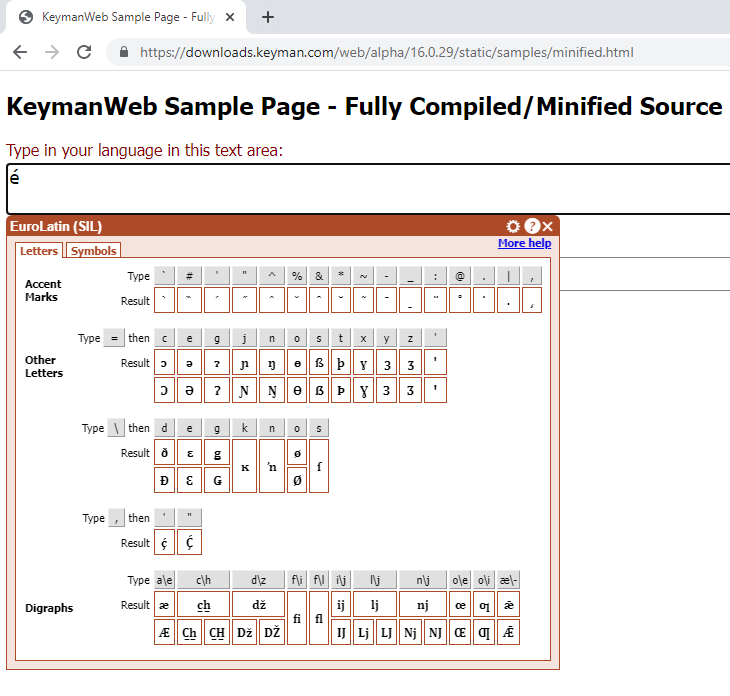
The Swedish test was failing because we had a deployment issue with version 2.0 of sil_euro_latin, which I have since resolved on the backend.
@keymanapp-test-bot retest SUITE_DESKTOP GROUP_WINDOWS_FIREFOX TEST_BASELINE_SWEDISH GROUP_WINDOWS_CHROME TEST_BASELINE_SWEDISH GROUP_MACOS_SAFARI TEST_BASELINE_SWEDISH GROUP_MACOS_CHROME TEST_BASELINE_SWEDISH GROUP_MACOS_FIREFOX TEST_BASELINE_SWEDISH

SUITE_DESKTOP: Desktop Platforms
GROUP_WINDOWS_FIREFOX:
- TEST_BASELINE_SWEDISH (PASSED): Retested this as per the instructions in web/samples/minified.html page and it is working as expected.
GROUP_WINDOWS_CHROME:
- TEST_BASELINE_SWEDISH (FAILED): Retested this as per the instructions in web/samples/minified.html page and it is showing an error message.
GROUP_MACOS_CHROME:
- TEST_BASELINE_SWEDISH (FAILED): Retested this as per the instructions in web/samples/minified.html page and it is showing an error message.
GROUP_MACOS_FIREFOX:
- TEST_BASELINE_SWEDISH (PASSED): Retested this as per the instructions in web/samples/minified.html page and it is working as expected.
GROUP_MACOS_SAFARI:
- TEST_BASELINE_SWEDISH (FAILED): Retested this as per the instructions in web/samples/minified.html page and it is showing an error message.
SUITE_TOUCH: Touch platform tests
GROUP_IPHONE_SAFARI_TOUCH:
- TEST_BASELINE_ADD_SIL_IPA (PASSED): Tested this in iOS 15.5 / iPhone 13 Pro Max Simulator in web/samples/minified.html page and it is working as expected.
- TEST_BASELINE_ADD_KM (PASSED): Tested this in iOS 15.5 / iPhone 13 Pro Max Simulator in web/samples/minified.html page and it is working as expected.
- TEST_BASELINE_ADD_KHMER_ANGKOR (PASSED): Tested this in iOS 15.5 / iPhone 13 Pro Max Simulator in web/samples/minified.html page and it is working as expected.
- TEST_BASELINE_ADD_SPANISH (PASSED): Tested this in iOS 15.5 / iPhone 13 Pro Max Simulator in web/samples/minified.html page and it is working as expected.
- TEST_BASELINE_SWEDISH (PASSED): Tested this in iOS 15.5 / iPhone 13 Pro Max Simulator in web/samples/minified.html page and it is working as expected.
- TEST_BASELINE_CAMEROON (PASSED): Tested this in iOS 15.5 / iPhone 13 Pro Max Simulator in web/samples/minified.html page and it is working as expected.
- TEST_ATTACHMENT_API (PASSED): Tested this in iOS 15.5 / iPhone 13 Pro Max Simulator in web/testing/attachment-api page and it is working as expected.
- TEST_NORMAL_USE (PASSED): Tested this in iOS 15.5 / iPhone 13 Pro Max Simulator in web/testing/attachment-api page and it is working as expected.
- TEST_ELEMENT_HOPPING (PASSED): Tested this in iOS 15.5 / iPhone 13 Pro Max Simulator in web/testing/attachment-api page and it is working as expected.
- TEST_SPECIFIC_KEYBOARDS (PASSED): Tested this in iOS 15.5 / iPhone 13 Pro Max Simulator in web/testing/attachment-api page and it is working as expected.
GROUP_IPHONE_SAFARI_HARDWARE:
- TEST_BASELINE_ADD_SIL_IPA (PASSED): Tested this in iOS 15.5 / iPhone 13 Pro Max Simulator in web/samples/minified.html page and it is working as expected.
- TEST_BASELINE_ADD_KM (PASSED): Tested this in iOS 15.5 / iPhone 13 Pro Max Simulator in web/samples/minified.html page and it is working as expected.
- TEST_BASELINE_ADD_KHMER_ANGKOR (PASSED): Tested this in iOS 15.5 / iPhone 13 Pro Max Simulator in web/samples/minified.html page and it is working as expected.
- TEST_BASELINE_ADD_SPANISH (PASSED): Tested this in iOS 15.5 / iPhone 13 Pro Max Simulator in web/samples/minified.html page and it is working as expected.
- TEST_BASELINE_SWEDISH (PASSED): Tested this in iOS 15.5 / iPhone 13 Pro Max Simulator in web/samples/minified.html page and it is working as expected.
- TEST_BASELINE_CAMEROON (PASSED): Tested this in iOS 15.5 / iPhone 13 Pro Max Simulator in web/samples/minified.html page and it is working as expected.
- TEST_ATTACHMENT_API (PASSED): Tested this in iOS 15.5 / iPhone 13 Pro Max Simulator in web/testing/attachment-api page and it is working as expected.
- TEST_NORMAL_USE (PASSED): Tested this in iOS 15.5 / iPhone 13 Pro Max Simulator in web/testing/attachment-api page and it is working as expected.
- TEST_ELEMENT_HOPPING (PASSED): Tested this in iOS 15.5 / iPhone 13 Pro Max Simulator in web/testing/attachment-api page and it is working as expected.
- TEST_SPECIFIC_KEYBOARDS (PASSED): Tested this in iOS 15.5 / iPhone 13 Pro Max Simulator in web/testing/attachment-api page and it is working as expected.
SUITE_TOUCH: Touch platform tests
GROUP_ANDROID_CHROME_HARDWARE:
- TEST_BASELINE_ADD_SIL_IPA (PASSED): Tested this in API 29 / Android 10 emulator in web/samples/minified.html page and it is working as expected.
- TEST_BASELINE_ADD_KM (PASSED): Tested this in API 29 / Android 10 emulator in web/samples/minified.html page and it is working as expected.
- TEST_BASELINE_ADD_KHMER_ANGKOR (PASSED): Tested this in API 29 / Android 10 emulator in web/samples/minified.html page and it is working as expected.
- TEST_BASELINE_ADD_SPANISH (PASSED): Tested this in API 29 / Android 10 emulator in web/samples/minified.html page and it is working as expected.
- TEST_BASELINE_SWEDISH (PASSED): Tested this in API 29 / Android 10 emulator in web/samples/minified.html page and it is working as expected.
- TEST_BASELINE_CAMEROON (PASSED): Tested this in API 29 / Android 10 emulator in web/samples/minified.html page and it is working as expected.
- TEST_ATTACHMENT_API (PASSED): Tested this in API 29 / Android 10 emulator in web/testing/attachment-api page and it is working as expected.
- TEST_NORMAL_USE (PASSED): Tested this in API 29 / Android 10 emulator in web/testing/attachment-api page and it is working as expected.
- TEST_ELEMENT_HOPPING (PASSED): Tested this in API 29 / Android 10 emulator in web/testing/attachment-api page and it is working as expected.
- TEST_SPECIFIC_KEYBOARDS (PASSED): Tested this in API 29 / Android 10 emulator in web/testing/attachment-api page and it is working as expected.
SUITE_TOUCH: Touch platform tests
GROUP_IPAD_SAFARI_TOUCH:
- TEST_BASELINE_ADD_SIL_IPA (PASSED): Tested this in iOS 15.5 / iPad Air (5th generation) in web/samples/minified.html page and it is working as expected.
- TEST_BASELINE_ADD_KM (PASSED): Tested this in iOS 15.5 / iPad Air (5th generation) in web/samples/minified.html page and it is working as expected.
- TEST_BASELINE_ADD_KHMER_ANGKOR (PASSED): Tested this in iOS 15.5 / iPad Air (5th generation) in web/samples/minified.html page and it is working as expected.
- TEST_BASELINE_ADD_SPANISH (PASSED): Tested this in iOS 15.5 / iPad Air (5th generation) in web/samples/minified.html page and it is working as expected.
- TEST_BASELINE_SWEDISH (PASSED): Tested this in iOS 15.5 / iPad Air (5th generation) in web/samples/minified.html page and it is working as expected.
- TEST_BASELINE_CAMEROON (PASSED): Tested this in iOS 15.5 / iPad Air (5th generation) in web/samples/minified.html page and it is working as expected.
- TEST_ATTACHMENT_API (PASSED): Tested this in iOS 15.5 / iPad Air (5th generation) in web/samples/minified.html page and it is working as expected.
- TEST_NORMAL_USE (PASSED): Tested this in iOS 15.5 / iPad Air (5th generation) in web/testing/attachment-api page and it is working as expected.
- TEST_ELEMENT_HOPPING (PASSED): Tested this in iOS 15.5 / iPad Air (5th generation) in web/testing/attachment-api page and it is working as expected.
- TEST_SPECIFIC_KEYBOARDS (PASSED): Tested this in iOS 15.5 / iPad Air (5th generation) in web/testing/attachment-api page and it is working as expected.
GROUP_IPAD_SAFARI_HARDWARE:
- TEST_BASELINE_ADD_SIL_IPA (PASSED): Tested this in iOS 15.5 / iPad Air (5th generation) in web/samples/minified.html page and it is working as expected.
- TEST_BASELINE_ADD_KM (PASSED): Tested this in iOS 15.5 / iPad Air (5th generation) in web/samples/minified.html page and it is working as expected.
- TEST_BASELINE_ADD_KHMER_ANGKOR (PASSED): Tested this in iOS 15.5 / iPad Air (5th generation) in web/samples/minified.html page and it is working as expected.
- TEST_BASELINE_ADD_SPANISH (PASSED): Tested this in iOS 15.5 / iPad Air (5th generation) in web/samples/minified.html page and it is working as expected.
- TEST_BASELINE_SWEDISH (PASSED): Tested this in iOS 15.5 / iPad Air (5th generation) in web/samples/minified.html page and it is working as expected.
- TEST_BASELINE_CAMEROON (PASSED): Tested this in iOS 15.5 / iPad Air (5th generation) in web/samples/minified.html page and it is working as expected.
- TEST_ATTACHMENT_API (PASSED): Tested this in iOS 15.5 / iPad Air (5th generation) in web/samples/minified.html page and it is working as expected.
- TEST_NORMAL_USE (PASSED): Tested this in iOS 15.5 / iPad Air (5th generation) in web/testing/attachment-api page and it is working as expected.
- TEST_ELEMENT_HOPPING (PASSED): Tested this in iOS 15.5 / iPad Air (5th generation) in web/testing/attachment-api page and it is working as expected.
- TEST_SPECIFIC_KEYBOARDS (PASSED): Tested this in iOS 15.5 / iPad Air (5th generation) in web/testing/attachment-api page and it is working as expected.
SUITE_DESKTOP: Desktop Platforms
GROUP_WINDOWS_FIREFOX:
- TEST_SELECTION (PASSED): Tested in https://downloads.keyman.com/web/alpha/16.0.29/static/testing/unminified.html link and it is working as expected.
- TEST_SELECTION_2 (PASSED): Tested this in the above Uniminified Test Page in Firefox and it is working as expected.
- TEST_CONTEXT_BASE (PASSED): Tested this in the above Uniminified Test Page in Firefox and it is working as expected.
- TEST_CONTEXT_SELECTION (PASSED): Tested this in the above Uniminified Test Page in Firefox and it is working as expected.
- TEST_CONTEXT_SELECTION_2 (PASSED): Tested this in the above Uniminified Test Page in Firefox and it is working as expected.
- TEST_CONTEXT_SELECTION_3 (PASSED): Tested this in the above Uniminified Test Page in Firefox and it is working as expected.
- TEST_CONTEXT_SELECTION_4 (PASSED): Tested this in the above Uniminified Test Page in Firefox and it is working as expected.
SUITE_DESKTOP: Desktop Platforms
GROUP_WINDOWS_CHROME:
- TEST_SELECTION (PASSED): Tested this in the above Uniminified Test Page in Windows Chrome Browser and it is working as expected.
- TEST_SELECTION_2 (PASSED): Tested this in the above Uniminified Test Page in Windows Chrome Browser and it is working as expected.
- TEST_CONTEXT_BASE (PASSED): Tested this in the above Uniminified Test Page in Windows Chrome Browser and it is working as expected.
- TEST_CONTEXT_SELECTION (PASSED): Tested this in the above Uniminified Test Page in Windows Chrome Browser and it is working as expected.
- TEST_CONTEXT_SELECTION_2 (PASSED): Tested this in the above Uniminified Test Page in Windows Chrome Browser and it is working as expected.
- TEST_CONTEXT_SELECTION_3 (PASSED): Tested this in the above Uniminified Test Page in Windows Chrome Browser and it is working as expected.
- TEST_CONTEXT_SELECTION_4 (PASSED): Tested this in the above Uniminified Test Page in Windows Chrome Browser and it is working as expected.
SUITE_DESKTOP: Desktop Platforms
GROUP_MACOS_SAFARI:
- TEST_SELECTION (PASSED): Tested this in the above Unminified Test Page in SAFARI Browser and it is working as expected.
- TEST_SELECTION_2 (PASSED): Tested this in the above Unminified Test Page in SAFARI Browser and it is working as expected.
- TEST_CONTEXT_BASE (PASSED): Tested this in the above Unminified Test Page in SAFARI Browser and it is working as expected.
- TEST_CONTEXT_SELECTION (PASSED): Tested this in the above Unminified Test Page in SAFARI Browser and it is working as expected.
- TEST_CONTEXT_SELECTION_2 (PASSED): Tested this in the above Unminified Test Page in SAFARI Browser and it is working as expected.
- TEST_CONTEXT_SELECTION_3 (PASSED): Tested this in the above Unminified Test Page in SAFARI Browser and it is working as expected.
- TEST_CONTEXT_SELECTION_4 (PASSED): Tested this in the above Unminified Test Page in SAFARI Browser and it is working as expected.
GROUP_MACOS_CHROME:
- TEST_SELECTION (PASSED): Tested this in the above Unminified Test Page in Chrome Browser and it is working as expected.
- TEST_SELECTION_2 (PASSED): Tested this in the above Unminified Test Page in Chrome Browser and it is working as expected.
- TEST_CONTEXT_BASE (PASSED): Tested this in the above Unminified Test Page in Chrome Browser and it is working as expected.
- TEST_CONTEXT_SELECTION (PASSED): Tested this in the above Unminified Test Page in Chrome Browser and it is working as expected.
- TEST_CONTEXT_SELECTION_2 (PASSED): Tested this in the above Unminified Test Page in Chrome Browser and it is working as expected.
- TEST_CONTEXT_SELECTION_3 (PASSED): Tested this in the above Unminified Test Page in Chrome Browser and it is working as expected.
- TEST_CONTEXT_SELECTION_4 (PASSED): Tested this in the above Unminified Test Page in Chrome Browser and it is working as expected.
GROUP_MACOS_FIREFOX:
- TEST_SELECTION (PASSED): Tested this in the above Unminified Test Page in Firefox Browser and it is working as expected.
- TEST_SELECTION_2 (PASSED): Tested this in the above Unminified Test Page in Firefox Browser and it is working as expected.
- TEST_CONTEXT_BASE (PASSED): Tested this in the above Unminified Test Page in Firefox Browser and it is working as expected.
- TEST_CONTEXT_SELECTION (PASSED): Tested this in the above Unminified Test Page in Firefox Browser and it is working as expected.
- TEST_CONTEXT_SELECTION_2 (PASSED): Tested this in the above Unminified Test Page in Firefox Browser and it is working as expected.
- TEST_CONTEXT_SELECTION_3 (PASSED): Tested this in the above Unminified Test Page in Firefox Browser and it is working as expected.
- TEST_CONTEXT_SELECTION_4 (PASSED): Tested this in the above Unminified Test Page in Firefox Browser and it is working as expected.
SUITE_DESKTOP: Desktop Platforms
GROUP_LINUX_FIREFOX:
- TEST_SELECTION (PASSED): Tested this in Ubuntu Bionic Linux (VM) in the Unminified Test Page in Firefox Browser and it is working as expected.
- TEST_SELECTION_2 (PASSED): Tested this in Ubuntu Bionic Linux (VM) in the Unminified Test Page in Firefox Browser and it is working as expected.
- TEST_CONTEXT_BASE (PASSED): Tested this in Ubuntu Bionic Linux (VM) in the Unminified Test Page in Firefox Browser and it is working as expected.
- TEST_CONTEXT_SELECTION (PASSED): Tested this in Ubuntu Bionic Linux (VM) in the Unminified Test Page in Firefox Browser and it is working as expected.
- TEST_CONTEXT_SELECTION_2 (PASSED): Tested this in Ubuntu Bionic Linux (VM ) in the Unminified Test Page in Firefox Browser and it is working as expected.
- TEST_CONTEXT_SELECTION_3 (PASSED): Tested this in Ubuntu Bionic Linux (VM) in the Unminified Test Page in Firefox Browser and it is working as expected.
- TEST_CONTEXT_SELECTION_4 (PASSED): Tested this in Ubuntu Bionic Linux (VM) in the Unminified Test Page in Firefox Browser and it is working as expected.
@keymanapp-test-bot retest SUITE_DESKTOP GROUP_WINDOWS_CHROME TEST_BASELINE_SWEDISH GROUP_MACOS_SAFARI TEST_BASELINE_SWEDISH GROUP_MACOS_CHROME TEST_BASELINE_SWEDISH
@bharanidharanj I cannot replicate the behavior. Let's retest these in a rubber ducky session.
SUITE_DESKTOP: Desktop Platforms
GROUP_WINDOWS_CHROME:
- TEST_BASELINE_SWEDISH (BLOCKED): Not able to retest this issue since it is throwing an error message after selecting the Swedish Keyboard. Seems to be blocked. FYI, I am using Windows 10 (Native Machine)

GROUP_MACOS_SAFARI:
- TEST_BASELINE_SWEDISH (BLOCKED): Not able to retest this issue since it is throwing an error message after selecting the Swedish Keyboard. Seems to be blocked. FYI, I am using MacMini M1 OS (Native Machine)
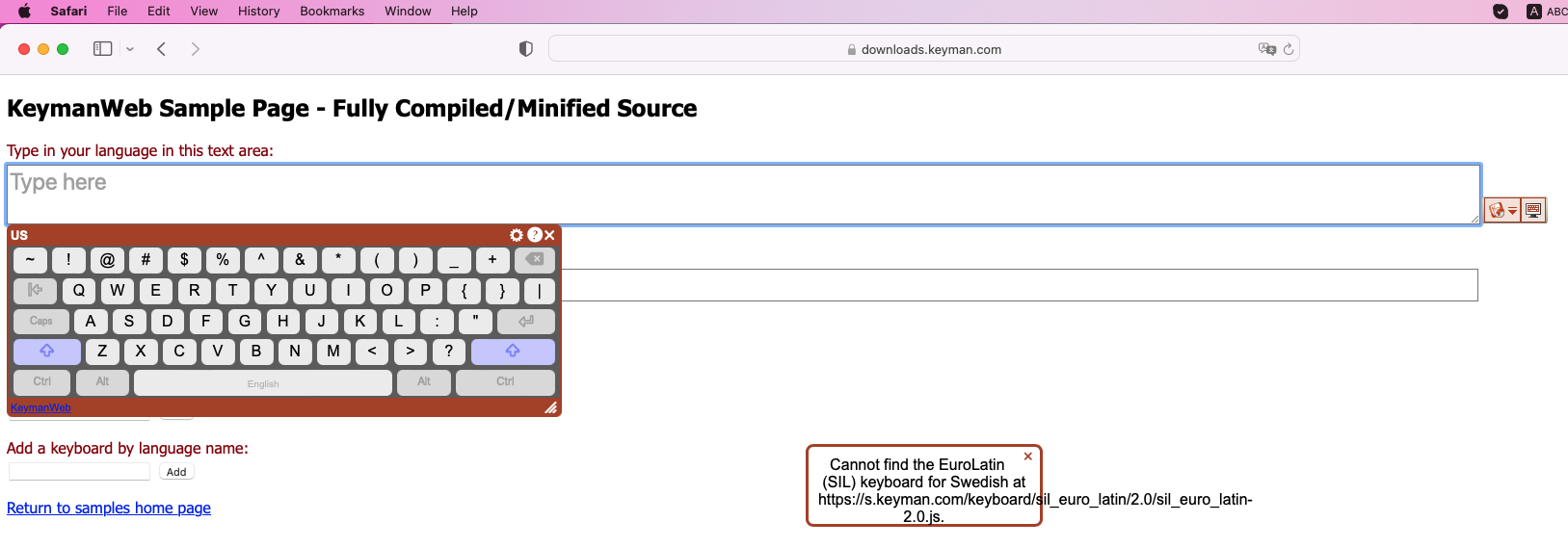
GROUP_MACOS_CHROME:
- TEST_BASELINE_SWEDISH (BLOCKED): Not able to retest this issue since it is throwing an error message after selecting the Swedish Keyboard. Seems to be blocked. FYI, I am using MacMini M1 OS (Native Machine)
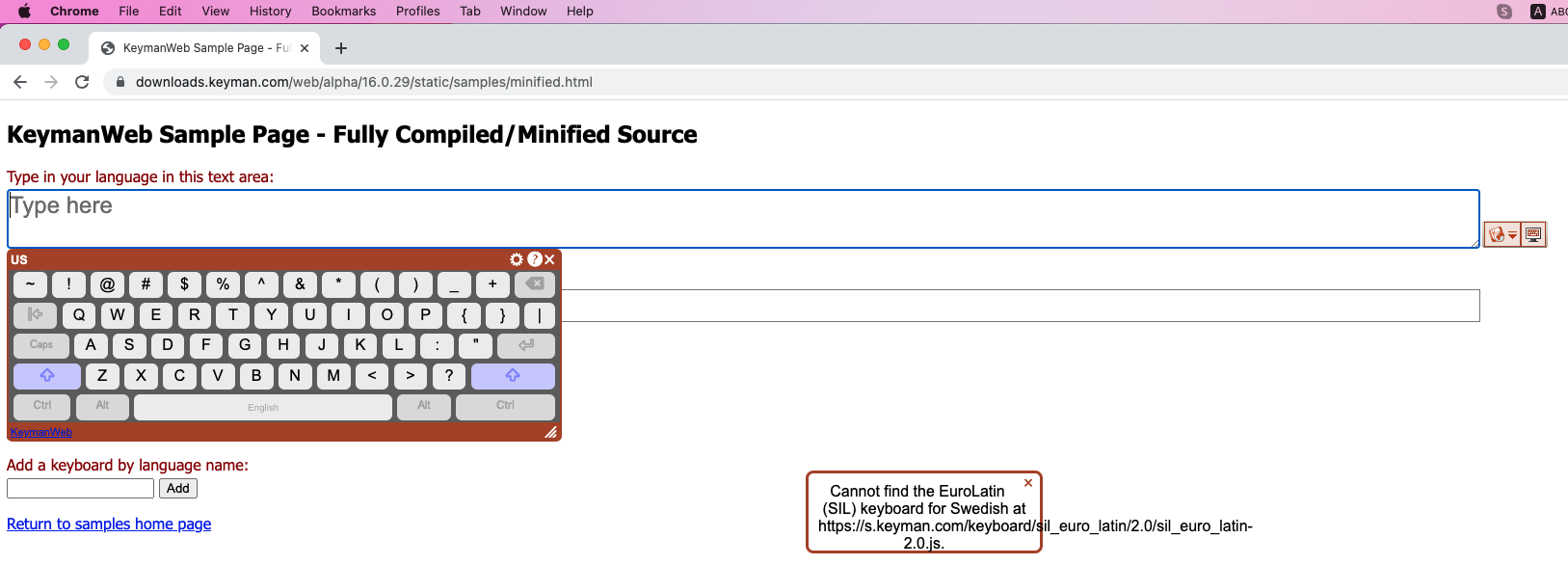
@jahorton @mcdurdin Makara and I have retested the Swedish Keyboard issue in my Windows OS as well as in the Mac Mini M1 OS and we were able to reproduce it. But Makara was not able to reproduce this issue in his Virtual Machine. I am using Native Machine. (Windows and MacMini). So, we are confused whether the Native machine makes this kind of problem?
- TEST_BASELINE_SWEDISH (BLOCKED): Not able to retest this issue since it is throwing an error message after selecting the Swedish Keyboard.
I have flushed this file from the CDN cache to try and ensure there is nothing wrong there. Can you try clearing your browser cache and retrying these tests?
@keymanapp-test-bot retest SUITE_DESKTOP GROUP_WINDOWS_CHROME TEST_BASELINE_SWEDISH GROUP_MACOS_SAFARI TEST_BASELINE_SWEDISH GROUP_MACOS_CHROME TEST_BASELINE_SWEDISH
SUITE_DESKTOP: Desktop Platforms
GROUP_WINDOWS_CHROME:
- TEST_BASELINE_SWEDISH (PASSED): Retested this as per Marc's suggestion (Clear the Catch Memory) ..and..YES..it is working fine. Thanks, Marc ! :-)
GROUP_MACOS_SAFARI:
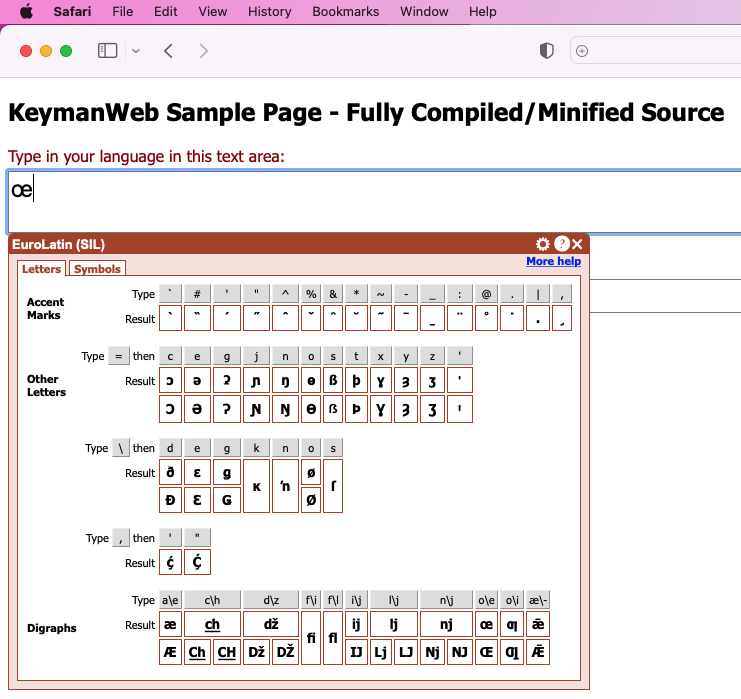
- TEST_BASELINE_SWEDISH (PASSED): Retested this as per Marc's suggestion (Clear the Catch Memory) and now it is working fine.
GROUP_MACOS_CHROME:
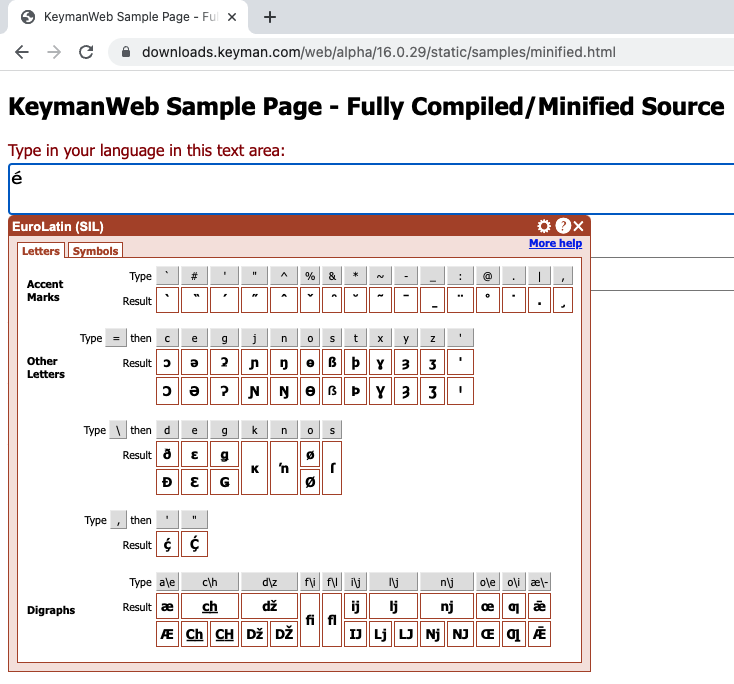
- TEST_BASELINE_SWEDISH (PASSED): Retested this as per Marc's suggestion (Clear the Catch Memory) and now it is working fine.
Looks like everything in KMW worked well; sad there was some odd cache / s.keyman.com behavior that interfered at points, though.

The cache issue with s.keyman.com relates to failed deployments we have been experiencing and for which I have a patch in the pipeline