
XServiceManager
 XServiceManager copied to clipboard
 kaisar945
This is a system service injection framework that allows you to directly add services to the framework without being restricted by the SELinux policy.
XServiceManager
中文
What is this
A system service injection framework that allows bypassing SELinux policies in order to add custom services to system services.
Usage Scenarios
- System development can be integrated into
aospas part of theframework - Xposed development injects services into the
frameworklayer for other applications to call
How to works
After Android 5.0, it is limited by SELinux mandatory policy, so adding services to the system needs to modify the sepolicy policy which is very difficult for inexperienced developers, so there is XServiceManager project. You can easily add services to the framework to make them available to other applications. The XServiceManager hosts the system clipboard service by hijacking it, and custom services are actually managed by the XServiceManager on your behalf rather than actually added to the system ServiceManager, so your service must be added via the XServiceManager interface to add calls.
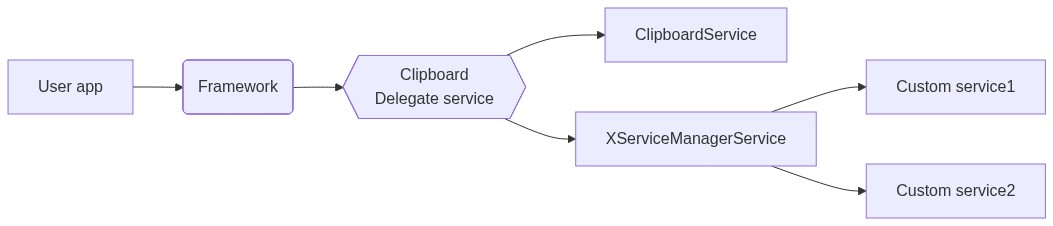
Supported Versions
Android 5.0+
How to use
Here only the
xposedintegration methodaospintegration method similar please study yourself
-
Clone the
XServiceManagerproject to the project rootgit clone https://github.com/kaisar945/XServiceManager.git libxservicemanager -
Open the
build.gradlefile in the main project and add theimplementation project(path: ':libxservicemanager')dependency to thedependenciessection -
Writing custom services
-
In the
Xposedinitialization class after confirming that the current process is thesystem_serverprocess add the initialization code and add a custom service-
No dependency on system services and
Contextpublic void handleLoadPackage(final XC_LoadPackage.LoadPackageParam lpparam) { if("android".equals(lpparam.packageName)){ XServiceManager.initForSystemServer(); XServiceManager.addService("simple", new SimpleService()); } } -
Dependency on system services and
Contextpublic void handleLoadPackage(final XC_LoadPackage.LoadPackageParam lpparam) { if("android".equals(lpparam.packageName)){ XServiceManager.initForSystemServer(); XServiceManager.registerService("simple2", new XServiceManager.ServiceFetcher<Binder>() { @Override public Binder createService(Context ctx) { return new SimpleService2(ctx); } }); } }
-
-
Use custom services in other applications
Tip:The service object obtained in case of injection failure is
null, so please always check the service object before using the service.- Use
getServiceorgetServiceInterfaceof XServiceManager class to get the service object
IBinder binder = XServiceManager.getService("simple");
if(binder != null){
	ISimpleService service = ISimpleService.Stub.asInterface(binder);
	service.doSomething();
}
// Use the getServiceInterface function to get a service. Make sure the service interface is not obfuscated. -keep class com.your.ISimpleService$* {*;} ISimpleService service = XServiceManager.getServiceInterface("simple"); if(service != null){ service.doSomething(); } - Use
Risk
Because the custom service runs in the system_server process and therefore has the highest system privileges, please ensure that the security and stability of the service is taken into account at the beginning of the design otherwise it may cause the device to run unstable
FAQ
-
Unable to call custom services
Filter the
XServiceManagerlogs to check if the following logs are availableXServiceManager inject successIf you do not find a successful injection hint there should be some other exception hints please check if it is caused by your service if not congratulations you have found a bug please submit an issue to me
-
Storing data files in custom services
Custom services belong to the
systemuser group by default and are restricted bySELinuxfrom storing data in paths other than/data/system, so you can choose to create a proprietary directory in that directory for data storage. -
TransactionTooLargeExceptionoccurs when calling the serviceThis error is caused by the
IPCdata buffer limit which is about1MbPlease avoid large data exchange
 kaisar945