
STIGMA
 STIGMA copied to clipboard
 juliedavila
Simple Python program to parse OpenSCAP result files and give results
STIGMA
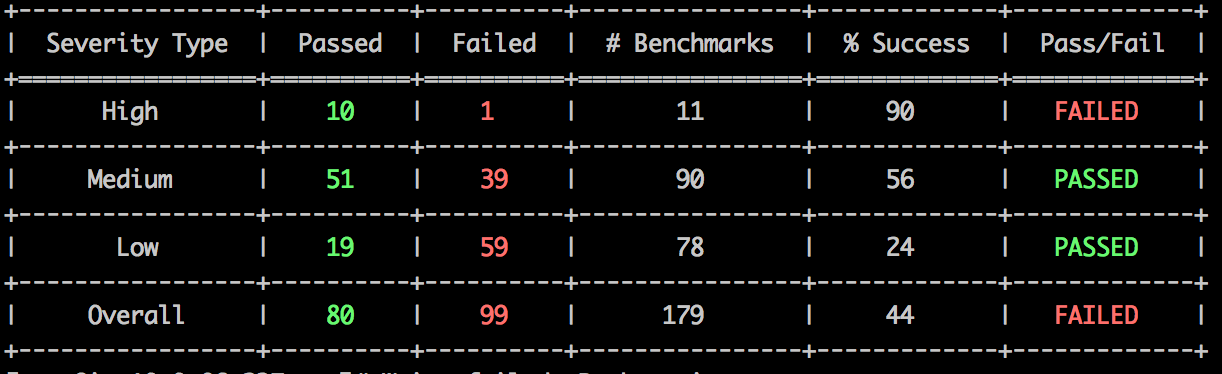
Easy Python program to parse OpenSCAP result files and give results. Like the following:
Instructions
-
Install OpenSCAP
yum install openscap-utils
-
Download SCAP DISA STIG zip file from here
-
Unzip DISA STIG content
-
Evaluate your favorite profile, for example MAC-1_Public, and write XCCDF results into a results.xml file.
    # Example
    oscap xccdf eval --profile MAC-1_Public --results results.xml --cpe U_RedHat_5_V1R2_STIG_Benchmark-cpe-dictionary.xml U_RedHat_5_V1R2_STIG_Benchmark-xccdf.xml
- Run STIGMA
python stigma.py -P /path/to/results.xml
- Optional Flags:
- -T Integer representing acceptable pass percentage of all benchmarks Combined
- -H Integer representing acceptable pass percentage of High Severity Benchmarks
- -M Integer representing acceptable pass percentage of Medium Severity Benchmarks
- -L Integer representing acceptable pass percentage of Low Severity Benchmarks
Metadata
51
Stars
6
Forks
Watchers
Owner
 juliedavila
Metadata
Simple Python program to parse OpenSCAP result files and give results