

 johnno1962
[Help / Question] - Get initial injection working
Heya! Happy to say I'm finally able to give this a shot on a new project.
Hopefully this is just a quick question or setup detail, but it seems like I just can't get the injection bundle to come up, or the original .app service to find the running app to inject to. Essentially, in following the examples in this doc (and even using the prepare project feature in the .app), nothing seems to log to the console. I haven't done much beyond a few retries, a few manual bundle loads outside of the preparation tool, but no dice there.
This is usually a case where some small setup detail is missed just misconfigured. For instance, I've got the special linker/interposable flags included, but that doesn't mean some other flags aren't messing with it at compile or runtime.
Any chance you might have some low-hanging-fruit things to check that you've run into before? Specifically, what might be causing the bundle to not get to the point of logging to the console? Happy to share some more details if it helps, as I didn't want to drop a bunch of logs to ask you to get deep into a debugging session, lol.
Thanks again for this and your other tools, and many times in advance for your time!

Hi, seems like you might be mixing up the injectionIII project and the HotReloading project (this one) on which it is based. In theory to use this (HotReloading) project you should only have to add it as a Swift Package and you should see a message like: 🔥 HotReloading available for sources under ["/Users/johnholdsworth"]. If you're using the app released by the InjectionII project it's a bit more involved. You need to add a piece of code to application(_ application: UIApplication, didFinishLaunchingWithOptions:... something like:
Bundle(path: "/Applications/InjectionIII.app/Contents/Resources/iOSInjection.bundle")!.load()
which should either load the bundle and print a message or fail. Once it has loaded it will connect to the InjectionIII.app if you have it running which will ask you to select your project's source directory.
If it gets this far and either option says it is watching for changes, when you save a file it should attempt injection though it seems you haven't got that far. Hope this helps.

Ah, I appreciate the clarity there. Yeah, I started with the SPM project but didn't see anything, so I experimented with the App next.
I think that's the part I'm stuck on - bringing in the package directly, I didn't see anything crop up in the logs. No warnings or errors that I could see, and the HotReloading keyword was nowhere to be found. My concern is something is maybe being stripped or just dropped by the project, but it's a bit difficult to debug it from where I'm sitting.
Does that description make sense - that the project is brought in but doesn't seem to 'startup' on launch?
Seems like it hasn't been added correctly. When you added the SPM to the project did you select "HotReloading" to add to your app target in the second dialogue as it shows i the README? If it's been added to the target you should see the message I mentioned. Is this an iOS project? Does it show building the HotReloading sources in the logs?
Yep, the project is iOS being built with an M1 (not sure if there are architecture requirements). I did in indeed follow the readme, and retried a few times in case something didn't quite kick over internally from the package install. Outside of that main install with the flags, I didn't see much else where I could go wrong, heh.
I was able to confirm that Guts was properly found and compiled via the build log which seems good news. No other output of notice though. I didn't see the core HotReloading library building, not sure if I missed it or what. I can dig into that a bit too.
HotReloading is still your best bet though it sounds like it's not been added correctly. You should be able to see all you need from the build logs. If it is building a target HotReloading and linking HotReloading.o into your app you should be ok although there are others. I have an M1 so it won't be that. Do you have TeamView/Tuple or Hangouts we could try? What version of Xcode are you using? This is the simulator right? Can you email your build log to github at johnholdsworth dot com or post it here?
Have you tried getting started with https://github.com/johnno1962/SwiftUI-Kit ?
Do you have TeamView/Tuple or Hangouts we could try?
I'd love to, and even if we don't find the time, I appreciate your offer more than ya know!
I'm more than happy to keep playing with this today. Basic defects at work so should have some time in a bit, haha. Let me give it a good try one more time and collect some logs to start with. I'll ping back here a couple of times with updates!
Also also: I haven't actually tried the getting-started repo, let me do that alongside the above. Maybe it'll tease something out that's being suppressed by the main project.
If you can't get https://github.com/johnno1962/SwiftUI-Kit working be sure to let me know!
Be sure to be running version 4.4.4+. I've been working on HotReloading today.
So the great news is that the sample project works perfectly! I got my first taste of a CMD+S instant reload and I'm already hooked. I am even more determined to figure this out.
I've done a refresh off main from your commit about an hour ago, and I can also try other releases. ATM I'm doing a diff against the sample package's project file to make sure I'm not borking up other settings. So far, no major differences.
Something I didn't think of until now: We're running Cocoapods, which does a bunch of funky framework addition magic. Any chance that may be conflicting with that here? I can't really imagine how, but if it's a linker thing, that may be part of it. Or maybe I'm just adding more noise to the issue. I'll keep testing.
A bit more information. HotReloading is currently implemented in the file "HotReloading/StandaloneInjection.swift" which doesn't do all that much and is called from "HotReloadingGuts/ClientBoot.mm" which has a + load method that should fire when your app starts. Either this code isn't making it into your executable and + load isn''t being called or there is some threading problem where this code in the load method:
    if (!isiOSAppOnMac && !isVapor && !getenv("INJECTION_DAEMON"))
        if (Class standalone = objc_getClass("StandaloneInjection")) {
            [[standalone new] run];
            return;
        }
doesn't make it to here:
class StandaloneInjection: InjectionClient {

    static var singleton: StandaloneInjection?
    var watchers = [FileWatcher]()

    override func runInBackground() {
Thanks for the pointer on that. I threw a breakpoint or two around and can confirm it's not being hit in the app.
Because this is a big... enterprisey app we'll say, it's got a lot of weird workarounds and hacks to make old and curmudgeonly vendor libraries embed properly. I've been playing around with different versions, linking setups, target iOS versions, Cocoapod installer instructions - so far, no luck on getting it to come online. Still messing around with it though.
Hey, any chance you might be available for that chat around 3:00 or 4:00pm PST? I wouldn't mind starting up that call if you still have the mental fortitude for today ;) If so, shoot me an email at [email protected] and we can set something up. (or of course anything else you might prefer, just offering a hand first!)
Hi, we can hook up later if you like somehow but first there is one question we need to answer: Is the injection code being included in the binary? To get the answer to this find the path to the executable and do something like the following:
Johns-Mac-mini InjectionIII % nm ~/Library/Developer/Xcode/DerivedData/TestInjection-bonygtxmfzrcaxcbxqrewujrdxqz/Build/Products/Debug-iphonesimulator/TestInjection.app/TestInjection | grep BundleInjection
0000000100636988 t +[BundleInjection connectedAddress]
00000001006364e4 t +[BundleInjection load]
0000000100636538 t +[BundleInjection tryConnect:]
0000000100816e70 S _OBJC_CLASS_$_BundleInjection
0000000100816e48 S _OBJC_METACLASS_$_BundleInjection
0000000100691b00 s __OBJC_$_CLASS_METHODS_BundleInjection
0000000100810d10 s __OBJC_CLASS_RO_$_BundleInjection
0000000100810cc8 s __OBJC_METACLASS_RO_$_BundleInjection
Johns-Mac-mini InjectionIII % nm ~/Library/Developer/Xcode/DerivedData/TestInjection-bonygtxmfzrcaxcbxqrewujrdxqz/Build/Products/Debug-iphonesimulator/TestInjection.app/TestInjection | grep StandaloneInjection
00000001005f0ab4 T _$s12HotReloading19StandaloneInjectionC15runInBackgroundyyF
...
If the code isn't included look at your build logs to see why the Swift Package isn't being built in. If it is then it is something to do with the dynamic linker not calling the + load method for some reason (linker option?)
@johnno1962 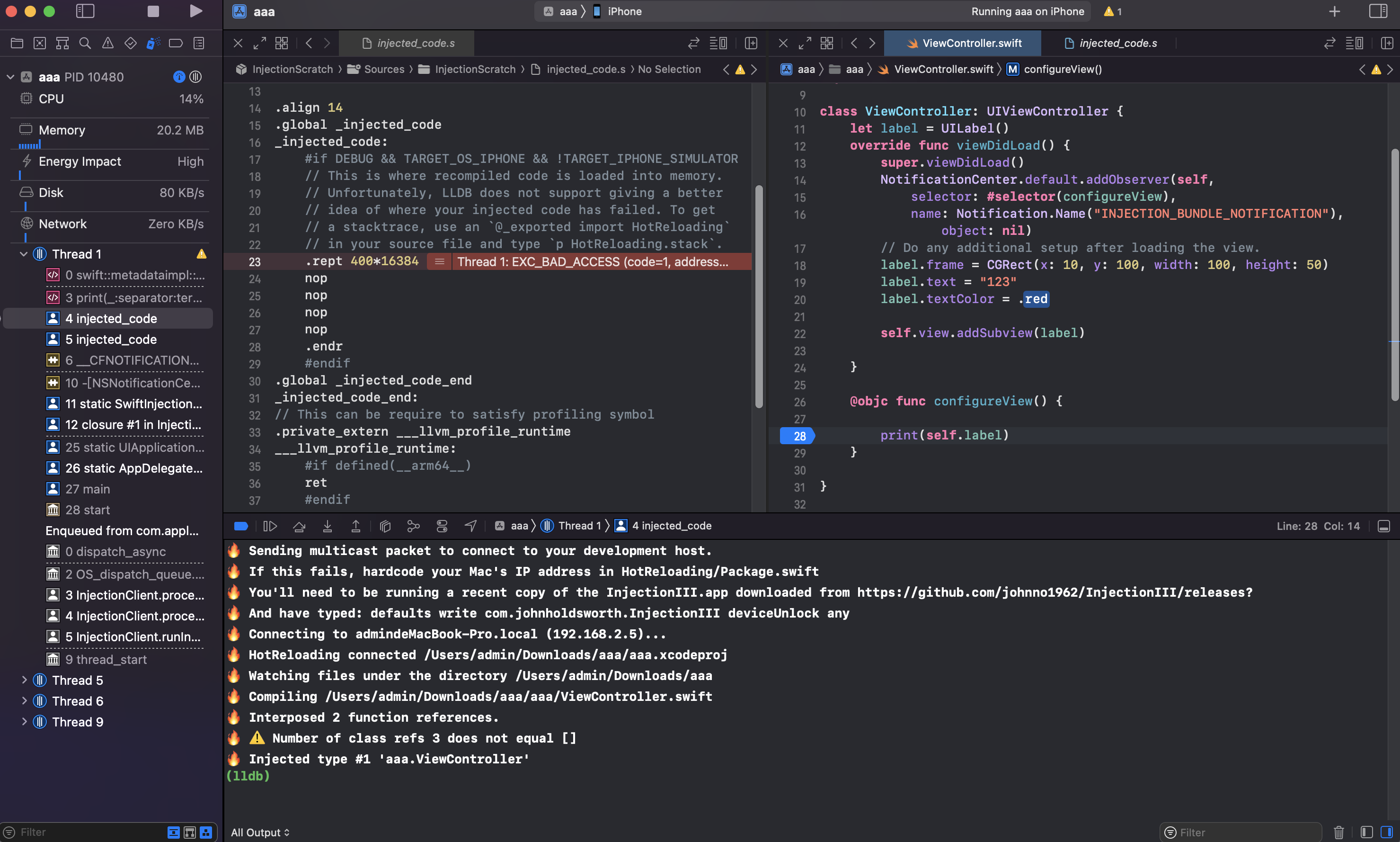 There is an error here, when I command + s, Swiftui kit also has this problem (xcode13.4.1 IOS15.4.1).

@cnjsyyb, you seem to be using the device version of injection which is very much at the experimental stage; You should have more success using it in the simulator. Injection is reporting an error about class refs that shouldn't occur. If the project you're using to test this could be posted here that would be helpful looking into this.
@cnjsyyb, you seem to be using the device version of injection which is very much at the experimental stage; You should have more success using it in the simulator. Injection is reporting an error about class refs that shouldn't occur. If the project you're using to test this could be posted here that would be helpful looking into this. aaa.zip Thank you very much for your reply. I did use the device version of injection to test it before. Now I'm using the simulator and it's perfect😀. The test project has been uploaded.
Just in case anyone else is tripped up by this, If you're integrating this into an Xcode project that uses build configurations other than the two supported by SPM (e.g. one is named "Dev" instead of "Debug") you may find that SPM builds the release version of your dependencies. Renaming this config to the standard "Debug" worked :D
