

 johnlindquist
notify not showing
Notify is not showing.
my notify code:
// Name: habits

import "@johnlindquist/kit"

notify("Some title", "some subtitle")
The log:
[2023-01-03 15:32:56.263] [info] ↖ Bounds: Prompt arg ui { x: 896, y: 202, width: 768, height: 480 }
I am running a MBP M1 - macOS Ventura

@joelgrimberg You may need to enable this in system preferences (osx should have prompted you to do it, but it's kind of hit or miss :/ )
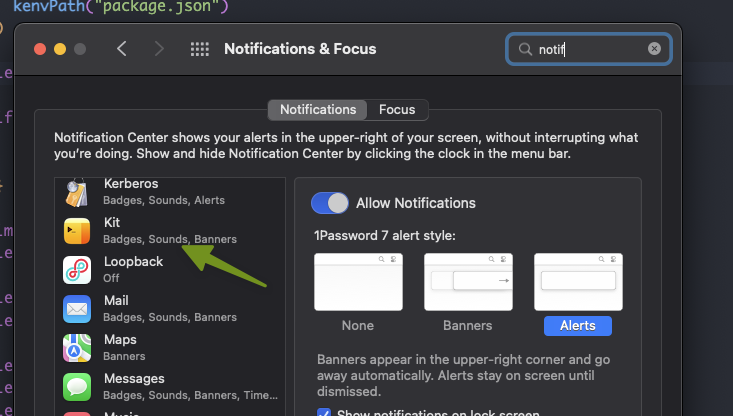
If you started Script Kit or the script from the terminal/vs code terminal/webstorm terminal/etc, then that app would be the one that needs the permissions

ah. did not think of that one. Somehow it makes sense to me to find this in the docs 🤔
I do not have Kit in this notifications list. can I reset / trigger something, so ScriptKit will be added (again) to this list?
You may have to quit, re-open Kit.app. Maybe even restart your computer. 😢
This is the only answer I found on StackOverflow:
https://stackoverflow.com/questions/68371681/how-to-reset-the-push-notifications-permissions-alert-on-macos