

 joanpablo
Working with Objects on ReactiveTextField and ReactiveFormField
Hi. I am having a little trouble in managing below scenerio:
-
I have a class named Query that has one member selectedValue. I want to bind this query.selected value to ReactiveFormField but when I try to do this I get error that Query is not a subtype of String.
-
In second case I want to bind the query to ReactiveFormField that code is commented in the attached picture but then I do not undestand how I can detect onTap event I want to change the selectedValue in onTap event.
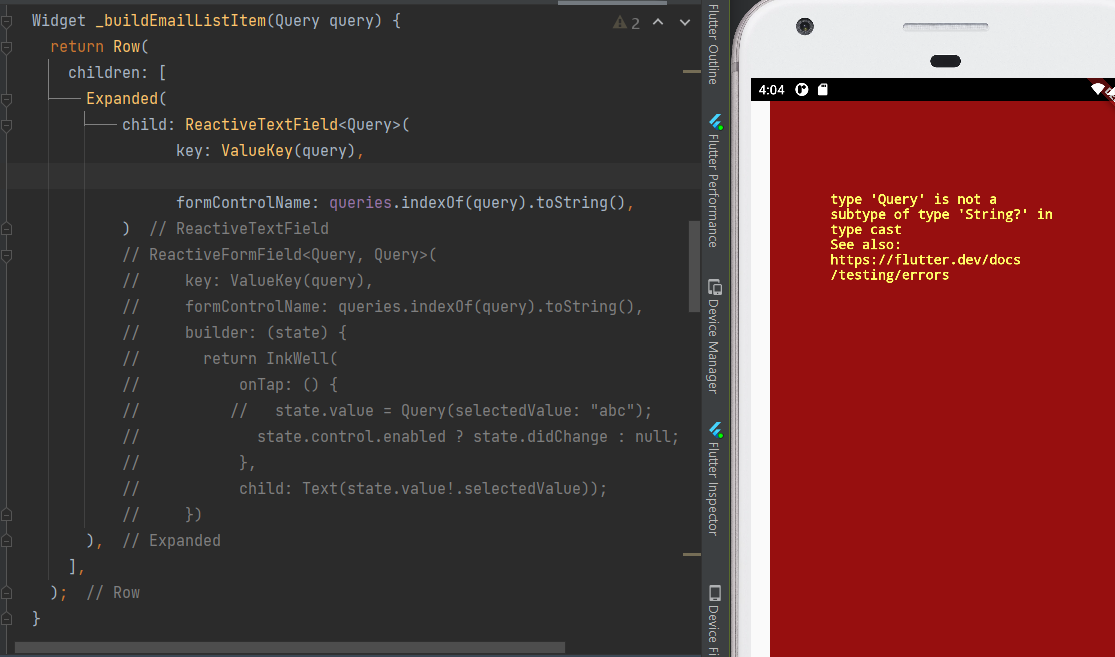

In first case you need to bing either a string or use value accessor method

In first case you need to bing either a string or use value accessor method
I was able to bind required data using ReactiveFormField and using made a custom ReactiveWidget. But now I am not sure how do I validate it. I am trying to make a custom Validator for that Widget.
The validator must check control.value.query[i].selectedValue != "". When I bind this validator and try to send empty data it does make the control invalid but the validation message is never shown. I have tried this:
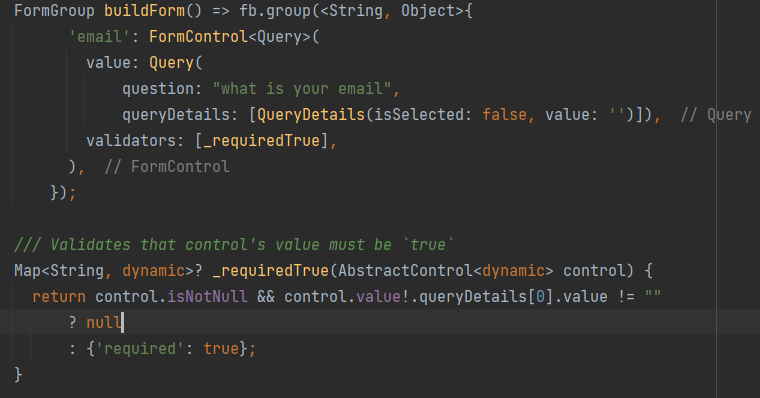
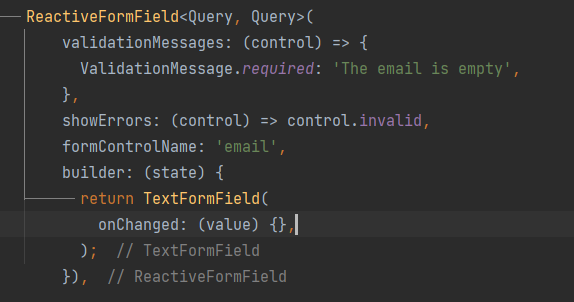
Put breakpoint inside your validator and check what is wrong there
I have tried that, but validator is not called in ReactiveFormfield. I am trying to use a simple scenario. It does populate the errors in form but validation message is not shown anywhere.
i have two options and user must select one. If he has selected nothing the form should show the validation message just like it does in ReactiveTextField.
Seems like I have to use ReactiveValueListenableBuilder for Custom Widgets validation.
@vasilich6107 I have changed a few things but still I have to use ReactiveValueListenableBuilder instead of the control automatically handling the validation messages and show on UI. Or am I intercepting ReactiveFormField's functionality wrong?
This is my model now.
class Query {
  String question;
  String? selectedValue;
  List<QueryDetails> queryDetails;
  Query(
      {required this.question, this.selectedValue, required this.queryDetails});
}

class QueryDetails {
  bool isSelected;
  String value;

  QueryDetails copyWith({bool? isSelected, String? value}) {
    return QueryDetails(
        isSelected: isSelected ?? this.isSelected, value: value ?? this.value);
  }

  QueryDetails({required this.isSelected, required this.value});
}
Query List
List<Query> queries = [
  Query(question: 'What is your age', selectedValue: null, queryDetails: [
    QueryDetails(isSelected: false, value: '< 30'),
    QueryDetails(isSelected: false, value: '> 30')
  ]),
  Query(
      question: 'What is your investment preference',
      selectedValue: null,
      queryDetails: [
        QueryDetails(isSelected: false, value: 'Long Term'),
        QueryDetails(isSelected: false, value: 'Short Term')
      ]),
];
This is my form group
FormGroup form = fb.group(
  <String, Object>{
    'ageGroup': fb.group({
      'age': FormControl<String>(
        value: '12',
        validators: [Validators.required, Validators.min('16')],
      ),
      'ageInt': FormControl<int>(
        value: 14,
        validators: [Validators.required, Validators.min(16)],
      )
    }),
    'investmentPrefGroup': fb.group({
      'investmentPref': FormControl<Query>(
        value: queries[1],
        validators: [Validators.required]
      )
    }),
    'booleanObject':
        FormControl<BooleanObject>(value: BooleanObject(name: null)),
    'email': FormControl<String>(
      validators: [Validators.required, Validators.email],
      //asyncValidators: [_uniqueEmail],
    ),
  },
);
This is what I am trying to do
var ageGroup = form.control('ageGroup') as FormGroup;
var investmentGroup = form.control('investmentPrefGroup') as FormGroup;
ReactiveForm(
      formGroup: form,
      child: Column(
        children: [
          const SizedBox(height: 10),
          ReactiveForm(
            formGroup: ageGroup,
            child: ReactiveTextField(
              formControlName: 'ageInt',
              showErrors: (control) => control.invalid,
              validationMessages: (control) => {
                ValidationMessage.min:
                    'A value lower than 16 is not accepted',
                ValidationMessage.required: "Age can not be empty"
              },
              valueAccessor: IntToStringValueAccessor(),
            ),
          ),
          const SizedBox(height: 10),
          ReactiveForm(
            formGroup: investmentGroup,
            child: ReactiveFormField<Query, Query>(
                key: ValueKey(queries[1]),
                formControlName: 'investmentPref',
                showErrors: (control) => control.invalid,
                validationMessages: (control) =>
                    {ValidationMessage.required: "Can not be empty"},
                builder: (state) {
                  return ReactiveValueListenableBuilder<Query>(
                    formControlName: 'investmentPref',
                    builder: (context, control, child) => Column(
                      crossAxisAlignment: CrossAxisAlignment.start,
                      children: [
                        Text(control.value?.selectedValue == null
                            ? 'Select at one option'
                            : 'Investment pref set to ${control.value?.selectedValue.toString()}'),
                        Row(
                          children: [
                            Expanded(
                              child: MaterialButton(
                                color: investmentGroup
                                            .control('investmentPref')
                                            .value
                                            .selectedValue ==
                                        'Short Term'
                                    ? Theme.of(context).primaryColor
                                    : Colors.grey,
                                onPressed: () => investmentGroup
                                    .control('investmentPref')
                                    .value = shortTerm,
                                child: const Text('Short Term'),
                              ),
                            ),
                            const SizedBox(width: 8.0),
                            Expanded(
                              child: MaterialButton(
                                color: investmentGroup
                                            .control('investmentPref')
                                            .value
                                            .selectedValue ==
                                        'Long Term'
                                    ? Theme.of(context).primaryColor
                                    : Colors.grey,
                                onPressed: () => investmentGroup
                                    .control('investmentPref')
                                    .value = longTerm,
                                child: const Text('Long Term'),
                              ),
                            )
                          ],
                        ),
                      ],
                    ),
                  );
                }),
          ),
        ],
      ),
    ),
I am expecting it to show ValidationMessage somewhere if nothing is selected amount Short Term and Long Term like ReactiveFormField shows it.
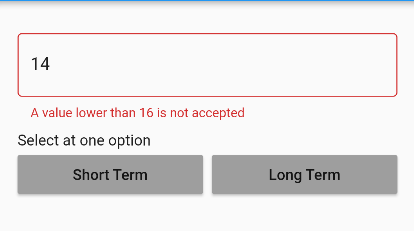
Hi @lyba-alphai,
Is your parent Widget a Stateless or Stateful widget? I mean the Widget that contains all that logic and declaration of the FormGroup....?

Hi @lyba-alphai,
the example you are presenting here contains several misunderstanding concepts about Flutter Reactive Forms.
One of these misunderstandings is that you are listening for changes in the investmentPref control's value. But you never change this value, you are changing investmentPref.value.selectedValue but not investmentPref.value.
Been looking at the issues and I didn't want to create a new one because I think it is most likely that I'm missing some documentation somewhere but I have read, so here's my issue:
- I have a ReactiveDropdownField<SomeCustomClass> widget, defined the corresponding fb.group({ 'formControl' : fb.control<SomeCustomClass?>(null)})
- Then at runtime I'm patching the form with SomeCustomClass data before I render the corresponding widget and then I render the widget.
- I am getting a BindingCastException in the _resolveFormControl() function.
- Inspecting the _resolveFormControl(), the parent property has FormControl( Instance of 'FormControl<Object>') which I believe should be FormControl( Instance of 'FormControl<SomeCustomClass>') since it's value is SomeCustomClass
Last time I had such an error with primitive like ReactiveTextField
Would appreciate the help.

After hours of debugging, it turns out my problem was caused by opting null types like FormControl<SomeCustomClass?>, which turned the control into an Object and caused type mismatch so I removed them and instantiated the control with SomeCustomClass().
I'm guessing this is he default behavior but it would be nice to opt in null values for custom control types like the one above.