

 jmix-framework
XLSX formula value is not calulated when the report file is opened in LibreOffice
Add a formula that sums column values.
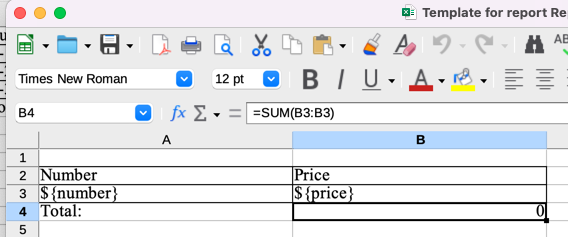
Run the report.
If you open the report using MS Office, the formula is evaluated correctly.
If you open the report using LibreOffice, there will be a correct formula in the cell, but the value is not calculated.
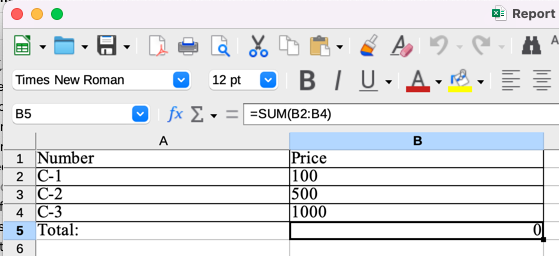
If you invoke Data - Calculate - Recalculate (F9) command in LibreOffice, the formula value will be refreshed.
See CUBA forum topic See CUBA issue

The workaround is to post-process the report using Apache POI that can evaluate formulas:
        ReportOutputDocument document = reportRunner.byReportCode("contracts-report")
                .run();
        ByteArrayInputStream bis = new ByteArrayInputStream(document.getContent());
        Workbook wb = new XSSFWorkbook(bis);
        FormulaEvaluator evaluator = wb.getCreationHelper().createFormulaEvaluator();
        for (Sheet sheet : wb) {
            for (Row r : sheet) {
                for (Cell c : r) {
                    if (c.getCellType() == CellType.FORMULA) {
                        evaluator.evaluateFormulaCell(c);
                    }
                }
            }
        }
        ByteArrayOutputStream bos = new ByteArrayOutputStream();
        wb.write(bos);
        byte[] modifiedFileBytes = bos.toByteArray();
Maybe we can add this behavior to each report generation and enable/disable it by some feature flag.
Added new property to force formulas evaluation - jmix.reports.formulas-post-processing-evaluation-enabled.
True by default.

Checklist A template xlsx containing the formula has been created Open the generated report using LibreOffice 7.4

In most cases is will be enough to set LibreOffice property Tools - Options - LibreOffice Calc - Formula - Recalculation on File Load to 'Always recalculate'