jlesage
Adding Custom Certificate
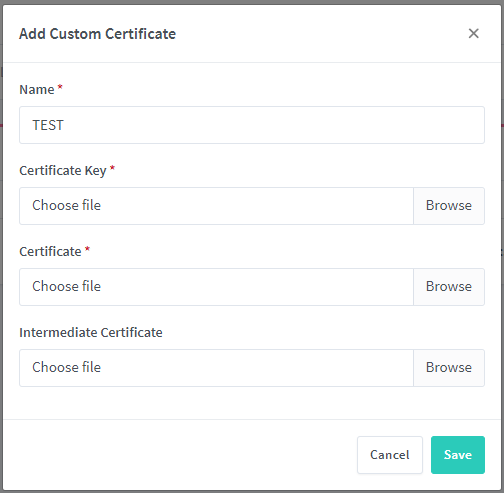
When adding a custom certificate, you can browse and select the necessary files for the key etc, but in the window it still states "Choose file".
For example, I have chosen all three of the files here, but this is what I see:

Hey - same thing happen to me too, on some previous release it worked by just selecting them then clicking save. It's almost like the UI didn't reload correctly.
Now the UI doesn't "reload" & the files don't seem to get selected.
Version : v1.9.2 Platform : Docker (UnRaid)

I'm having this problem too. I did a workaround just moving the cert files to the proper location and editing the host configuration with nano. But iit is not in the database, so it doesn't appear on the gui. Dirty, but it works. It would be nice to have this working and working properly. My ISP is blocking port 80 and I only can get certificates via DNS challenge, so I have to do it manually, and add them later. Version: Latest Platform: Docker (UnRaid)

I'm having this problem too. I did a workaround just moving the cert files to the proper location and editing the host configuration with nano. But iit is not in the database, so it doesn't appear on the gui. Dirty, but it works
I have the same problem. My work around is import a self signed the cert first. And then use volume to map the npm-xxx/private.pem and npm-xxx/fullchain.pem to the /etc/letsencrypt/live/yourdomain/ certs

did the same as jiatao99 from the very beginning. Now the certificate that was updated on the host, but in the web interface of the proxy Manager shows the old dates, although the certificate is actually new.