
GraphView

GraphView copied to clipboard
 jjoe64
Graph view x axis label is being cut off at end.
I am using GraphView to plot date in xaxis with values in y axis. But xaxis last label is being cut of when i set vertical axis title. Check the screenshot for reference. The last xaxis lebel should 20 insted its coming as 2.
    DateFormat dateFormat = new SimpleDateFormat("dd");
    GraphView graph = findViewById(R.id.graph);
    Calendar calendar = Calendar.getInstance();
    Date d1 = calendar.getTime();
    calendar.add(Calendar.DATE, 1);
    Date d2 = calendar.getTime();
    calendar.add(Calendar.DATE, 1);
    Date d3 = calendar.getTime();
    calendar.add(Calendar.DATE, 1);
    Date d4 = calendar.getTime();

    // you can directly pass Date objects to DataPoint-Constructor
    // this will convert the Date to double via Date#getTime()
    LineGraphSeries<DataPoint> series = new LineGraphSeries<>(new DataPoint[]{
            new DataPoint(d1, 1),
            new DataPoint(d2, 5),
            new DataPoint(d3, 3),
            new DataPoint(d4, 2)
    });
    graph.addSeries(series);

    // set date label formatter
    graph.getGridLabelRenderer().setLabelFormatter(new
    DateAsXAxisLabelFormatter(graph.getContext(), dateFormat));
    //graph.getGridLabelRenderer().setLabelFormatter(new
    DateAsXAxisLabelFormatter(graph.getContext()));
    graph.getGridLabelRenderer().setNumHorizontalLabels(mNumLabels);

    // set manual x bounds to have nice steps
    graph.getViewport().setXAxisBoundsManual(true);
    graph.getViewport().setMinX(d1.getTime());
    graph.getViewport().setMaxX(d4.getTime());
    graph.getGridLabelRenderer().setGridStyle(GridLabelRenderer.GridStyle.HORIZONTAL);

    graph.setTitle("Chart Title");
    graph.getGridLabelRenderer().setVerticalAxisTitle("Vertical Axis");
    graph.getGridLabelRenderer().setHorizontalAxisTitle("Horizontal Axis");

    // as we use dates as labels, the human rounding to nice readable numbers
    // is not nessecary
    graph.getGridLabelRenderer().setHumanRounding(false);
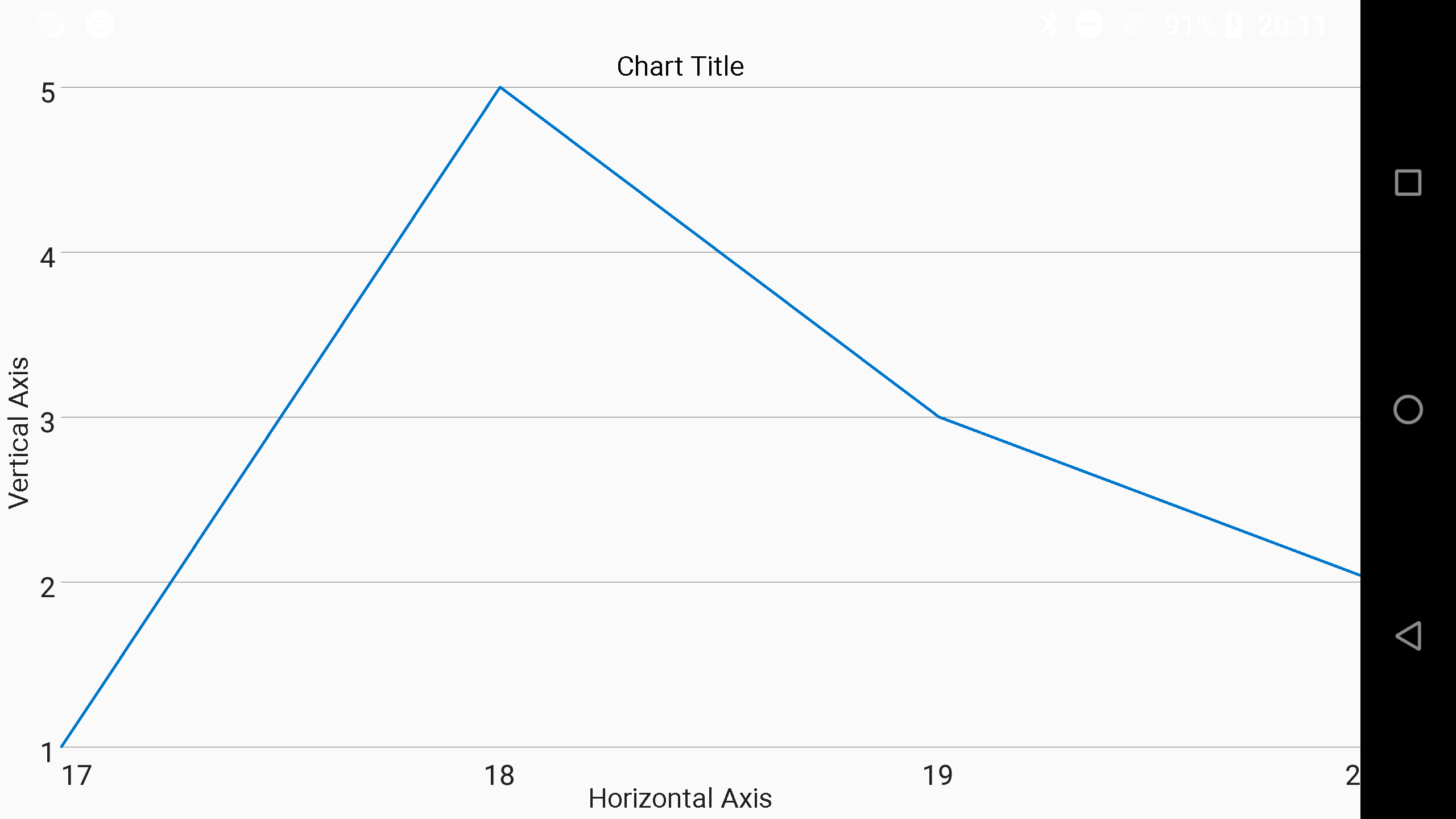

Any updates on that? I'm facing the same issue at the moment. Setting the axis label cuts off the graph on the right side.
One workaround: android:layout_marginRight="5dp"
However, the last data point gets cut off anyway - you will probably only notice when 'series.isDrawDataPoints = true'

BR Matthias


