

 jgraph
Cannot use the website because it violates a Content Security Policy directive
Preflight Checklist
- [x] I agree to follow the Code of Conduct that this project adheres to.
- [x] I have searched the issue tracker for a feature request that matches the one I want to file, without success.
Describe the bug The title basically says it, trying to access https://app.diagrams.net/ results in an infinite loading screen and Chrome throwing Security errors
To Reproduce Be on the newest Chrome version and visit the site i guess. I don't know if there are other factors that play into this.
Screenshots
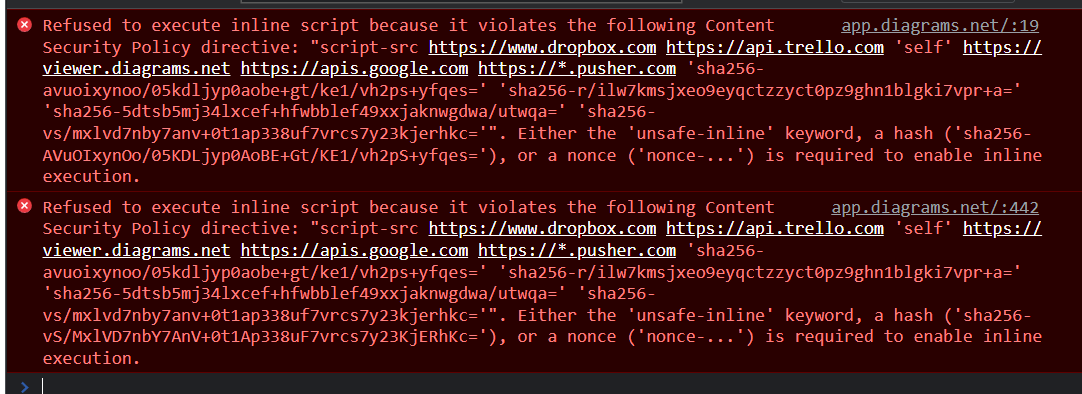
Desktop:
- OS: Win10
- Browser: Chrome v105.0.5195.127
Additional context i've had the same exact issue with the Nvidia Forums too. Was this a recent update with Chrome that changed Security Policies, causing some sites to break?


even with all extensions disabled it's still giving me the same errors.
ok i messed around a bit more and fixed the issue... i just cleared the site's cookies and now it's working. but why? why would a random cookie break the site?
why is this issue closed? it's still not solved. :(
when i disable cookies the site loads everytime but obviously none of my settings are kept. when i enable cookies it works once (before it creates it's cookie) and trying to reload the site just gives the same error as above. I'm still confused why it wouldn't work, even with all extensions disabled.