

 jgraph
Color picker does not pick the right color
Preflight Checklist
- [ x] I agree to follow the Code of Conduct that this project adheres to.
- [x ] I have searched the issue tracker for a feature request that matches the one I want to file, without success.
Describe the bug Whenever I try to use the color picker to pick a color from an existing shape on the file, the file gets greyed out and the picker selects the greyed version of the color not the actual color
To Reproduce Steps to reproduce the behavior:
- Go to fill
- Click on the color panel
- Click on the 3 dots
- select the color pick and try to pick a color from the existing file
- See error
Expected behavior when trying to pick a color it should not be greyed out
Screenshots
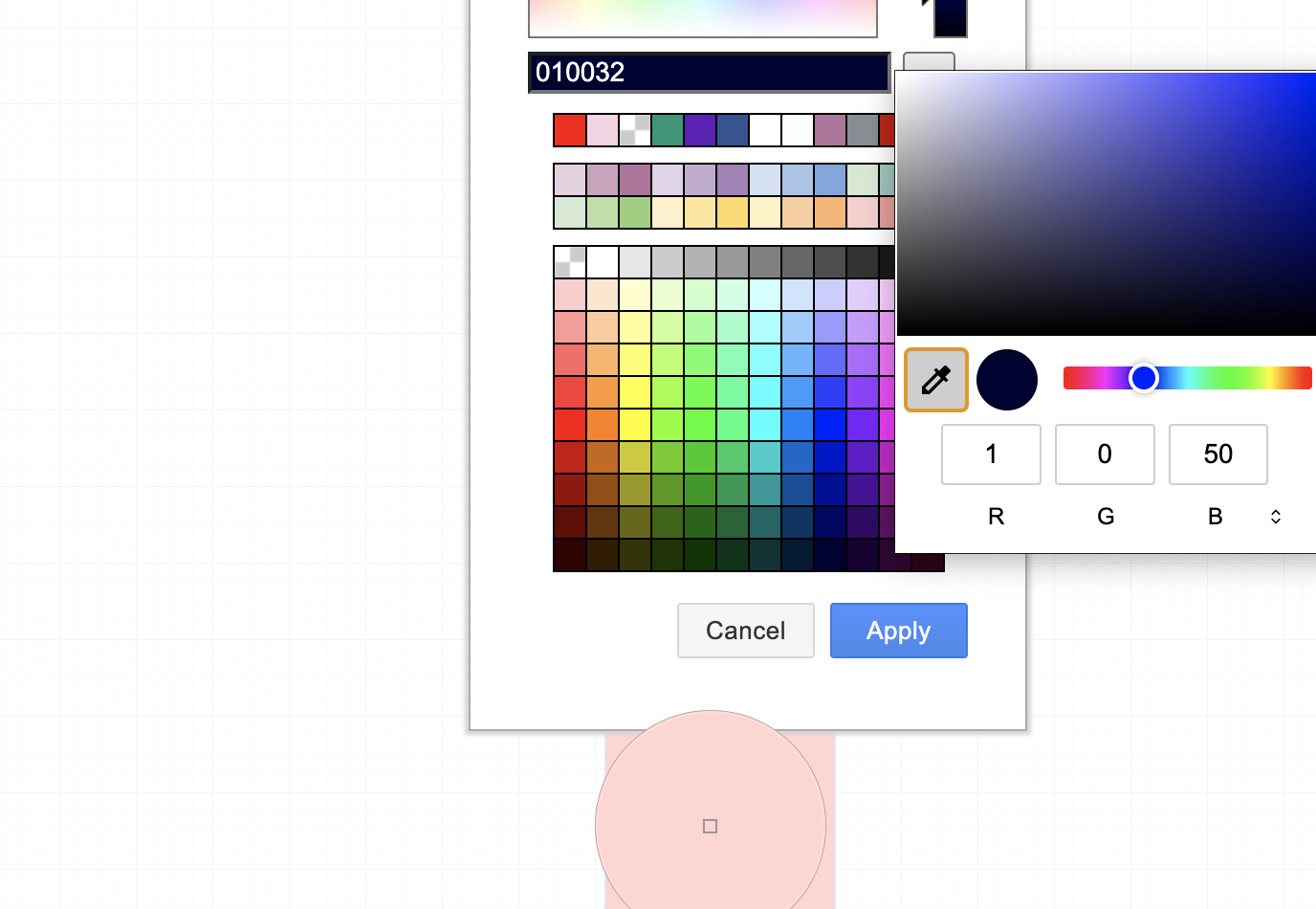
draw.io version (In the Help->About menu of the draw.io editor):
- diagrams.net 20.2.3
Desktop (please complete the following information):
- OS: [iOS]
- Version [12.5.1]
Additional context Add any other context about the problem here.


Try shift+click on the original color button in the style panel.
Worked thanks! but still needs to be fixed from the original style panel
This issue has been automatically marked as stale because it has not had recent activity. It will be closed if no further activity occurs. Thank you for your contributions. See the FAQ for more information.
![stale[bot] avatar](https://avatars.githubusercontent.com/in/1724?v=4 "Published by a pub.dev verified publisher")