

 jgraph
Text Wrap Not Working
Preflight Checklist
- [X] I agree to follow the Code of Conduct that this project adheres to.
- [x ] I have searched the issue tracker for a feature request that matches the one I want to file, without success.
Describe the bug Word wrap not working - see attached example.
To Reproduce Steps to reproduce the behavior:
- Go to '...'
- Click on '....'
- Scroll down to '....'
- See error
Expected behavior Expect text to wrap to boundaries of text object.
Screenshots If applicable, add screenshots to help explain your problem. worWrapIssue.zip
draw.io version (In the Help->About menu of the draw.io editor):
- draw.io version [e.g. 13.7.3]
Desktop (please complete the following information):
- OS: [e.g. Win10]
- Browser [e.g. chrome, safari]
- Version [e.g. [2004]](url
)
Smartphone (please complete the following information):
- Device: [e.g. iPhone6]
- OS: [e.g. iOS8.1]
- Browser [e.g. stock browser, safari]
- Version [e.g. 22]
Additional context Add any other context about the problem here.

Hi,
would you like to add the whole link https://lacted.org/wp-json/wc/v2/products/?consumer_key=ck_52fe8090e45dc424f094a3237771a85a9a8b4a15&consumer_secret=cs_0038bf9e811dd1e958e772e6fc081faf45e20e08 as a label to a Text shape from a library on the left?
P.S since it is very long line, you could add a label and then link it (double click the label > Click Insert link on the right in Format panel > add URL and click "Apply".
Regards,

No. I am just documenting our code, so I want it as a text field. Curiously, it does break at the question mark, is there a reason it won't wrap through the rest of the string? Experimenting further, I see that spaces are required to activate word wrap. I assume that is a choice by the coders.
Thanks. Basically spaces are required and question mark (as a possible end of a sentence) can affect word wrapping. You could select text and in Property/Values change option under Text overflow but not sure if this suits your needs fully.
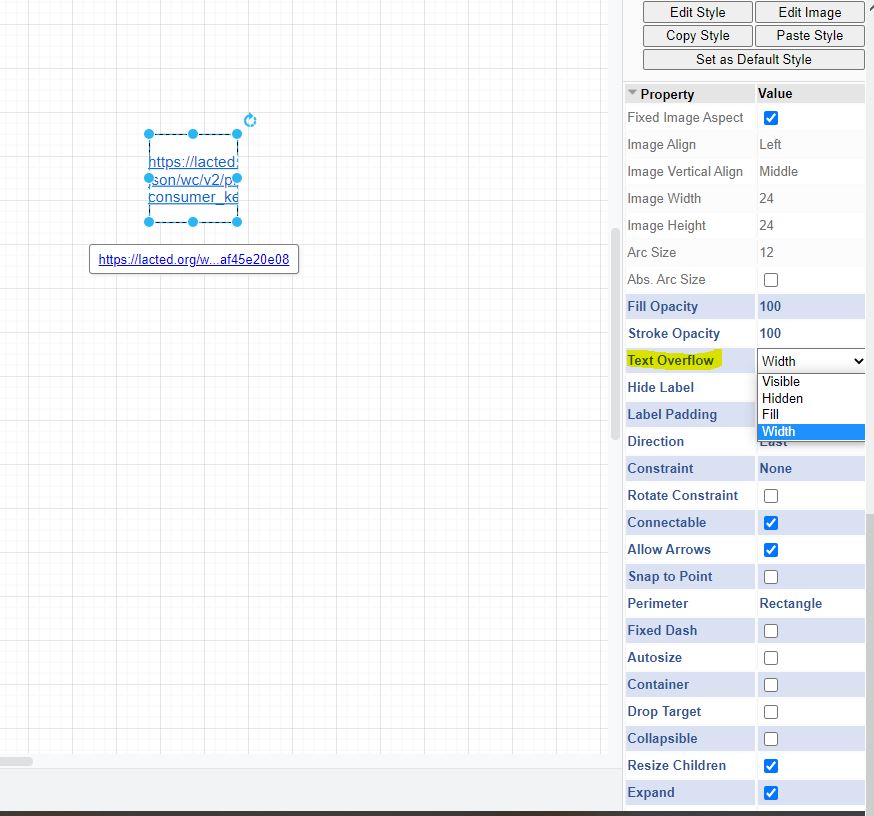
Not quite. I just want to wrap all of the text in the box. But it isn't a big deal...
@davidjgraph is it closed? Cannot see word warping. I think the solution is still your video from 10 years ago. Shouldn,t we see the 'text wrap' check box in the text column? https://www.youtube.com/watch?v=dRdwUKUv2LU

This issue has been automatically marked as stale because it has not had recent activity. It will be closed if no further activity occurs. Thank you for your contributions. See the FAQ for more information.
![stale[bot] avatar](https://avatars.githubusercontent.com/in/1724?v=4 "Published by a pub.dev verified publisher")
I was hoping to use draw.io to diagram a JWT... but the long text of the encoded JWT won't wrap in a box. C'est dommaage, what a pity!
I need something like this to fit into a box and word wrap (but with no breaks):
eyJhbGciOiJIUzI1NiIsInR5cCI6IkpXVCJ9.eyJzdWIiOiIxMjM0NBT3ODkwIiwibmFtZSI6IkpvaG4gRG9lIiwiaWF0IjoxNTE2MjM5MDIyfQ.SflKxwRJSMeKKF2QT4fwpMeJf36OPk6yJV_adQssw5x


The workaround provided does not properly wrap text. Is there another solution?

@phwoo if you have a problem please open a new ticket. Otherwise, a single ticket becomes unmanageably long.