

 jessfraz
spotify-wine cannot be installed any more with 'Administrator' account
The spotify-wine container doesn't work any more. Wine refuses to install with the error message. Please install Spotify using a normal account instead of an Administrator account.
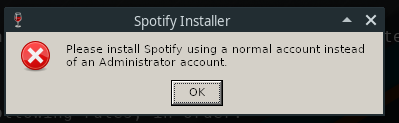
I tried creating a new user account and run wine under that user but that doesn't seem to work.
root@153a68bfb4c7:~# adduser user
root@153a68bfb4c7:~# su - user -c "wine /usr/src/SpotifySetup.exe"
wine: cannot find L"Z:\\usr\\src\\SpotifySetup.exe"
This was fixed by adding +x and +r permissions to /usr/src/SpotifySetup. Now of course I've got the Make sure that your X server is running and that $DISPLAY is set correctly. error.
To work around this I whitelist the XAUTHORITY and DISPLAY environment variables.
root@153a68bfb4c7:~# su --login --whitelist-environment=XAUTHORITY,DISPLAY user -c "wine /usr/src/SpotifySetup.exe"
This results in the same error message as before. Please install Spotify using a normal account instead of an Administrator account. I've searched for a way to run something with less privileges in Wine. The only thing I could find was wine runas /trustlevel:0x2000 <program> in a thread on OneDrive.exe[1]. This wine container however doesn't have C:\Windows\System32\runas.exe. Does anyone know how to add it?
Here's the script I'm using to start the container.
# Credit to @paddy-hack
SESSIONXAUTH=${XAUTHORITY:-$HOME/.Xauthority}
DOCKER_XAUTH=${SESSIONXAUTH}.docker
cp --preserve=all $SESSIONXAUTH $DOCKER_XAUTH
echo "ffff 0000  $(xauth nlist $DISPLAY | cut -d\  -f4-)" \
    | xauth -f $DOCKER_XAUTH nmerge -

docker run --rm -it \
	-v /etc/localtime:/etc/localtime:ro \
	-v $DOCKER_XAUTH:$DOCKER_XAUTH:ro \
	-e XAUTHORITY=$DOCKER_XAUTH \
	--cpuset-cpus 0 \
	-v /tmp/.X11-unix:/tmp/.X11-unix  \
	-e DISPLAY=unix$DISPLAY \
	--device /dev/snd:/dev/snd \
	--name spotify-wine \
	jess/spotify-wine bash
[1] https://bugs.launchpad.net/ubuntu/+source/playonlinux/+bug/1750155

Issue-Label Bot is automatically applying the label bug to this issue, with a confidence of 0.90. Please mark this comment with :thumbsup: or :thumbsdown: to give our bot feedback!
Links: app homepage, dashboard and code for this bot.
![issue-label-bot[bot] avatar](https://avatars.githubusercontent.com/in/27079?v=4 "Published by a pub.dev verified publisher")
Is there a solution to that? How do we install apps that can't have administrator privilege?

@dhsdshdhk, I am unaware of a solution for this. I am not an expert in Wine. My guess is that someone with enough knowledge about the working of Wine can probably get this working.
I managed to find runas in an older version of wine staging:
sudo apt-get install -y winehq-staging=5.11~focal wine-staging=5.11~focal wine-staging-amd64=5.11~focal wine-staging-i386=5.11~focal --allow-downgrades
However, Spotify still detects admin and refuses to install
