

 jesseduffield
No difference between pushed/not pushed commits in git bare repos
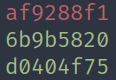
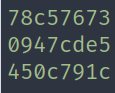
Bug description On git bare repos, lazygit shows all the commit hashes as pushed to the remote repo (green) even when they aren't
To Reproduce
- Create a git bare repo
- Launch Lazygit with a command similar to
lazygit --git-dir=/your/git/dir/.git/ --work-tree=/your/git/dir - Create a commit in local and don't push it to remote
Expected behavior I would expect the commits not present in the remote branch to show their hash in red
Screenshots
This is how it looks in a regular repo without pushing
 This is how it looks in a bare repo without pushing
Version info:
Git: git version 2.39.2
Lazygit: commit=v0.37.0, build date=2023-02-01T11:17:14Z, build source=binaryRelease, version=0.37.0, os=linux, arch=amd64, git version=2.39.2 (from arch linux community)
Additional context Not sure if this is a Git limitation. If it helps, this is the bare repo config
[core]
	repositoryformatversion = 0
	filemode = true
	bare = true
[remote "origin"]
	url = [email protected]
[status]
	showUntrackedFiles = no
[branch "master"]
	remote = origin
	merge = refs/heads/master
Also taking the opportunity to say that Lazygit is great! I use it daily
