jdhitsolutions
[Bug]: Get-NCalendar: text vs object
Describe the problem
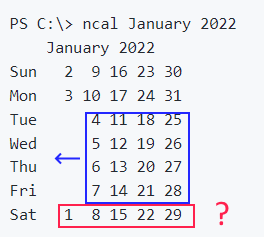
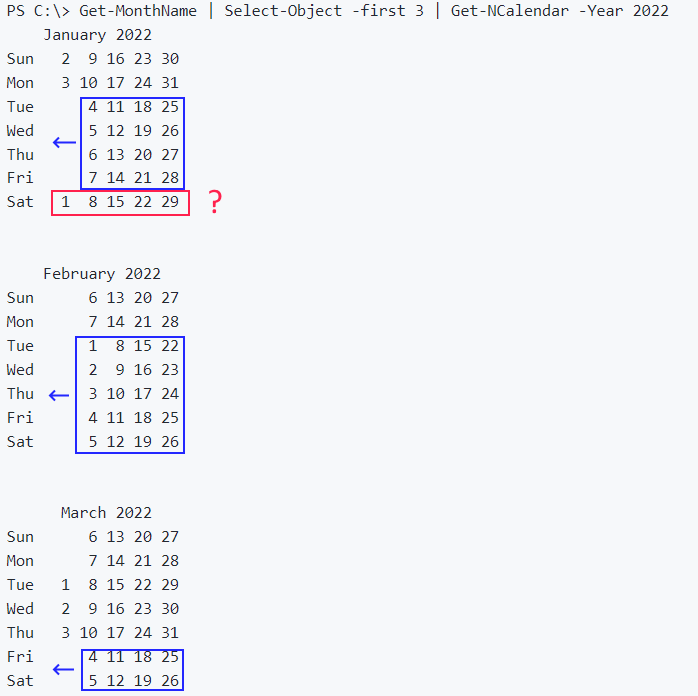
The pictures below are from the module frontpage. They show that Get-NCalendar produces completely wrong output. My tests say the same. That is because you work with text but not objects.
In red - strange location.
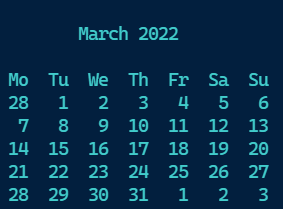
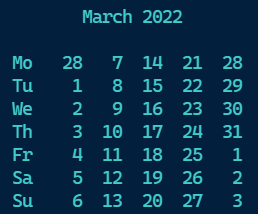
This is an example of calendar object which can be used to create both vertical and horisontal calendar as well. The origin is _getcalendar function. NOTE: I use 2-char day name header.
Output is a full month date object matrix.
function build-calendar {
    [cmdletbinding()]
    Param (
        [datetime]$start = (Get-Date -Day 1),
        [System.DayOfWeek]$FirstDay = 'Monday'
    )

    $currCulture = [system.globalization.cultureinfo]::CurrentCulture

    $mo  = $start.month
    $yr  = $start.year
    $max = $currCulture.DateTimeFormat.Calendar.GetDaysInMonth($yr, $mo)
    $end = Get-Date -Year $yr -Month $mo -Day $max
    $fd  = $FirstDay.value__
    $currentDay = $start

    $day0 = [System.Collections.Generic.List[object]]::new()
    $day1 = [System.Collections.Generic.List[object]]::new()
    $day2 = [System.Collections.Generic.List[object]]::new()
    $day3 = [System.Collections.Generic.List[object]]::new()
    $day4 = [System.Collections.Generic.List[object]]::new()
    $day5 = [System.Collections.Generic.List[object]]::new()
    $day6 = [System.Collections.Generic.List[object]]::new()

    # adjust for the beginning of the month
    while ($currentDay.DayOfWeek.value__ -ne $fd) {
        $currentDay = $currentDay.AddDays(-1)
    }
    while ($currentDay.date -le $end.date) {
        [datetime]$aDay = $currentDay
        Switch ($aDay.DayOfWeek.value__) {
            0 { $day0.add($aday) }
            1 { $day1.add($aday) }
            2 { $day2.add($aday) }
            3 { $day3.add($aday) }
            4 { $day4.add($aday) }
            5 { $day5.add($aday) }
            6 { $day6.add($aday) }
        }
        $currentDay = $currentDay.AddDays(1)
    }

    # add enough days to finish the week
    While ($currentDay.DayOfWeek.value__ -ne 0) {
        [datetime]$aDay = $currentDay
        Switch ($aDay.DayOfWeek.value__) {
            0 { $day0.add($aday) }
            1 { $day1.add($aday) }
            2 { $day2.add($aday) }
            3 { $day3.add($aday) }
            4 { $day4.add($aday) }
            5 { $day5.add($aday) }
            6 { $day6.add($aday) }
        }
        $Currentday = $currentDay.AddDays(1)
    }
    if ($fd) {$day0.add([datetime]$currentDay)}

    $mo = if ($fd -eq 0) {
        [pscustomobject]@{
            PSTypeName = "PSCalendarMonth"
            Month      = "{0:MMMM}" -f $start
            Year       = $start.year
            D0         = $day0
            D1         = $day1
            D2         = $day2
            D3         = $day3
            D4         = $day4
            D5         = $day5
            D6         = $day6
        }
    } else {
        [pscustomobject]@{
            PSTypeName = "PSCalendarMonth"
            Month      = "{0:MMMM}" -f $start
            Year       = $start.year
            D1         = $day1
            D2         = $day2
            D3         = $day3
            D4         = $day4
            D5         = $day5
            D6         = $day6
            D0         = $day0
        }
    }
    $dow = $mo.psobject.Properties.name | Where-Object { $_ -notmatch "Month|Year" }

    # Build an array of short day names
    $abbreviated = $currCulture.DateTimeFormat.AbbreviatedDayNames.foreach{if ($_.length -gt 2) {$_.substring(0,2)} else {$_}}
    $days = [System.Collections.Generic.List[string]]::new()
    $n = if ($fd -eq 0) {0} else {1}
    for ($n; $n -lt $abbreviated.count; $n++) {$days.add($abbreviated[$n])}
    if ($fd) {$days.add($abbreviated[0])}

    for ($i = 0; $i -lt 6; $i++) {
        $pass = $false # empty object filter
        $week = '' | Select-Object $days
        for ($k = 0; $k -lt $dow.count; $k++) {
            $weekDay = ($mo.$($dow[$k])[$i]) -as [datetime]
            if ($weekDay) {
                $week.($days[$k]) = $weekDay
                $pass = $true
            }
        }
        if ($pass) {$week}
    }
} # END build-calendar
Expectation
No response
Additional Information
No response
PowerShell version
5.1
Platform
Windows 11 Pro or Enterprise
Additional Checks
- [X] You are using the latest version of this module.
- [X] You have read this repository's README file.
- [X] You have read full help and examples for the command you are having problems with.
- [X] You are running PowerShell in an elevated session.
- [X] You are running in a traditional PowerShell console or Windows Terminal

I completely agree that I'm going through a lot of work to format text instead of working with an object. I absolutely would prefer to have an object and my code sort of does that. The challenge has always been formatting. I'll take a look at your suggestion. Thanks.

I have played with processing workflow and have made orientation prototypes. I hope this idea would be useful.
function get-calendarMonth {
    param (
        [datetime]$start = (Get-Date -Day 1),
        [System.DayOfWeek]$FirstDay = 'Monday'
    )

    $currCulture = [system.globalization.cultureinfo]::CurrentCulture

    $mo  = $start.month
    $yr  = $start.year
    $max = $currCulture.DateTimeFormat.Calendar.GetDaysInMonth($yr, $mo)
    $end = Get-Date -Year $yr -Month $mo -Day $max
    $fd  = $FirstDay.value__
    $currentDay = $start

    $day0 = [System.Collections.Generic.List[object]]::new()
    $day1 = [System.Collections.Generic.List[object]]::new()
    $day2 = [System.Collections.Generic.List[object]]::new()
    $day3 = [System.Collections.Generic.List[object]]::new()
    $day4 = [System.Collections.Generic.List[object]]::new()
    $day5 = [System.Collections.Generic.List[object]]::new()
    $day6 = [System.Collections.Generic.List[object]]::new()

    # adjust for the beginning of the month
    while ($currentDay.DayOfWeek.value__ -ne $fd) {
        $currentDay = $currentDay.AddDays(-1)
    }
    while ($currentDay.date -le $end.date) {
        [datetime]$aDay = $currentDay
        Switch ($aDay.DayOfWeek.value__) {
            0 { $day0.add($aday) }
            1 { $day1.add($aday) }
            2 { $day2.add($aday) }
            3 { $day3.add($aday) }
            4 { $day4.add($aday) }
            5 { $day5.add($aday) }
            6 { $day6.add($aday) }
        }
        $currentDay = $currentDay.AddDays(1)
    }

    # add enough days to finish the week
    While ($currentDay.DayOfWeek.value__ -ne 0) {
        [datetime]$aDay = $currentDay
        Switch ($aDay.DayOfWeek.value__) {
            0 { $day0.add($aday) }
            1 { $day1.add($aday) }
            2 { $day2.add($aday) }
            3 { $day3.add($aday) }
            4 { $day4.add($aday) }
            5 { $day5.add($aday) }
            6 { $day6.add($aday) }
        }
        $Currentday = $currentDay.AddDays(1)
    }
    if ($fd) {$day0.add([datetime]$currentDay)}

    $mo = if ($fd -eq 0) {
        [pscustomobject]@{
            Month = "{0:MMMM}" -f $start
            Year  = $start.year
            D0 = $day0
            D1 = $day1; D2 = $day2
            D3 = $day3; D4 = $day4
            D5 = $day5; D6 = $day6
        }
    } else {
        [pscustomobject]@{
            Month = "{0:MMMM}" -f $start
            Year  = $start.year
            D1 = $day1; D2 = $day2
            D3 = $day3; D4 = $day4
            D5 = $day5; D6 = $day6
            D0 = $day0
        }
    }
    $dow = $mo.psobject.Properties.name | Where-Object { $_ -notmatch "Month|Year" }

    # Build an array of short day names
    $abbreviated = $currCulture.DateTimeFormat.AbbreviatedDayNames.foreach{if ($_.length -gt 2) {$_.substring(0,2)} else {$_}}
    $days = [System.Collections.Generic.List[string]]::new()
    $n = if ($fd -eq 0) {0} else {1}
    for ($n; $n -lt $abbreviated.count; $n++) {$days.add($abbreviated[$n])}
    if ($fd) {$days.add($abbreviated[0])}

    $month = for ($i = 0; $i -lt 6; $i++) {
        $pass = $false # empty object filter
        $week = '' | Select-Object $days
        for ($k = 0; $k -lt $dow.count; $k++) {
            $weekDay = ($mo.$($dow[$k])[$i]) -as [datetime]
            if ($weekDay) {
                $week.($days[$k]) = $weekDay
                $pass = $true
            }
        }
        if ($pass) {$week}
    }

    @{ # output structure
        Calendar = $month
        Weekend  = if ($fd -eq 0) {0,6} else {5,6} # non-computable in child env
    }
} # END get-calendarMonth

function format-Hcalendar {
    [cmdletbinding()]
    param (
        [Parameter(Position=0, Mandatory, ValueFromPipeline)]
        $inputObject,
        [string[]]$highlightDates,
        [switch]$NoANSI,
        [alias('trim')][switch]$MonthOnly,
        #[switch]$NoWeekend # do not highligth weekend days
        [switch]$Holidays # experimental
    )

    $calendar = $inputObject
    if ($calendar.Count -eq 0) {return}
    $weekdays  = $calendar.Calendar[0].psobject.Properties.name
    $today     = [datetime]::now
    $separator = '  '
    $headWidth = $weekdays[0].length
    $weekend   = $weekdays[$calendar.weekend]
    if ($highlightDates) {
        $highlightdates = foreach ($item in $HighlightDates) {
            if ($item -notmatch "$($today.year)") {$item = '{0}/{1}' -f $item,$today.year}
            $item -as [datetime]
        }
    }

    $month = foreach ($week in $calendar.Calendar) {
        $wk = foreach ($day in $weekdays) {
            $Trails = $false
            if ($today.month -ne $week.$day.month) {
                if ($MonthOnly) {
                    $day = $null
                    $d = ' '
                } else {
                    $Trails = $true
                    $d = $week.$day.day
                }
            } else {
                $d = $week.$day.day
            }
            $value = "$d".padleft($headWidth, ' ')
            if (($week.$day.date -eq $today) -AND -Not $NoANSI) {
                "{0}{1}{2}" -f $PScalendarConfiguration.Today, $value, "$esc[0m"

            }
            elseif (($highlightDates -contains $week.$day.date) -AND -Not $NoANSI) {
                "{0}{1}{2}" -f $PScalendarConfiguration.Highlight, $value, "$esc[0m"
            }
            else {
                if ($NoANSI) {$value}
                elseif ($day -in $weekend) {
                    $style = if ($Trails) {'Trails'} else {'Weekend'}
                    "{0}{1}{2}" -f $PScalendarConfiguration.$style, $value, "$esc[0m"
                } elseif ($Trails) {
                    "{0}{1}{2}" -f $PScalendarConfiguration.Trails, $value, "$esc[0m"
                }
                else {$value}
            }
        }
        $wk -join $separator
    }

    $days = if ($NoANSI) {$weekdays} else {
        foreach ($d in $weekdays) {
            "{0}{1}{2}" -f $PScalendarConfiguration.DayofWeek, $d, "$esc[0m"
        }
    }

    $plainHead = '{0} {1}' -f $today.tostring('MMMM'), $today.year
    $head = if ($NoANSI) {$plainHead} else {
        "{0}{1}{2}" -f $pscalendarConfiguration.title, $plainhead, "$esc[0m"
    }
    [int]$pad = (10*$headWidth - $plainhead.Length) / 2 + 2
    $p = " " * $pad
    "`n$p$head`n"
    $days -join $separator
    $month
} # END format-Hcalendar

function format-Vcalendar {
    [cmdletbinding()]
    param (
        [Parameter(Position=0, Mandatory, ValueFromPipeline)]
        $inputObject,
        [string[]]$highlightDates,
        [switch]$NoANSI,
        [alias('trim')][switch]$MonthOnly
    )

    $calendar = $inputObject
    if ($calendar.Count -eq 0) {return}
    $weekdays  = $calendar.Calendar[0].psobject.Properties.name
    $today     = [datetime]::now
    $separator = '  '
    $headWidth = $weekdays[0].Length
    $weekend   = $weekdays[$calendar.weekend]

    $month = foreach ($name in $weekdays) {
        $row = foreach ($day in $calendar.calendar.$name) {
            $Trails = $false
            if ($today.month -ne $day.month) {
                if ($MonthOnly) {
                    $day = $null
                    $d = ' '
                } else {
                    $Trails = $true
                    $d = $day.day
                }
            } else {
                $d = $day.day
            }
            "$d".padleft($headWidth, ' ')
        }
        if (-not $NoANSI) {
            $name = "{0}{1}{2}" -f $PScalendarConfiguration.DayofWeek, $name, "$esc[0m"
        }
        '{0}  {1}' -f $name, ($row -join $separator)
    }

    $plainHead = '{0} {1}' -f $today.tostring('MMMM'), $today.year
    $head = if ($NoANSI) {$plainHead} else {
        "{0}{1}{2}" -f $pscalendarConfiguration.title, $plainhead, "$esc[0m"
    }
    [int]$pad = (10*$headWidth - $plainhead.Length) / 2
    $p = " " * $pad
    "`n$p$head`n"
    $month
} # END format-Vcalendar

get-calendarMonth | format-Hcalendar
get-calendarMonth | format-Vcalendar