jdf
jdf
keyPressed function does not work correctly and is not colour coded correctly

The function keyPressed is not correctly marked in colour and does not work as expected. The globally defined variable here pressed cannot be called, the error message: UnboundLocalError: local variable 'pressed' referenced before assignment.
The function keyReleased is colour-correct and works without problems. Here the error message does not appear if the function keyPressed is commented out beforehand.
The variable is defined as follows:
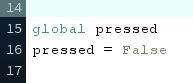
I am using version 3.5.4, on Windows 10.
This is all my code:
add_library('peasycam')


# ---
# Variablen
# ---

global cubeSize
cubeSize = 3

global cube
cube = []

global cam

global pressed
pressed = False


# ---
# Klassen
# ---

class Cubies:
    def __init__(self, pos, color):
        self.pos = pos
        self.color = color

    @property
    def show(self):
        fill(255)
        stroke(0)
        strokeWeight(0.1)
        pushMatrix()
        translate(self.pos[0], self.pos[1], self.pos[2])
        fill(self.color)
        box(1)
        popMatrix()


# ---
# Funktionen
# ---

def rotateU():
    for i in range(0, len(cube)):
        cubeObject = cube[i]
        if (cubeObject.pos[1] == -1):
            #cubeObject.color = color(0, 0, 255)
            temp = cubeObject.pos[0]
            cubeObject.pos[0] = cubeObject.pos[2] * -1
            cubeObject.pos[2] = temp * -1

            cube[i] = cubeObject


def setup():
    fullScreen(P3D)

    for x in range(-1, 2):
        for y in range(-1, 2):
            for z in range(-1, 2):
                cube.append(Cubies([x,y,z], color(200,200, 200)))

    cube[2].color = color(255,0,0)

    cam = PeasyCam(this, width/2, height/2, 0, 10)
    cam.setMinimumDistance(50)
    cam.setMaximumDistance(1000)


def draw():
    background(255);
    translate(width/2, height/2, 0)
    scale(50);

    for cubeObject in cube:
        cubeObject.show

def keyPressed():
    if(key == "k" and not pressed):
        rotateU()
        pressed = True

def keyReleased():
    if(key == "k"):
        pressed = False

The global pressed at the top of your file is redundant. What you need to add is a global line to the function that must write to the global variable --
pressed = False

...

def keyPressed():
    global pressed  # this line is missing in your code
    if(key == "k"):
        pressed = True
There's a keyPressed() method and keyPressed system variable, and the editor cannot distinguish them, hence the odd coloring.