
quickmath.nvim
 quickmath.nvim copied to clipboard
 jbyuki
A live calculator in neovim
Quickmath
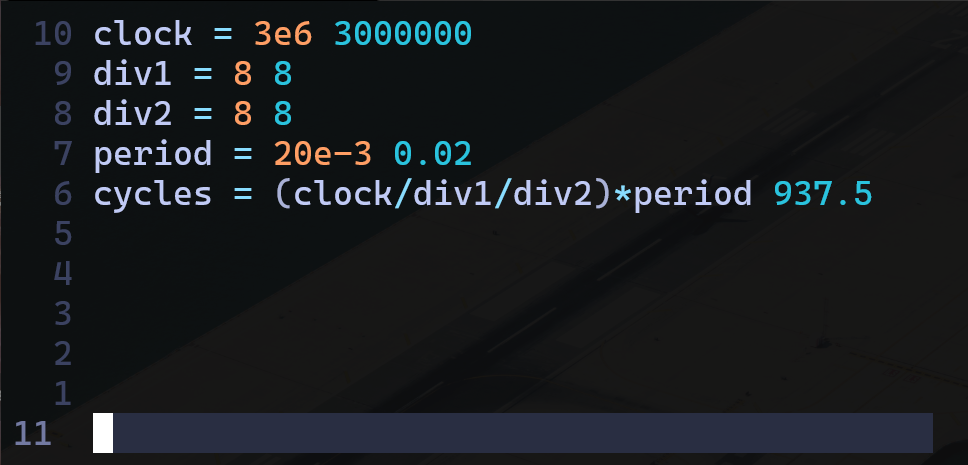
A simple plugin to do live calculations in Neovim.
Install
Install using your prefered method:
Plug 'jbyuki/quickmath.nvim'
use "jbyuki/quickmath.nvim"
Background
This is a long standing plug-in in my collections of not really polished plugins, not that my released my plugins are very polished either. I felt obligated to release it because of how useful it is, especially if you study or work in a scientific field, and because there are no really equivalent plug-ins now in the nvim plugin ecosystem. It can pointed out also that outside the realm of nvim really, we usually do our computations in the traditional way, on a calculator or a more "programming mindset" person could do it in a python interpreter or in matlab repl maybe but these tools don't offer a live computation environnement, i.e. an environnement where values of variables can be changed on the fly, and all subsequent calculations are updated immediately, which is terribly useful in any involved computation! The only tool that I see other persons use that I'm aware is Excel but still, it feels very heavy and clunky.
Using an environnement such as nvim allows to implement and use a live calculator very easily and it is terribly useful and should be more widely known. Btw, the source of this plugin is only ~70 lines long so it's very easy to implement it.
Usage
Ok, enough rants.
You can use this tool simply by invoking:
:Quickmath
All calculations is actually lua code.
This means you can use functions which are available in the math module.
Lists them using :lua print(vim.inspect(math)).
All the math module functions are put in global namespace when quickmath is initiated. So instead of writing math.cos, cos can be simply written.
Get that output
You can select the output by pressing $ when at the end of the line, or $$ anywhere else in the line.
Then just yank.
Vectors
In addition to the math module there is a custom vector implementation.
The only global function is vec(...) which takes the vectors components.
The vector it self implements a lot of functions and some operators the work on them.
Vectors are immutable so all functions and operations that returns a vector,
returns a new vector.
The vectors can be of any dimension but naturally doing operations on to vectors requires them to be of the same dimensionality.
You can create a vector in one of three ways:
a = vec(1,2,3)
b = vec({4,5,6})
c = vec {7,8,9}
Functions
clone
Creates a clone of the vector.
a = vec(1,2,3)
b = a:clone() -- b == vec(1,2,3)
unpack
Unpacks the vector into its components.
a = vec(1,2,3)
x, y, z = a:unpack() -- x = 1, y = 2, z = 3
mag
Get the magnitude, or length, of the vector.
a = vec(3,4)
len = a:mag() -- len = 5
magsq
Get the square magnitude, or length, of the vector. This has better performance if you don't need the actual magnitude but are for example comparing one vector to another.
a = vec(3,4)
len = a:magsq() -- len = 25
setmag
Creates a copy of the vector with the same direction but the given magnitude.
a = vec(3,4)
b = a:setmag(10) -- b == vec(6, 8)
scale
Takes a number or a vector as input and created a new vector and scales it either by the given factor or element-wise by vector.
a = vec(3,4)
b = a:scale(2) -- b == vec(6, 8)
-- or
a = vec(3,4)
b = a:scale(vec(1,2)) -- b == vec(3, 8)
norm
Creates a normalized copy of the vector.
a = vec(3,4)
b = a:norm() -- b = vec(0.6, 0.8)
len = b:mag() -- len == 1
dist
Calculates the distance between the vectors.
a = vec(1,0)
b = vec(-1,0)
c = a:dist(b) -- c == 2
distsq
Calculates the square distance between the vectors.
Like magsq this is more performant and great if you are
comparing vectors.
a = vec(1,0)
b = vec(-1,0)
c = a:distsq(b) -- c == 4
limit
Creates a copy of the vector and limits its magnitude to the given value.
a = vec(6,8)
b = a:limit(5) -- b = vec(3,4)
-- and
a = vec(6,8)
b = a:limit(25) -- b = vec(6,8)
Operator implementations
Negating
Vectors can be negated simply by pretending a -.
a = vec(1,2)
b = -a -- b == vec(-1,-2)
Adding
a = vec(1,2)
b = vec(2,1)
c = a + b -- c == vec(3,3)
Subtracting
a = vec(1,2)
b = vec(2,1)
c = a - b -- c == vec(-1,1)
Dot product
a = vec(1,2)
b = vec(2,1)
c = a * b -- c == 4
Multiply
a = vec(1,2)
c = a * 5 -- c == vec(5,10)
Note
The local plugin that I use has actually more functionnalities that I added progressively when I needed them such as complex numbers, plots, bode plots, etc... They weren't added in this version because they need external installation but if there are request I can consider adding them with proper support.
Alternatives
- qalc.nvim - Uses
qalcas a backend.
 jbyuki