
en.javascript.info

en.javascript.info copied to clipboard
 javascript-tutorial
Error description with element hidden check in "Element size and scrolling"
The tutorial said:
Geometry properties are calculated only for displayed elements.
If an element (or any of its ancestors) has display:none or is not in the document, then all geometry properties are zero (or null for offsetParent).
For example, offsetParent is null, and offsetWidth, offsetHeight are 0 when we created an element, but haven’t inserted it into the document yet, or it (or it’s ancestor) has display:none.
We can use this to check if an element is hidden, like this:
function isHidden(elem) {
  return !elem.offsetWidth && !elem.offsetHeight;
}
But, what if the hidden element is hidden by setting the width to 0, not the height? 😀


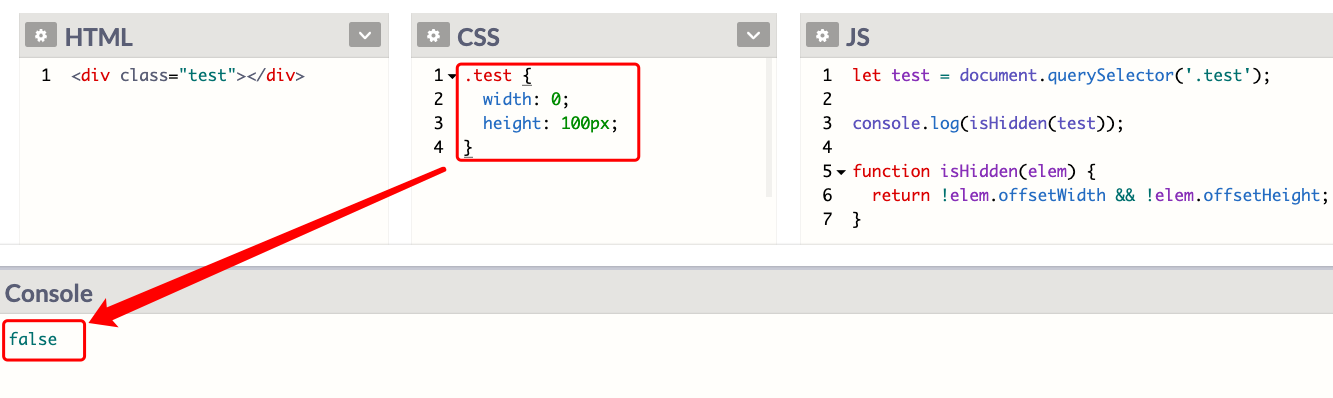
What about this?
function isHidden(elem) {
  return !elem.offsetWidth && (!elem.offsetHeight || !elem.offsetWidth);
}