

 jaredpar
Error when using with vs2017 15.5.1 Enterprise Edition
Hi Jaredpar,
Thanks for this great tool - it has really helped us with our 2013+2015 installation base.
We are moving to 2017 and i am getting the following problems. Does this point to some recent changes to the vs-sdk?
Additional information: Object of type 'Microsoft.VisualStudio.Settings.ExternalSettingsManager' cannot be converted to type 'Microsoft.VisualStudio.ExtensionManager.SettingsStorage.ISettingsManager'.
I have tried with both and without (/defaultDomain flag) vsixutil /install C:......\Simple001.vsix /rootSuffix TestMe /version 15 /product Enterprise /defaultDomain
If you could point me to resources\docs you used to original create this tool, i would be happy to attempt a fix myself.
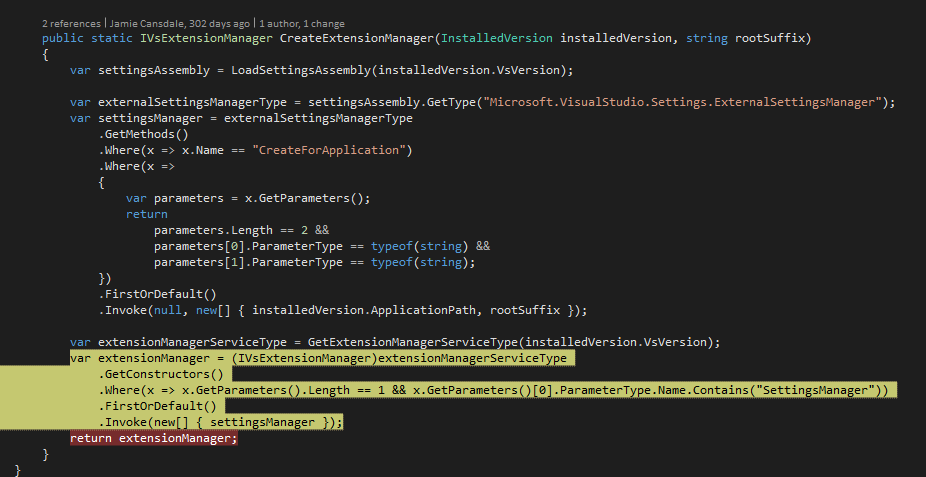

Other people are having problems with VS 2017 as well. 😢
https://github.com/sharwell/MouseFastScroll/blob/master/Tvl.VisualStudio.MouseFastScroll.IntegrationTests/VisualStudioInstanceFactory.cs#L272
I know it's possible to install stuff from inside VS 2017 if you get hold of the SVsExtensionManager service:
https://github.com/jcansdale/DogfoodVsix/blob/master/src/Dogfood.Services.14.0/DogfoodService.cs#L25
One day I'll try to get a similar thing working from outside VS.
BTW, you might find this a handy way to (re)install extensions from inside VS: http://vsixgallery.com/author/jamie%20cansdale

Sorry I missed this issue initially
If you could point me to resources\docs you used to original create this tool, i would be happy to attempt a fix myself.
This is likely just an assembly binding redirect problem. The issue is likely in the generation of the config file or probing path when creating the AppDomain to run the code.
https://github.com/jaredpar/VsixUtil/blob/master/Src/ApplicationContext.cs#L8

Apologies. Missed your response in Apr. We are currently using the native installer for vs2017 at the moment ( very slow ).
Hopefully will get a chance to try the fix in #13 next week.
@jburrow No problem, I was just doing some house keeping - pointing at issues that maybe can be closed. 😄
BTW, @josetr who sent #13 has been doing some excellent work over at https://github.com/josetr/VsixTesting. If you're interested in integrations testing extensions, you should check it out.
Was this issue resolved in #13?
Yes & sorry for not checking if there was an issue open for it back then 😢.
