

 jalvesaq
Omnifunc completion is not compatible with nvim-cmp (consistently output warning).
I used nvim-cmp with R-LSP.
And I use cmp-omni to source the omnifunc to cmp's auto-completion.
But after I do so, as I start to type anything, Nvim-R consistently give my the following warnings:
And the omnifunc completions cannot source its content to nvim-cmp (sometimes it can, but most of time it can't.).
I tried to disable cmp-omni (but still enabled nvim-cmp) and the warning is still consistently giving me.
But when I manually type C-X C-O, the omnifunc given by Nvim-R shows its content well.
Wrong string length (menu for completion): 13137 x 8185
[ClientServer] Unknown command:  {'cls': 'f', 'pkg': 'base'}}, {'word': 'readBin', 'menu': 'func [base]', 'user_data': {'cls': 'f', 'pkg': 'base'}}, {'word':
'r [...]
Wrong string length (menu for completion): 8798 x 8186
[ClientServer] Unknown command: ': 'func [base]', 'user_data': {'cls': 'f', 'pkg': 'base'}}, {'word': 'month.abb', 'menu': 'character [base]', 'user_data': {'
cl [...]
Wrong string length (menu for completion): 12675 x 8185
[ClientServer] Unknown command: }, {'word': 'default.stringsAsFactors', 'menu': 'func [base]', 'user_data': {'cls': 'f', 'pkg': 'base'}}, {'word': 'delayedAss
ig [...]
Wrong string length (menu for completion): 22312 x 8185
[ClientServer] Unknown command: c [base]', 'user_data': {'cls': 'f', 'pkg': 'base'}}, {'word': 'all.equal.list', 'menu': 'func [base]', 'user_data': {'cls': '
f' [...]
[ClientServer] Unknown command:  'base'}}, {'word': 'as.list.Date', 'menu': 'func [base]', 'user_data': {'cls': 'f', 'pkg': 'base'}}, {'word': 'as.list.defaul
t' [...]
Wrong string length (menu for completion): 22312 x 8185
[ClientServer] Unknown command: c [base]', 'user_data': {'cls': 'f', 'pkg': 'base'}}, {'word': 'all.equal.list', 'menu': 'func [base]', 'user_data': {'cls': '
f' [...]
[ClientServer] Unknown command:  'base'}}, {'word': 'as.list.Date', 'menu': 'func [base]', 'user_data': {'cls': 'f', 'pkg': 'base'}}, {'word': 'as.list.defaul
t' [...]
minimal vimrc to reproduce the problem:
call plug#begin()

    Plug 'hrsh7th/cmp-nvim-lsp'
    Plug 'hrsh7th/cmp-buffer'
    Plug 'hrsh7th/nvim-cmp'
    Plug 'hrsh7th/cmp-omni'

    Plug 'neovim/nvim-lspconfig'

    Plug 'jalvesaq/Nvim-R', {'for': ['r', 'rmd']}

call plug#end()

let R_set_omnifunc = ["r",  "rmd", "rnoweb", "rhelp", "rrst"]
let R_non_r_compl = 0

lua << EOF

local cmp = require'cmp'

cmp.setup({
    mapping = {
        ['<C-b>'] = cmp.mapping(cmp.mapping.scroll_docs(-4), { 'i', 'c' }),
        ['<C-f>'] = cmp.mapping(cmp.mapping.scroll_docs(4), { 'i', 'c' }),
        ['<C-Space>'] = cmp.mapping(cmp.mapping.complete(), { 'i', 'c' }),
        ['<C-y>'] = cmp.config.disable,
        ['<C-e>'] = cmp.mapping({
            i = cmp.mapping.abort(),
            c = cmp.mapping.close(),
        }),
        ['<CR>'] = cmp.mapping.confirm({ select = true }),
        ['<tab>'] = cmp.mapping.confirm({ select = true }),
        ['<ESC>'] = cmp.mapping.abort(),


    },
    sources = cmp.config.sources({
        { name = 'nvim_lsp' },
        { name = 'omni' }, -- if this line is commented, the nvimR omni-func is still not compatible with nvim-cmp

    }, {
        { name = 'buffer' },
    }
    ),
})


require'lspconfig'.r_language_server.setup{
    on_attach = on_attach,
    flags = {
        -- This will be the default in neovim 0.7+
        debounce_text_changes = 150,
    },
}
EOF

What is your Neovim version? I'm trying your minimal init.vim, and the only problem that I can see is that the float window with additional information doesn't appear when an item is selected from nvim-cmp menu:
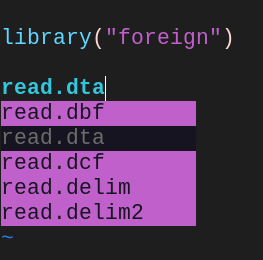
while it appears with <c-x><c-o>:
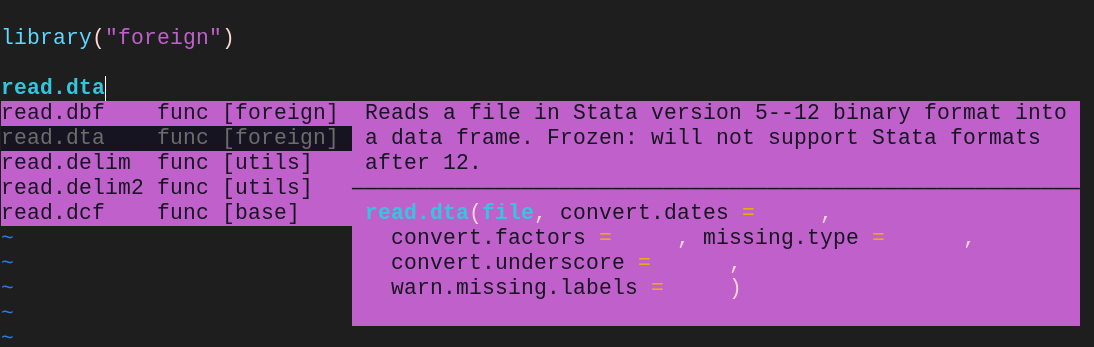
I'm using the development version of Neovim (v0.8.0-dev+2-g08a144912).

What is your Neovim version? I'm trying your minimal init.vim, and the only problem that I can see is that the float window with additional information doesn't appear when an item is selected from nvim-cmp menu:
while it appears with
<c-x><c-o>:
I'm using the development version of Neovim (v0.8.0-dev+2-g08a144912).
I get the same issue with not seeing additional info in the float window from cmp-omni but the full menu on <c-x><c-o>, Neovim v0.7.0

When we press <c-x><c-o>, Nvim-R requests to its nclientserver the completion menu for the keyword being completed. After, for instance, the selection of read.csv from the pop up menu, if you do the command :echo v:completed_item, you get:
{'word': 'read.csv', 'menu': 'func [utils]', 'user_data': {'cls': 'f', 'pkg': 'utils'}, 'info': '', 'kind': '', 'abbr': ''}
When you select the item read.csv from the pop up menu, the event CompleteChanged is triggered. Then, Nvim-R uses the values of cls and pkg to request to its nclientserver the cached data on read.csv which, finally, is used to create the float window.
It seems that nvim-cmp doesn't use Vim's native completion function to pop up the completion menu, instead using its own mechanism to draw the pop up menu. Consequently, the CompleteChanged event isn't triggered, and Nvim-R doesn't create the float window.
I guess the best solution would be to create a nvim-cmp source that either interacted directly with Nvim-R's nclientserver or used the data from ~/.cache/Nvim-R directly, as ncm-R did in the past. The easiest solution, perhaps, could be a nvim-cmp source that would be a copy of cmp-omni but that would check the value of user_data and then replicate what the function AskForComplInfo() does.
Note: while waiting for somebody to write a nvim-cmp source to Nvim-R, you could try in your init.vim/vimrc:
let R_auto_omni = ["r"]
This would enable Nvim-R's automatic omni completion for the r file type.
I created a source for nvim-cmp. Please, try it: https://github.com/jalvesaq/cmp-nvim-r