

 jacobslusser
Switch input method so slowly
When I switch input method by "ctrl+space", It should take one second or more.

Switch input method? Changing Overtype? You doing something like:
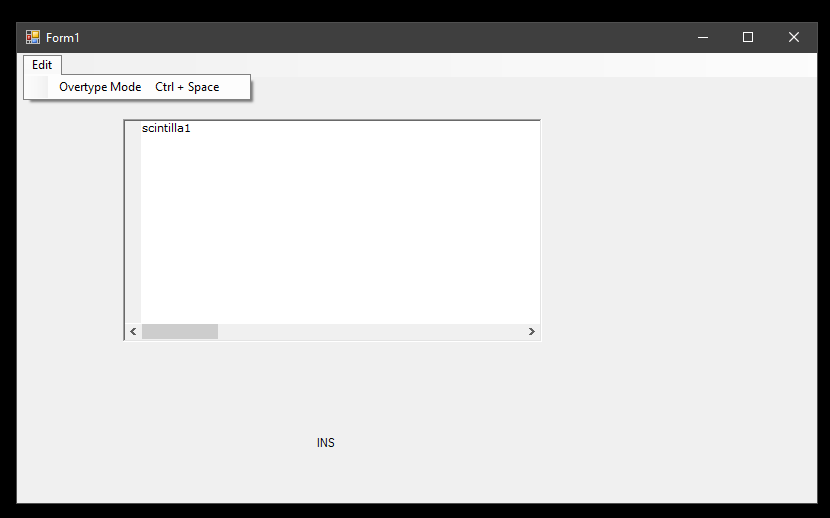
using System;
using System.Windows.Forms;
using ScintillaNET;

namespace WindowsFormsApp2
{
    public partial class Form1 : Form
    {
        public Form1() => InitializeComponent();

        private void Form1_Load(object sender, EventArgs e)
        {
            sc.ClearCmdKey(Keys.Insert); //Clear the default binding

            sc.AssignCmdKey(Keys.Control | Keys.Space, Command.EditToggleOvertype);

            testOvertype.ShortcutKeyDisplayString = "Ctrl + Space";
        }

        private void sc_UpdateUI(object sender, ScintillaNET.UpdateUIEventArgs e) => label1.Text = ((sc.Overtype) ? "OVR" : "INS" );

        private void testOvertype_Click(object sender, EventArgs e) => SendKeys.Send("^ ");
    }
}
It's instant for me and I get the side-effect of the scintilla control inserting a space every time. That can be worked around.
If this wasn't what you're talking about, PLEASE let me know.

@tobeypeters OP's issue is about IME. https://en.wikipedia.org/wiki/Input_method

This issue is about IME. SciTE is a SCIntilla based Text Editor. It's just work fine. But Text Editor based on ScintillaNET, even the ScintillaNET demo, switching input method by "ctrl+space" will take one second or more. it is annoyance.
Confused. I have the winform and WPF project and neither have anything about ImeMode in them and ctrl-space isn't a built-in scintilla shortcut. I don't see anything in SciTE either. I know, scintilla has API for it.
Please point me in the right direction.
If I manually set ImeMode to something, it seems instant. I want to help. Obviously, I need something else installed or setup on my machine. I'm assuming that's it.
Maybe you only use English instead of using the input method in other languages.
I'd like to figure this out. Cause, I'm not making an editor. But ... the system I'm writing has an editor built-in. I'm trying to provide absolutely everything I can. If anybody uses my system, they will probably bring those files into Visual Studio or vice-versa anyway. The moto is "Make it possible for the user to stay in your app, longer than their in other apps". BUT, don't BLOT your apps. Don't stuff MS Word into your app. :)
If the editor portion gets good enough, maybe I can copy it out and make a separate app from it.