
coros
 coros copied to clipboard
 jHaselberger
containerized ros development environment






Jumpstart ROS developent with no headache! Full browser support. OpenGL support with no need of a physically atachted GPU.
📦 Included
ROS
- full ros distro (currently melodic)
- rqt and all plugins
- rviz
- carla ros bridge
IDE (accessible through the browser)
- full python (2.7) environment
- visual studio code server
🏃 Start the service
There are two provided start and stop scripts - one for windows, the other one for unix systems.
First pull the github project to get these scripts with git clone https://github.com/gismo07/coros.git.
windows
cd utils-windows.\start-windows.cmd
unix
cd utilssudo chmod +x ./start.sh./start.sh
💻 Access the environment
- to open the IDE, simply open the browser and go to localhost:80
- The password is currently set to
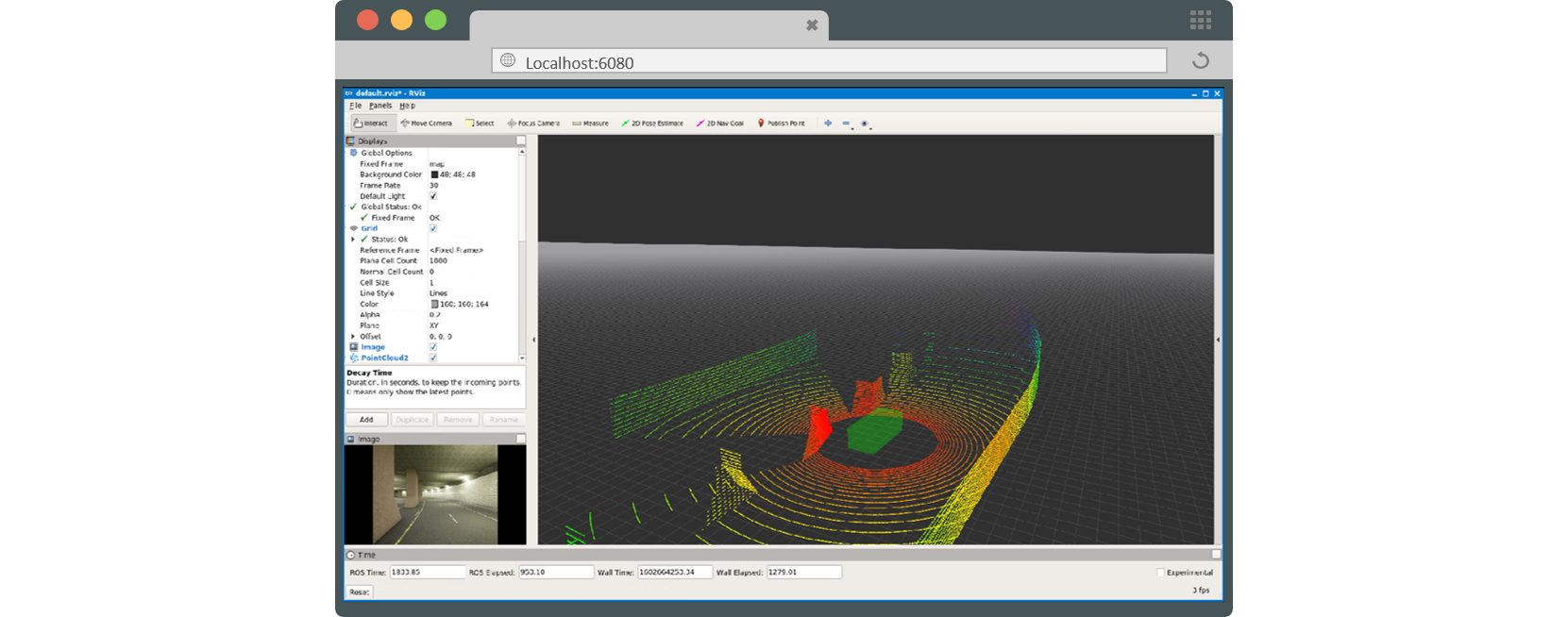
dev@ros - to see rviz or some other gui stuff, open another browser tab localhost:6080/vnc.html and click connect
💾 Data storage
Per default all perisistent data is located at the host pc (assuming windows for now) under C:/ros-persistent-data. Create this folder before starting the container.
How to bind to a local folder
If you want to bind a existing folder of the host to the docker container, the docker-compose.yaml file is used for that. For each folder, a new volume section has to be added:
        volumes:
            - type: bind
              source: /<PATH_TO_FOLDER_ON_HOST>
              target: /<TARGET_DESTINATION_ON_THE_CONTAINER>
              volume:
                nocopy: true  # just keep that
🚘 Carla integration
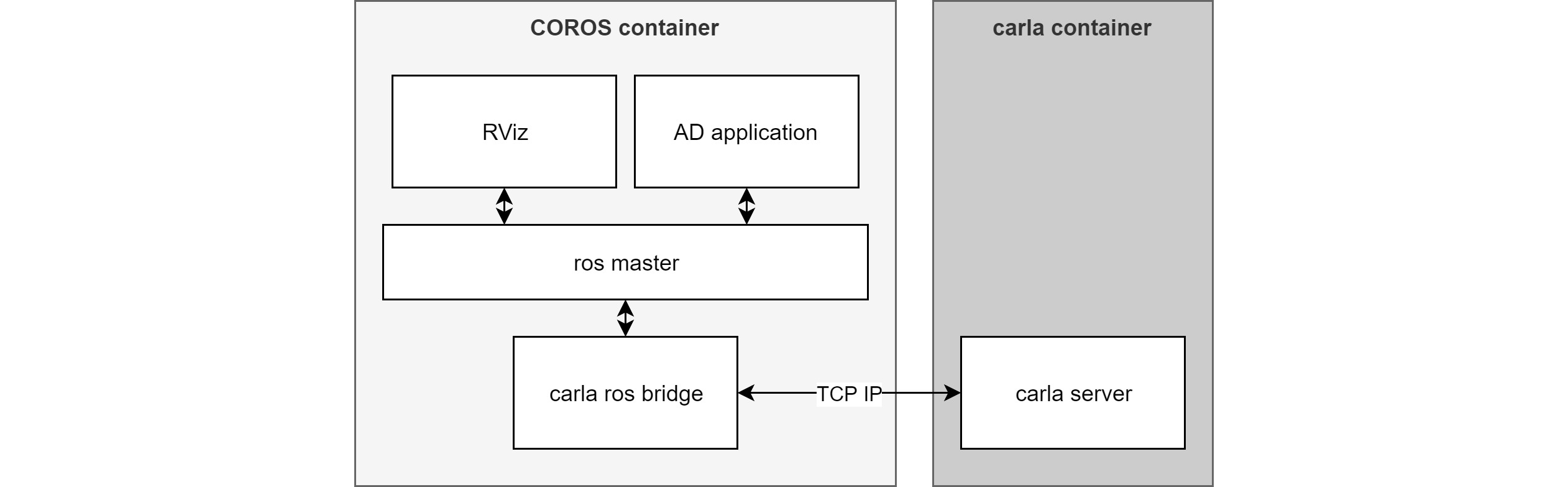
Since version 1.1 COROS comes with a preinstalled version of the Carla PythonAPI and ROS bridge. Currently we use Carla version 0.9.10.1.
The Carla simulation itself is not part of COROS to maintain platform independence
Start Carla
To use the Carla-Ros bridge, make sure that Carla is running and accessible over the network.
Linux users with NVIDIA GPU
-
Get the right carla docker image:
sudo docker pull carlasim/carla:0.9.10.1 -
Make sure the package
xhostis available on your system. If not:sudo apt-get update sudo apt-get install xhost -
start carla while forwarding the x context:
xhost local:root sudo docker run \ -e SDL_VIDEODRIVER=x11 \ -e DISPLAY=$DISPLAY \ -v /tmp/.X11-unix:/tmp/.X11-unix \ -p 2000-2002:2000-2002 \ -it \ --gpus all \ carlasim/carla:0.9.10.1 ./CarlaUE4.sh -opengl -
alternatively, carla can also be started without graphical output:
xhost local:root
sudo docker run \
  -e SDL_VIDEODRIVER=offscreen \
  -e DISPLAY=$DISPLAY \
  -v /tmp/.X11-unix:/tmp/.X11-unix \
  -p 2000-2002:2000-2002 \
  -it \
  --gpus all \
  carlasim/carla:0.9.10.1 ./CarlaUE4.sh -opengl
Windows users
-
Download the
0.9.10.1version from the offical carla releases. -
Start the carla exe located under
CARLA_0.9.10.1\WindowsNoEditor\CarlaUE4.exe:./CarlaUE4.exe -Carla-server -windowed
Start the ROS bridge
Within COROS everything is allready setup to communicate with carla.
Open a new terminal and start the ros bridge example:
roslaunch carla_ros_bridge carla_ros_bridge_with_example_ego_vehicle.launch
🔧 Configuration
The environment comes shipped with a docker-compose.yaml to start the service and manage some parameters:
version: '3.7'
services:
    headless-ros-vnc:
        ports:
            - '80:8080'
            #- '5900:5900'
            - '6080:6080'
        volumes:
            - type: bind
              source: C:/ros-persistent-data
              target: /my_ros_data
              volume:
                nocopy: true
        image: johannhaselberger/coros
coros makes use of three open ports:
8080: access to visual studio code server5900: the default vnc port (could be theoretically accessed with any vnc client, however, as the port is forwarded via noVNC that's not intended)6080: access to the novnc web interface
Important: for each instance of coros these ports have to be assigned to available host-ports!
📥 Install Packages Permanently
To avoid installing the same packages over and over again after each container reboot, it makes sense to create your own COROS image.
- Create a new Dockerfile (e.g.
Dockerfile.customCoros) - Within the image derive from
johannhaselberger/coros - Install the packages, e.g. git with:
RUN apt-get update && DEBIAN_FRONTEND=noninteractive apt-get install -y \ git &&\ rm -rf /var/lib/apt/lists/* - Build and tag the image with:
sudo docker build --compress -f Dockerfile.customCoros --force-rm --rm -t coros:custom . - Set the target image within
utils/docker-compose.yamlandutils-windows/docker-compose.yamltoDockerfile.customCoros
😱 Known issues
Mounting errors on windows
- start docker with admin rights
- right click on the docker system tray icon -> Settings
- Under
Shared Drivesset the checkbox for the C drive
Access denied errors
Try to start the service with sudo rights. On windows open our shell with admin rights.
Operating system linux cannot be used on this platform error
This is mainly a windows error. Right klick on the docker tray icon and select switch to linux containers.
I can see some remote topics, however no data can be received
That's a very common ROS network issue:
- make sure you can ping the remote machine
- add all remote host names and your own host name to
\etc\hostson all machines - restart the ROS master
Timeout from Carla ROS bridge
Depending on your specific setup, make sure you enter the correct IPs within the Carla launch files. These can be found at: /carla_rb_ws/src/carla_ros_bridge/launch/. Also there is a configuration file at /carla_rb_ws/src/carla_ros_bridge/config/settings.yaml.
 jHaselberger