
ios-app

ios-app copied to clipboard
 ivpn
ivpn
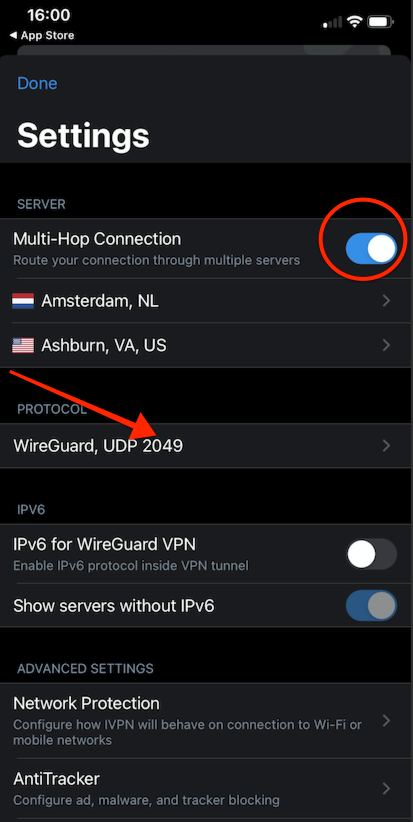
Port number shows when MultiHop is selected
Description:
When selecting MultiHop and going to the Setting screen, the port number shown along with the protocol name, instead of just "UDP" or "TCP".
Expected result:
As described on https://github.com/ivpn/ios-app/issues/232, when MultiHop is enabled, the port should be shown as "UDP" or "TCP" without port numbers.
Steps to reproduce:
- Install App Store build 2.6.3 (8)
- Login with a Pro account.
- Select MultiHop either with OpenVPN or WireGuard.
- Go to Settings.
- Observe that the protocol shows the port number.
Screenshot:
Environment:
IVPN: 2.6.3 (8) Device: iPhone XR iOS 16.3 Beta


Verified fixed on 2.6.4 (17), iPhone XR iOS 16 iPad 6 iOS 15.6, when MultiHop is enabled, in the Settings screen, the port is shown as "UDP" or "TCP" without port numbers.