

 ionic-team
Failure when using "gradle" command
I have an extremely simple setup where trapeze is working fine for both manifest and res commands, but no for gradle command.
My package.json dependency is "@trapezedev/configure": "^5.0.0". But I've already checked that the problem also exists in version 4.0.1.
This simple config.yml file (whose gradle section is taken directly from one of your examples):
platforms:
  android:
    gradle:
      - file: app/build.gradle
        target:
          android:
            buildTypes:
              release:
                minifyEnabled:
        replace:
          minifyEnabled: true
fails with the following error:
user@user:~/Documents/Git/ionic-app$ npx trapeze run config.yml --android-project android  -y
run android gradle
Fatal error: Error running command
Error: Unable to load or parse gradle file: Error: spawn ENOTDIR
    at GradleFile.parse (/home/user/Documents/Git/ionic-app/node_modules/@trapezedev/project/dist/android/gradle-file.js:216:19)
    at async GradleFile.replaceProperties (/home/user/Documents/Git/ionic-app/node_modules/@trapezedev/project/dist/android/gradle-file.js:47:9)
    at async execute (/home/user/Documents/Git/ionic-app/node_modules/@trapezedev/configure/dist/operations/android/gradle.js:14:13)
    at async executeOperations (/home/user/Documents/Git/ionic-app/node_modules/@trapezedev/configure/dist/tasks/run.js:74:10)
    at async runCommand (/home/user/Documents/Git/ionic-app/node_modules/@trapezedev/configure/dist/tasks/run.js:34:9)
    at async /home/user/Documents/Git/ionic-app/node_modules/@trapezedev/configure/dist/index.js:55:13
    at async Command.<anonymous> (/home/user/Documents/Git/ionic-app/node_modules/@trapezedev/configure/dist/util/cli.js:31:13)
This is very strange. If I modify my config.yml file to this, everything works fine and trapeze behaves as it should:
platforms:
  android:
    manifest:
      - file: AndroidManifest.xml
        target: manifest
        merge: |
          <manifest>
            <uses-permission android:name="android.permission.CAMERA" />
            <uses-permission android:name="android.permission.RECORD_AUDIO" />
            <uses-permission android:name="android.permission.MODIFY_AUDIO_SETTINGS" />
          </manifest>
      - file: AndroidManifest.xml
        target: manifest/application/activity
        attrs:
          android:exported: true
          android:networkSecurityConfig: "@xml/network_security_config"
    res:
      - path: xml
        file: network_security_config.xml
        text: |
          <?xml version="1.0" encoding="utf-8"?>
          <network-security-config>
            <base-config>
              <trust-anchors>
                <certificates src="system"/>
                <certificates src="user"/>
              </trust-anchors>
            </base-config>
          </network-security-config>
Of course the android folder exists, is well formed and file android/app/build.gradle is available. Proof is below:
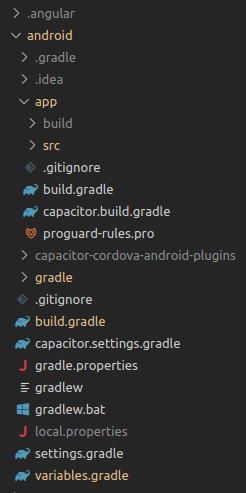

Ok, I know what's happening. But still, I'm not sure why the script gradle-file.js behaves like this.
The problem is JAVA_HOME variable. trapeze's gradle command requires Java to be available, and that's why if JAVA_HOME env variable is not set, it will return an error like this:
Fatal error: Error running command
Error: JAVA_HOME not set which is required for android.gradle modifications
So, I set my JAVA_HOME env variable like this: export JAVA_HOME=/usr/bin/java. Everything pretty standard.
Running trapeze again and debugging file gradle-file.js, I find out that this file is finally trying to run Java using path /usr/bin/java/bin/java!!! Looking into method getJava I can see that it is building this wrong path out of nowhere, for some reason:

I already provided the valid JAVA_HOME path. Why is this method messing with it? Of course, If a setup export JAVA_HOME=/usr everything works fine. But that's a really weird value for JAVA_HOME..... isn't it?
JAVA_HOME is supposed to be set to the root of the java home dir not the actually java binary. That's just a convention in the Java world and certainly something we can/should mention in the docs.
Also the error could be improved
