

 ionic-team
bug: menu animation is not rtl-aware
Bug Report
Ionic version: 5.4.1
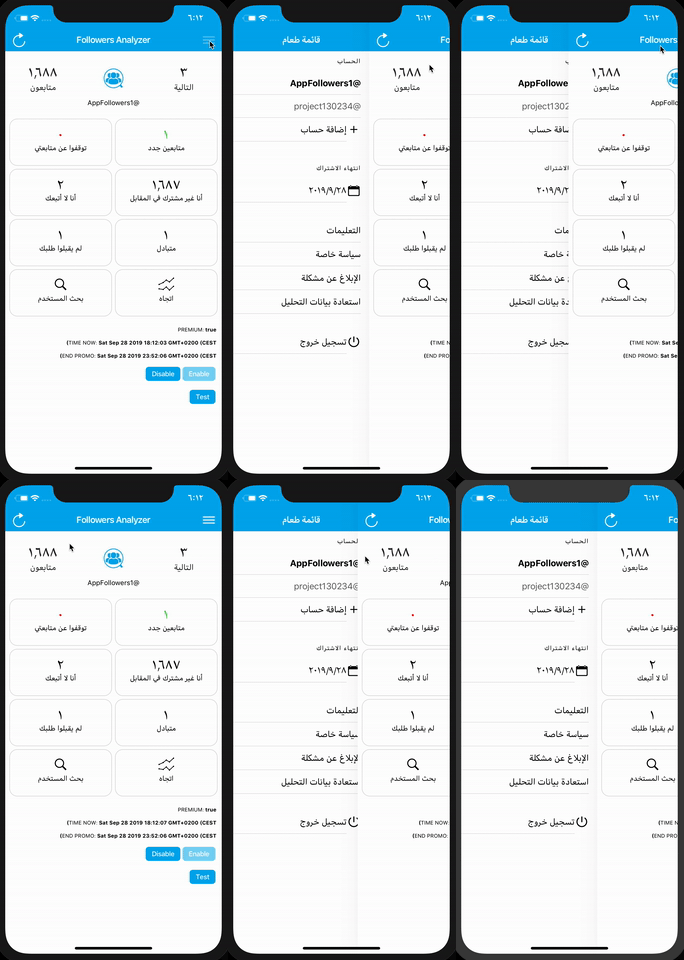
Current behavior: Setting the RTL dynamically (document.dir = "rtl"), the menu is opened from the wrong side, it works instead if you set dir = "rtl" statically in the main HTML tag of the index.html
Ionic info:
Ionic:
Ionic CLI : 5.4.1 (/usr/local/lib/node_modules/ionic) Ionic Framework : @ionic/angular 4.10.0 @angular-devkit/build-angular : 0.13.9 @angular-devkit/schematics : 7.3.9 @angular/cli : 7.3.9 @ionic/angular-toolkit : 1.5.1
Capacitor:
Capacitor CLI : 1.0.0 @capacitor/core : 1.0.0
Cordova:
Cordova CLI : 9.0.0 ([email protected]) Cordova Platforms : android 8.1.0, ios 5.0.1 Cordova Plugins : cordova-plugin-ionic-keyboard 2.1.3, cordova-plugin-ionic-webview 4.0.1, (and 20 other plugins)
Utility:
cordova-res : 0.3.0 (update available: 0.6.0) native-run : 0.2.8
System:
ios-sim : 8.0.2 NodeJS : v10.15.0 (/usr/local/bin/node) npm : 6.11.2 OS : macOS Mojave Xcode : Xcode 10.3 Build version 10G8

Hello @LiveXenon,
Thanks for the issue. Have you found a solution for that I have the same problem?

I also have the same problem, in this case I had to set manually the "side" attribute of the menu to "start", however if you are changing from translation dynamically, that might become a problem

Thanks for the issue. The problem here is that the animation that shows/hides the menu is a) not RTL-aware and b) not reactive, so changing LTR/RTL modes on the fly will not update the animation.

Just in case if this could help, forcing the ion-menu to be destroyed and re-created when changing the direction seems to be a valid workaround for now.
Please take a look at this StackBlitz demo: https://stackblitz.com/edit/workaround-ionic-issue-19489

In that demo, I'm creating two side menus but only one of them is rendered based on the value of platform.isRTL. Both ion-menu are identical – the *ngIf is actually the workaround for the issue since it destroys and re-creates the ion-menu.
<ion-app>
  <!--
    We can declare the content of the side menu like this
    so we can reuse it for both ion-menu without duplicating
    the code.
  -->
  <ng-template #sideMenuTemplate>
    <ion-header>
      <ion-toolbar>
        <ion-title>Side Menu</ion-title>
      </ion-toolbar>
    </ion-header>
    <ion-content>
      <ion-list>
        <ion-item>Menu Item 1</ion-item>
        <ion-item>Menu Item 2</ion-item>
        <ion-item>Menu Item 3</ion-item>
        <ion-item>Menu Item 4</ion-item>
        <ion-item>Menu Item 5</ion-item>
      </ion-list>
    </ion-content>
  </ng-template>

  <ion-menu *ngIf="platform.isRTL" contentId="main" side="start">
    <ng-container *ngTemplateOutlet="sideMenuTemplate"></ng-container>
  </ion-menu>

  <ion-menu *ngIf="!platform.isRTL" contentId="main" side="start">
    <ng-container *ngTemplateOutlet="sideMenuTemplate"></ng-container>
  </ion-menu>

  <ion-router-outlet id="main"></ion-router-outlet>
</ion-app>

Just in case if this could help, forcing the
ion-menuto be destroyed and re-created when changing the direction seems to be a valid workaround for now.Please take a look at this StackBlitz demo: https://stackblitz.com/edit/workaround-ionic-issue-19489
In that demo, I'm creating two side menus but only one of them is rendered based on the value of
platform.isRTL. Bothion-menuare identical – the*ngIfis actually the workaround for the issue since it destroys and re-creates theion-menu.<ion-app> <!-- We can declare the content of the side menu like this so we can reuse it for both ion-menu without duplicating the code. --> <ng-template #sideMenuTemplate> <ion-header> <ion-toolbar> <ion-title>Side Menu</ion-title> </ion-toolbar> </ion-header> <ion-content> <ion-list> <ion-item>Menu Item 1</ion-item> <ion-item>Menu Item 2</ion-item> <ion-item>Menu Item 3</ion-item> <ion-item>Menu Item 4</ion-item> <ion-item>Menu Item 5</ion-item> </ion-list> </ion-content> </ng-template> <ion-menu *ngIf="platform.isRTL" contentId="main" side="start"> <ng-container *ngTemplateOutlet="sideMenuTemplate"></ng-container> </ion-menu> <ion-menu *ngIf="!platform.isRTL" contentId="main" side="start"> <ng-container *ngTemplateOutlet="sideMenuTemplate"></ng-container> </ion-menu> <ion-router-outlet id="main"></ion-router-outlet> </ion-app>
Thank you @sebaferreras Ya, I did that. And it worked.
As I find it to be, The problem is mainly not the click on a button in order to open the menu but rather swiping on real device or even chrome devtools. When you do that, ionic recognize the swipes on the first loaded page as 'menu-swipe' and on other pages as 'goback-swipe', to sum it up: If you have:
- dir="rtl" on the html tag
- you define the ion menu to be in 'start' You will get -> manual opening of the menu via button that works BUT swiping in order to open the menu DOES NOT
Thanks

Thanks for the issue. This has been resolved via https://github.com/ionic-team/ionic-framework/pull/27079, and a fix will be available in an upcoming release of Ionic Framework.
Thanks for the issue! This issue is being locked to prevent comments that are not relevant to the original issue. If this is still an issue with the latest version of Ionic, please create a new issue and ensure the template is fully filled out.
![ionitron-bot[bot] avatar](https://avatars.githubusercontent.com/in/8640?v=4 "Published by a pub.dev verified publisher")