

 invoke-ai
[bug]: win11 ModuleNotFoundError: No module named 'npyscreen' on install
Is there an existing issue for this?
- [X] I have searched the existing issues
OS
Windows
GPU
cuda
VRAM
No response
What version did you experience this issue on?
2.3.2
What happened?
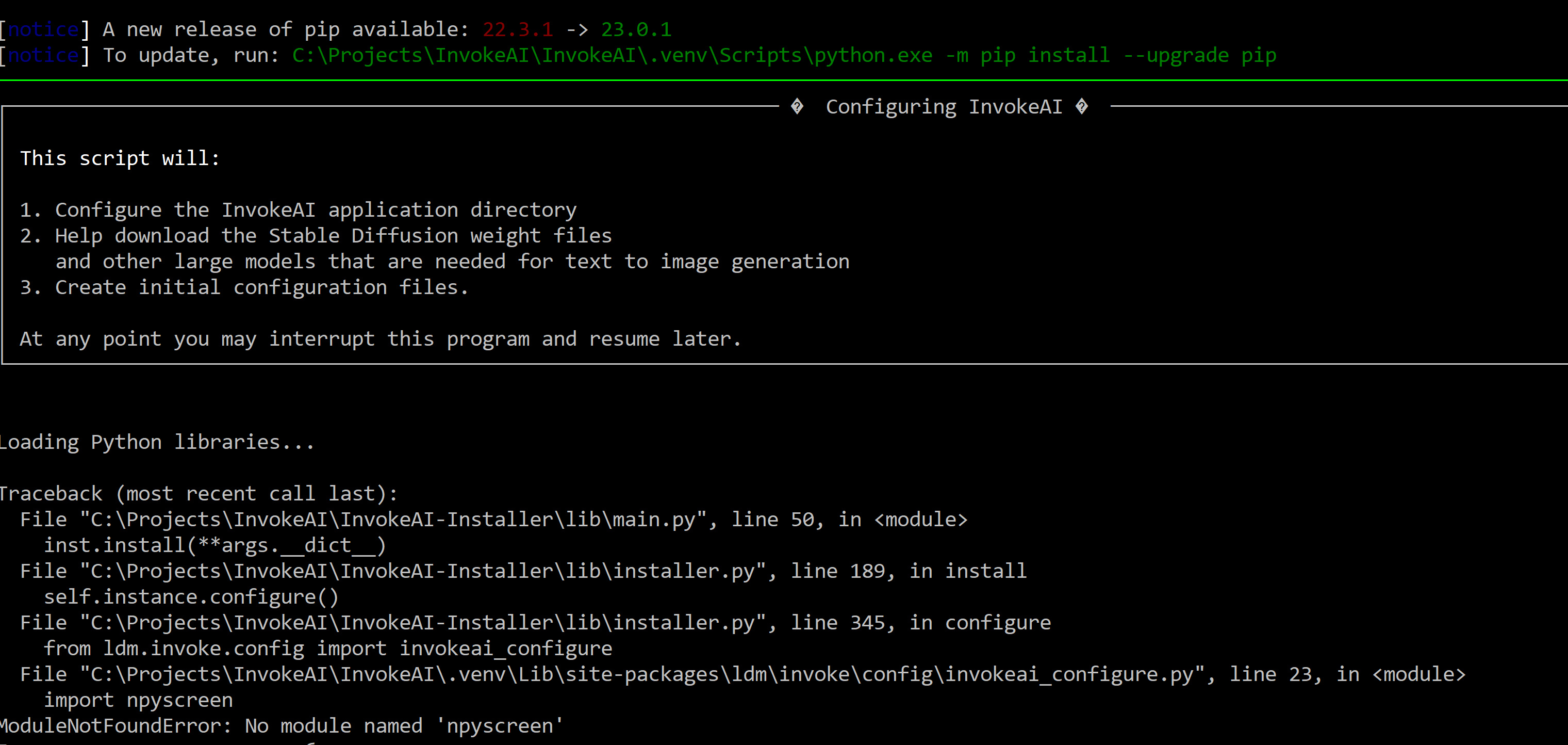
Error before starting configuration install phase.
Loading Python libraries... Traceback (most recent call last): File "C:\Projects\InvokeAI\InvokeAI-Installer\lib\main.py", line 50, in
inst.install(**args.dict) File "C:\Projects\InvokeAI\InvokeAI-Installer\lib\installer.py", line 189, in install self.instance.configure() File "C:\Projects\InvokeAI\InvokeAI-Installer\lib\installer.py", line 345, in configure from ldm.invoke.config import invokeai_configure File "C:\Projects\InvokeAI\InvokeAI.venv\Lib\site-packages\ldm\invoke\config\invokeai_configure.py", line 23, in import npyscreen ModuleNotFoundError: No module named 'npyscreen'
Screenshots
Additional context
No response
Contact Details
No response

Something apparently went wrong when the initial requirements were being installed. Did you see any error messages prior to the configuration dialog starting?

it happens to me too, i didn't notice any errors before the configuration dialog starting


It's something wrong with automated installer. I tried manual installation and it worked. https://invoke-ai.github.io/InvokeAI/installation/020_INSTALL_MANUAL/
Manual installation did not help. It's invoke-configure that's erroring out. Prior steps worked fine. Confirmed that Numpy 1.23.5 was installed as per script.
Attempt to start invoke here produces an error Missing (invokeai) \configs\stable-diffusion\v1-finetune.yaml
Attempted 4 different installs, both manual and auto, with or without admin rights. All files are cached and verified on HD. I am on WIn10 (21H2) so it's not the OS.

Updating the PIP manually made no difference.
If it matters, my boot drive is C:, but I install programs on D:
Installer is in D:\temp\invokeai-installer and I am attempting to install into D:\invokeai
FOUND THE CAUSE! InvokeAI wants the npyscreen lib in the Invoke site-package subdir, but if the user has prior install of python, and has npyscreen installed previously, then the install will NOT copy the npyscreen over!!!! It will only copy the lib definitions!
Look inside $HOME_DIR.venv\Lib\site-packages
You probably have [npyscreen-4.10.5.dist-info] subdir, but not the [npyscreen] subdir itself! THAT is causing invokeai-configure to fail.
And you already have it somewhere else in the system, which is why PIP didn't copy it over. It figures you already have it!
You need to find your own Python site-package cache. For me it's in my \users<username>\AppData\Local\Programs\Python\Python310\Lib\Site-packages
Copy the Npyscreen subdir to the other cache inside .venv
And now your invokeai-configure should run!
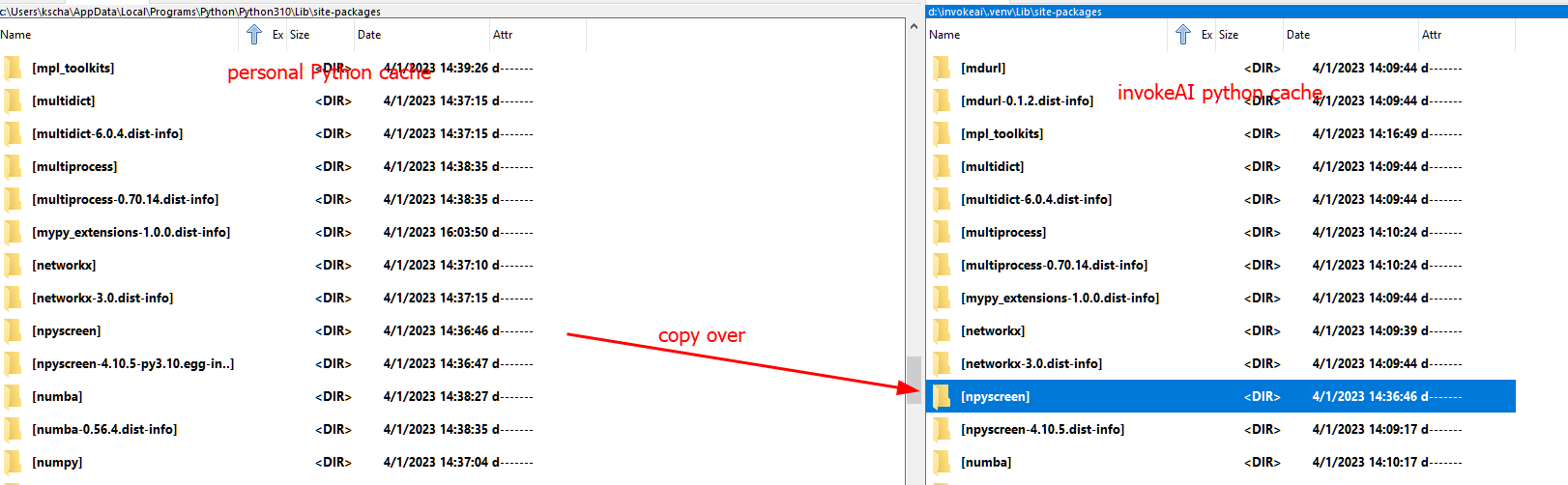
Just realized one could simply copy the existing npyscreen-x.x-whatever to npyscreen and it should run the same. DUH.
I'm getting exact same error when installing, i have done multiple install of SD before on my system and had tried installing InvokeAI before, so my system is kind of a mess. but i did what "kschang77 suggested but didn't work for me even downloaded npyscreen and ran pip to install and instaledl successfully but still getting same error?
I have Pythons 2.5, 3.9, and 3.10 installed and or reminiscences. I'm total noob to coding an programing, i just hack my way through.
HELPPP! Thanks
Loading Python libraries...
Traceback (most recent call last):
File "D:\InvokeAI-Installer\lib\main.py", line 50, in

npyscreen4.10.5 in python lib is not exist, perhaps author delete files, if you use pip install we will find in site-packages no the directory. i find the workaround that install 4.10.0 replace it. after pip install npyscreen==4.10.0 you can copy npyscreen directory to env lib site-packages.

You know, I cannot reproduce this issue on a Windows 10 system. npyscreen is present in the pypi repository: https://pypi.org/project/npyscreen/ and I have tried uninstalling and reinstalling multiple times without triggering this bug.
npyscreen is installed when the installer script runs pip install . My guess is that there was a transient error downloading npyscreen and the package directory got screwed up. Don't know why this affected multiple people, though.
Any thoughts?
Could it be triggered by people who have pre-existing Python 2 or 3 installed?
Gamer / Trekker / IT Developer / about.me/kschang77 "Whereever you go, there you are." -- Buckaroo Banzai
On Wednesday, April 12, 2023 at 07:38:07 PM PDT, Lincoln Stein ***@***.***> wrote:
You know, I cannot reproduce this issue on a Windows 10 system. npyscreen is present in the pypi repository: https://pypi.org/project/npyscreen/ and I have tried uninstalling and reinstalling multiple times without triggering this bug.
— Reply to this email directly, view it on GitHub, or unsubscribe. You are receiving this because you commented.Message ID: @.***>
The use of virtual environments is supposed to avoid this type of problem.
Does anyone have a screenshot or log of the lengthy install messages that
appear before it got to the invokeai-configure step? In theory the
installation should have stopped with an error message at that step if
npyscreen couldn't be installed.
I don't recall seeing any error messages or log on screen that referred to any errors. The prompt looked just "empty", as if everything had been finished, but invokeAI won't start. I then went to try the "manual install", which did not work either. On Friday, April 14, 2023 at 07:19:53 AM PDT, Lincoln Stein @.***> wrote:
The use of virtual environments is supposed to avoid this type of problem.
Does anyone have a screenshot or log of the lengthy install messages that
appear before it got to the invokeai-configure step? In theory the
installation should have stopped with an error message at that step if
npyscreen couldn't be installed.
— Reply to this email directly, view it on GitHub, or unsubscribe. You are receiving this because you commented.Message ID: @.***>
Thanks everyone, it's working now. Make sure to have the right folder name npyscreen.


Bonjour
sorry I do not speak English
pour le npyscreen , perso j'ai été sur https://pypi.org/project/npyscreen/#filesc récupéré manuellement le fichier
npyscreen-4.10.5.tar.gz une fois décompresser, et récupéré le dossier a l’intérieur le dernier avec plus d’élément que celui installer par python sur mon pc, cela a fonctionner j'ai repris les étapes 7 pour réparer , et cela fonctionne bien. [edit] et copier dans invokeai evidemment bonne journée.


I think this still needs to be re-opened.
On a fresh install of windows 10, with a fresh install of python 3.11, if the first automatic install fails (in my case as i locked the PC during the install accidently). A re-install will not copy these files...
For me, copying the npyscreen folder from %appdata%\Python\Python311\site-packages to the C:\AI\InvokeAI\.venv\Lib\site-packages (install directory) directory worked for me :)

Faced the same issue while installing via automatic script. Then tried clean manual installation with the same result - invokeai-configure cannot find npyscreen module.
Finally found a solution:
pip install -I --no-cache-dir npyscreen==4.10.5
The thing was, in my venv\Lib\site-packages there actually was a folder npyscreen-4.10.5.dist-info. But it contains just a packet metadata, not the actual library. So, I just force installed npyscreen manually.
Maybe that would help anyone who faced the same issue.
OS: Windows 10x64 GPU: NVIDIA RTX 3060 12GB

@ebr you closed this issue but it is NOT fixed! I installed on a fresh windows 11 with a prior installation of A1111. I used the automatic installer for InvokeAI 3.4.0post1, and the issue is still there. as described in https://github.com/invoke-ai/InvokeAI/issues/3055#issuecomment-1493173459 the npyscreen folder is missing in .venv, while the npyscreen-4.10.5.dist-info exists. manually copying over currently fixes the missing library, but this must not be needed when using the automatic installer, the installer should prepare the venv with all libraries as needed!

Can confirm this is still a headache.
I want to note this is kind of a big deal as it seems to me you are aiming to be the "user friendly" experience, and ironically this was by far the hardest install I've done of any software this year, and I spend most of my time doing stuff like this for several small businesses.
The only reason I persisted was the promise of (hopefully) superior speeds to Automatic1111, as I discovered their processing time was abysmal compared to comfyUI, and so I became interested. However, both of those are literally just download and unzip, install done, while this nearly had me give up because of a basic inability to install. I finally got it working by using an elevated powershell and changing Set-ExecutionPolicy -ExecutionPolicy RemoteSigned, followed by manually installing pip install npyscreen==4.10.0 before building the whole thing out using "invokeai-configure --yes --root ." (be sure to include the period).

I've had the same problem on W11 with A1111 already installed and D:\InvokeAI. I've solved it by:
- deleting pip cache :
PS C:\> remove-item '~\AppData\Local\pip\cache\' -Recurse -Force - deleting the folder "D:\invokeai.venv\Lib\site-packages\npyscreen-4.10.5.dist-info"
- installing the module in the invokeai venv:
(InvokeAI) PS D:\invokeai> pip install npyscreenHope that helps.

Simple fix for me is to force reinstall npyscreen
pip install--no-cache-dir --force-reinstall npyscreen
