

 invoke-ai
[bug]: 'CrossAttention' object has no attribute 'cached_mem_free_total'
Is there an existing issue for this?
- [x] I have searched the existing issues
OS
Windows
GPU
cuda
VRAM
6GB
What happened?
Whenever I try to use any function to generate an image, I get this error "'CrossAttention' object has no attribute 'cached_mem_free_total'" (I'm using the browser-ui)
Screenshots
2022-12-10T13:18:32-0300:
Image generation requested: {"prompt":"","iterations":1,"steps":50,"cfg_scale":7.5,"threshold":0,"perlin":0,"height":512,"width":512,"sampler_name":"k_lms","seed":2325424055,"progress_images":true,"progress_latents":false,"save_intermediates":5,"generation_mode":"txt2img","init_mask":"","seamless":false,"hires_fix":false,"variation_amount":0}
2022-12-10T13:18:32-0300:
Server error: 'CrossAttention' object has no attribute 'cached_mem_free_total'
Additional context
No response
Contact Details
No response

I just experienced the same error!
OS Windows 11
GPU cuda (RTX 3070ti)
VRAM 8GB

I am also experiencing the same error. On a new install, with all my installed models OS: Windows 10 GPU: RTX 3070, 8GB

Same. On same platform 3070 8Gb, i7
Also experienced 'NoneType' object has no attribute 'tokens_count_including_eos_bos' on inpainting. May be unrelated.

While waiting for the 'official' fix from the maintainers, there is a temporary solution for the cached_mem_free_total problem:
- Open
./ldm/models/diffusion/cross_attention_control.pyfile using a text editor. - Go to line 187, add the following code:
self.cached_mem_free_total = Nonebelow the other 4 lines that start withself.. For clarity, attached is the screenshot how the code should look like after modification:
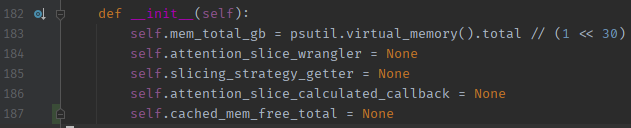
- Save the file and try restarting InvokeAI.
EDIT (2022-12-11): The maintainers have pushed their fix. See #1902. The fix I proposed above was more like a 'hack' and I am not familiar with the internal diffusion/image generator code. Please use the official fix instead of the one above. 🙏

