

 invoke-ai
[bug]: "object of type 'Image' has no len()" when I try to use img2img
Is there an existing issue for this?
- [X] I have searched the existing issues
OS
Linux
GPU
cuda
VRAM
24GB
What happened?
when trying to use img2img, I get the "object of type 'Image' has no len()" error.
Screenshots
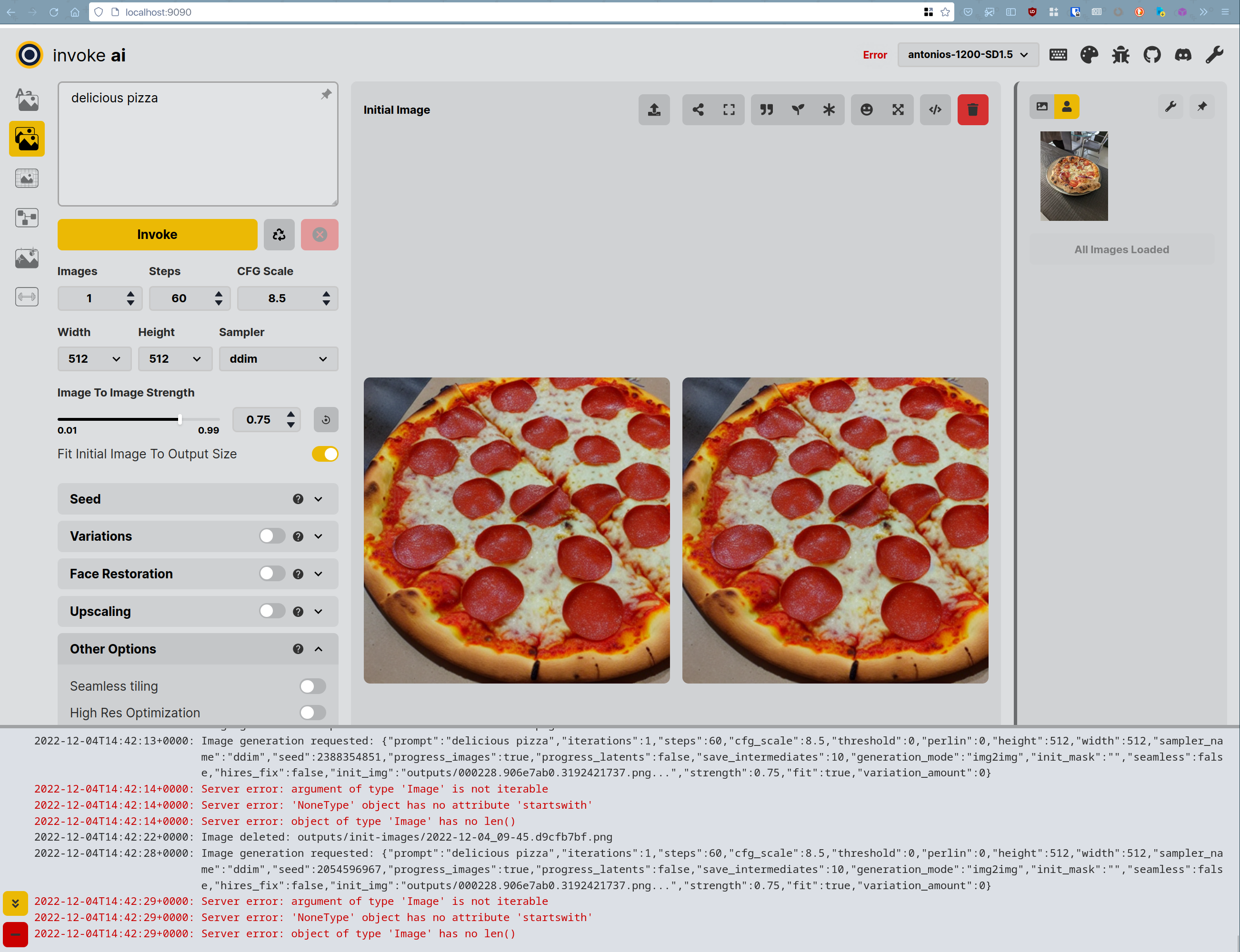
Additional context
terminal output :
'prompt': 'delicious pizza', 'iterations': 1, 'steps': 60, 'cfg_scale': 8.5, 'threshold': 0, 'perlin': 0, 'height': 512, 'width': 512, 'sampler_name': 'ddim', 'seed': 2054596967, 'progress_images': True, 'progress_latents': False, 'save_intermediates': 10, 'generation_mode': 'img2img', 'init_mask': '', 'seamless': False, 'hires_fix': False, 'init_img': <PIL.Image.Image image mode=RGB size=512x512 at 0x7F9FE67A3070>, 'strength': 0.75, 'fit': True, 'variation_amount': 0}


Traceback (most recent call last):
  File "/run/media/antouank/evo1/_REPOS_/InvokeAI/backend/invoke_ai_web_server.py", line 1380, in get_image_path_from_url
    if "init-images" in url:
TypeError: argument of type 'Image' is not iterable


Traceback (most recent call last):
  File "/run/media/antouank/evo1/_REPOS_/InvokeAI/backend/invoke_ai_web_server.py", line 1225, in parameters_to_generated_image_metadata
    rfc_dict["orig_hash"] = calculate_init_img_hash(
  File "/run/media/antouank/evo1/_REPOS_/InvokeAI/ldm/invoke/args.py", line 1182, in calculate_init_img_hash
    if image_string.startswith(prefix):
AttributeError: 'NoneType' object has no attribute 'startswith'


Decoding image:   0%|                                                                                                                      | 0/45 [00:00<?, ?it/s]
Generating:   0%|                                                                                                                           | 0/1 [00:00<?, ?it/s]
object of type 'Image' has no len()


Traceback (most recent call last):
  File "/run/media/antouank/evo1/_REPOS_/InvokeAI/backend/invoke_ai_web_server.py", line 1117, in generate_images
    self.generate.prompt2image(
  File "/run/media/antouank/evo1/_REPOS_/InvokeAI/ldm/generate.py", line 486, in prompt2image
    results = generator.generate(
  File "/run/media/antouank/evo1/_REPOS_/InvokeAI/ldm/invoke/generator/base.py", line 93, in generate
    image = make_image(x_T)
  File "/run/media/antouank/evo1/_REPOS_/InvokeAI/ldm/invoke/generator/img2img.py", line 52, in make_image
    samples = sampler.decode(
  File "/run/media/antouank/evo1/_REPOS_/InvokeAI/invokeai/lib/python3.10/site-packages/torch/autograd/grad_mode.py", line 27, in decorate_context
    return func(*args, **kwargs)
  File "/run/media/antouank/evo1/_REPOS_/InvokeAI/ldm/models/diffusion/sampler.py", line 379, in decode
    img_callback(x_dec,i)
  File "/run/media/antouank/evo1/_REPOS_/InvokeAI/backend/invoke_ai_web_server.py", line 881, in image_progress
    command = parameters_to_command(generation_parameters)
  File "/run/media/antouank/evo1/_REPOS_/InvokeAI/backend/modules/parameters.py", line 43, in parameters_to_command
    if "init_img" in params and len(params["init_img"]) > 0:
TypeError: object of type 'Image' has no len()
Contact Details
@antouank

I think I have the same issue using a 2048x2048px jpg:
Server error: argument of type 'Image' is not iterable Server error: 'NoneType' object has no attribute 'startswith' Server error: object of type 'Image' has no len()
but when I uncheck "Fit Initial Image To Output Size" I got:
RuntimeError: CUDA out of memory. Tried to allocate 2.00 GiB (GPU 0; 6.00 GiB total capacity; 5.07 GiB already allocated; 0 bytes free; 5.10 GiB reserved in total by PyTorch) If reserved memory is >> allocated memory try setting max_split_size_mb to avoid fragmentation. See documentation for Memory Management and PYTORCH_CUDA_ALLOC_CONF


I tried resetting the web UI from settings (wrench icon) and it fixed the problem for me, but I really don't know what the actual problem was
I keep getting the same error, has there been a fix or work around?
For me, it was solved by changing the "display in-progress images" from accurate, to fast. Hopefully it helps you too.

I am having the same issue which is caused by the display in-progress setting when set to "accurate" currently running the developer version (main branch).
