

 interactionresearchstudio
"Connecting your camera to your Home Network" does not work
Describe the bug "Connecting your camera to your Home Network" does not work. The 192.168.50.1 address is hard coded into the Auto WiFi Hotspot as described at Raspberry Pi - Auto WiFi Hotspot Switch Internet To Reproduce Steps to reproduce the behavior: Follow https://mynaturewatch.net/instructions-homenetwork
Expected behavior I expect the Pi to join MY wifi network by DHCP -- I even made a reservation for it using its MAC address, but it comes up 192.168.50.1 Even raspi-config did not help. It says "Could not communicate with spa_supplicant" Your network setup may be OK for your average birdwatcher, but not for an Uber-computer-geek bird watcher like me. I would like to be able to reconfigure the network settings without trashing the rest of the web site.
Hardware
- Device: Pi Zero 2 W
- Naturewatch Camera software version: 1.7
Additional context The use of Etcher is outdated. I used Raspberry Pi Imager which includes customization features.

Hi @linuxdan,
From what you say, it could be a configuration error… (https://forums.raspberrypi.com/viewtopic.php?t=314167#p1879284). You could also use a USB dongle to add WiFi/Ethernet.

The instructions at https://mynaturewatch.net/instructions-homenetwork never show where to change the IP address.
I found a file at /home/pi/NaturewatchCameraServer/wificfg.json with the default wifi settings hard-coded in.
How do I change the IP addresses ?
Hello @linuxdan, As far as I know, it's never a good idea to set a fix IP address directly (DHCP reservation is better, as you stated above). Otherwise, I'd recommand to change the hostname instead (here, since the IP is the same, it won't solve the problem).
You could try to remove hostapd which create the hotspot (sudo apt remove hostapd) and stop the wifisetup service which is installed during the building of the image (sudo systemctl disable wifisetup.service)
Then restart the Pi to see if the IP is now attributed by the DHCP.
Edit: it seems to work and allows the DHCP to attribute a different IP to the Pi. Note that you lose the connectivity as soon as you remove hostapd (so it might be wiser to disable the wifisetup service first). Disabeling the howtapd service might be enough, but I did not try it yet (should be done using sudo systemctl disable hostapd). Also, I used Pi Imager to configure the Wi-Fi network and the SSH connection, but I messed up the configuration of the user and password, so I had to start the server by hand (cd ~/NaturewatchCameraServer and python3 -m naturewatch_camera_server &).
hosted removed wifisetup.service disabled There was a hard-coded reference to 192.168.50 as a DHCP-range at the bottom of /etc/dnsmasq.conf that I commented out. Finally. /boot/mynaturewatchcamera-wpa-supplicant.txt said country=GB despite having initially set it to country=US
I re-reset it .
Rebooted, and wlan0 is there, but not connected. Tried raspi-config, but it says "Could not communicate with spa_supplicant"
Next suggestions ?
… and there is more hardcoding in /etc/hostapd/hostapd.conf which, fortunately survived the apt remove
hostapd is for creating a wifi access point. I do not want that. I just want the bird-cam on my network.
Can you restart from zero and use Pi Imager to configure your Wi-Fi network and then disable wifisetup and remove hostapd?
That way, you shouldn't have to use raspi-config to set the Wi-Fi configuration.
hostapd is for creating a wifi access point. I do not want that. I just want the bird-cam on my network.
Yes, it's the reason I proposed to remove it with the sudo apt remove hostapd. I see you are in a war against the hardcoded values (which I understand), but what I think is that those values are not hardcoded, they are probably modified by the hostapd service. I don't think that dnsmasq plays a role when the hostapd service is taken down (it is used has a server for the hotspot AP, but not for the Wi-Fi client, but we can also sudo apt remove dnsmasq it).
How are you accessing your Pi (screen and keyboard or SSH or something else) ?
dnsmasq removed. rasp-config now lets me try to configure wireless, but it still gives an IP of 192.168.50.1
I also removed dnsmasq. It removed 1 IPv6 bounded to my wlan0 interface (there was one more inet6):
$ ip a
1: lo: <LOOPBACK,UP,LOWER_UP> mtu 65536 qdisc noqueue state UNKNOWN group default qlen 1000
    link/loopback 00:00:00:00:00:00 brd 00:00:00:00:00:00
    inet 127.0.0.1/8 scope host lo
       valid_lft forever preferred_lft forever
    inet6 ::1/128 scope host
       valid_lft forever preferred_lft forever
2: wlan0: <BROADCAST,MULTICAST,UP,LOWER_UP> mtu 1500 qdisc pfifo_fast state UP group default qlen 1000
    link/ether 00:10:fa:6e:38:4a brd ff:ff:ff:ff:ff:ff
    inet 192.168.50.1/24 brd 192.168.50.255 scope global wlan0
       valid_lft forever preferred_lft forever
    inet 192.168.0.14/24 brd 192.168.0.255 scope global dynamic noprefixroute wlan0
       valid_lft 86395sec preferred_lft 75595sec
    inet6 fe80::b53a:5a0:25d8:e095/64 scope link tentative
       valid_lft forever preferred_lft forever
I don't really understand where the issue is. Maybe one config file is broken, and the Pi cannot connect to anything because of that.
I'll retry with the image without changing the hostname and username (unlike I did the first time).
I'll still do the changes using SSH:
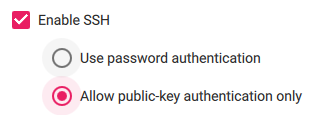
And also preconfigure the SSID and passphrase for my AP.
You know, it really helps NOT to have a typo in the MAC address for the DHCP reservation
It is up and working now. But the "Connect … to your Home Network" instructions need rewriting
I will see if I can capture what I did, then re-do it from scratch to verify.
But the "Connect … to your Home Network" instructions need rewriting
Neat. And it's only necessary to use Pi Imager, and the rest is unnecessary (that's what I noticed when retrying right now).
My sincere apologies. This was all my goof-up. Once the network had the correct MAC address, everything worked "out of the box" as advertised.
Well, there is an update to be made to the instructions (https://mynaturewatch.net/instructions-homenetwork). Happy to hear that the solution is working as you were expecting :-)
I think I've found the problem with the existing instructions https://mynaturewatch.net/instructions-homenetwork. It says to edit the file mynaturewatchcamera-wpa-supplicant.txt in the boot partion of the sd card. I did this but it didn't work. So I did some digging on the help forum and came across a comment from mark sharman in this thread https://mynaturewatch.net/forum?p=post%2Fconnect-to-home-network-9770732%3Fpid%3D1305264385 that said to ADD your home network to /etc/wpa_supplicant/wpa_supplicant.conf... With the sd card in a card reader on my linux machine I can see the rootfs partion of the sd card and found that file but I can't open it because it says it's a link to the mynaturewatchcamera-wpa-supplicant.txt file which doesn't exist (see screenshots). So editing the .txt file as the instructions says won't do anything because the link the to it is broken as the file does exist.

Hi @RyanB-Shields,
I do not remember exactly, but I believe the issue was elsewhere.
I can't open it because it says it's a link to the mynaturewatchcamera-wpa-supplicant.txt file which doesn't exist (see screenshots).
Actually, it makes sense. Your Linux system uses its own /etc/fstab file, so the mounted /boot folder is not the one of the SD card, but the one of your system. And it is likely that mynaturewatchcamera-wpa-supplicant.txt does not exist on your system. Furthermore, creating and altering it in /boot wouldn't have any effect on the SD card, etc. However, you could delete the link (/etc/wpa_supplicant/wpa_supplicant.conf) and replace it with a file with the correct settings. But again, I don't think it was the issue (but it could be it).
The /boot folder is the one on the SD card. If you look at the 2nd screenshot in my comment above you can see it's an external device and I've highlighted the mynaturewatchcamera-wpa-supplicant.txt file. I read though the other comments on the forum post and managed to get it connect to be home WiFi briefly but then it does off after a few 2nd and the mynaturewatch1234 (not the actual number) access point appears in the list of available WiFi networks on my phone. It's seems like something is making it revert back to the access point mode just after it finishes booting and overrides the connection to my home network. I just don't know what setting or config file is doing it.
Hi @RyanB-Shields,
Indeed, the SD card /boot is mounted, but it is not mounted at /boot (it's not mounted at the root of your filesystem) but most likely at /mnt/[...]/boot or /media/[...]/boot. You can try to open a terminal in the SD card /boot folder and show the absolute path (pwd).
There is a systemctl service that reconfigure the Wi-Fi AP at each start: https://github.com/interactionresearchstudio/NaturewatchCameraServer/blob/4cc7b03e0c1dd2568188fa816b66da67e062f387/helpers/wifisetup.service
It calls this script (/home/pi/NaturewatchCameraServer/helpers/cfgsetup.py):
https://github.com/interactionresearchstudio/NaturewatchCameraServer/blob/4cc7b03e0c1dd2568188fa816b66da67e062f387/helpers/cfgsetup.py
And since the SSID changes depending on the RPi board, can change dynamically after the first boot. A solution is to edit the helper script:
https://github.com/interactionresearchstudio/NaturewatchCameraServer/blob/4cc7b03e0c1dd2568188fa816b66da67e062f387/helpers/cfgsetup.py#L29-L34
You could add configFileSSID = currentSSID at line 28.
Ah yes of course that makes sense with /boot folder. I've hooked up the pi zero that's running mymaturecamera to a monitor, keyboard and mouse, so I could access the command line. I used nano to edit the file and add configFileSSID = currentSSID above the if configFileSSID == currentSSID like you suggested saved the changes and rebooted. But it's still appearing as an access point on my phone and doesn't join my home network. I did a cat on the file after the reboot and I can see my change did save as I can see the comment and line I added appear as below.
#Override access point mode configFileSSID = currentSSID
if configFileSSID == currentSSID: print("Config file and hostapd SSIDs match. No need to change them.") else: hostConfigFile[2] = "ssid=" + configFileSSID + "\n" print("Updating hostapd config with new SSID...") changedSettings = 1
The rest of the file is unchanged from the original.