integrations
Disable rich previews for channels
It can become really annoying in Slack when all GitHub links are automatically previewed.
For example, sharing links with coworkers in a private message and the chat is cluttered by previews instead of a list of links.
This should be a setting that can be turned on or off for specific channels and DMs.

@tonglil Just to get some additional context on this: Do you think the previews take up too much space, or would you prefer not to see them at all?
Before this integration took over previews for GitHub links, Slack would show the default previews which didn't show much relevant information. Were those previews less annoying?

I upvoted this because there's some people I DM where neither of us want to see unfurls for anything. Any time a preview comes up we just delete it. In other channels I want the unfurls, but being able to disable this on a per channel basis would be great.

@wilhelmklopp they take up too much space and I just want links most of the time. The context it provides isn't that useful.
Before I (and others) would by use the Slack setting to hide all links from unfurling by default, and expand them using /expand.
The new ones are better, but I often (not always) delete the default previews too.
The old webhook system still works, but sadly only for Enterprise accounts: https://slack.com/apps/A0F7YS2SX-github

Is this still relevant? If so, just comment with any updates and we'll leave it open. Otherwise, if there is no further activity, it will be closed.
![stale[bot] avatar](https://avatars.githubusercontent.com/in/1724?v=4 "Published by a pub.dev verified publisher")
IMHO still relevant. I always click the X to remove any GH preview as any preview takes up too much space. I would like an option to disable them per-user, per-channel, however it's supported in Slack. Thank you!

Started seeing these more often lately and they are incredibly annoying.
They should have a setting similar to the image setting where the content is hidden by default and can be expanded.


I turned on the integration and it triggered several team members as they believed it's too noisy. I have to say, on second inspection, I agree.
I think it would be nice to either allow people to customize the message or just add an option to post a single line notification of a new issue or PR.
I believe the old plugin support this feature, not sure why the new one doesn't?

The constant preview is very annoying. And it is made even more annoying by the fact that if all members don't have access to the repo, it posts:
The link you shared is from a private repository. Not everyone in this workspace may have access to the associated GitHub content.
asking for permission EVERY TIME.
Obviously hiding unfurls is a feature that a lot of us like. You need to allow that for every integration by channel or for every user by setting.

Partial solution: /github settings will allow you to turn the github rich preview prompt off. Still doesn't work for all of slack previews by channel, but it helped me.
Partial solution: /github settings will allow you to turn the github rich preview prompt off
But only if you have the permissions to do so.
I enabled rich previews in certain channels and now I would like to disable it... though I am unable to find the view where I can do that.

Partial solution:
/github settingswill allow you to turn the github rich preview prompt off. Still doesn't work for all of slack previews by channel, but it helped me.
/github settings with which parameters ?
I get as answer to the command "you do not have any settings configured."
No help provided.

One thing I found confusing is that when I turned on github previews, I thought this enabled them on my view of message containing a link, not that the links that I sent would have previews for everyone else in the channel.

Any chance we can turn these off? If not, oh well, I guess I can live with it.

The ability to customize how this integration shows up in my channel would make the integration a whole lot more useful to me

Probably showing just small preview with issue title and open/closed/assigned status is fine, but showing contents of issue description is too annoying.

Hi. Any chance i can get some insight on how to use the /github settings command to disable rich previews? I've seen #595 where the OP seems to have successfully disabled previews with that command but every time I use it I get the message
You do not have any settings configured.

Here's how to mute it:
- trigger the prompt 5 times
- dismiss 5 times
- you'll get a prompt
- click
mute indefinitely - now
/github settingsshows a dialog to enable it: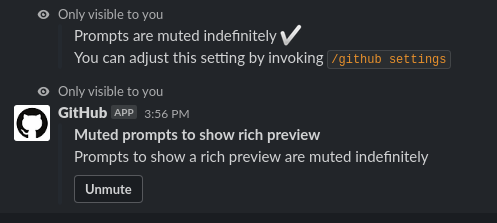
The prompts are very annoying. Any space used is space wasted when I don't want to use this feature. In certain workspaces both dismiss and show buttons just show a spinner so I have to explicitly delete them to remove clutter from the discussion. Because of this I also can't mute in these workspaces (I also don't wish to just send 5 random links).
The setting is super inconvenient and not at all clear. At least give us explicit control over this setting please.

Just to add one more voice: please add the ability to disable link previews for a channel.


I've tried to trigger the prompt more than 5 times as per the steps here: https://github.com/integrations/slack/issues/487#issuecomment-598238044
The mute indefinitely message did not come up. I'm a workspace admin and have set up the GH Slack App in the channel I triggered the messages/previews on.
I used issues from this repo, which is public. Not sure why it's not coming up.

I'm not sure if this is the same issue, but I find the github app messages to be waaay too big
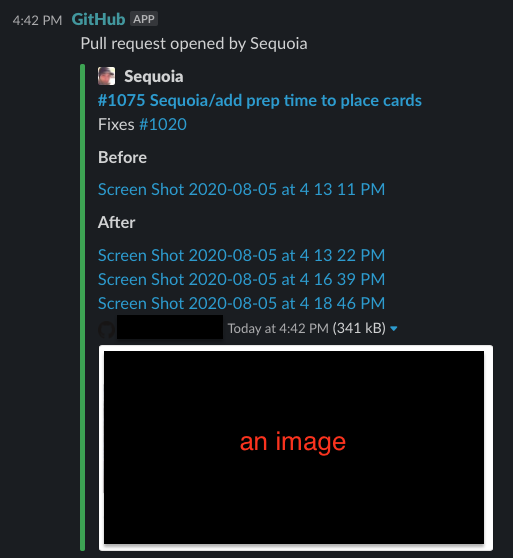
This is a huge amount of space for what I want, and it causes my coworkers to say (understandably): "I don't want us to use a bot like that, it's too much clutter. I'd like something along the lines of:
Sequoia opened a new PR: #1075 Sequoia/add prep time to place cards
What I'd like is a oneline setting. I have tried /github settings but I get "You do not have any settings configured." so I don't know if there's any way to change this.

Upvote for me too. I understand this thread is specific to github integration/unfurls, but a feature per channel in general would be super userful. I know I can turn them off for just me, but that's not what we need. Our android engineering channels use an rss to stay on top of android releases, but because I can't turn off auto-unfurling for the CHANNEL (those don't listen to my settings when posted by a plugin/bot, either), we end up with HUGE posts (e.g., Jetpack libraries updates). In order to reduce the intrusion of these posts, it would be lovely if I could control link unfurling and previews at a per-channel level. There are channels where I love this feature, but this one is not one of them.
I will add that I use the accessibility functions, zoom at 150% to protect my eyes long-term, so these are massive for me, but still size-able even at 100%. That said, these previews don't serve a purpose, and it's the same one over and over. That's not necessary, either.
https://ibb.co/y0pcp8C - 150% zoom https://ibb.co/x6GDWyJ - 100% zoom *NOTE: These images will auto-delete in 1 month.

I can't believe that you guys are forcing us to see all of these details .. please implement a control over this as soon as possible .. it's killing me :(

+1 for this feature. The previews quickly clutter the channel, and to globally deactivate them, per user, is nor really practical.

What I'd like is a
onelinesetting. I have tried/github settingsbut I get "You do not have any settings configured." so I don't know if there's any way to change this.
+1. I've hated this deeply for very long, it's way too expansive. Having a one-liner setting like you described would be perfect!

Is there some way to unfurl just the title of the PR in the preview?

/github settings worked for me – it's a per-user setting. Relief! It's crazy this integration doesn't respect the Show text previews of linked websites and Show images and files from linked websites Slack options.