
reactdatagrid

reactdatagrid copied to clipboard
 inovua
Rowspan strange behaviour when used on multiple columns
- what edition are you using: community
- version: 4.0.5
What you did: I'm try to use rowspan on multiple columns with different span. If column 0 rowspan is 1, on column 1 rospan is 2 and on column 2 rowspan is 4. I have always 4 rows. so the rowspan for each rows/columns are
| COL 0 | COL 1 | COL 2 |
|---|---|---|
| 1 | 2 | 4 |
| 1 | 1 | 1 |
| 1 | 2 | 1 |
| 1 | 1 | 1 |
Relevant code or config
const gridStyle = { minHeight: 550 };
const modeList = [{ id: 0, label: "AND" }, { id: 1, label: "OR" }];
const columns = [
  { name: 'channel', header: 'Channel', minWidth: 50, defaultFlex: 1 },
  {
    name: 'mode0',
    header: 'Level 0',
    defaultFlex: 1,
    width: 100,
    render: ({ value }) => modeList[value].label,
    rowspan: ({ data, value, rowIndex, column, dataSourceArray }) => {
      return data.id % 2 ? 1:2;
    }
  },
  {
    name: 'mode1',
    header: 'Level 1',
    defaultFlex: 1,
    width: 100,
    render: ({ value }) => modeList[value].label,
    rowspan: ({ data, value, rowIndex, column, dataSourceArray }) => {
      return data.id % 4 ? 1:4;
    }
  }

];

const dS = [
  {id:0, channel:"CH-0", mode0:0, mode1:0},
  {id:1, channel:"CH-1", mode0:0, mode1:0},
  {id:2, channel:"CH-2", mode0:0, mode1:0},
  {id:3, channel:"CH-3", mode0:0, mode1:0}

];

  const [dataSource, setDataSource] = useState(dS);


  return (
    <div>

      <ReactDataGrid

        theme="amber-dark"
        idProperty="id"
        defaultActiveCell={DEFAULT_ACTIVE_CELL}

        style={gridStyle}
        columns={columns}
        dataSource={dataSource}
        editable={false}


      />
    </div>
  );
What happened:
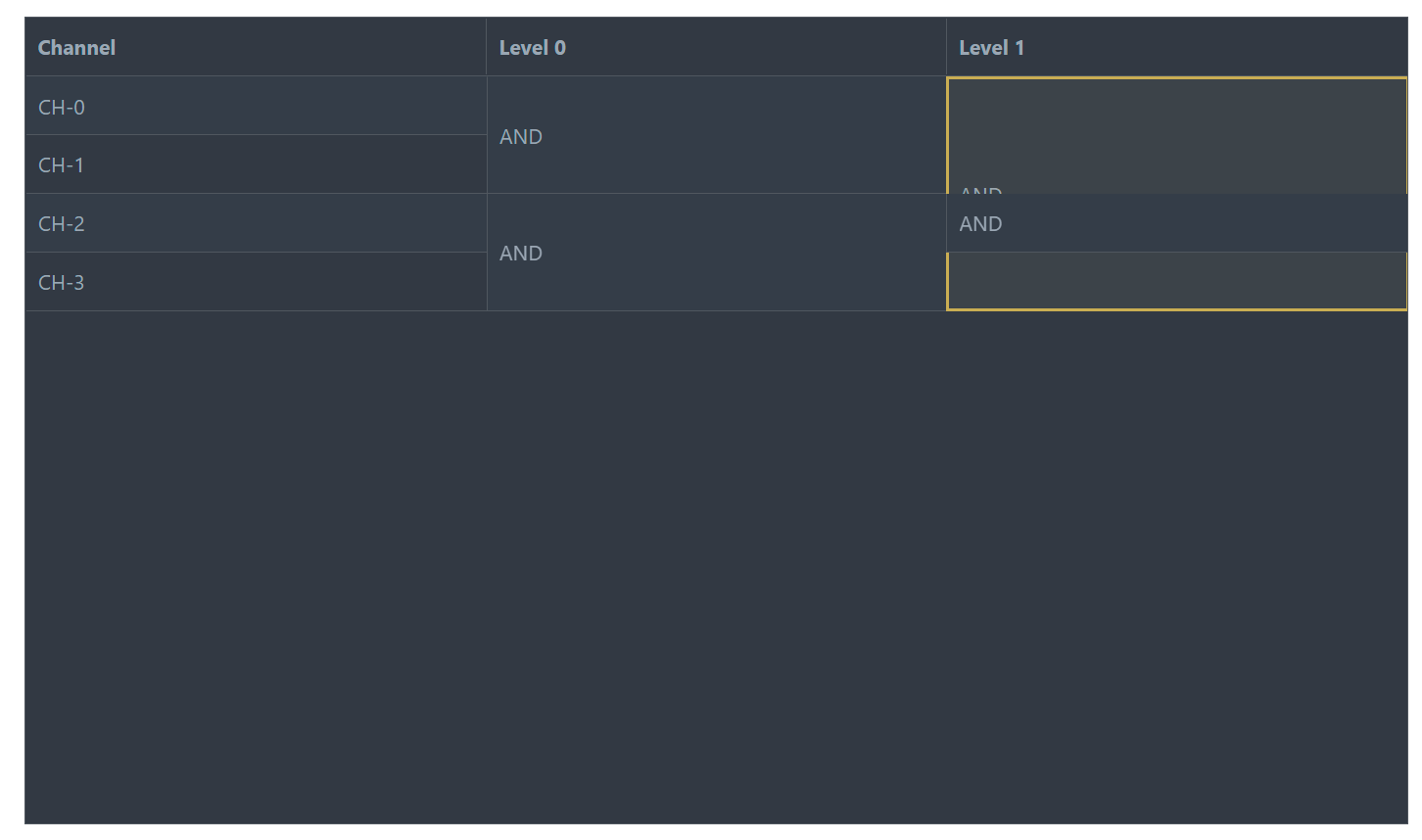
Reproduction repository:
https://codesandbox.io/s/inovua-reactdatagrid-bug-on-rowspan-gh5cj?file=/src/App.js
visualization is not correct on the second colum, row2 the rowspan do not hide the cell 2,2
Suggested solution:
