

 innoveit
BleManagerDidUpdateValueForCharacteristic not being called for Accelerometer?
Version
Tell us which versions you are using:
- react-native-ble-manager v6.6.4
- react-native v0.59.8
- iOS/Android v8.0
Expected behaviour
I have been trying to fetch accelerometer data, Now I have an issue that when notifications starts the listener doesn't call.
setTimeout(()=>{
id = peripheral.id;
BleManager.startNotification(id,MoveMentServiceUUID,MoveMentCharUUID).then(()=>{
console.log("Movement Notification started>>>> on "+ peripheral.id);
bleManagerEmitter.addListener(
'BleManagerDidUpdateValueForCharacteristic',
({ **value,id,MoveMentServiceUUID, MoveMentServiceUUID**}) => {
// Convert bytes array to string
const data = bytesToString(value);
console.log(Recieved ${data} for characteristic ${characteristic});
}
);
});
},300);
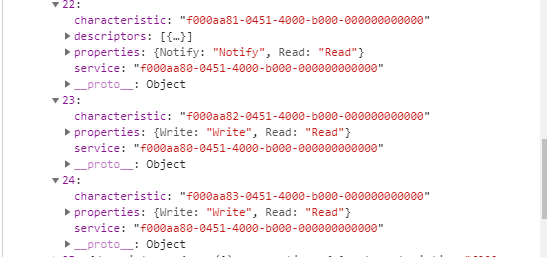
There are 5 UUIDs for movement sensor, I am pretty confuse to use them:
var MoveMentServiceUUID = "f000aa80-0451-4000-b000-000000000000";
var MoveMentCharUUID = "f000aa81-0451-4000-b000-000000000000";
var MoveMentConfigUUID = "f000aa82-0451-4000-b000-000000000000";
var MovMentPeriodUUID = "f000aa83-0451-4000-b000-000000000000";
var MovMentNotifUUID ="00002902-0000-1000-8000-00805f9b34fb";
Actual behaviour
Some value should be read into the Listener
Steps to reproduce
- Scaning
- Connecting
- Started Notification
- Reading
Stack trace and console log
Hint: it would help a lot if you enable the debugger ("Pause on exceptions" in the "Source" panel of Chrome dev tools) and spot the place where the error is thrown
Notifications turns on, but the listener is not called.
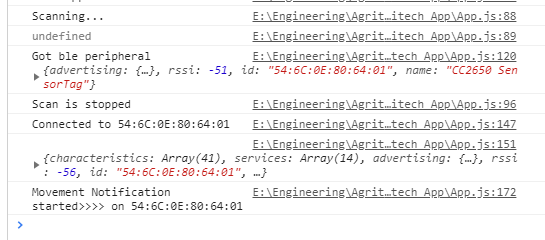
I think I am passing wrong arguments to the listener, and liberary has quite a short description about the listener.
Please Help me out

Hi, I don't see any error, maybe you have to start the notification with a command to the device.


Same issue here, startNotification gives success, but BleManagerDidUpdateValueForCharacteristic callback is not called when write.


Hi @juninhoall, for me, it worked after I sent correct command, here is the flow I tried, it may help you.
useEffect(() => {
    try {
      BleManager.start({showAlert: false})
        .then(() => debugLog('BleManager started.'))
        .catch(error => errorLog('BeManager could not be started.', error));
    } catch (error) {
      errorLog('unexpected error starting BleManager.', error);
      return;
    }

    const listeners = [
      bleManagerEmitter.addListener(
        'BleManagerDiscoverPeripheral',
        handleDiscoverPeripheral,
      ),
      bleManagerEmitter.addListener(
        BleEventType.BleManagerDidUpdateState,
        data => {
          debugLog('BleManagerDidUpdateState', data);
        },
      ),
      bleManagerEmitter.addListener('BleManagerStopScan', handleStopScan),
      bleManagerEmitter.addListener(
        BleEventType.BleManagerDidUpdateNotificationStateFor,
        handleNotify,
      ),
      bleManagerEmitter.addListener(
        'BleManagerDisconnectPeripheral',
        handleDisconnectedPeripheral,
      ),
    ];
    handleAndroidPermissions(); //to make sure user have given bluetooth and location permission

    return () => {
      debugLog('[app]', 'main component unmounting. Removing listeners...');
      for (const listener of listeners) {
        listener.remove();
      }
    };
    // eslint-disable-next-line react-hooks/exhaustive-deps
  }, []);

//Start scan it will call BleManagerDiscoverPeripheral
 BleManager.scan([], 5, false, {
          matchMode: BleScanMatchMode.Sticky,
          scanMode: BleScanMode.LowLatency,
          callbackType: BleScanCallbackType.AllMatches,
        })
          .then(() => {
            debugLog('[startScan]', 'scan promise returned successfully.');
          })
          .catch(err => {
            errorLog('[startScan]', `ble scan returned in error ${err}`);
          });
//Then connect to device
await BleManager.connect(peripheral?.id);

//After connection retrieve services
await BleManager.retrieveServices(
          peripheral?.id,
        );

//If your device supports notify characteristic, above response will give list of supported service and characteristics
BleManager.startNotification(peripheral?.id,/*service id of that characteristic*/,/*characteristic id of that characteristic*/)
      .then(async res => {
        debugLog('Subscribed to characteristic', res);
        setIsSubscribed(true);
        bleManagerEmitter.addListener(
          BleEventType.BleManagerDidUpdateValueForCharacteristic,
          handleUpdateValueForCharacteristic,
        );
      })
      .catch(error => {
        errorLog('Error subscribing to characteristic:', error);
      });

 //Once device is connected and subscribed request from the device with the correct command to get some response, in my case I was triggering wrong commad so was not getting the response
BleManager.writeWithoutResponse(
      peripheral?.id ?? '',
     /*device service if for read*/,
     /*device characteristic ID for read*/,
      [0x02, 0x01, 0x00, 0x00, 0x00, 0x03],  //My command is to get the firmware version of the device, you will need to find correct command for your device
    )
      .then(() => debugLog('Get firmware version'))
      .catch(error =>
        warnLog('Error getting firmware version', error),
      );
This last call should trigger BleManagerDidUpdateValueForCharacteristic
Hi @juninhoall, for me, it worked after I sent correct command, here is the flow I tried, it may help you.
useEffect(() => {
    try {
      BleManager.start({showAlert: false})
        .then(() => debugLog('BleManager started.'))
        .catch(error => errorLog('BeManager could not be started.', error));
    } catch (error) {
      errorLog('unexpected error starting BleManager.', error);
      return;
    }

    const listeners = [
      bleManagerEmitter.addListener(
        'BleManagerDiscoverPeripheral',
        handleDiscoverPeripheral,
      ),
      bleManagerEmitter.addListener(
        BleEventType.BleManagerDidUpdateState,
        data => {
          debugLog('BleManagerDidUpdateState', data);
        },
      ),
      bleManagerEmitter.addListener('BleManagerStopScan', handleStopScan),
      bleManagerEmitter.addListener(
        BleEventType.BleManagerDidUpdateNotificationStateFor,
        handleNotify,
      ),
      bleManagerEmitter.addListener(
        'BleManagerDisconnectPeripheral',
        handleDisconnectedPeripheral,
      ),
    ];
    handleAndroidPermissions(); //to make sure user have given bluetooth and location permission

    return () => {
      debugLog('[app]', 'main component unmounting. Removing listeners...');
      for (const listener of listeners) {
        listener.remove();
      }
    };
    // eslint-disable-next-line react-hooks/exhaustive-deps
  }, []);

//Start scan it will call BleManagerDiscoverPeripheral
 BleManager.scan([], 5, false, {
          matchMode: BleScanMatchMode.Sticky,
          scanMode: BleScanMode.LowLatency,
          callbackType: BleScanCallbackType.AllMatches,
        })
          .then(() => {
            debugLog('[startScan]', 'scan promise returned successfully.');
          })
          .catch(err => {
            errorLog('[startScan]', `ble scan returned in error ${err}`);
          });
//Then connect to device
await BleManager.connect(peripheral?.id);

//After connection retrieve services
await BleManager.retrieveServices(
          peripheral?.id,
        );

//If your device supports notify characteristic, above response will give list of supported service and characteristics
BleManager.startNotification(peripheral?.id,/*service id of that characteristic*/,/*characteristic id of that characteristic*/)
      .then(async res => {
        debugLog('Subscribed to characteristic', res);
        setIsSubscribed(true);
        bleManagerEmitter.addListener(
          BleEventType.BleManagerDidUpdateValueForCharacteristic,
          handleUpdateValueForCharacteristic,
        );
      })
      .catch(error => {
        errorLog('Error subscribing to characteristic:', error);
      });

 //Once device is connected and subscribed request from the device with the correct command to get some response, in my case I was triggering wrong commad so was not getting the response
BleManager.writeWithoutResponse(
      peripheral?.id ?? '',
     /*device service if for read*/,
     /*device characteristic ID for read*/,
      [0x02, 0x01, 0x00, 0x00, 0x00, 0x03],  //My command is to get the firmware version of the device, you will need to find correct command for your device
    )
      .then(() => debugLog('Get firmware version'))
      .catch(error =>
        warnLog('Error getting firmware version', error),
      );
This last call should trigger
BleManagerDidUpdateValueForCharacteristic
Hello, I am trying the same thing, but when I BleManager.startNotification do I have to put the notify characteristics or the write, and why I need to notify at first ?
