
ai-dj
 ai-dj copied to clipboard
 innermost47
The sampler that dreams. AI-powered VST3 for real-time music generation. Generate tempo-synced loops, trigger via MIDI, sculpt the unexpected. 8-track sampler meets infinite sound engine. No pre-made...
OBSIDIAN-Neural
🎵 Real-time AI music generation VST3 plugin for live performance
⚡ Quick Start: Get your API key and start generating in minutes — no GPU or setup required. 🔥 Free codes available ↓
📄 Late Breaking Paper - AIMLA 2025 - Presented at the first AES International Conference on Artificial Intelligence and Machine Learning for Audio (Queen Mary University London, Sept 8-10, 2025)
🎓 Tutorial - From DAW setup to live performance (French + English subtitles)

Live AI music generation in your DAW
Draw-to-Audio Live Demo
Watch the draw-to-audio feature in action - Live improvisation session showing real-time sketch-to-sound generation:
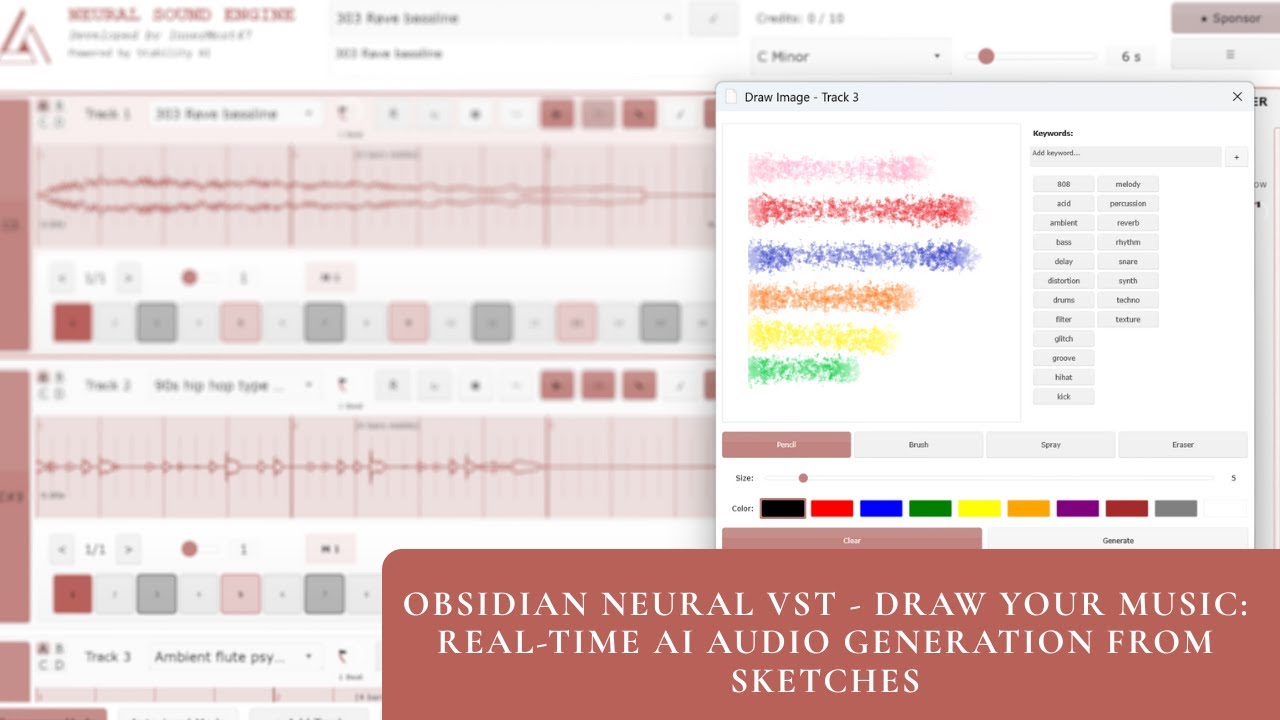
Raw improvisation showcasing the experimental draw-to-audio workflow: sketch patterns → AI interprets visuals → generates matching loops on the fly.
What Obsidian Neural does
Type words → Get musical loops instantly. No stopping your creative flow.
- 8-track sampler with MIDI triggering (C3-B3)
- 4 pages per track (A/B/C/D) - Switch variations instantly by clicking page buttons
- Draw-to-sound - Sketch your ideas visually and let AI interpret them musically
- Perfect DAW sync - Auto time-stretch to project tempo
- Real-time generation - No pre-recorded samples
Text example: Type "dark techno kick" → AI generates techno loop → Trigger with MIDI while jamming
Drawing example: Draw a chaotic pattern → AI interprets visual elements as musical characteristics → Generates matching loop
What Obsidian Neural does NOT
OBSIDIAN Neural is NOT a song generator like Suno or Udio. It's a performance tool for musicians:
- No full songs in one click - You build your track loop by loop
- No lyrics or vocals - Focus on instrumental loops and sound design
- No auto-arrangement - You're the composer, AI is your loop generator
Think of it as: A creative sampler that generates sounds on-demand, not a "press play and get a song" tool.
Features
Text-to-Audio Generation
Type natural language descriptions and get instant musical loops:
- "dark techno kick"
- "ambient pad with reverb"
- "808 bass with distortion"
Draw-to-Audio Generation
Express your musical ideas visually (original concept by A.D.) - Each track includes a drawing canvas where you can sketch patterns, shapes, or abstract concepts. The AI analyzes your drawing using a Vision Language Model (VLM) and translates visual elements into musical descriptions:
- Click the Draw button on any track
- Use pencil, brush, spray, or eraser tools
- Choose colors and brush sizes
- Click Generate to send your drawing
How it works:
- Your drawing is encoded as Base64 image data
- A Vision Language Model interprets the visual elements using musical vocabulary
- The generated textual description is sent to the audio generation model
- Result: A unique sound that matches your visual concept
Example workflow:
- Draw sharp, angular lines → AI interprets as "aggressive staccato synth"
- Sketch flowing curves → AI interprets as "smooth flowing pad"
- Use red/orange colors → AI might associate with "warm analog tones"
- Create chaotic patterns → AI interprets as "glitchy percussion"
Canvas features:
- 512x512 drawing area
- 4 brush types (Pencil, Brush, Spray, Eraser)
- 10 color presets
- Adjustable brush size (1-50)
- State preservation per track/page
This feature bridges the gap between visual creativity and sonic experimentation, allowing producers to explore sound design through intuitive visual metaphors.
Note: This draw-to-audio feature is currently experimental and under active development.
Quick Start
🟣 Cloud Inference API (Recommended)
Generate AI loops directly from your DAW with zero setup. Professional quality.
- Download VST3 from Releases
- Get your API key from obsidian-neural.com
- Load the VST in your DAW
- Configure in the plugin:
- Click the ⚙️ settings button (top right) or wait for the first-time setup dialog
- Choose "Server/API" mode
- Enter Server URL:
https://ai-harmony.duckdns.org/obsidian - Enter your API key
- Click "Save & Continue"
👉 Detailed setup guide:
📘 Getting Started
🎚️ First Step - Using the Plugin in Your DAW
🎨 Draw-to-Audio - Express Your Musical Ideas Visually
🎛️ Bank Management - Organize and Manage Your Generated Sounds
Pricing:
- Free: 10 credits (10 samples) - Try it out
- Starter: €14.99/month - 500 credits (500 samples)
- Pro: €29.99/month - 1500 credits (1500 samples)
- Studio: €59.99/month - 4000 credits (4000 samples)
Each generation costs 1 credit (1 LLM generation + 1 audio generation). Samples up to 30 seconds, ~10s generation time.
Benefits:
- Zero setup - Works immediately
- Professional quality
- Variable duration (up to 30s)
- No GPU or powerful hardware required
- Perfect for live performance
🔵 Self-Hosted Server + GPU (Advanced)
Best for privacy, customization, and unlimited generations.
- Get Stability AI access
- Follow build from source instructions
- Run server interface:
python server_interface.py - Download VST3 from Releases
- Load the VST in your DAW
- Configure in the plugin:
- Click the ⚙️ settings button (top right) or wait for the first-time setup dialog
- Choose "Server/API" mode
- Enter your local server URL (default:
http://localhost:8000) - Leave API key empty for local server
- Click "Save & Continue"
Benefits: Unlimited generations, full privacy, variable duration
Requirements: GPU with CUDA support, Python environment
🟢 Local Models (Offline)
Runs completely offline. No servers, Python, or GPU needed.
- Get Stability AI access
- Download models from innermost47/stable-audio-open-small-tflite
- Copy to
%APPDATA%\OBSIDIAN-Neural\stable-audio\ - Download VST3 from Releases
- Choose "Local Model" in plugin
Requirements: 16GB+ RAM, Windows (macOS/Linux coming soon)
Current limitations:
- Fixed 10-second generation
- Some timing/quantization issues
- High RAM usage
Which Option Should I Choose?
| Feature | Cloud API | Self-Hosted | Local Models |
|---|---|---|---|
| Setup Difficulty | ⭐ Easy | ⭐⭐⭐ Advanced | ⭐⭐ Moderate |
| Hardware Requirements | None | GPU + CUDA | 16GB+ RAM |
| Generation Quality | ⭐⭐⭐ Best | ⭐⭐ Good | ⭐ Bad |
| Variable Duration | ✅ Up to 30s | ✅ Yes | ❌ Fixed 10s |
| Cost | Pay per use | Free (after setup) | Free |
| Privacy | Data processed on cloud | Full privacy | Full privacy |
| Internet Required | ✅ Yes | ❌ No | ❌ No |
| Best For | Beginners, live gigs | Privacy-focused, unlimited use | Offline work, testing |
Community
🎯 Share your jams! I'm the only one posting OBSIDIAN videos so far. Show me how YOU use it!
📧 Contact: Form
💬 Discussions: GitHub Discussions
📺 Examples: Community Sessions
🌐 Website: obsidian-neural.com
Download
VST3 Plugin:
Install to:
- Windows:
C:\Program Files\Common Files\VST3\ - macOS:
~/Library/Audio/Plug-Ins/VST3/ - Linux:
~/.vst3/
Status & Support
🚀 Active development - Updates pushed regularly
⭐ 136+ GitHub stars - Thanks for the support!
🐛 Issues: Report bugs here
📊 API Status: Check status page for real-time service monitoring
🎯 Community Milestone
Road to 200 Stars! Currently at 136+ 🌟
When we hit 200 stars, we're celebrating with a community giveaway:
Prize: 1 year of Starter Pack free access (€179.88 value)
Eligibility: Active community members (stars, discussions, issues, contributions)
Every star, contribution, and piece of feedback helps make Obsidian Neural better. Thank you for being part of this journey! 🙏
License
- 🆓 GNU Affero General Public License v3.0 (Open source)
AI Model: Stability AI Community License
More Projects
🎵 Music Production Tools
🥁 BeatCrafter - Intelligent MIDI drum pattern generator VST3
Proof of concept for live performance with foot controller. Generates authentic drum patterns that evolve from simple to complex.
🎛️ Randomizer - Generative music studio
Experimental web-based music creation tool with procedural generation.
🎧 Audio Content
🎵 YouTube Channel - Original compositions
Electronic music, ambient soundscapes, metal, and experimental productions by InnerMost (2010-2023).
💬 Connect
📧 Contact: Form
💬 GitHub: @innermost47
🌐 Website: anthony-charretier.fr
Credits & Attribution
Developed by InnerMost47 (Anthony Charretier)
Special thanks to:
- A.D. for the original draw-to-audio concept
- Stability AI for Stable Audio Open
- The open-source community
- All beta testers and early adopters
OBSIDIAN-Neural - Where artificial intelligence meets live music performance.
Made with 🎵 in France




Metadata
Owner
 innermost47
Metadata
The sampler that dreams. AI-powered VST3 for real-time music generation. Generate tempo-synced loops, trigger via MIDI, sculpt the unexpected. 8-track sampler meets infinite sound engine. No pre-made...