

 influxdata
Chronograf v2.x Table has no way to sort descending
Tools US 2.x cluster.
Dashboard: Log File Studies V1.x - Shards
Cell: Shard ID Found
This code:
from(bucket: v.bucket) |> range(start: v.timeRangeStart, stop: v.timeRangeStop) |> filter(fn: (r) => r._measurement == "log") |> filter(fn: (r) => r._field == "msg") |> filter(fn: (r) => exists r.shard_id) |> drop(columns: ["_measurement","_start","_stop","_field","op_name","service","lvl","log_id"]) |> drop(columns: ["db","engine"]) |> group(columns: ["shard_id"]) |> count(column: "_value") |> group() |> sort(columns: ["_value"], desc: true) |> yield()
Will give this raw data:
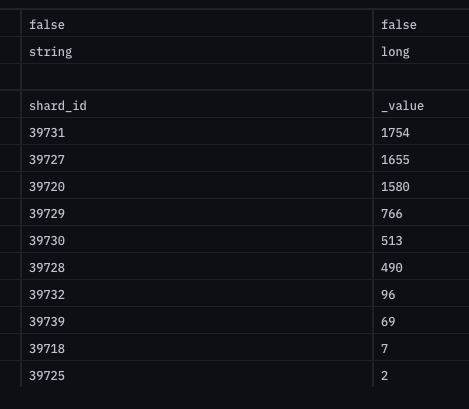
But doing a table display, I currently cannot pick "No Sort" or some other option to indicate the table is already sorted by Flux. Currently, I must use the default "_time" or pick my "_value". Picking the above for my data set will result in an ascending sort which is not very useful.
Either add a way to say "No Sort" or "As Is" so the sort can be done in Flux or add second drop down box to allow me to choose Asc and Desc
(Yes, I can hit the column sort in the table afterward and I use that as a workaround but I would like my data to start out sorted descending.)

Same here, I want to set table to display more recent values on top, but it seems that there is no way to do that. I have to use Grafana instead to do visualisations?
