

 influxdata
All datapoints does not always reach the database in multiprocessing scenario for the `flush_interval < 1000`
Steps to reproduce: Run the following code:
import time
import multiprocessing
from influxdb_client import InfluxDBClient, Point, WritePrecision
from influxdb_client.client.write_api import WriteType, WriteOptions
from influxdb_client.client.util.multiprocessing_helper import MultiprocessingWriter

token = "TOKEN HERE=="
org = "my-org"
bucket = "reproduce_bug"

def write_process(q):
    # with InfluxDBClient(url="http://localhost:8086", token=token, org=org) as client:
    with MultiprocessingWriter(url="http://localhost:8086", token=token, org=org, write_options=WriteOptions(batch_size=1000)) as writer:
        # write_api = client.write_api(write_options=WriteOptions(batch_size=1000))#, write_type=WriteType.batching))
        now = time.time_ns()
        processed = 0
        while True:
            i = q.get()
            point = Point.from_dict({
                "measurement": "bug_test",
                "tags": {},
                "fields": {
                    "id": i,
                    "temp": 2.2324234232,
                    "temp2": 221,
                    "temp3": 2
                },
                "time": now+processed
            }, WritePrecision.NS)

            writer.write(bucket=bucket, record=point)
            processed += 1
            print(processed)

def feeder_process(q):
    for i in range(250000):
        q.put(i)

def feeder_process2(q):
    for i in range(250000):
        q.put(i)

if __name__=='__main__':
    q = multiprocessing.Queue()
    write_p = multiprocessing.Process(target=write_process, args=(q,))
    feeder_p = multiprocessing.Process(target=feeder_process, args=(q,))
    feeder_p2 = multiprocessing.Process(target=feeder_process2, args=(q,))
    write_p.start()
    feeder_p.start()
    feeder_p2.start()
    write_p.join()
    feeder_p.join()
    feeder_p2.join()
Expected behavior: The code above produces 500 000 arbitrary data points with unique IDs. When the code has processed all the 500 000 data points, it is expected that all of them should be present in the InfluxDB database, which can be verified by running a |> count() on the measurement.
Actual behavior: By running a |>count() on the data in e.g., Chronograf, there are sometimes less than 500 000 samples. This does not happen every time and it cannot seem to reproduce with MultiprocessingWriter instead of with the normal write_api in the code snippet. In my real-world scenario, however, the bug persists even with MultiprocessingWriter. I have tried to increase the frequency of the bug by adding more feeder processes, which seems to have some effect on it.
The actual scenario where the bug started to appear is similar to this code snippet. I have several processes that produce data and place it into a results queue, the results queue is read by a handler process that writes the results to the database. In the real scenario, there is always between around 5-30 samples missing. I have removed the real data in the real scenario and replaced it with a simple ID field to track the packets and to ensure that the data isn't the cause. I have also added unique timestamps to ensure that no data point is overwritten.
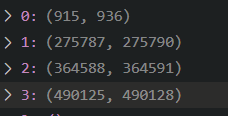
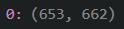
When analyzing the real-world scenario data I found several "gaps" in the IDs, which implies that the packet with IDs within the gaps are missing. I have attached a screenshot of my analysis of two tests below. In the top picture, 4 intervals with missing packets were identified, and in the second picture, only one was identified. Please let me know if the images need further explanation.
Specifications:
- Client Version: 1.26.0
- InfluxDB Version: 2.1.1
- Platform: Windows 10, influxdb in docker

UPDATE: When I increased the batch size to 10 000 instead of 1000, the bug was reproduced even with the MultiprocessingWriter. Similarly, by decreasing flush interval to 0.1 seconds, the bug was reproduced. In this case 499959/500000 packets were present in the database, which means that 41 packets got lost somewhere. Could this possibly have something to do with flush implementation below: https://github.com/influxdata/influxdb-client-python/blob/5168a04983e3b70a9451fa3629fd54db08b91ecd/influxdb_client/client/write_api.py#L368-L371
UDATE 2: When I increased the flush interval to 100 seconds in my real-world scenario, I managed to get ALL data points to the database for the first time. I used a batch size of 1000, which ensured that the flush would ONLY get triggered when the last < 1000 data points are to be written. This further raises my suspicion about the flush implementation.
Hi @deivard,
thanks for using our client.
The problem is in your point which doesn't produces unique time series: https://docs.influxdata.com/influxdb/cloud/reference/key-concepts/data-elements/#series
The following code works correctly:
import multiprocessing
import time

from influxdb_client import Point, WritePrecision
from influxdb_client.client.util.multiprocessing_helper import MultiprocessingWriter
from influxdb_client.client.write_api import WriteOptions

token = "my-token"
org = "my-org"
bucket = "my-bucket"


def write_process(q):
    with MultiprocessingWriter(url="http://localhost:8086", token=token, org=org,
                               write_options=WriteOptions(batch_size=1000), debug=True) as writer:
        now = time.time_ns()
        processed = 0
        while True:
            i = q.get()
            if i is None:
                # Poison pill means terminate
                break
            point = Point.from_dict({
                "measurement": "bug_test",
                "tags": {
                    "id": i
                },
                "fields": {
                    "temp": 2.2324234232,
                    "temp2": 221,
                    "temp3": 2
                },
                "time": now + processed
            }, WritePrecision.NS)

            writer.write(bucket=bucket, record=point)
            processed += 1
            print(f"{processed}: {point.to_line_protocol(WritePrecision.NS)}")


def feeder_process(q):
    for i in range(250000):
        q.put(i)


def feeder_process2(q):
    for i in range(250000, 500000):
        q.put(i)


if __name__ == '__main__':
    q = multiprocessing.Queue()
    write_p = multiprocessing.Process(target=write_process, args=(q,))
    feeder_p = multiprocessing.Process(target=feeder_process, args=(q,))
    feeder_p2 = multiprocessing.Process(target=feeder_process2, args=(q,))
    write_p.start()
    feeder_p.start()
    feeder_p2.start()
    feeder_p.join()
    feeder_p2.join()
    q.put(None)
    write_p.join()
and corresponding flux query:
from(bucket: "my-bucket")
  |> range(start: v.timeRangeStart, stop: v.timeRangeStop)
  |> filter(fn: (r) => r["_measurement"] == "bug_test" and r["_field"] == "temp")
  |> group()
  |> count(column: "_value")
Regards

Hi @bednar,
Thank you for your reply. It was my understanding that as long as the timestamp is unique, it counts as a unique time series. In the code I attached, the timestamps are unique. I enforce uniqueness in the timestamp by incrementing the timestamp each time a packet is processed: "time": now+processed.
Early in my research project, I tried the approach where a unique ID is added as a tag to ensure that all measurements are unique, but that, however, made the database so slow it could not handle the rate at which data was sent to it. It used up all available RAM and most of the CPU. I assumed that I tried to index the unique ID tags and kept as much as it could in memory. Perhaps it was something wrong with our setup at the time, but it was enough for me to consider it an unviable approach.
Anyway, I ran your code with a slight modification that enforced many flushes, and this time only 499975 / 500000 points were accounted for, even with the ID in the tag. Try running the reproduction code a couple of times with a batch size of 10 000 and flush interval of 100ms, and check if all points are accounted for this time.
Hi @bednar,
Thank you for your reply. It was my understanding that as long as the timestamp is unique, it counts as a unique time series. In the code I attached, the timestamps are unique. I enforce uniqueness in the timestamp by incrementing the timestamp each time a packet is processed: "time": now+processed.
You are right, sorry for misunderstood.
Early in my research project, I tried the approach where a unique ID is added as a tag to ensure that all measurements are unique, but that, however, made the database so slow it could not handle the rate at which data was sent to it. It used up all available RAM and most of the CPU. I assumed that I tried to index the unique ID tags and kept as much as it could in memory. Perhaps it was something wrong with our setup at the time, but it was enough for me to consider it an unviable approach.
The high cardinality can cause consumptions of a lot of resources. Please take a look to Hardware sizing - https://docs.influxdata.com/influxdb/v1.8/guides/hardware_sizing/
Anyway, I ran your code with a slight modification that enforced many flushes, and this time only 499975 / 500000 points were accounted for, even with the ID in the tag. Try running the reproduction code a couple of times with a batch size of 10 000 and flush interval of 100ms, and check if all points are accounted for this time.
It looks like that problem is bound to lower flush_interval. I've use the following piece of code for testing. For the flush_interval >= 1000 everything works fine.
import multiprocessing
import time

from influxdb_client import Point, WritePrecision
from influxdb_client.client.influxdb_client import InfluxDBClient
from influxdb_client.client.util.multiprocessing_helper import MultiprocessingWriter
from influxdb_client.client.write_api import WriteOptions

url = "http://localhost:8086"
token = "my-token"
org = "my-org"
bucket = "my-bucket"
measurement = "bug_test_" + str(time.time_ns())
debug = False


def write_process(q, m):
    with MultiprocessingWriter(url=url, token=token, org=org,
                               write_options=WriteOptions(batch_size=1000, flush_interval=1000),
                               debug=debug) as writer:
        now = time.time_ns()
        processed = 0
        while True:
            i = q.get()
            if i is None:
                # Poison pill means terminate
                break
            point = Point.from_dict({
                "measurement": m,
                "tags": {},
                "fields": {
                    "id": i,
                    "temp": 2.2324234232,
                    "temp2": 221,
                    "temp3": 2
                },
                "time": now + processed
            }, WritePrecision.NS)

            writer.write(bucket=bucket, record=point)
            processed += 1
            print(processed)


def feeder_process(q):
    for i in range(250000):
        q.put(i)


def feeder_process2(q):
    for i in range(250000, 500555):
        q.put(i)


def check_written_data():
    with InfluxDBClient(url=url, token=token, org=org, debug=debug) as client:
        count = client.query_api().query(f'''
                from(bucket: "{bucket}")
                    |> range(start: 0, stop: now())
                    |> filter(fn: (r) => r["_measurement"] == "{measurement}" and r["_field"] == "temp")
                    |> group()
                    |> count(column: "_value")
            ''')[0].records[0]['_value']
        print(f"Written count: {count}")


if __name__ == '__main__':
    q = multiprocessing.Queue()
    write_p = multiprocessing.Process(target=write_process, args=(q, measurement))
    feeder_p = multiprocessing.Process(target=feeder_process, args=(q,))
    feeder_p2 = multiprocessing.Process(target=feeder_process2, args=(q,))
    write_p.start()
    feeder_p.start()
    feeder_p2.start()
    feeder_p.join()
    feeder_p2.join()
    print("-> send poison pill")
    q.put(None)
    print("-> wait to finish writes")
    write_p.join()
    print(f"-> check written data for: {measurement}")
    check_written_data()
As a workaround you can set the flush_interval to something like:
import threading
flush_interval=threading.TIMEOUT_MAX / 1000
Hi,
Thank you for your reply. I am fairly certain that the bug is not tied to flush intervals < 1000. I believe it is dependent on the packet rate AND flush interval. If the packet rate is high enough for the flush interval to never be reached, the bug does not seem to appear. I have only encountered the bug when the batch is being flushed, i.e., the packet rate is low enough for the flush to trigger.
On another note, I tried a high flush interval (500 000 ms) in my research project, and still, some points are not received by the database. I am almost entirely certain that they all have unique timestamps, so they should not be overwritten. The disappearing points show no obvious pattern and are placed sporadically throughout the monitor session. I cross-validated the data via a file that was created simultaneously as the data was sent to the database with data I retrieved from the database, which makes me confident that there is no problem with the logic of the monitor application, but instead with the sending of points to the database, even while no batches are flushed.
Am I missing some QoS setting on the Influxdb-client that maybe uses an approach that favors speed over guaranteed packet transmission? Are packets guaranteed to be transmitted successfully if no error occurs?
Am I missing some QoS setting on the Influxdb-client that maybe uses an approach that favors speed over guaranteed packet transmission?
There isn't a particular setting for packet transmission, but we also have support for synchronous writes without underlaying batching: How to use to prepare batches for synchronous write into InfluxDB
Are packets guaranteed to be transmitted successfully if no error occurs?
Yes, but maybe there is a problem with server part, because the client depends on successful response form InfluxDB: https://docs.influxdata.com/influxdb/v2.2/write-data/troubleshoot/#review-http-status-codes
Hi @bednar sounds like you did run into issues with a flush interval that is under 1 second? Was any further investigation done?

It has been a while since I created this issue and worked with the client, but since there seems to be a misunderstanding I want to clarify that the bug is not, according to my investigations, a direct consequence of the flush interval being lower than 1 second. It is instead caused by the buffer size and write rate in combination with the flush interval: If there are not enough writes to fill up the buffer in the flush interval time, the buffered samples will be flushed which may lead to some of them being lost. It must be a problem with the flush algorithm since if there are no flushes, which happens if the buffer fills up before the flush interval is reached, there are no lost samples.
Hi @bednar sounds like you did run into issues with a flush interval that is under 1 second? Was any further investigation done?
@powersj, I don't remember exactly what was causes the problem... 😢
I have the same issue and was able to reproduce by just iterating over for loops twice with something like
import time

for _ in range(0, 2):
 for i in range(0, 100):
   client.write_api(write_options=SYNCHRONOUS).write(bucket='test', org='my-org', record={'measurement': 'testing', 'fields': {f'test_{i}': i}, 'time': time.time_ns()})
On Influx, I do see multiple queries to write the data but see only the first value from the loop in the bucket. If you re-run the loop after a few seconds then you the second value being entered. I have tried all different write precision options and no change in the result
However, by this point, there should 4 data points per field and I only see 2 on Influx

However, by this point there should 4 data points per field and I only see 2 on Influx
@abhi1693 Are you certain that each timestamp is unique? If I'm not mistaken the granularity of time.time_ns() is rather low, which means that there could be loops where the writes have the exact same timestamp. If they have the same timestamp and no other unique identifiers the values will be overwritten and the overwritten values will be lost. Try adding a unique value to the timestamp or an id tag.
@deivard They all seem unique to me
2022-08-17T09:58:05.002052Z [info     ] [InfluxClient] Initializing connection to http://localhost:8086 [oms.influxdb.base]
2022-08-17T09:58:05.004251Z [info     ] [InfluxClient] Writing record: {'measurement': 'test', 'fields': {'test_0': 0}, 'tags': {'does': 2, 'work': 1}, 'time': 1660730285004221197} [oms.influxdb]
2022-08-17T09:58:05.013990Z [info     ] [InfluxClient] Writing record: {'measurement': 'test', 'fields': {'test_1': 1}, 'tags': {'does': 2, 'work': 1}, 'time': 1660730285013937787} [oms.influxdb]
2022-08-17T09:58:05.022040Z [info     ] [InfluxClient] Writing record: {'measurement': 'test', 'fields': {'test_2': 2}, 'tags': {'does': 2, 'work': 1}, 'time': 1660730285021996872} [oms.influxdb]
2022-08-17T09:58:05.029413Z [info     ] [InfluxClient] Writing record: {'measurement': 'test', 'fields': {'test_3': 3}, 'tags': {'does': 2, 'work': 1}, 'time': 1660730285029384855} [oms.influxdb]
2022-08-17T09:58:05.036933Z [info     ] [InfluxClient] Writing record: {'measurement': 'test', 'fields': {'test_4': 4}, 'tags': {'does': 2, 'work': 1}, 'time': 1660730285036878498} [oms.influxdb]
2022-08-17T09:58:05.044650Z [info     ] [InfluxClient] Writing record: {'measurement': 'test', 'fields': {'test_0': 0}, 'tags': {'does': 2, 'work': 1}, 'time': 1660730285044593578} [oms.influxdb]
2022-08-17T09:58:05.048705Z [info     ] [InfluxClient] Writing record: {'measurement': 'test', 'fields': {'test_1': 1}, 'tags': {'does': 2, 'work': 1}, 'time': 1660730285048656155} [oms.influxdb]
2022-08-17T09:58:05.052253Z [info     ] [InfluxClient] Writing record: {'measurement': 'test', 'fields': {'test_2': 2}, 'tags': {'does': 2, 'work': 1}, 'time': 1660730285052214593} [oms.influxdb]
2022-08-17T09:58:05.055393Z [info     ] [InfluxClient] Writing record: {'measurement': 'test', 'fields': {'test_3': 3}, 'tags': {'does': 2, 'work': 1}, 'time': 1660730285055353058} [oms.influxdb]
2022-08-17T09:58:05.060368Z [info     ] [InfluxClient] Writing record: {'measurement': 'test', 'fields': {'test_4': 4}, 'tags': {'does': 2, 'work': 1}, 'time': 1660730285060313962} [oms.influxdb]

Note: This is just a sample to reproduce the issue. In my original code, I have unique IDs with different values but for the same field that are getting lost.
Here is another baffling result
2022-08-17T10:08:56.314365Z [info     ] [InfluxClient] Initializing connection to http://localhost:8086 [oms.influxdb.base]
2022-08-17T10:08:56.316639Z [info     ] [InfluxClient] Writing record: {'measurement': 'test', 'fields': {'test_0': 1}, 'tags': {'does': 2, 'work': 1}, 'time': 1660730936316585747} [oms.influxdb]
2022-08-17T10:08:56.331164Z [info     ] [InfluxClient] Writing record: {'measurement': 'test', 'fields': {'test_0': 311}, 'tags': {'does': 2, 'work': 1}, 'time': 1660730936331089896} [oms.influxdb]

@abhi1693 What does your query look like? Are you using any aggregate windows?
I was not using anything specific myself but the data explorer was using it. @deivard Thanks for your insight as I was stumped at this for the last few days. I should have just used a CLI query to verify it. I'll run more complex tests to verify this works
No problem, @abhi1693.
This bug in this issue is related to the flush in batch write operations. As far as I know, normal synchronous writes work as intended.
@bednar - was reviewing older issues again and was wondering if you were able to reproduce yet? It would be nice if we had a reproducer outside the use of the multiprocessing library to further simplify things.
@deivard if you are still interested in this issue, since you are able to reproduce this, would you be able to print the metric that you create to a file as well and diff the file to absolutely ensure that the timstamp is unique? The use of now + processed, smells that there could be a case with an overlap.
Hi @powersj, I do not have time to do any further tests. I am not sure what you mean by "overlap". If you mean duplicate, it is 100% guaranteed that the timestamps are unique for each point since "now" is set once before the processing loop and then for each iteration, the unique timestamp is incremented. Just to ensure that each point gets a unique timestamp.
If you want to reproduce this outside of the multiprocessing library you need to make sure that the flush operation is triggered for the batch writes, since this is when the bug occurs. I can also say that multiprocessing is not a culprit in this case since all points are processed correctly, which can be verified by storing them locally and comparing the local values with the values in the database.