

 infi-pc
Is there support for Rider Jetbrain?
LocatorsJS does not open the Rider IDE to find the right component
** Browser **
- Chrome Version 106.0.5249.91 (Build officiel) (64 bits)
** OS **
- Windows 11
** IDE **
- Rider
Expected behavior Open Rider IDE on the right component
Screenshots
Settings:
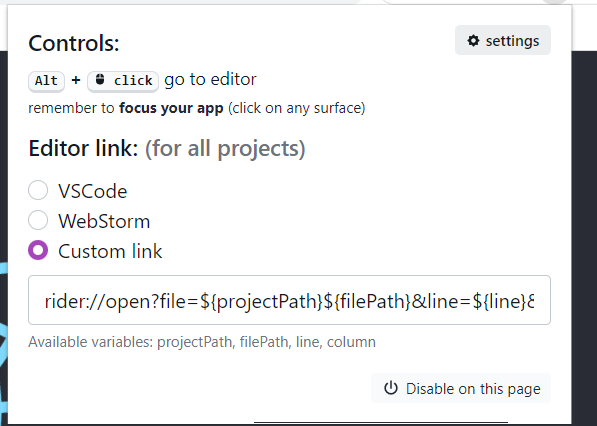
Error:


it seems to be an issue on Rider's side. I have created issue there https://youtrack.jetbrains.com/issue/RIDER-83324/URL-protocol-handler

Thanks for opening the issue @infi-pc, I followed it and retrieve the url via Toolbox
Actually, Toolbox doesn't require an absolute file path from "C:Users\john-doe..." provided by the env variable ${filePath} but only the relative path from the project root "my-project\src\app..."
The env variable ${projectPath} is empty.
So I tried to update the path via the regex editor in the settings, but the plugin crashes randomly when passing back slashes or more then 7 characters, it forced to refresh chrome. May be a new issue ?
I tried on Chrome and Edge and on several different computers.
I see. I didn't handle invalid Regex, I just merged a fix. It should be updated in Chrome Extension soon. https://github.com/infi-pc/locatorjs/commit/3616189585a95683c498126311e8fa86fc4ee915
@Mathieuka did you make the extension work with Rider? I tried following template: jetbrains://rider/navigate/${filePath}&line=${line}&column=${column}, but as you mentioned Rider requires using relative paths and projectPath is empty. I couldn't find any information about regexes. @infi-pc Could you guide me on this topic?

@Mathieuka did you make the extension work with Rider? I tried following template: jetbrains://rider/navigate/${filePath}&line=${line}&column=${column}, but as you mentioned Rider requires using relative paths and projectPath is empty. I couldn't find any information about regexes. @infi-pc Could you guide me on this topic?
No, I no longer use rider but Webstorm
Ok, I have managed to find the regex functionality and make it work for Rider. For anyone interested I used following template: jetbrains://rider/navigate/reference?project={projectName}&path=${filePath}:${line}:${column} {projectName} is replaced with solution name I am currently working on and following regex: C.\RiderProjects\.?\ with empty to. It works on Windows with the assumption of having solution located in default location.