

 inducer
pycuda on Windows is crashing with access violation
Behavior
pycuda crashes immediately when trying to do something useful with it.. Any ideas?
Example to reproduce
import pycuda.driver as cuda
a_gpu = cuda.mem_alloc(64)
Resulting error
"C:\Program Files (x86)\Python38\python.exe" C:/Users/.../main.py
Process finished with exit code -1073741819 (0xC0000005)
Environment
- Windows 10 (Build 19041.630)
- Python 3.8.1 (tags/v3.8.1:1b293b6, Dec 18 2019, 22:39:24) [MSC v.1916 32 bit (Intel)] on win32
- pycuda 2020.1
- CUDA 11.2
- NVIDIA Driver Version: 461.33
- GPU: NVIDIA GeForce GTX TITAN X

- How did you install pycuda?
- Can you run https://github.com/NVIDIA/cuda-samples/tree/master/Samples/matrixMulDrv?

- How did you install pycuda?
I installed it simply using pip install pycuda
C:\WINDOWS\system32>"C:\Program Files (x86)\Python38\python.exe" -m pip install pycuda
Collecting pycuda
  Using cached pycuda-2020.1.tar.gz (1.6 MB)
Requirement already satisfied: pytools>=2011.2 in c:\program files (x86)\python38\lib\site-packages (from pycuda) (2021.2.1)
Requirement already satisfied: decorator>=3.2.0 in c:\program files (x86)\python38\lib\site-packages (from pycuda) (4.4.2)
Requirement already satisfied: appdirs>=1.4.0 in c:\program files (x86)\python38\lib\site-packages (from pycuda) (1.4.3)
Requirement already satisfied: mako in c:\program files (x86)\python38\lib\site-packages (from pycuda) (1.1.4)
Requirement already satisfied: numpy>=1.6.0 in c:\program files (x86)\python38\lib\site-packages (from pytools>=2011.2->pycuda) (1.18.1)
Requirement already satisfied: MarkupSafe>=0.9.2 in c:\program files (x86)\python38\lib\site-packages (from mako->pycuda) (1.1.1)
Installing collected packages: pycuda
    Running setup.py install for pycuda ... done
Successfully installed pycuda-2020.1
WARNING: You are using pip version 20.0.2; however, version 21.0.1 is available.
You should consider upgrading via the 'C:\Program Files (x86)\Python38\python.exe -m pip install --upgrade pip' command.
- Can you run https://github.com/NVIDIA/cuda-samples/tree/master/Samples/matrixMulDrv?
Interestingly, this sample fails, although other samples I have tried do work.
See below for comarison between matrixMulDrv and matrixMul:
Sample "matrixMulDrv" (fails):
[ matrixMulDrv (Driver API) ]
> Using CUDA Device [0]: GeForce GTX TITAN X
> GPU Device has SM 5.2 compute capability
  Total amount of global memory:     12884901888 bytes
sdkFindFilePath <matrixMul_kernel64.fatbin> in ./
sdkFindFilePath <matrixMul_kernel64.fatbin> in ./../../bin/win64/Debug/matrixMulDrv_data_files/
sdkFindFilePath <matrixMul_kernel64.fatbin> in ./common/
sdkFindFilePath <matrixMul_kernel64.fatbin> in ./common/data/
sdkFindFilePath <matrixMul_kernel64.fatbin> in ./data/
> findModulePath found file at <./data/matrixMul_kernel64.fatbin>
> initCUDA loading module: <./data/matrixMul_kernel64.fatbin>
checkCudaErrors() Driver API error = 0701 "too many resources requested for launch" from file <C:\ProgramData\NVIDIA Corporation\CUDA Samples\v11.2\0_Simple\matrixMulDrv\matrixMulDrv.cpp>, line 160.

C:\ProgramData\NVIDIA Corporation\CUDA Samples\v11.2\0_Simple\matrixMulDrv\../../bin/win64/Debug/matrixMulDrv.exe (process 19460) exited with code 1.
Sample "matrixMul" (works):
[Matrix Multiply Using CUDA] - Starting...
GPU Device 0: "Maxwell" with compute capability 5.2

MatrixA(320,320), MatrixB(640,320)
Computing result using CUDA Kernel...
done
Performance= 22.30 GFlop/s, Time= 5.878 msec, Size= 131072000 Ops, WorkgroupSize= 1024 threads/block
Checking computed result for correctness: Result = PASS

NOTE: The CUDA Samples are not meant for performancemeasurements. Results may vary when GPU Boost is enabled.
PS: I used the samples that came with the CUDA Toolkit. I just assume they are the same as the one you refer to on github.
import pycuda.driver as cuda
a_gpu = cuda.mem_alloc(64)
Try adding import pycuda.autoinit before trying to allocate memory.
It's actually not gpu memory allocation that fails, but the initialization itself.
So import pycuda.autoinit also fails, because it internally fails in this line: https://github.com/inducer/pycuda/blob/29466d4e93ec20a81ce2534327aed24903c3a2e2/pycuda/autoinit.py#L5
And all this seems to be doing is calling cuInit:
https://github.com/inducer/pycuda/blob/29466d4e93ec20a81ce2534327aed24903c3a2e2/src/cpp/cuda.hpp#L502
So that post gave me an idea: https://stackoverflow.com/questions/38610264/cuinit0-not-needed-anymore
Could it be a problem that the device number is not set anywhere? I have two GPUs an onboard GPU and an NVIDIA GPU...
But matrixMulDrv must be calling cuInit, and that must be succeeding, given how far it gets. Could check (maybe with "Dependency Walker") that pycuda's _driver DLL and matrixMulDrv find the same CUDA library?
_driver.cp38-win32.pyd seems to crash before it even get's to loading cuda and calling cuInit(). I will have to investigate deeper.
The following call is out of address space, I just debugged without having the debug symbols / source code.
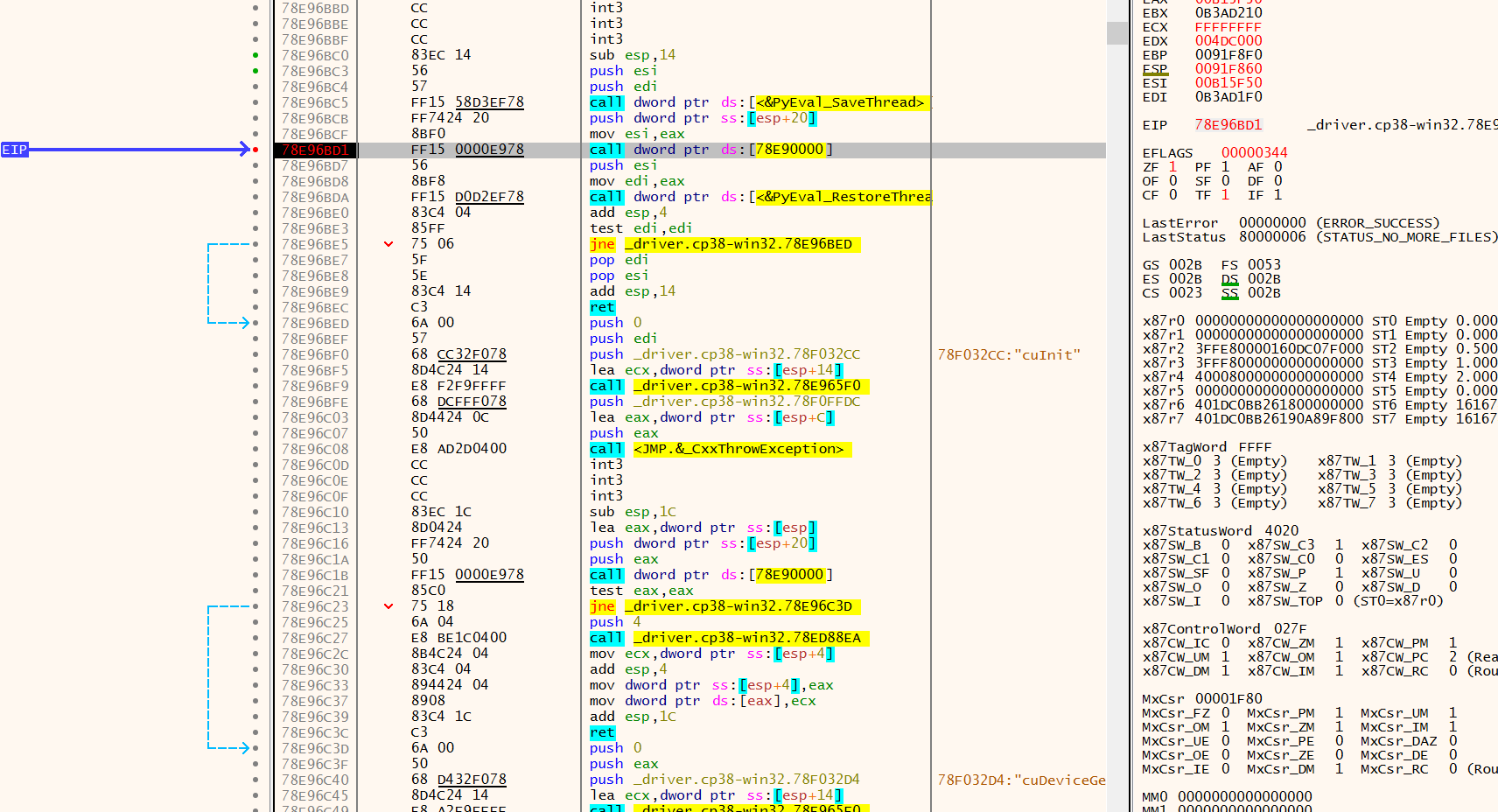
Will have to debug with source...
Honestly, I was a bit to lazy to get the whole build environment ready to compile this myself, so I downloaded and installed this pre-compiled wheel pycuda-2020.1+cuda102-cp38-cp38-win32.whl from https://www.lfd.uci.edu/~gohlke/pythonlibs/#pycuda and it works out of the box..
So there must be a difference to the PyPI version which you can download with pip.
That's very strange. There aren't any binaries up on the package index (see?), so I wonder where your original binary was compiled, and what went wrong with it...
Hmm interesting. So this means that during pip install pycuda it must have been compiled locally on my machine and something must have gone wrong with it?