

 imaNNeo
fl_chart axis title not aligning with the bar when rotateAngle is used
I'm using fl_chart for platting a bar chart in the Flutter application. I have lengthy titles for the x-axis units and the issue I'm seeing is, more the length of the title more the alignment goes for a toss.
In the below chart, x-axis titles with less length aligns properly with the bar where as one with lengthier text seems to move away from the chart.
FlTitlesData get titlesData => FlTitlesData(
      show: true,
      bottomTitles: SideTitles(
        showTitles: true,
        getTextStyles: (context, value) => const TextStyle(
          color: Color(0xff7589a2),
          fontWeight: FontWeight.bold,
          fontSize: 14,
        ),
        rotateAngle: 300,
        getTitles: (double value) {
          switch (value.toInt()) {
            case 0:
              return 'Test';
            case 1:
              return 'Unassigned 123434';
            case 2:
              return 'Alert Saftey 123243';
            case 3:
              return 'Belfast 12324';
            case 4:
              return 'Cardiff 243423';
            case 5:
              return "Domino's Pizza 123234";
            case 6:
              return 'Glasgow 1232';
            case 7:
              return 'James Newma 13434';
            case 8:
              return 'LCC';
            case 9:
              return 'Liverpool';
            case 10:
              return 'Testing 123455 454545';
            case 11:
              return 'Testing 456';
            case 12:
              return 'Testing 789';
            case 13:
              return 'Testing 321';
            case 14:
              return 'Testing 890';
            default:
              return '';
          }
        },
      ),
      leftTitles: SideTitles(
        showTitles: true,
        getTextStyles: (context, value) => const TextStyle(
            color: Color(0xff7589a2),
            fontWeight: FontWeight.bold,
            fontSize: 14),
        getTitles: (value) {
          if (value == 25) {
            return '25';
          } else if (value == 50) {
            return '50';
          } else if (value == 75) {
            return '75';
          } else {
            return '';
          }
        },
      ),
      topTitles: SideTitles(showTitles: false),
      rightTitles: SideTitles(showTitles: false),
    );
BarChart(
          BarChartData(
            titlesData: titlesData,
            gridData:
                FlGridData(drawHorizontalLine: true, drawVerticalLine: false),
            axisTitleData: axisTitleData(context),
            borderData: borderData,
            barGroups: barGroups,
            maxY: 75,// Dynamic
          ),
        )
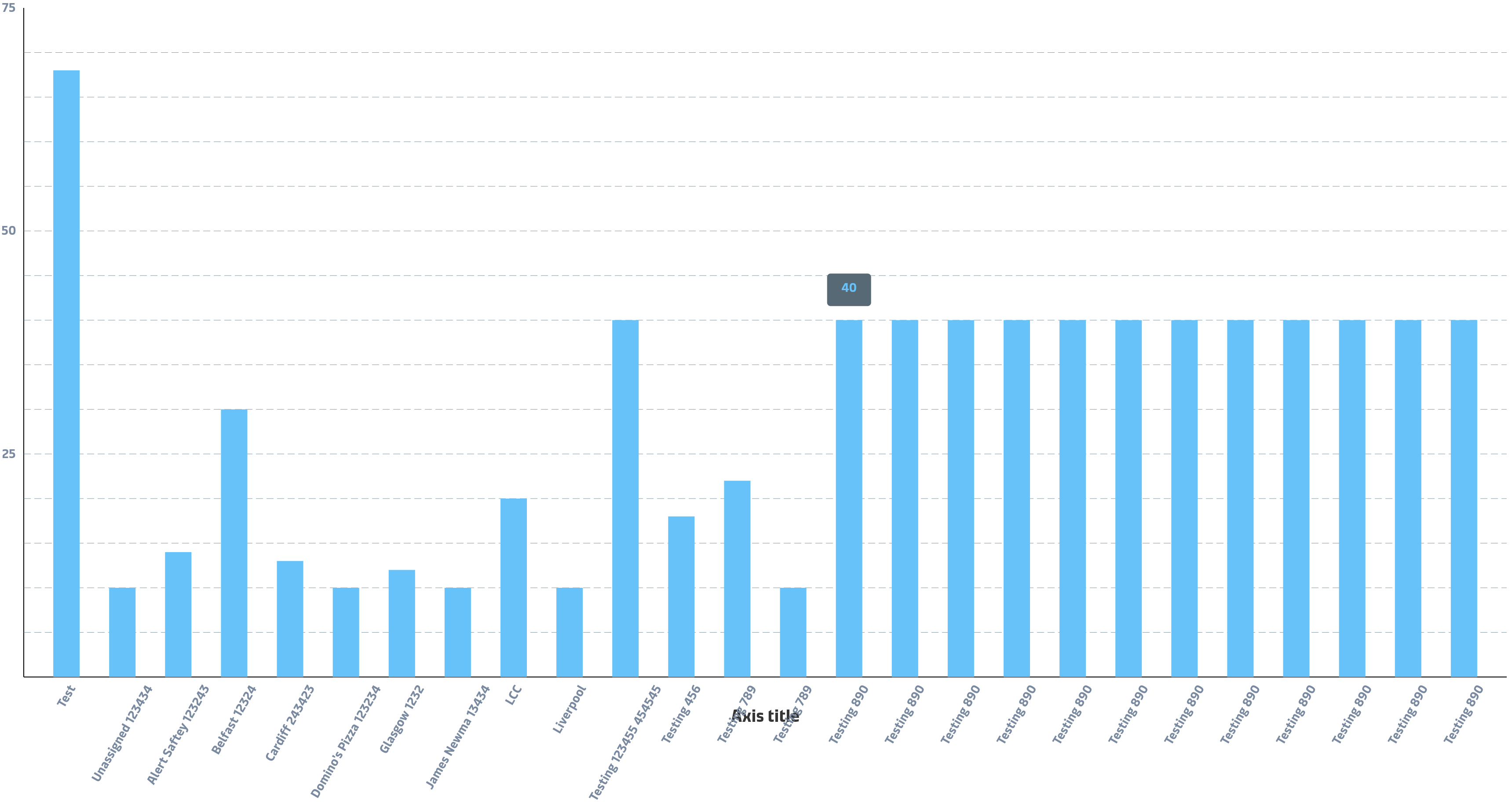
Flutter version: 2.8.0 fl_chart version: 0.41.0

Hi.
Actually, we need to fix it internally, but for a workaround, you can increase reservedSize property of your bottom titles.

Hi @imaNNeo . I think you misunderstood the request. The overlap can be fixed with reservedSize. But the spacing of the bars and the spacing of the texts for the bars does not match.
