

 iluvadev
Unhandled Exception
When clicking on a folder inside an OST, the following exception is shown. The Folder seems to contain 639 objects and the file is localized in german.
Thanks in advance for any help or input!
************** Ausnahmetext **************
System.IndexOutOfRangeException: Index was outside the bounds of the array.
at XstReader.LTP.MapType[T](List1 blocks, HID hid, Int32 offset) in C:\Dev\iluvadev\dijji\XstReader\src\XstReader.Api\LTP.cs:line 864 at XstReader.LTP.ReadTableInternal[T](BTree1 subNodeTree, UInt64 dataBid, Action2 idGetter, Action1 postProcessAction) in C:\Dev\iluvadev\dijji\XstReader\src\XstReader.Api\LTP.cs:line 498
at XstReader.LTP.ReadTable[T](NID nid, Action2 idGetter, Action1 postProcessAction) in C:\Dev\iluvadev\dijji\XstReader\src\XstReader.Api\LTP.cs:line 181
at XstReader.XstFolder.GetMessages() in C:\Dev\iluvadev\dijji\XstReader\src\XstReader.Api\XstFolder.cs:line 165
at XstReader.XstFolder.get_Messages() in C:\Dev\iluvadev\dijji\XstReader\src\XstReader.Api\XstFolder.cs:line 105
at XstReader.App.MainForm.SetCurrentXstElement(XstElement value) in C:\Dev\iluvadev\dijji\XstReader\src\XstReader\MainForm.cs:line 56
at XstReader.App.MainForm.set_CurrentXstElement(XstElement value) in C:\Dev\iluvadev\dijji\XstReader\src\XstReader\MainForm.cs:line 46
at XstReader.App.MainForm.<Initialize>b__31_1(Object s, XstElementEventArgs e) in C:\Dev\iluvadev\dijji\XstReader\src\XstReader\MainForm.cs:line 101
at XstReader.App.Controls.XstFolderTreeControl.RaiseSelectedItemChanged() in C:\Dev\iluvadev\dijji\XstReader\src\XstReader\Controls\XstFolderTreeControl.cs:line 43
at XstReader.App.Controls.XstFolderTreeControl.<Initialize>b__1_0(Object s, TreeViewEventArgs e) in C:\Dev\iluvadev\dijji\XstReader\src\XstReader\Controls\XstFolderTreeControl.cs:line 30
at Krypton.Toolkit.KryptonTreeView.OnAfterSelect(TreeViewEventArgs e)
at Krypton.Toolkit.KryptonTreeView.OnTreeViewAfterSelect(Object sender, TreeViewEventArgs e)
at System.Windows.Forms.TreeView.OnAfterSelect(TreeViewEventArgs e)
at System.Windows.Forms.TreeView.TvnSelected(NMTREEVIEW* nmtv)
at System.Windows.Forms.TreeView.WmNotify(Message& m)
at System.Windows.Forms.TreeView.WndProc(Message& m)
at System.Windows.Forms.Control.ControlNativeWindow.WndProc(Message& m)
at System.Windows.Forms.NativeWindow.Callback(IntPtr hWnd, WM msg, IntPtr wparam, IntPtr lparam)

Hi, thanks for the issue and all the stacktrace, it helps a lot.
It seems that some inner header in the ost file is corrupt or it does not contain expected data. I will analyze in more detail the trace and in a near future (i don't have a lot time, sorry🙄) I will protect these functions in order to evict this error and maybe, show some of the content
Again, thanks for reprort this ugly bug

Thanks for your quick reply! I am not in a hurry to read that file and really appreciate the time and effort developers like you put into tools. I can’t share the file, but more than willing to test potential fixes or try a version with more debug output if that helps to find the problem. Just reach out if I can help in any way if you come around to take a deeper look into this. Thanks again and take care!
Hi, I published a new release: 2022-10-10 There are more protection against unexpected exceptions, and the application tries to show all information and ignores the information that produced the exception.
In your case, I think this could not be a solution. The exception seems to be thrown when the XstReader tries to read the table with descriptions of the messages in a folder. Without this information the application can't load any content.
I don't know, try it and tell me something.
Hi, the new release fixed it, at least kind of. The application isnt throwing exceptions anymore or dies when trying to open the folder, it just doesnt show anything. So, it is at least better as before. Is it possible to have some information when the application doesn`t like the data it sees?
Hello, i think i have similar problem with some folders being empty. It worked up until 1.15. With 2.1.0 and 2.20 i just get some empty folders. A few up to 47 mails worked but the count just seems to be a coincidence, since i have a few with 10 mails not showing up an quite many not working with a lot of mails. I have a a german ost file as well so it sounds related. To big for sharing though. Is there any way to debug this without resorting to the sourcecode?

Hi, I have a sample ost having this issue.
IMO this is an issue of Outlook. This will occurs with high probability when we shutdown Outlook, before Outlook completes receiving data from IMAP server.
We can prepare repro for this:
- Use open source IMAP SMTP server hMailServer - Free open source email server for Microsoft Windows
- Accumulate dummy message by sending mail with SmtpClient Class (System.Net.Mail) | Microsoft Learn
- Use Outlook to receive them. And shutdown Outlook before all of them are received and processed.
I have tried some ways for recovery, but none of them helped.
(1) SCANPST.EXE. But it couldn't help to fix the logical broken data: Repair Outlook Data Files (.pst and .ost) - Microsoft Support
The log file indices some issues. But the detail of error meaning is unknown to us.
  **Attempting to walk all folders

        Failed to add row to the FLT, RowID = 3
        Failed to add row to the FLT, RowID = 2
        Failed to add row to the FLT, RowID = 1
        Failed to add row to the FLT, RowID = 0
(2) Clicking Compact Now button on Outlook Data File didn't help too.
And... the code level workaround will be:
- Skip broken table row record.
- Place fallback for listing up items.

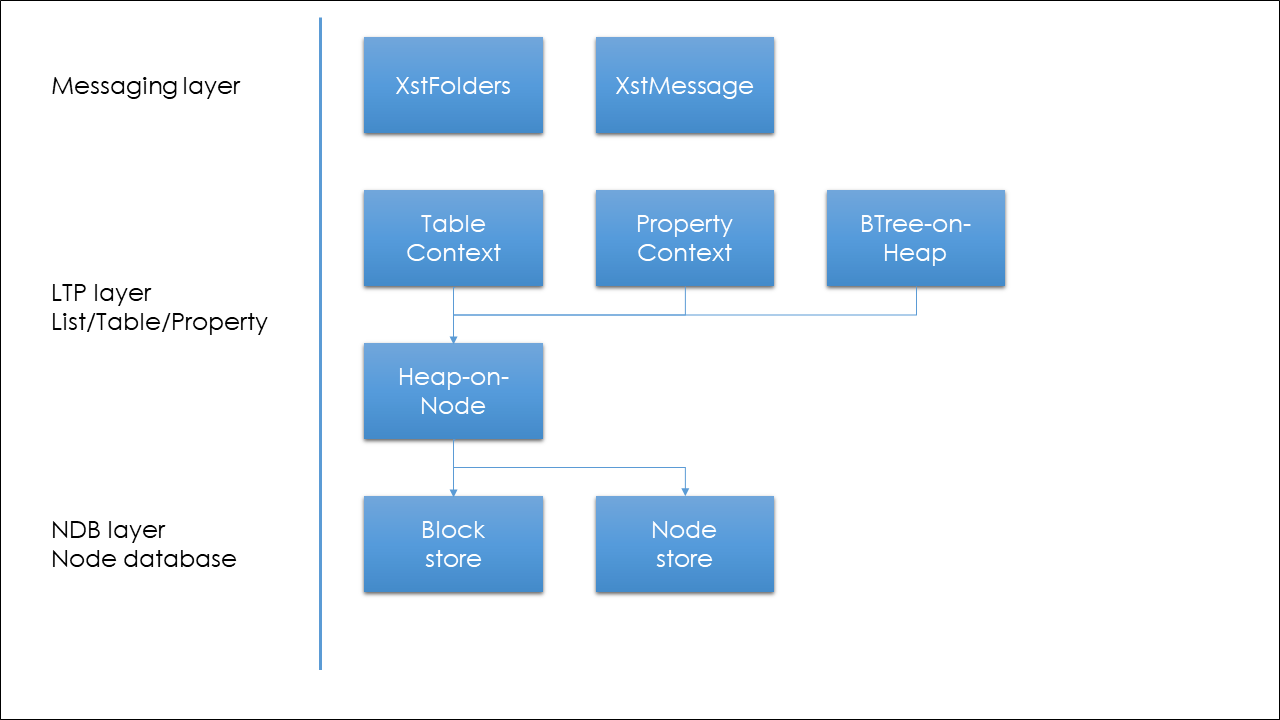
According to [MS-PST]: Outlook Personal Folders (.pst) File Format | Microsoft Learn documentation, OST/PST will be able to process structurally.
Messaging layer will be able to apply XstReader.Api directly.
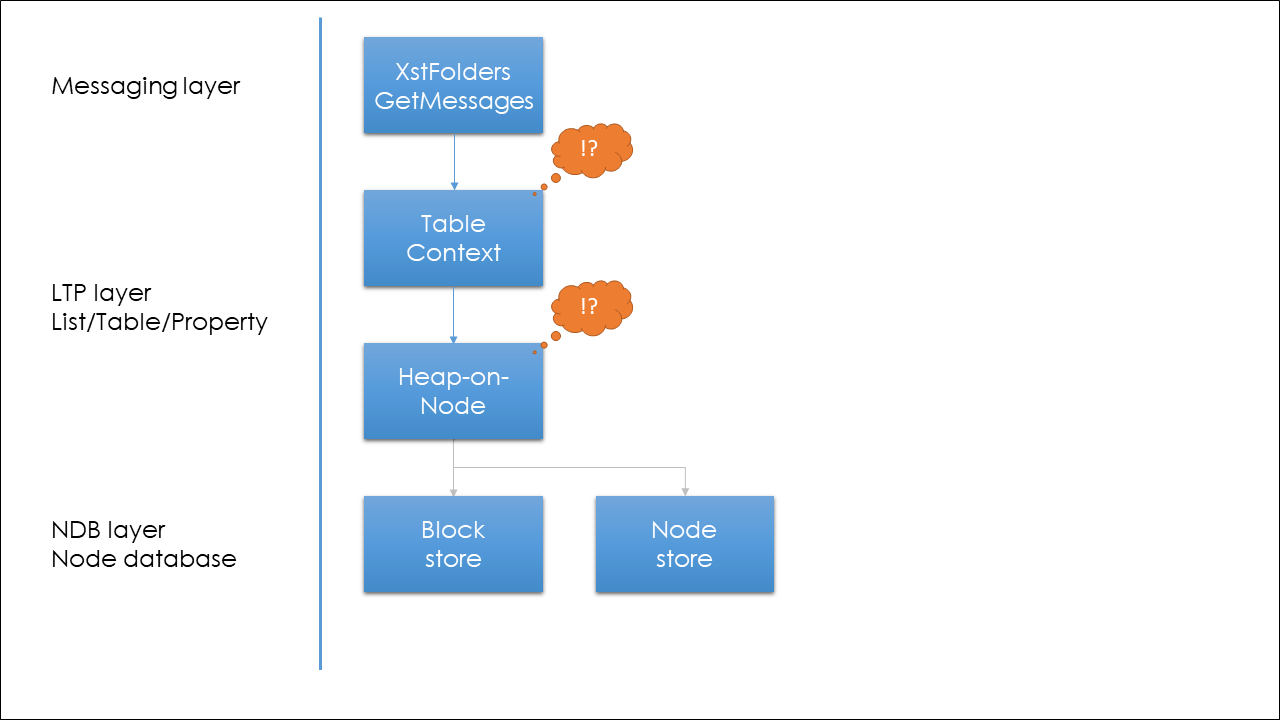
XstFolder.GetMessages method seems to access EnidType.CONTENTS_TABLE.
This means that Outlook stores references of child items (including mails, contacts and so on) to the TableContext with fewer properties embedded.
The our issue relates to TableContext. (TableContext is a kind of table structure. Imagine like DataTable)
TableContext's actual data is stored via Heap-on-node.
Thus there might be data mismatch among TableContext and Heap-on-node.
For detail inspection, I have extracted property list from that TableContext as a JSON text. It is about node id 8590 which has enumerating issue.
Search ERROR! from text file.
There are 593 matches (reading errors) in 266 total records from that TableContext.
I'm surprised that error is not few.
The property names written in JSON were taken throught XstReader.ElementProperties.KnownCanonicalNames.GetById of XstReader.Api.
And thanks for maintain great works like XstReader!
I'm sorry to say: there was no problem in neither XstReader or my posted ost file.
The strange behavior came from a .NET 6.0 breaking change.
Workaround sample:
diff --git a/src/XstReader.Api/NDB.cs b/src/XstReader.Api/NDB.cs
index a53abd3..5f01c92 100644
--- a/src/XstReader.Api/NDB.cs
+++ b/src/XstReader.Api/NDB.cs
@@ -537,7 +537,17 @@ namespace XstReader
                         if (buffer == null)
                             buffer = new byte[rb.InflatedLength];

-                        decompressionStream.Read(buffer, offset, rb.InflatedLength);
+                        int remaining = rb.InflatedLength;
+                        while (remaining != 0)
+                        {
+                            var numRead = decompressionStream.Read(buffer, offset, remaining);
+                            if (numRead == 0)
+                            {
+                                throw new EndOfStreamException();
+                            }
+                            remaining -= numRead;
+                            offset += numRead;
+                        }
                     }
                     read = rb.InflatedLength;
                 }
Or simply wrap with BinaryReader.ReadBytes.
Finally I could obtain a broken ost file.
This one won't occur breaks on XstFolder.GetMessages.
Instead, this broken data affects decoder on click of folder items.
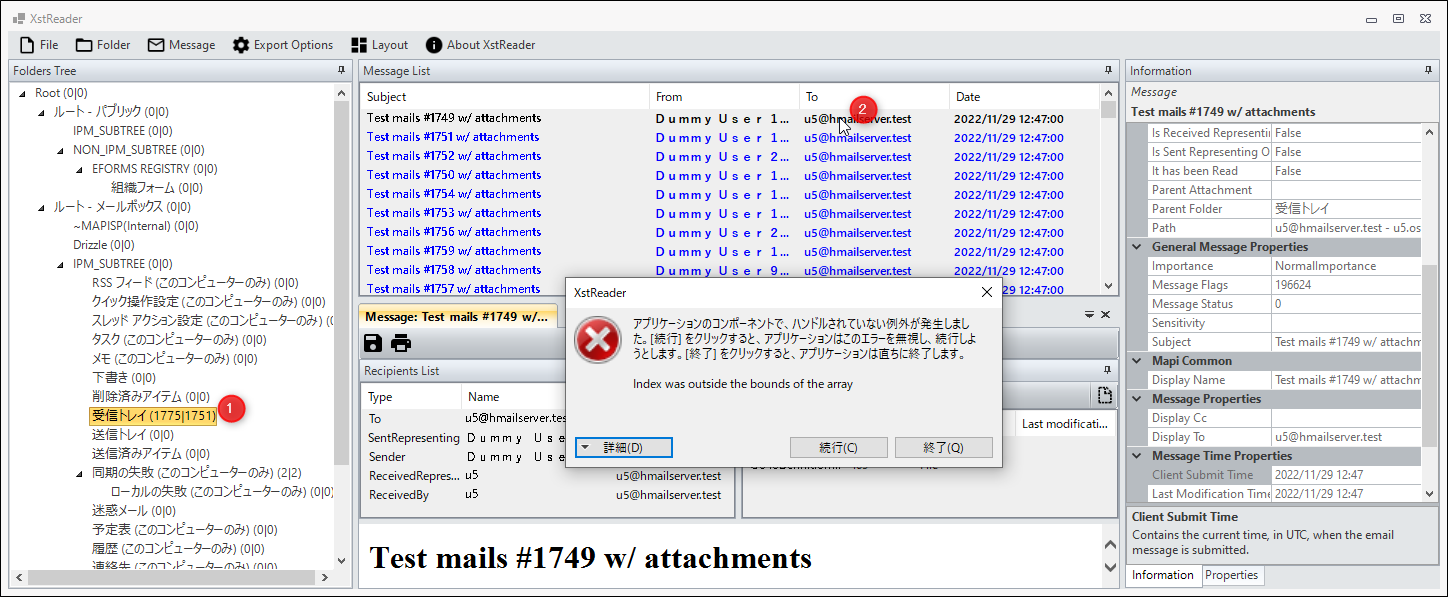
************** 例外テキスト **************
System.IndexOutOfRangeException: Index was outside the bounds of the array.
   at XstReader.LTP.HidSize(List`1 blocks, HID hid) in V:\XstReader\src\XstReader.Api\LTP.cs:line 857
   at XstReader.LTP.GetBytesForHNID(List`1 blocks, BTree`1 subNodeTree, HNID hnid) in V:\XstReader\src\XstReader.Api\LTP.cs:line 836
   at XstReader.LTP.ReadTableColumnValue(BTree`1 subNodeTree, List`1 blocks, RowDataBlock db, Int64 rowOffset, TCOLDESC col) in V:\XstReader\src\XstReader.Api\LTP.cs:line 615
   at XstReader.LTP.<>c__DisplayClass25_2`1.<ReadTableData>b__1() in V:\XstReader\src\XstReader.Api\LTP.cs:line 580
   at XstReader.XstProperty.get_Value() in V:\XstReader\src\XstReader.Api\XstProperty.cs:line 32
   at XstReader.App.XstPropertySetExtensions.ToPropertyGridSelectedObject(XstPropertySet propertySet) in V:\XstReader\src\XstReader\Extensions\XstPropertySetExtensions.cs:line 28
   at XstReader.App.Controls.XstPropertiesControl.LoadProperties() in V:\XstReader\src\XstReader\Controls\XstPropertiesControl.cs:line 50
   at XstReader.App.Controls.XstPropertiesControl.SetDataSource(XstElement dataSource) in V:\XstReader\src\XstReader\Controls\XstPropertiesControl.cs:line 42
   at XstReader.App.MainForm.SetCurrentXstElement(XstElement value) in V:\XstReader\src\XstReader\MainForm.cs:line 65
   at XstReader.App.MainForm.set_CurrentXstElement(XstElement value) in V:\XstReader\src\XstReader\MainForm.cs:line 46
   at XstReader.App.MainForm.<Initialize>b__30_3(Object s, XstElementEventArgs e) in V:\XstReader\src\XstReader\MainForm.cs:line 101
   at XstReader.App.Controls.XstMessageListControl.RaiseSelectedItemChanged() in V:\XstReader\src\XstReader\Controls\XstMessageListControl.cs:line 63
   at XstReader.App.Controls.XstMessageListControl.<Initialize>b__1_1(Object s, ListViewItemSelectionChangedEventArgs e) in V:\XstReader\src\XstReader\Controls\XstMessageListControl.cs:line 48
   at System.Windows.Forms.ListView.OnItemSelectionChanged(ListViewItemSelectionChangedEventArgs e)
   at System.Windows.Forms.ListView.WmReflectNotify(Message& m)
   at System.Windows.Forms.ListView.WndProc(Message& m)
   at System.Windows.Forms.Control.ControlNativeWindow.WndProc(Message& m)
   at System.Windows.Forms.NativeWindow.Callback(IntPtr hWnd, WM msg, IntPtr wparam, IntPtr lparam)
The broken ost is obtained through this situation, with Outlook 2013:
- Synchronize and continuously receive mail messages from IMAP server.
- Quit Outlook, when the ost file is going to grow from 16,424 KB to 32,712 KB
@kenjiuno thanks a lot for the information and your investigation!
First of all, sorry for my delayed response: I am having complicated weeks and I can't spend much time on the project. But, feel free to make the PR that you want. I will try to dedicate more time to this issue.
Thanks!
In the latest release, XstReader shows information if there are errors reading Folders, Messages or Attachments