
Cluckles
 Cluckles copied to clipboard
 ilikeprograms
Cluckles is a live theme editor that leverages Less to Customise Twitter Bootstrap
Cluckles

[ ](https://flattr.com/submit/auto?user_id=ilikeprograms&url=https://github.com/ilikeprograms/Cluckles&title=Cluckled Live Theme Editor&tags=github&category=software)
Cluckles Live Theme Editor for CSS Framework based on Less such as Twitter Bootstrap.
There is an example page provided (build/example/index.html) which makes it easy to see it in action!
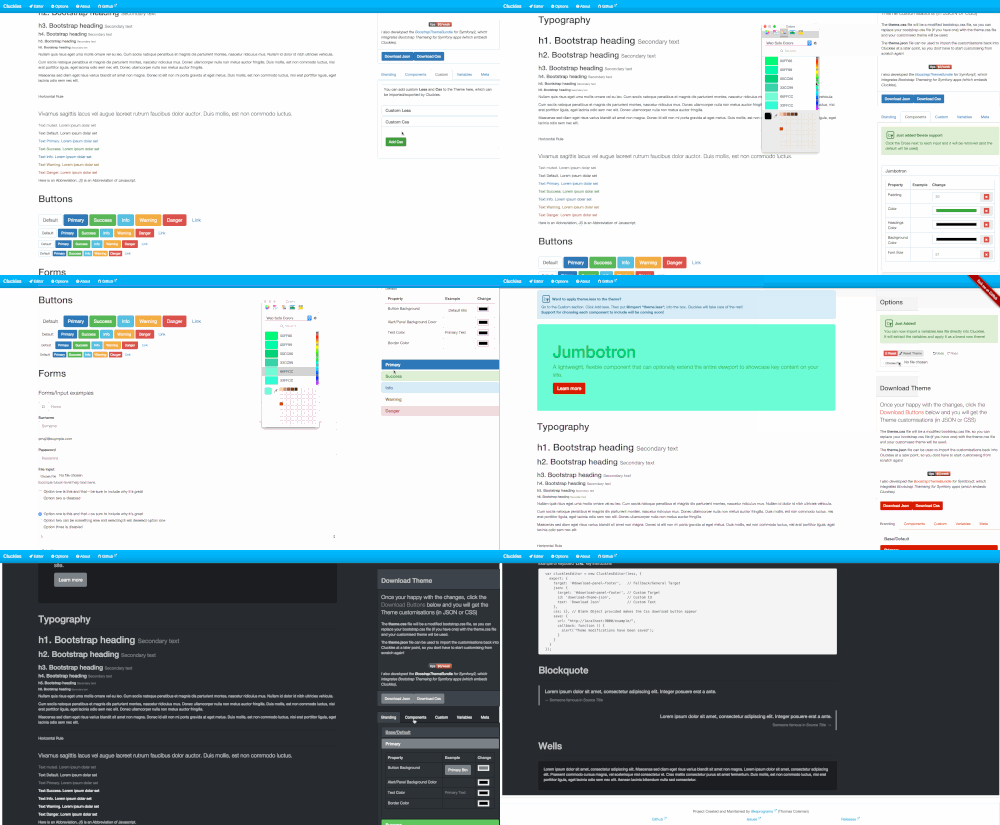
There is also a Live demo which can be found at:
http://cluckles.com
The example demo page has a User Interface which has panels where you can change the different parts of bootstrap by using color pickers to change the styling. Simple and Easy. You can even add Custom Less/CSS and import/export it!
The included files can be distributed and used in other projects to provide live editing functionality for Bootstrap. The files are also available on bower.
Coming Soon - Cluckles2/Desktop
Cluckles is being expanded to include much more functionality soon. Including the following:
- [ ] Split up so we have Cluckles core JS,
- [ ] Add additional support for SASS
- [ ] Migrate to using ES6, and possibly modules and Webpack2/Babel
- [ ] Modules to support different CSS Frameworks (Bootstrap, foundation etc)
- [ ] Editor built with Angular.
- [ ] Editor bridges Core JS with UI
- [ ] Make Editor embeddable. E.g embeds in Joomla etc
- [ ] Make Cluckles core JS work with Node (to support theme customising from CLI)
- [ ] Make editors UI for different frameworks
- [ ] Add ability to build for single frameworks to embed.
Quick Start
- Download the Project by either
cloningorforking. (Then CD into Cluckles) - Alternatively Cluckles is available on
Bowerascluckles - Install dependencies by running
npm installandbower install - Run
Gruntto build the files and open the example demo page in the browser - Take a look at the demo!
What is Supported?
At the moment, the following Components can be styled directly:
- [x] Base Styles
- [x] Typography
- [x] Tables
- [x] Dropdowns
- [x] Buttons
- [x] Inputs/Forms
- [x] Links
- [x] Navs
- [x] Tabs
- [x] Pills
- [x] Pagination/Pager
- [x] Navbars
- [x] Breadcrumbs
- [x] Labels
- [x] Badges
- [x] Jumbotron
- [x] Page Header
- [x] Thumbnails
- [x] Alerts
- [x] Tooltips
- [x] Popovers
- [x] Modals
- [x] Code/Kbd/Pre
- [x] Blockquotes
- [x] Progress Bars
- [x] List Groups
- [x] Panels
- [x] Wells
- [x] Headings
- [x] Body Text Color/Background
Getting started
To begin, download the repository from Git either by using the Clone in Desktop button, or download from Github:
Downloading
git clone https://github.com/ilikeprograms/Cluckles
cd Cluckles
Installing the Dependencies
Now you can start to install the dependencies. Grunt is used for build the JS files, and Bower for the JS files it depends on.
This means that Node.js and NPM needs to be installed on your system. To get Grunt/Bower to work, run the following commands
npm install
bower install
Build Files
There should be a build directory which contains the cluckles-x.x.x.js file which is the main distribution file.
This can be taken out from the project and will provide the live editing functionality.
It does however rely on the files in build/js/lib and build/less. The build/js/lib files however could be replaced with newer versions and should work ok.
If you have a dependency on a specific version of jquery for instance, just replace the file.
Changing the Build
The files in src and bower_components directories are used in the Build process to create the files in the build directory.
If you change the source files in the src directory, you will need to rebuild. Grunt is used for the build.
To build the project files just run the grunt command from the main directory. This will then make grunt run the default task which will build the files.
It will also automatically host a localhost server at http://localhost:9000/example which will host the build/example/index.html page
and open a tab in the browser at the address. It will also watch for changes to the source file and automatically rebuild for you,
if any changes are made.
Changing/Viewing Docs Files
The docs are powered by jekyll and Github pages. When the project is build, the dist files are copied to the docs folder, that the build files can be used in the Live demo.
To preview the Live demo to test them, run the following command from the command line:
jekyll --serve --base-url=
Then go to the browser and go to the url:
http://localhost:4000
Cluckles Editor Options
There are options that can be provided when a Cluckles instance is created and are as follows:
Misc
Miscellaneous Options
| Field | Type | Default | Desc |
|---|---|---|---|
| delay | number |
750 (milliseconds) | Milliseconds delay between refresh updates |
| undoSize | Number |
10 | Number of items to keep in the Undo history |
| embedSelector | string |
Will set this element to the height of the editor, if editor is in an embedded object |
Scope
The Scope option controls whether or not to limit the CSS generated by Cluckles to a given Scope.
When a selector is provided, the CSS generated will be prefixed with the selector (and similarly when the customCss and customLess options are set to true)
| Field | Type | Default | Desc |
|---|---|---|---|
| selector | string |
The CSS Selector to prefix the Compiled CSS selectors with | |
| customCss | boolean |
When set to true, the CSS will be prefixed with the selector |
|
| customLess | boolean |
When set to true the Less is compiled to CSS then prefixed with the selector |
Theme
Location to find the theme file to start editing (If editing existing theme).
| Field | Type | Default | Desc |
|---|---|---|---|
| url | string |
URL to locate the theme file |
Export
An export object can be provided to control the exporting options.
| Field | Type | Default | Desc |
|---|---|---|---|
| target | string |
'body' | Optional General DOM Element target, to append Export links to |
Export Json
The export.json object can be provided to configure the options for Downloading the theme modifications in JSON format.
The DOM node to append the export as json link, the id and the text of the link can be customised.
| Field | Type | Default | Desc |
|---|---|---|---|
| target | string |
export.target | DOM Element target to append json Export link |
| id | string |
'download_json_link' | ID attribute to set on the json Export link |
| text | string |
'Download Json' | Text content for the json Export link |
Export Css
The export.css object can be provided to configure the options for Downloading the Compiled Theme in Css format. See Cluckles#setupPostProcessor
The DOM node to append the export as css link, the id and the text of the link can be customised.
| Field | Type | Default | Desc |
|---|---|---|---|
| target | string |
export.target | DOM Element target to append css Export link |
| id | string |
'download_css_link' | ID attribute to set on the css Export link |
| text | string |
'Download Css' | Text content for the css Export link |
Export Save
The export.save object can be provided to configure the options for Saving the theme modifications (as JSON) to an external URL.
The DOM node to append the save link, the id and the text of the link can be customised.
The url and method can be provided to alter the HTTP method and the location the changes are send.
An optional success callback can also be provided to fire when the changes have been successfully received by the remote URL.
| Field | Type | Default | Desc |
|---|---|---|---|
| format | Array |
json |
The formats to include in the export |
| target | string |
export.target | DOM Element target to append save Export link |
| url (required) | string |
URL to send the modified theme changes | |
| method | string |
POST |
HTTP method for the save request |
| callback | Function |
Optional success save callback | |
| id | string |
'save_theme_link' | ID attribute to set on the save Export link |
| text | string |
'Save Theme' | Text content for the save Export link |
Example
<!-- Load our Fancy live editing Cluckles -->
<script src="../cluckles-1.0.3.js"></script>
<script>
  var clucklesEditor = new ClucklesEditor(less, {
    scope: {
      selector: '#mainContainer', // Only apply Cluckles styling to this element and descendants
      customCss: true,
      customLess: true
    },
    theme: {
      src: 'theme.json',
    },
    export: {
      target: '#download-panel-footer',   // Fallback/General Target
      json: {
        target: '#download-panel-footer', // Custom Target
        id: 'download-theme-json',        // Custom Id
        text: 'Download Json'             // Custom Text
      },
      css: {}, // Blank Object provided makes the Css download button appear
      save: {
        url: "http://localhost:9000/example/",
        callback: function () {
          alert('Theme modifications have been saved');
        }
      }
    }
  });
</script>
Contributing
I will happily accept contributions in any form, even if its just suggestions and I will have to work on them! Feel free to fork and submit a pull request.
Licence
This project is licenced under the MIT Licence.
Metadata
Owner
 ilikeprograms
Metadata
Cluckles is a live theme editor that leverages Less to Customise Twitter Bootstrap