

 icsharpcode
Add 64-bit compatibility
Hello,
Would you mind in adding to the Target CPU combo box 64- bit Intel compatible processor since almost all computers have both 32 and 64 bit architecture in one -> Also called WOW64.
Thank you.

Target CPU
- Any processor (prefer 32-bit) [AnyCPU (32-bit preferred)](.NET 4.5 or later only)
- Any processor (prefer 64-bit) [AnyCPU]
- 32-bit Intel-compatible processor [x86]
- x86-64 processor [x64]
- Intel 64-bit Itanium processor [Itanium]

Would it work in debug mode if I target the CPU to Any processor (prefer 64-bit) or x86-64. I use to target 64-bits in debug mode but the debuger dont work

This is because SharpDevelop.exe is compiled as x86.
If there are separate exes SharpDevelop-x86.exe and SharpDevelop-x64.exe, then debugging 64-bit process may be possible.
ILSpy can debug in 64-bit mode because it is compiled as AnyCPU, not x86.
Can I compile SharpDevelop as 64-bit?? could you please give me the steps with the source code.
Try to change SharpDevelop.exe Platform to AnyCPU, compile the project, see if it runs successfully or not.
In SharpDevelop.csproj, set <Prefer32Bit>False</Prefer32Bit>.
Compile the project.
Then delete AddIns\VersionControlSubversionAddIn and AddIns\Misc\UsageDataCollector (because they have 32-bit DLLs)
Start SharpDevelop.exe.
Now you can debug 64-bit processes in SharpDevelop!
I've created a 64 Bit Branch here: https://github.com/jogibear9988/SharpDevelop/tree/64bitVersion but I've fixed all the modules to 64Bit (PackageManagment also did not work in 32 Bit). I now look to include this into master, so we can select Platform to compile a 32Bit and a 64Bit Version!

I've now fixed my Branch & created 2 Versions of TypeScript & Svn Plugin (one 32 and one 64 Bit Version!). UsageDataCollector can support AnyCpu.
So now we can create 2 Exe Files (SD and SD64) and have 64 Bit support!
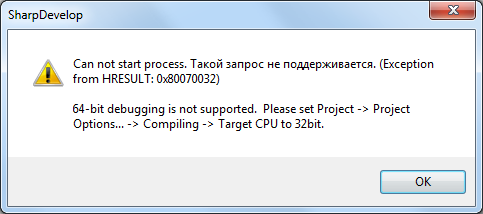
I write Add-Ins for Revit 2017 x64 application. But I get the problem when I try to attach to revit process for debugging:


is this problem still going ?! cause i figured it out!
Project -> Project Option -> Compiling -> Target Framework -> Convert your project to .NET Framework 4.5.2
this solve my problem :)
