

 iNavFlight
Odd behaviour of MSP Barometer
Current Behavior
There seems to be general weirdness around the handling of barometers that use MSP protocol. I am using the Matek M8Q-CAN GPS/Mag/Baro unit. I'm not using the UAVCAN port because iNav doesn't support that. I'm not using the I2C port because my flgiht controller (ZEEZ F7 V1) doesn't have any I2C pads. So I'm forced into using all three devices over a UART with MSP protocol, which works up to a point.
I configure my ports and devices like this:

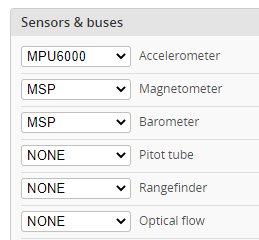

In this configuration, GPS and MAG work fine, BARO is weird.
- On power-up, iNav configurator shows that the baro is "OK" even if it is powered down or physically disconnected.

Once I plug in the battery, MAG and GPS light up too, but BARO is always there, even though it isn't.
Update: I now understand that this is default behaviour for MSP devices
-
If I plug in the USB first, then the battery, the barometer gives no readings (constant zero).
-
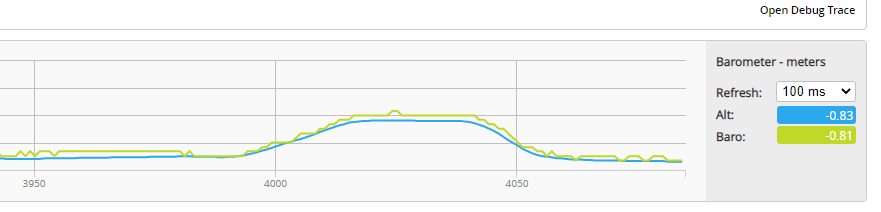
If I plug in the battery first, then USB, the BARO gives readings and I can see it changing on the Sensors screen.
-
When I fly the quad, my OSD Altitude reading hovers around zero (plus or minus 3m) even if the quad is more than 50m in the air. Here's a YouTube video that shows that. If I plug in a USB cable and look at the sensors in this condition, the BARO will be stuck on zero. Now here's the thing. If I go into Configuration and change the BARO to something else, say BMP280, save and reboot - the FC will freak out because "hardware fail". Now if I reconnect, go in and change BARO back to MSP, save and reboot, it will be giving readings again. Unfortunately I cannot do this in the field because there is a bug in SpeedyBee adaptor that prevents me from opening the Configuration page!!!! So it basically means I can't fly the quad.
Update - I filed a bug report with RunCam and they have updated the SpeedyBee app, which fixes the config page issue.
Steps to Reproduce
- You're probably going to need a BARO device that talks MSP, such as the Matek M8Q-CAN module with current firmware. If I thought someone was going to seriously work on the issue, I would be prepared to buy you one.
Other than that, I haven't been able to narrow down an exact repro. It seems a bit random, almost like there's a race condition. Sometimes the baro works, sometimes it doesn't, I've had a 100% failure rate when I try to fly, but on the bench sometimes it works.
I made two videos showing it working vs. non-working. I used serial logging to capture black box data. I armed the quad on my bench and physically lifted it up and down 3 times as far as the USB lead would allow (about 0.8m). I plotted this data against accelerometers so it is clear when teh craft is moving. First attempt, it was not working. Then I rebooted and fiddled around until I got barometer readings in the Sensors screen, disconnected Configurator and ran another test.
Video: Barometer working Video: Barometer not working
Expected behavior
- ~The barometer should not be indicated as "OK" when it is powered down or physically disconnected~.
- The barometer should work regardless of whether the USB or battery is connected first.
- The barometer/OSD reading should not be stuck at zero when flying.
Suggested solution(s)
I'm afraid I don't know enough about the internals of iNav to offer any useful suggestions. I have tried to read the code and asked about it on both Facebook and Discord, but none of the devs have responded to my questions.
Additional context
Config dump attached. INAV_cli_Palantir_3_20211107_160858-iNav-Baro-Issue.txt
- FC Board name and vendor: ZEEZ F7 (original V1 without baro or I2C)
- INAV version string:
# version
# INAV/ZEEZF7 3.0.2 Sep 15 2021 / 08:54:29 (66011184)
# GCC-9.3.1 20200408 (release)

I guess this answers point 1 - an MSP baro is always healthy (barometer.c).
bool baroIsHealthy(void)
{
    return true;
}
@NameOfTheDragon I have the same issue. Using MATEK's F405STD. GPS and magnetometer not working under iNAV 2.6, 3.1 and 4.0 versions. QUESTION: Do you have GPS and / or magnetometer readings ?

@jaymeneto128 Yes, the GPS and Compass work fine, well even. The Baro works but not consistently, which is why I think it's an iNav issue, something to do with how it starts up that I can't pin down.
I don't know if this applies to your situation, but I had to flash the firmware on the M8Q-CAN module in order to get MSP support. The initial versions didn't have it enabled in the firmware, apparently. It took a lot of reading small print to discover that.
Hi Tim Long, thanks for your reply,
The cause of my issue was using UART1 to receive MSP messages. My flight controller is MATEK's F405-STD. Conversely, MATEK's M8Q-CAN only worked when connected to UART 4 instead of UART1. I'm not sure if this odd behavior is due to a defective port or from something related to INAV's architecture.
We are witnessing a long period of rain here in Brazil, so I could not perform an open field test yet in order to guarantee all is ok with my setup.
THANKS - JAYME
Em sex., 7 de jan. de 2022 às 18:40, Tim Long @.***> escreveu:
@jaymeneto128 https://github.com/jaymeneto128 Yes, the GPS and Compass work fine, well even. The Baro works but not consistently, which is why I think it's an iNav issue, something to do with how it starts up that I can't pin down.
I don't know if this applies to your situation, but I had to flash the firmware on the M8Q-CAN module in order to get MSP support. The initial versions didn't have it enabled in the firmware, apparently. It took a lot of reading small print to discover that.
— Reply to this email directly, view it on GitHub https://github.com/iNavFlight/inav/issues/7576#issuecomment-1007759644, or unsubscribe https://github.com/notifications/unsubscribe-auth/AW7N57GORRJCT7KMCKPG5U3UU5MVHANCNFSM5HQ7E6VA . Triage notifications on the go with GitHub Mobile for iOS https://apps.apple.com/app/apple-store/id1477376905?ct=notification-email&mt=8&pt=524675 or Android https://play.google.com/store/apps/details?id=com.github.android&referrer=utm_campaign%3Dnotification-email%26utm_medium%3Demail%26utm_source%3Dgithub.
You are receiving this because you were mentioned.Message ID: @.***>
I have a identical problem and I'm going crazy for it. Always Matek M8Q-CAN connected in MSP to UART5 on a Zeez F7. The gps works, the magnetometer also works but the barometer remains in red. Latest firmware on the gps installed, what could it be? Since there are already two of us I believe that the implementation for this gps is not entirely correct.

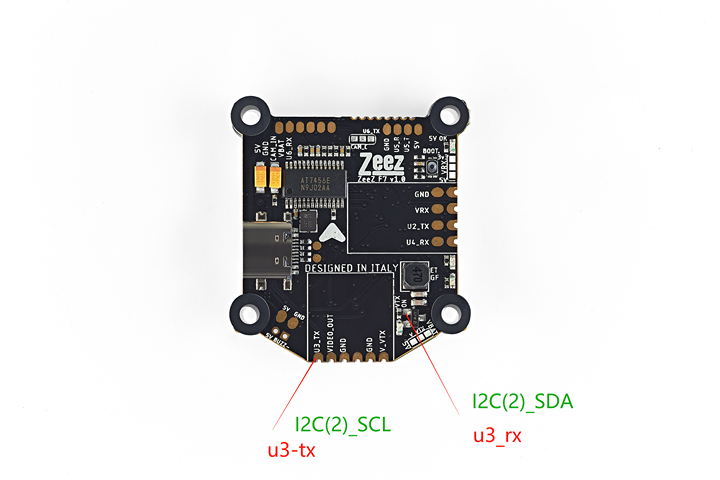
@NameOfTheDragon actually the I2C is there, just edit the target, compile the code and it works. But I wish it all worked in MSP.
@digitalentity for safety I tried M8Q-CAN with Ardupilot connected to a Pixhawk, everything works, gps, magnetometer and barometer. So please check your implementation if you have time because something is not working, thanks! I also tried to change UART but it always does the same thing, the barometer is not detected. Tested with iNav V4.1 and V5.
Hi Tim Long, thanks for your reply, The cause of my issue was using UART1 to receive MSP messages. My flight controller is MATEK's F405-STD. Conversely, MATEK's M8Q-CAN only worked when connected to UART 4 instead of UART1. I'm not sure if this odd behavior is due to a defective port or from something related to INAV's architecture. We are witnessing a long period of rain here in Brazil, so I could not perform an open field test yet in order to guarantee all is ok with my setup. THANKS>
But then did the barometer also work for you? Today I also tried on UART1 and 2, same problem. It is just something in the code that is not right. That it worked on the developer's Matek is a coincidence, it should work on the other FCs as well.
@digitalentity damn, I tried 4.1 again and now it works! I hope the problem is fixed with the V5 final because something broke the support for the MSP barometer.
Hi Ricardo de Azambuja, how are you?
About your patches: I can still (safely) apply them under iNAV 6.0? I couldn't apply patches to "navigation_pos_estimator.c" because it changed a lot since your last post.
THANKS IN ADVANCE - JAYME
Em ter., 8 de nov. de 2022 às 00:15, Ricardo de Azambuja < @.***> escreveu:
I was having problems with the MSP2 barometer too, therefore I made some changes in my fork that make it work more like the other MSP2 sensors: https://github.com/thecognifly/inav/tree/1272353c35546c055dc5fd7448c5d6cbe6f9da9a
— Reply to this email directly, view it on GitHub https://github.com/iNavFlight/inav/issues/7576#issuecomment-1306567576, or unsubscribe https://github.com/notifications/unsubscribe-auth/AW7N57HM5IEXQYEV6ERNJL3WHHAWFANCNFSM5HQ7E6VA . You are receiving this because you were mentioned.Message ID: @.***>
@jaymeneto128, my pull request (https://github.com/iNavFlight/inav/pull/8534) was merged into 6.1.0.

Ricardo, thanks for you response.
Can you give-me some help?
I've been using iNAV 6.0.0 since yesterday. I tried to swap I2C <--------> UART4 pins from my MATEK's F405-STD flight controller because my controller's pad's are badly damaged. In order to achieve my goal, I edited o arquivo ...\src\main\target\MATEKF405\target.h :
...
// #define I2C1_SCL PB6 // #define I2C1_SDA PB7 #define I2C1_SCL PA1 #define I2C1_SDA PA0 ...
#define USE_UART4 // #define UART4_RX_PIN PA1 // #define UART4_TX_PIN PA0 #define UART4_RX_PIN PB6 #define UART4_TX_PIN PB7
....
In my build, TX4/RX4 are useless, so I tried to reuse these pads replacing the original SDA/SCL pins. I compiled the target (with success), loaded the HEX file into FC, checked if I2C assumed the new pinout with "resource" command: all went OK.
However, no I2C signals are present in the new assigned PAD's. FC do not recognize the BMP280 connected to the pads. More important: I checked with my oscilloscope waveforms present and there is no clock and data flowing (SDA) or clock present (SCL).
QUESTION: What I'm forgetting?
THANKS IN ADVANCE - JAYME
Em sáb., 6 de mai. de 2023 às 14:44, Ricardo de Azambuja < @.***> escreveu:
@jaymeneto128 https://github.com/jaymeneto128, my pull request (#8534 https://github.com/iNavFlight/inav/pull/8534) was merged into 6.1.0 https://github.com/iNavFlight/inav/tree/release_6.1.0.
— Reply to this email directly, view it on GitHub https://github.com/iNavFlight/inav/issues/7576#issuecomment-1537189754, or unsubscribe https://github.com/notifications/unsubscribe-auth/AW7N57HCIVHIKUJJCLVKV63XE2EW7ANCNFSM5HQ7E6VA . You are receiving this because you were mentioned.Message ID: @.***>
I guess after the PRs above are all merged, this can be closed? If not, @ me
