

 home-assistant
Google Calendar inaccurately loading repeat events
The problem
The Google Calendar integration is showing events on days when it is not scheduled. The observed event is one that occurs every third Saturday of the month. However, today is the first Saturday and the event is listed in the calendar.
What version of Home Assistant Core has the issue?
Home Assistant 2023.2.5 Supervisor 2023.01.1 Operating System 9.5 Frontend 20230202.0 - latest
What was the last working version of Home Assistant Core?
No response
What type of installation are you running?
Home Assistant OS
Integration causing the issue
Google Calendar
Link to integration documentation on our website
https://www.home-assistant.io/integrations/google/
Diagnostics information
No response
Example YAML snippet
No response
Anything in the logs that might be useful for us?
No response
Additional information
No response

Hey there @allenporter, mind taking a look at this issue as it has been labeled with an integration (google) you are listed as a code owner for? Thanks!
Code owner commands
Code owners of google can trigger bot actions by commenting:
-
@home-assistant closeCloses the issue. -
@home-assistant rename Awesome new titleRenames the issue. -
@home-assistant reopenReopen the issue. -
@home-assistant unassign googleRemoves the current integration label and assignees on the issue, add the integration domain after the command.
(message by CodeOwnersMention)
google documentation google source (message by IssueLinks)
![home-assistant[bot] avatar](https://avatars.githubusercontent.com/in/97978?v=4 "Published by a pub.dev verified publisher")
Hello @hw-monkey thanks for the report. Can you give me steps to reproduce how the event was created on the Google side? Was it created in the UI or a 3rd party app?
Thanks!

I agree that this is a real issue. GC is a useless integration for me without full functional coverage of all-day events in large numbers. We use multiple all-day events without end-dates as our core reminder service for our home. It's the main purpose for us. I suspect that the read (load calendar) limits are too low in the present integration to be adoptable and in practical use for such a volume of entries. Each month in our calendar has on average 160 entries where most of them are perpetual. The GC integration, is not handling this high number of data points.

I agree that this is a real issue. GC is a useless integration for me without full functional coverage of all-day events in large numbers. We use multiple all-day events without end-dates as our core reminder service for our home. It's the main purpose for us. I suspect that the read (load calendar) limits are too low in the present integration to be adoptable and in practical use for such a volume of entries. Each month in our calendar has on average 160 entries where most of them are perpetual. The GC integration, is not handling this high number of data points.
Not sure I follow. I am not sure this has to do with a large number of events, but more the format of events are not handled
See my previous request for steps to reproduce this problem. You and the poster are the first to report this and I'm happy to help but i need some help.
[image: image.png] [image: image.png]
On Thu, Mar 30, 2023 at 1:28 AM Allen Porter @.***> wrote:
I agree that this is a real issue. GC is a useless integration for me without full functional coverage of all-day events in large numbers. We use multiple all-day events without end-dates as our core reminder service for our home. It's the main purpose for us. I suspect that the read (load calendar) limits are too low in the present integration to be adoptable and in practical use for such a volume of entries. Each month in our calendar has on average 160 entries where most of them are perpetual. The GC integration, is not handling this high number of data points.
Not sure I follow. I am not sure this has to do with a large number of events, but more the format of events are not handled
See my previous request for steps to reproduce this problem. You and the poster are the first to report this and I'm happy to help but i need some help.
— Reply to this email directly, view it on GitHub https://github.com/home-assistant/core/issues/89159#issuecomment-1489722031, or unsubscribe https://github.com/notifications/unsubscribe-auth/AOSFPGTRKD7P22ISQULPHQLW6UKWXANCNFSM6AAAAAAVPXPW3Y . You are receiving this because you commented.Message ID: @.***>
@allenporter Firstly, I thank you for the integration and I find it useful. And thank you for the willingness to help. Sorry for the long response delay.
Secondly, I honestly cannot confirm whether I created the event through Google Calendar itself or through IOS with a google account. I use them interchangeably. I believe the issue occurs when creating it through the iOS calendar, and is certainly limited to strange schedules like the second Tuesday, or third Saturday. Other repeating schedules seem to function properly.
Ok if you could do some testing and report back on a steps that makes this happen that would help me narrow down where to look. (E.g. I would have to obtain an iOS device and I'd rather have more conviction before doing so :) )
There hasn't been any activity on this issue recently. Due to the high number of incoming GitHub notifications, we have to clean some of the old issues, as many of them have already been resolved with the latest updates. Please make sure to update to the latest Home Assistant version and check if that solves the issue. Let us know if that works for you by adding a comment 👍 This issue has now been marked as stale and will be closed if no further activity occurs. Thank you for your contributions.
![issue-triage-workflows[bot] avatar](https://avatars.githubusercontent.com/u/13844975?v=4 "Published by a pub.dev verified publisher")
I have the same issue. My wife has an alternating 2 week work schedule. I use 2 repeating events to chart it. I created the events through the google calendar web site, not an app. I hope this additional information helps. Please let me know if I can provide anything further to assist in your trouleshooting.
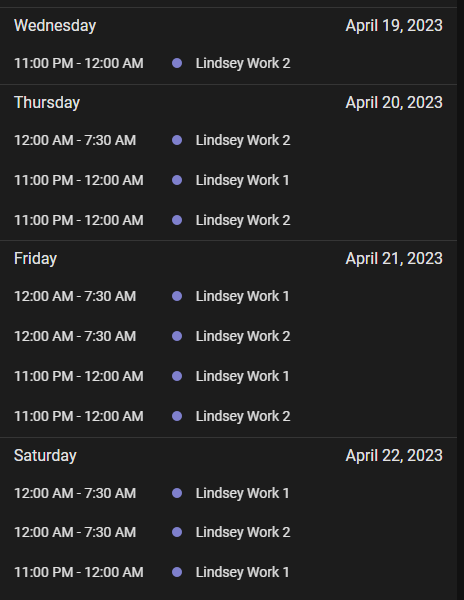
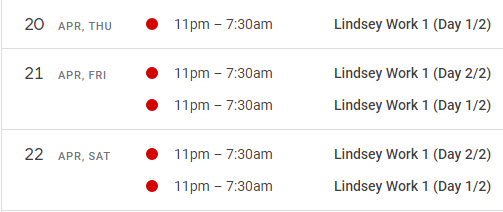
Lindsey Work 1 April 20, 2023, 11:00pm – April 21, 2023, 7:30am Every 2 weeks on Monday, Thursday, Friday, Saturday
Lindsey Work 2 April 26, 2023, 11:00pm – April 27, 2023, 7:30am Every 2 weeks on Sunday, Wednesday, Thursday, Friday
HA:
Google:

There hasn't been any activity on this issue recently. Due to the high number of incoming GitHub notifications, we have to clean some of the old issues, as many of them have already been resolved with the latest updates. Please make sure to update to the latest Home Assistant version and check if that solves the issue. Let us know if that works for you by adding a comment 👍 This issue has now been marked as stale and will be closed if no further activity occurs. Thank you for your contributions.
I have not been able to reproduce this yet, but only tried a little bit. (Honestly the screenshots are a little hard to follow when in a hurry, so if you have simpler written steps to reproduce this that would be appreciated)
I think the core of the issue is with recurring google calendar entries that skip weeks, and possibly ones that span midnight. HA isn't capturing that correctly, and is showing them every week. In the example above, Thursday April 20th as well as Friday and Saturday should all only show "Work 1" as seen in the google calendar. The "Work 2" entry is on the alternating week and should not appear at all on the HA calendar.
I have not explored HA coding, but can code. I have not looked at this integration’s code. But, if I were to guess, the specification for recurrence has layers so I would suspect this API data is not being fully resolved. The documentation for recurrence standard can be found here: https://datatracker.ietf.org/doc/html/rfc5545#section-3.8.5.3
Yes thanks. The intent is that the ical library implements rfc5545 in all the important cases for home assistant.
The specific next step is to find out the rrule used by Google calendar here and write a test to reproduce the issue.
There hasn't been any activity on this issue recently. Due to the high number of incoming GitHub notifications, we have to clean some of the old issues, as many of them have already been resolved with the latest updates. Please make sure to update to the latest Home Assistant version and check if that solves the issue. Let us know if that works for you by adding a comment 👍 This issue has now been marked as stale and will be closed if no further activity occurs. Thank you for your contributions.
There hasn't been any activity on this issue recently. Due to the high number of incoming GitHub notifications, we have to clean some of the old issues, as many of them have already been resolved with the latest updates. Please make sure to update to the latest Home Assistant version and check if that solves the issue. Let us know if that works for you by adding a comment 👍 This issue has now been marked as stale and will be closed if no further activity occurs. Thank you for your contributions.
Still unchanged output.
On Wed, May 31, 2023 at 10:07 AM issue-triage-workflows[bot] < @.***> wrote:
There hasn't been any activity on this issue recently. Due to the high number of incoming GitHub notifications, we have to clean some of the old issues, as many of them have already been resolved with the latest updates. Please make sure to update to the latest Home Assistant version and check if that solves the issue. Let us know if that works for you by adding a comment 👍 This issue has now been marked as stale and will be closed if no further activity occurs. Thank you for your contributions.
— Reply to this email directly, view it on GitHub https://github.com/home-assistant/core/issues/89159#issuecomment-1570309262, or unsubscribe https://github.com/notifications/unsubscribe-auth/AOSFPGTN2CSEH5RANLJGMWLXI5GCLANCNFSM6AAAAAAVPXPW3Y . You are receiving this because you commented.Message ID: @.***>
There hasn't been any activity on this issue recently. Due to the high number of incoming GitHub notifications, we have to clean some of the old issues, as many of them have already been resolved with the latest updates. Please make sure to update to the latest Home Assistant version and check if that solves the issue. Let us know if that works for you by adding a comment 👍 This issue has now been marked as stale and will be closed if no further activity occurs. Thank you for your contributions.
No Change. Integration is still inconsistent with google's internal handling of entries.
On Wed, Jun 14, 2023 at 11:06 AM issue-triage-workflows[bot] < @.***> wrote:
There hasn't been any activity on this issue recently. Due to the high number of incoming GitHub notifications, we have to clean some of the old issues, as many of them have already been resolved with the latest updates. Please make sure to update to the latest Home Assistant version and check if that solves the issue. Let us know if that works for you by adding a comment 👍 This issue has now been marked as stale and will be closed if no further activity occurs. Thank you for your contributions.
— Reply to this email directly, view it on GitHub https://github.com/home-assistant/core/issues/89159#issuecomment-1591426717, or unsubscribe https://github.com/notifications/unsubscribe-auth/AOSFPGUFRHGSWDT5JRJR6PLXLHHRFANCNFSM6AAAAAAVPXPW3Y . You are receiving this because you commented.Message ID: @.***>
Will be easier to tackle with simple steps to reproduce. (the screenshots above are helpful to illustrate the problem is happening, just a simple example how how the recurring event is setup in the calendar ui would help make it faster to reproduce)
Create an all-day entry that repeats every two weeks or every month on the same day and never ends in GC. Have it display within the integration with the right frequency.
On Thu, Jun 15, 2023 at 1:27 AM Allen Porter @.***> wrote:
Will be easier to tackle with simple steps to reproduce. (the screenshots above are helpful to illustrate the problem is happening, just a simple example how how the recurring event is setup in the calendar ui would help make it faster to reproduce)
— Reply to this email directly, view it on GitHub https://github.com/home-assistant/core/issues/89159#issuecomment-1592386791, or unsubscribe https://github.com/notifications/unsubscribe-auth/AOSFPGVT3LP4FV5N7U3PDIDXLKMKXANCNFSM6AAAAAAVPXPW3Y . You are receiving this because you commented.Message ID: @.***>
Thanks for that. I have done this, but I am still unable to reproduce the issue. I've tried different combinations of bi-weekly and monthly just to make sure i'm not misunderstanding the exact setting and still can't figure it out.
I wonder if there is some other calendar specific setting that is triggering this...
Ultimately what i'm trying to get is the underlying "RRULE" that is produced by google calendar. (This is not currently exposed in any sort of diagnostics, but is stored internally in the google calendar local storage in home assistant. It is also returned from the API, or we can find it from turning up debug logs in the python client library and seeing a new event get synced). I don't think i'll have time to add more diagnostics for the next release, but we can dig in more if we want to get into those other debugging routes.
There hasn't been any activity on this issue recently. Due to the high number of incoming GitHub notifications, we have to clean some of the old issues, as many of them have already been resolved with the latest updates. Please make sure to update to the latest Home Assistant version and check if that solves the issue. Let us know if that works for you by adding a comment 👍 This issue has now been marked as stale and will be closed if no further activity occurs. Thank you for your contributions.
There hasn't been any activity on this issue recently. Due to the high number of incoming GitHub notifications, we have to clean some of the old issues, as many of them have already been resolved with the latest updates. Please make sure to update to the latest Home Assistant version and check if that solves the issue. Let us know if that works for you by adding a comment 👍 This issue has now been marked as stale and will be closed if no further activity occurs. Thank you for your contributions.
@pgsylvestre i'd like to find a way to reproduce this (haven't been successful doing this yet) or to get the internal calendar "rrule". If you click on one of the events in the home assistant UI does it have any detail under the start end date/time? e.g. Every week on Monday or it might even have the RRULE
I believe I have the same issue. I have a calendar event scheduled for the last day of each month. This month my Google calendar shows this event on the 31st however, since there are months where the last day is on the 28th, 29th or 30th the Google calendar integration now shows this event on 28, 29, 30 and 31 July.
Can you see if you can reproduce this?
Thanks Arjen

@abeltman Can you show how this is configured in google calendar with a screenshot?
@abeltman Can you show how this is configured in google calendar with a screenshot?
@allenporter It appears that something has changed in Google Calendar since last week. I'm 100% positive that (in May this year) I created a calendar entry with a recurrence option that was previously available: "Every last day of the month". The proof is that in Google Calender this entry is still visible on every last day of the month until May 2024. On my iPhone legacy Calendar app it still says "repeats every month on 28th, 29th, 30th and 31st" but is only visible on the last day of the month. I believe that even last week when I first wrote in this thread, the option was still available as well but have not taken a screenshot.
When I open the event in Chrome browser it now says that this is an "Unsupported recurrence". Also, when I try to create a new even with "Last day of the month" recurrence this is no longer possible.
So... unfortunately I'm unable to show you how this is configured in Google Calendar. I'll keep the calender entry in Google until it expires and I will ignore the entry in Home Assistant calender on 28, 29 and 30 where the month has fewer days then 31, 30 or 29.