

 hluk
hluk
The menu is always on the top
Before creating a new issue, see list of known issues.
Describe the bug The menu is always on the top, even if there isn't enough space on the top but enough space on the bottom.
To Reproduce
- Click on any menu
Expected behavior The menu should normally appear on the bottom, except when there is no enough space on the bottom.
Screenshots
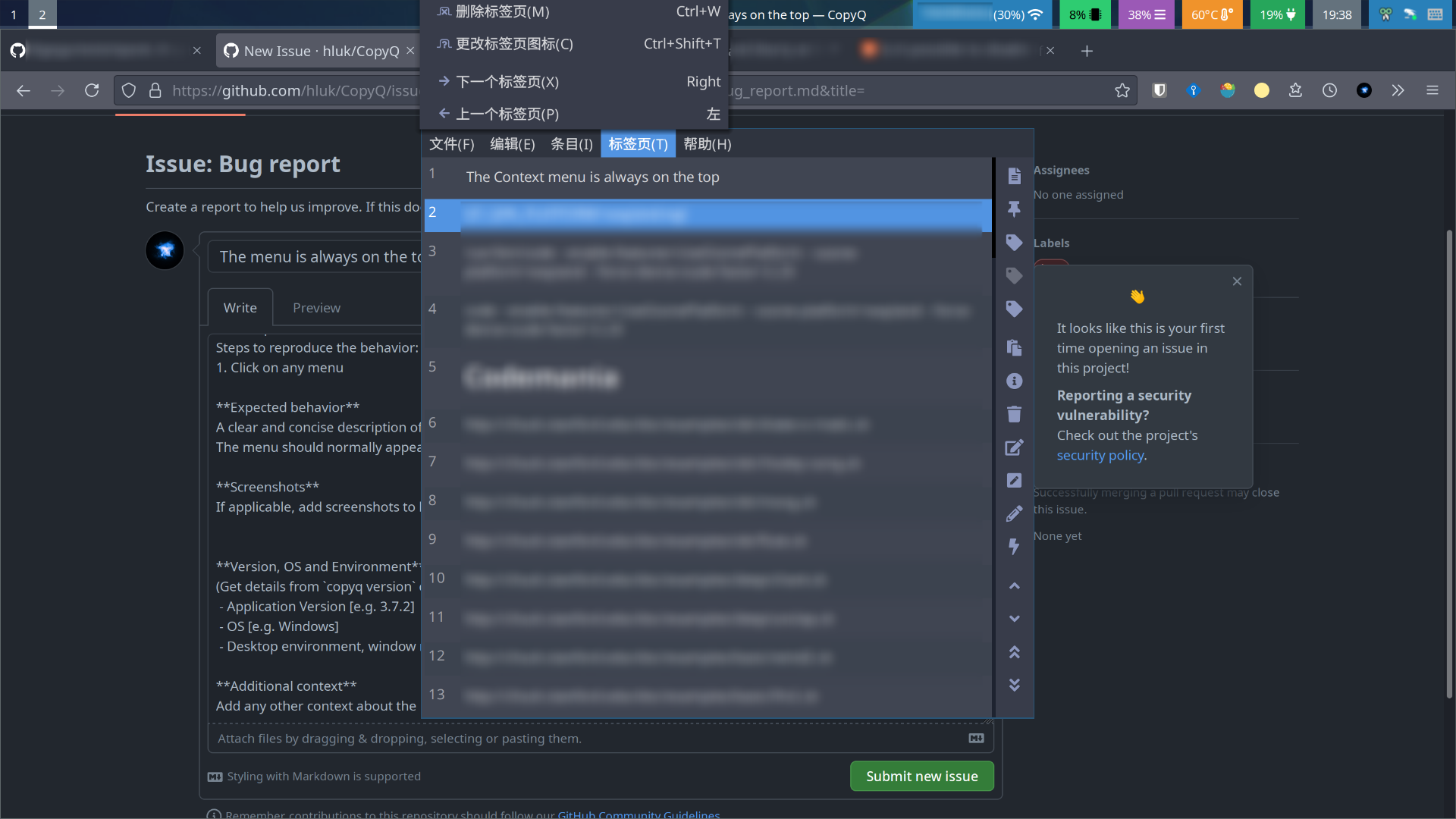
Version, OS and Environment CopyQ Clipboard Manager v4.1.0 Qt: 5.15.2 KNotifications: 5.81.0 Compiler: GCC Arch: x86_64-little_endian-lp64 OS: Arch Linux Desktop environment: Sway
Additional context The "help" menu, which is the shortest menu, doesn't have this issue. Sometimes the context menu on clipboard entries also has this issue, but it seems to occur randomly.

This looks like a Qt bug - possibly related to multi-monitor layout.
Does it help if you disable "Set colors for tabs, tool bar and menus" option in appearance config tab (in Preferences dialog)?

BTW, in Sway I had to change monitor layout so x,y coordinates of each output are always non-negative. Otherwise, menus were positioned incorrectly and I got some other strange UI behavior in Qt apps.